Search  for anything...

GIGABYTE - AORUS FO27Q2 (SA) - 27" QD-OLED Gaming Monitor - QHD 2560x1440-240Hz - 0.03ms GTG - AMD FreeSync Premium Pro - Type C KVM - HDMI, DP, Type C - Height Adjustable - Black

  • Based on 288 reviews
Condition: Used - Very Good
Checking for the best price...
$649.99 Why this price?
Save $50.00 was $699.99

Buy Now, Pay Later


As low as / mo
  • – Up to 36-month term if approved
  • – No impact on credit to apply
  • – Instant approval decision
  • – Secure and straightforward checkout

Ready to go? Add this product to your cart and select a plan during checkout.

Payment plans are offered through our trusted finance partners Klarna, Affirm, Afterpay, Apple Pay, and PayTomorrow. No-credit-needed leasing options through Acima may also be available at checkout.

Learn more about financing & leasing here.

Selected Option

Free shipping on this product

30-day refund/replacement

To qualify for a full refund, items must be returned in their original, unused condition. If an item is returned in a used, damaged, or materially different state, you may be granted a partial refund.

To initiate a return, please visit our Returns Center.

View our full returns policy here.


Availability: Only 7 left in stock, order soon!
Fulfilled by Computer Headquarters, Inc

Arrives Sunday, Mar 29
Order within 11 hours and 57 minutes
Available payment plans shown during checkout

Protection Plan Protect Your Purchase
Checking for protection plans...

Style: 27" QHD 240Hz | OLED | Flat | Height & Tilt


Features

  • PIXEL PERFECT IN 3RD GEN QD-OLED PANEL The AORUS FO27Q2 features a stunning 27-inch QD-OLED display, delivering uncompromising image quality and unmatched gaming performance down to every pixel.
  • EXCLUSIVE AI-BASED PROTECTION WITH GIGABYTE OLED CARE GIGABYTE uses an AI-based algorithm to minimize the risks of burn-in issues and deploys it across a suite of OLED protecting technologies in the AORUS FO27Q2s background with minimal interference. OLED Care includes different settings that can be adjusted as you wish, and it efficiently minimizes the risks of burn-in issues.
  • LIFE-LIKE COLORS EXPERIENCE With 1.5M:1 contrast ratio, 99% DCI-P3 color gamut, and 10-bit color depth, you can experience unmatched contrast with deeper blacks and witness lifelike visuals like never before.
  • SUPPORT VESA DISPLAY HDR TRUE BLACK 400 AND CLEARMR 13000 With VESA DisplayHDR True Black 400, AORUS FO27Q2 ensures a more realistic and captivating gaming experience with accurate color and contrast reproduction. Additionally, the VESA ClearMR 13000 certification ensures top-tier motion clarity in digital displays, achieving 125-135 times more clear pixels than blurry pixels.
  • SUPPORT AMD FREESYNC PREMIUM PRO With AMD FreeSync Premium Pro, the AORUS FO27Q2 provides an enhanced gaming experience by reducing screen tearing and stuttering, particularly in High Dynamic Range (HDR) content.
  • TACTICAL FEATURES TO ENHANCED GAMEPLAY The AORUS FO27Q2 monitor elevates your gameplay with a suite of built-in, tactical assistance features designed to give you the edge in precision and control. Game Assist features, including timer, crosshairs, and PIP/PBP, help you on tracking the elapsed game time and focus on your in-game enemy. Black Equalizer 2.0 helps you to see the detail of deeper blacks without sacrificing clarity elsewhere on the screen. Dashboard displays monitor vital hardware stats without interrupting your game.
  • EXTENDED 3-YEAR WARRANTY With the AI-based GIGABYTE OLED Care protection along with the top-tier QD-OLED panel implemented in the monitors, GIGABYTE provides a premium 3-year warranty including coverage for panel burn-in for users to be completely worry-free. (*Warranty terms may vary by region.)

Description

Elevate your gaming with the AORUS FO27Q2 (SA)! Immerse yourself in the action with its 27" QD-OLED display, featuring a 240Hz refresh rate and a 0.03ms GTG response time. With AMD FreeSync Premium Pro, the AORUS FO27Q2 (SA) offers seamless play and adjustable height for ultimate comfort. It’s not just a monitor—it’s your gateway to gaming greatness.

Brand: GIGABYTE


Screen Size: 27 Inches


Resolution: QHD Wide 1440p


Aspect Ratio: 169


Screen Surface Description: Glossy


Standing screen display size: ‎27 Inches


Screen Resolution: ‎2560x1440


Max Screen Resolution: ‎2560 x 1440 Pixels


Brand: ‎GIGABYTE


Series: ‎AORUS FO27Q2 SA


Item model number: ‎AORUS FO27Q2 SA


Item Weight: ‎14.96 pounds


Product Dimensions: ‎9.73 x 28.11 x 19.72 inches


Item Dimensions LxWxH: ‎9.73 x 28.11 x 19.72 inches


Color: ‎Black


Voltage: ‎240 Volts (AC)


Manufacturer: ‎GIGABYTE


Date First Available: ‎June 30, 2024


Frequently asked questions

If you place your order now, the estimated arrival date for this product is: Sunday, Mar 29

Yes, absolutely! You may return this product for a full refund within 30 days of receiving it.

To initiate a return, please visit our Returns Center.

View our full returns policy here.

  • Klarna Financing
  • Affirm Pay in 4
  • Affirm Financing
  • Afterpay Financing
  • PayTomorrow Financing
  • Financing through Apple Pay
Leasing options through Acima may also be available during checkout.

Learn more about financing & leasing here.

Top Amazon Reviews


  • If you're still using an old VG248QE.. this is the perfect upgrade. Best monitor I've ever owned.
Style: 27" QHD 240Hz | IPS | Flat | Height &amp...
Owner for 1 year. As part of an entire overhaul of my setup I went from an Asus VG248QE to the M27QX as my main monitor after almost a decade and I couldn't be happier with it. I'm over 40yrs old.. my competitive days are long gone, but I still play shooters and other fast paced games and still value high fps / high refresh rate over high resolution. I spent a lot of time (months) deciding on a new monitor and the review on RTINGS for this sold me. I still wasn't prepared for exactly how much of an upgrade it was in every single way. It's almost like Gigabyte used the VG248QE as an inspiration to make the M27QX. The Gigabyte stand is almost identical to Asus, it's sturdy and well made, there is height adjustment from 1-6 inches above your desk... this is great for accommodating different desk/chair setups and personal preference. The frame is sleek compared to Asus, of course the screen is not edge to edge but it's still much nicer than a bulky plastic frame. I considered ultrawide for a long time but that would've meant having to get a different desk to make it work for me... and I would've had to settle with far less specs wise than this monitor where price is concerned, I still got a bump up in size from 24 to 27in and it's welcomed. The panel came in perfect shape, no stuck/dead pixels. The RTINGS review mentioned this monitor had great color out of the box and it does, you don't know what your missing if all you've ever used is TN panels like me. IPS is so crisp it's unreal, the difference in color cannot be understated. This monitor also has backlight strobing which mimics the fluid motion of old CRT monitors and helps to reduce motion blur in fast paced games, on the Asus I had to use a 3rd party program to make it work with AMD GPU's..not so on the M27QX. Even if you turn motion blur off in your competitive games (you should) there will still be blur on non-strobed monitors... this was a big selling point for me. I'm happy with 1440p as an upgrade, I am used to having games run high fps on 1080p even in single player games if allowable. Things are better than when 4k first came out but it is obviously still harder to run. I've seen 4k benchmarks for certain GPU's/games under 60fps and that is a no go for me. If you're buying 240hz refresh the goal should be as close to 240fps as you can get. I'm used to 120 and going to 240 is still very noticeable (in Rocket League for example). Once you see over 120 fps synced with your monitor in any game, you'll never want to go back. Another huge upgrade is the joystick menu on this monitor, in all the years I had the Asus I struggled till the end to remember how to navigate the menu, and hated to access it. The menu on the M27QX is so intuitive you'll have it down in no time, I find myself using it often to change between picture modes, adjust brightness/blackness levels ingame or late at night among other settings (there are many settings to fine tune if you are into that). Just like Asus they even included a built in OSD crosshair that you can apparently customize, I personally don't use it much but it is a nice option to have to build aim in games/modes that don't have a crosshair. Last but not least, the name M27QX is shorter and cooler, they really thought of everything! An expensive and hard to justify upgrade for me, but it paid off. 5* ... show more
Reviewed in the United States on July 29, 2023 by John

  • Not nearly as good as I had hoped...You'll probably need new VESA M4x16mm screws too.
Style: 27" QHD 180Hz | IPS | Flat | ICE White
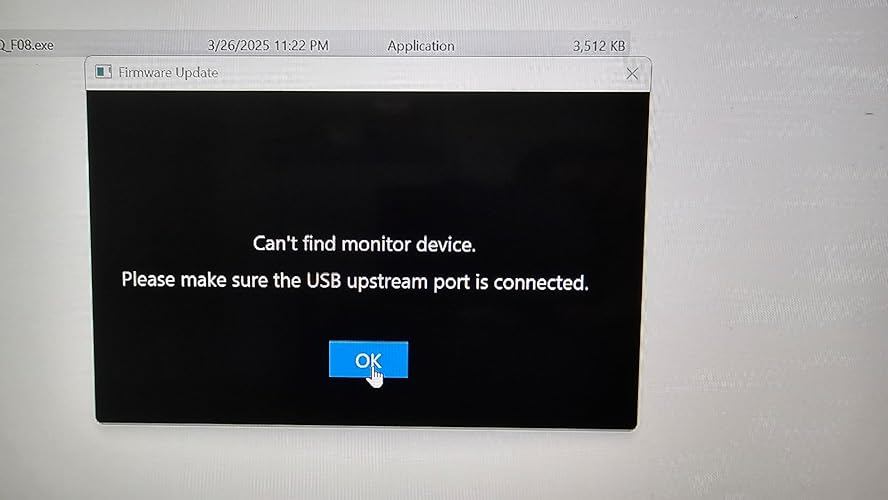
The media could not be loaded. I don't know how this has a KVM function with the ports it has. I have it connected to an 8-port HDMI KVM from Vertiv. I didn't buy it for that though, I bought it for the IPS, resolution, thin bezel, high refresh rate and to replace a trusty old ASUS PB278Q 27" 1440P Eye Care Monitor (PB278Q) - QHD (2560 x 1440), IPS, DisplayPort, HDMI, DVI. The ASUS was finally starting to have power supply issues, so I got this one because it has similar specs and I was hoping the screen quality would be the same. 1) VESA mount has DEEP screws, M4x16mm to 20mm. My M4x10mm wouldn't fit. It does NOT come with screws. 2) Immediately I notice the display quality is noticeably worse than the ASUS. It looks fuzzy at 1440p. 3) I can't increase the refresh rate above 59.5Hz without it dropping the resolution down to 1080p, etc. If I set it to 120hz it lets me go to 1440p again, but the screen flickers in and out intermittently. I can noticeably see the refresh rate is higher when dragging windows around rapidly, but the flicker makes it unusable. I am not going to blame this on the monitor yet, since it might be related to the Vertiv KVM, however it handles high refresh rates from my gaming laptop with a RTX4080 in it. 4) I'm not sure if this is a 1.0 or 2.0 monitor version because the menu system doesn't give you an info page on firmware or hardware versions. Huh, why couldn't this be added? I'll have to attach the USB cable to find out I suppose. 5) The screen has a sort of metallic sheen look to it on the sides of the display. If your head is directly centered, but you look side ot side there is a sort of prizmatic look to the back light on full white background. If you move your head from side to side, this sheen, or shadow, or prizmatic effect moves with you. Seems almost like what you see with a privacy screen effect with reduced viewing angles, etc. The ASUS display was far far better in this respect. 6) The screen looks like by default there is some sort of edge softening being done, like a continuous edge algorithm. It just makes everything looks fuzzy/blurry. I dug around in the menu system and found the "Super Resolution" setting under "Gaming". It doesn't affect the resolution, but at the 0 setting it makes everything fuzzy. You can turn it up to 4 and the pixels get crisp again like what I would expect for a 1440p monitor, but the contrast doesn't appear near as good as the ASUS. The ASUS has a 80,000,000:1 contrast ratio. This monitor says 1000:1. Maybe that is the biggest issue right there, wish I had seen that spec sooner. 1000:1, really??? The ASUS monitor had DEEP blacks, and CRISP BRIGHT whites. This monitor feels washed out to me. When the "super resolution" is at 0 setting, the fonts are a bit darker with more contrast because more pixels are involved. If you set it to 4, there are fewer pixels but since there is much worse contrast ratio it makes the thinner strokes in the font harder to see. 7) I installed the monitor drivers from Gigabyte, didn't change anything really. BLUF, I guess I shouldn't have expected much from a monitor that cost less than $300 and given the new fancy monitors are even exceeding $1k price tags. That said, my old 2012 ASUS PB278Q monitor that cost a similar amount looked much better and also had built in speakers. If only I could find a powersupply for it! UPDATE: I give up... I am returning this junk. Monitor can't be seen by OSD Sidekick on 3 computers, two on Win11, and a laptop on Win10. Direct HDMI connection and using their special USB-A/B cable. Neither the OSD sidekick or firmware updater will see the monitor and allow it to be updated. Curiously though, the Sidekick in the GCC control center sees the monitor and allows settings to be changed, but not the firmware version or update. This monitor has terrible problems with switching inputs from one device to another via KVM. Half the time the screen goes into a psuedo color flashing pattern, or it has issues when there is a black backround with green text where it starts emitting red dots all over the screen. Yes, I tried several different high quality HDMI cables. I tried a DP cable. I direct connected monitor so the Versiv KVM wasn't a factor. I'm an EE that has designed PCB's, FPGA, PALs, UARTs, yadda yadda, so not a newb. I wish I hadn't wasted 4 days fighting with this monitor. It's probably one of the worst monitors I have messed with in over a decade. I know have the old ASUS monitor back again and after fighting to get the PSU to switch on, I am delighted to see a MUCH better picture quality. It really is night and day better. ... show more
Reviewed in the United States on March 27, 2025 by CARL MANKINEN CARL MANKINEN

  • Works great! Very Impressive!
Style: 27" QHD 240Hz | IPS | Flat | Height &amp...
So I bought this about two weeks ago. I bought one “used Like new” because I wanted to save a few bucks. This was before I did a ton of research and saw issues about dead/stuck pixels and backscreen glow. After I read about those I honestly tried to cancel my order and was just going to get a G7. Glad Amazon said it was too late! Opened it up just to see how it would look. Despite being used, had zero dead/stuck pixels and worked flawlessly. I did run into a minor issue that was kind of my fault though. Because it was used, it didnt come with the dp cable that is usually supplies. I thought “no biggie” and used my old Dp cable. Big mistake. It worked fine for a day or two but then had alot of issues. Screen wouldn’t display, etc. At first I thought it was the monitor so I tried an hdmi cord and it was fine. I eventually had a dp cord delivered by Amazon (make sure you get the latest standard and a decent cord) and everything works fine. Make sure the cord you are using is rated for 1440p 240 hz, whether it is hdmi or dp! As far as the actual monitor, it is beautiful, brightness is good but gets a little washed out at full brightness. The HDR sucks, but it does with all monitors right now unless you get an OLED. Leave it off. Overall very happy with my monitor and glad that other reviews didnt change taking a chance on this. I think for the most part they have worked out their QC issues and now make a great monitor. Totally worth it! ... show more
Reviewed in the United States on March 6, 2023 by Les Geaux

Can't find a product?

Find it on Amazon first, then paste the link below.
Checking for best price...