Search  for anything...

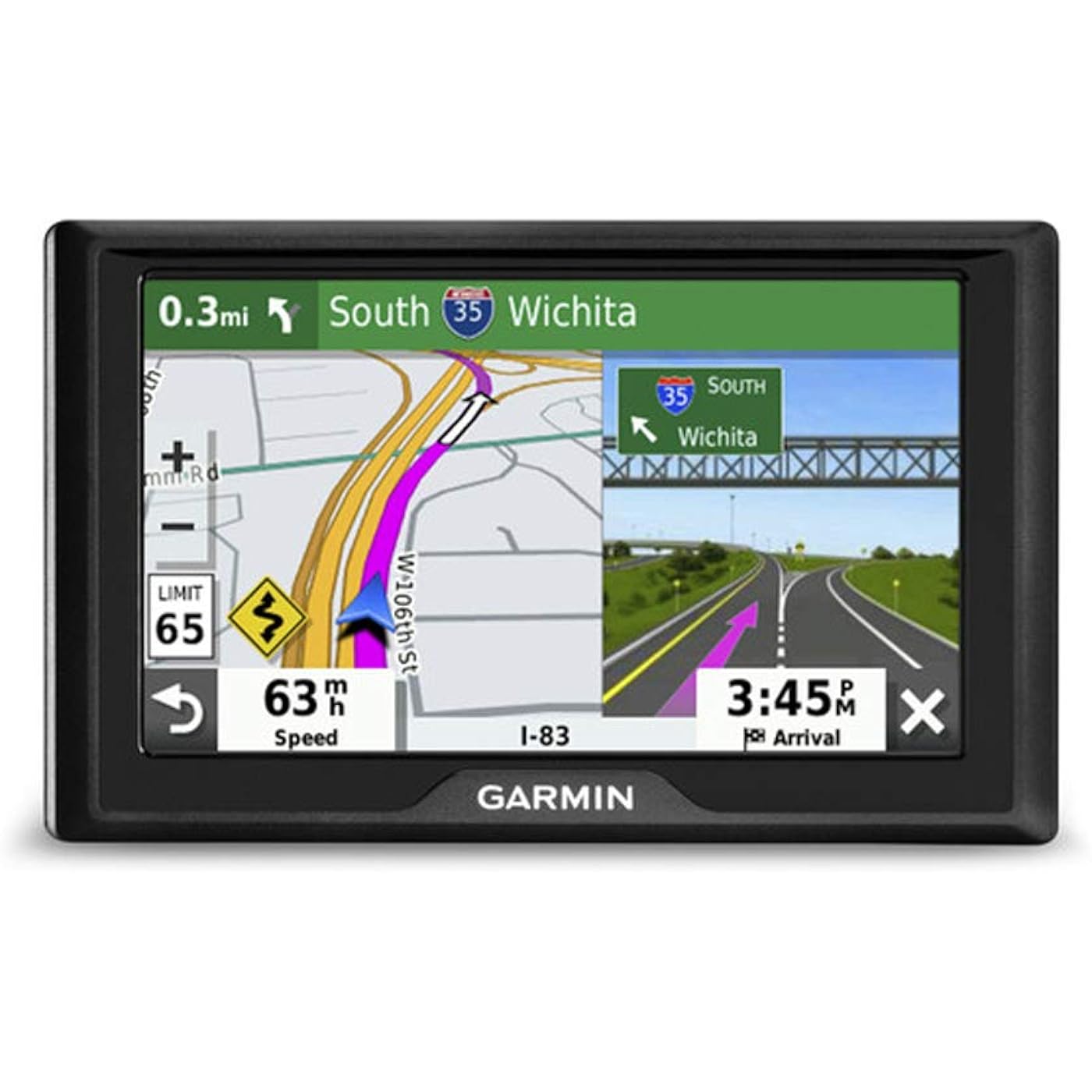
Garmin 010-02036-07 Drive 52 and Traffic, GPS Navigator with 5” Display, Simple On-Screen Menus, Easy-to-See Maps
  • Based on 18,576 reviews
Condition: New
Checking for inventory...

Notify me when this product is back in stock

$179.99 Why this price?
Presidents' Day Sale · 55% off was $399.99

Buy Now, Pay Later


As low as $30.00 / mo
  • – 6-month term
  • – No impact on credit
  • – Instant approval decision
  • – Secure and straightforward checkout

Payment plans are offered through our trusted finance partners Klarna, Affirm, Afterpay, Apple Pay, and PayTomorrow. No-credit-needed leasing options through Acima may also be available at checkout.

Learn more about financing & leasing here.

Selected Option

Free shipping on this product

Returnable until Jan 31, 2026

To qualify for a full refund, items must be returned in their original, unused condition. If an item is returned in a used, damaged, or materially different state, you may be granted a partial refund.

To initiate a return, please visit our Returns Center.

View our full returns policy here.


Availability: Unavailable
Fulfilled by Amazon
Available payment plans shown during checkout

Style: Drive 52 & Traffic


Pattern: Navigator


Features

  • 5 GPS navigator with traffic alerts
  • Easy-to-use 5 GPS navigator includes detailed map updates of the U.S. and Canada
  • Simple on-screen menus and bright, easy-to-see maps
  • Garmin Traffic is ready to use right out of the box without use of a smartphone
  • Road tripready with The HISTORY Channel database of notable historic sites, a U.S. national parks directory, TripAdvisor traveler ratings and millions of Foursquare points of interest (POIs)

Description

With its simple menus and easy-to-read maps, Garmin Drive 52 lets you view turn-by-turn directions at a glance on a bright 5” touchscreen display. Offering preloaded detailed maps of the U.S. and Canada — with traffic and map updates plus helpful driver alerts to encourage safer driving — this GPS navigator complements any road trip or daily commute. Battery life up to 1 hour.

Brand: Garmin


Model Name: 010-02036-07


Vehicle Service Type: Car


Screen Size: 5 Inches


Special Feature: Touchscreen


Connectivity Technology: Wireless


Map Type: City Tour, Street


Included Components: Garmin Drive 52, vehicle suction cup mount, traffic receiver/vehicle power cable, USB cable, quick start manual See more


Battery Life: 1 Hours


Mounting Type: Dashboard Mount, found in image


Product Dimensions: 5.5 x 0.8 x 3.3 inches


Item Weight: 14.1 ounces


Item model number: 010-02036-07


Batteries: 1 Lithium Ion batteries required. (included)


Is Discontinued By Manufacturer: No


OS: Windows


Connectivity technologies: Wireless


Special features: Touchscreen


Other display features: Wireless


Human Interface Input: Touchscreen


Scanner Resolution: 480 x 272


Color: Black


Whats in the box: Garmin Drive 52, vehicle suction cup mount, traffic receiver/vehicle power cable, USB cable, quick start manual


Department: mens


Manufacturer: Garmin


Date First Available: January 7, 2019


Frequently asked questions

This product is currently out of stock. Please check back later for shipping info.

Yes, absolutely! You may return this product for a full refund within 30 days of receiving it.

To initiate a return, please visit our Returns Center.

View our full returns policy here.

  • Klarna Financing
  • Affirm Pay in 4
  • Affirm Financing
  • Afterpay Financing
  • PayTomorrow Financing
  • Financing through Apple Pay
Leasing options through Acima may also be available during checkout.

Learn more about financing & leasing here.

Top Amazon Reviews


  • Excellent GPS with Clear Display
Style: DriveSmart 65 & Traffic Pattern: Navigator
The Garmin DriveSmart 65 has been an excellent GPS. The large 6.95" screen is clear and easy to read, and the directions are accurate and reliable. I really like the voice-control feature, which makes it convenient to use while driving. It updates quickly, finds routes fast, and overall works smoothly every time. A great GPS that does exactly what it should. ... show more
Reviewed in the United States on November 14, 2025 by Mo

  • Best of the best GPS
Style: DriveSmart 55 & Traffic Pattern: Navigator
Great GPS for your automobile! Beats anything the automobile manufacturers put in their cars. Really beats using your cell phone as a GPS! Excellent detail with turn by turn verbal instrations. Plug in and go. Plus it has lifetime updates with the absolute most accurate information.
Reviewed in the United States on December 28, 2025 by Ted in Missouri

  • Works well but can be buggy at times
Style: Drive 52 Pattern: Navigator
I wanted a handheld GPS to use on trips without having to rely on my cell phone. The Garmin Drive 52 fit my price point, and I also know that Garmin is one of the leading names in the navigation industry. I figured it was worth a shot to try. The navigation system does work however it's not the easiest to use. Typing in an address can be a nightmare at times. It is almost like the keyboard is stuck or does not register the letters I am selecting. I have been given wrong directions twice- it sent me in a big circle- randomly changed my directions to head back to the location I was leaving and sometimes cannot even connect to the satellite to get me directions. Do not get me wrong it has also worked flawlessly on other occasions. Glad I made the purchase but could definitely use some improvements. Maybe if I had more money to spend on one of their higher end products, I would not have these issues. I still trust the Garmin name. ... show more
Reviewed in the United States on December 25, 2024 by Honest reviewer

  • Invaluable piece of kit - I live in the UK and needed it for travel in USA/Canada
Style: DriveSmart 65 & Traffic Pattern: Navigator
Really excellent piece of kit that proved totally invaluable for our trip from the UK to Canada. After years of working from paper maps and internet screen shots - we rented a vehicle in Florida (back in 2019) that came with a dash mounted Garmin as a free upgrade and immediately realised it was taking a huge amount of stress and pre-planning away from us. Post pandemic and travelling again I decided to buy this unit to make life much easier. Living in the UK - I was able to order this GPS (SatNav) on Amazon.com (rather than Amazon.co.uk) and have it delivered to me in the UK direct from the USA. It is a great sized unit that is very very easy and intuitive to use and for the driver to see and read as you are driving. Like all GPS (SatNav) units it can very occasionally get small things wrong - but 99.999% it was very accurate. Anyone travelling to Canada - be warned that mobile/cell phone costs in Canada are unbelievably high - therefore EVEN with a USA/Canadian sim card in our phone - it would have cost a fortune to buy enough data in Canada (not necessarily the same in the USA which had much cheaper mobile/cell phone charges) to use a smart phone as a GPS/SatNav. Therefore we found it much more cost effective to buy the GPS/SatNav outright and it will work for years for future visits. One last thing about this model - after doing loads of research online - it tells you that this model is designed to work in tandem with a connected mobile/cell phone in order to receive traffic updates. It tells you this model works perfectly well as a GPS/SatNav on its own - but will not give live traffic updates without a connected mobile/cell phone - I considered this before buying - but decided that route guidance was enough and more important to me that anything else. HOWEVERE - after arriving in Canada - this device WAS giving us live traffic reports and rerouting to take the least congested routes - and we did NOT pair it with a mobile/cell phone - but still received live traffic reports. Great unit - Highly Recommended ... show more
Reviewed in the United States on July 2, 2024 by beancounterboy

  • Handy and accurate.
Style: DriveSmart 55 & Traffic Pattern: Navigator
Very good ! We have had Garmin navigation for many years. We take this on vacation for easy directions
Reviewed in the United States on November 18, 2025 by Amazon Customer

  • Almost very please
Style: DriveSmart 65 & Traffic Pattern: Navigator
This is my 6th dash top Garmin gps. I have used Garmin Nuvi's for a long time. I like this one better than all the past ones. It is very easy to use and I really like the large size. It is easy to see even in bright sunlight, way better than any of my past models. I do not use the bluetooth function for the phone or the voice command so I cannot comment on them. It has built in wifi so once you connect it to your home network, it will automatically download upgrades without connecting to your computer. If you have purchased custom "voice" files, like Dr. Nightmare, they provide no way to install them...at least it is not documented. You can download them to your computer and then copy them manually to the proper folder in the GPS and they will work fine. I would recommend this GPS for anyone who wants to get from here to there with ease. It works great!! Dislikes! I do have a few.... 1. I do not like the way this model attaches to the ball mount. It take two hands to release it whereas all of my other models could be easily released with one hand and they were still very secure in their attachment. 2. I am an avid geocacher, since 2003. ALL of my past models could easily display geocaches on the screen. All you had to do was put them in a .gpx file and copy them to the proper folder in the GPS. THIS model does not do that very well. You can follow the same procedure but instead of getting the neat little geocaching icons on the screen you get these big ugly icons that look like tabs or signs. I do not like this at all...big downer. But the overall good outweighs this downer. There is a "workaround". You can export your caches to a POI file and copy it to the POI folder in the GPS. All of the caches will then display on the screen using a much smaller, and less ugly icon. You can then select one and navigate to it. The upside to using POI is that you can have more of them. I easily put in over 3000. The name of each one will NOT display on the screen, but at least you can see them. If you touch one, you can navigate to it, or you can quickly find them in the menu. So.... it works well for geocaching but not quite as well as any of my older, smaller models. 3. I use LINUX on my computer, not Windows. I also have a MacBook laptop. ALL of my older model Gamins would plug into Linux or Mac and display on the screen like a disk drive. You could then drag and drop your .gpx or .poi files over to the proper folder. THIS model GPS will NOT do that.... not on a Mac and not using Linux. You MUST have WINDOWS to transfer your files. This really sucks... I had to install Windows on my desktop using dual boot just to retain my sanity. I admit I am a Windows hater. I could give you reasons but I'll spare you. So if you are a Windows hater like me, plan on being disappointed. Again, the good of this GPS outweighs ever this. It is a keeper. 4. Although this GPS is very very easy to use and easy to figure out, the documentation is poor. You might even say it sucks but not quite that bad. If you are a basic user, new to GPS, then the documentation is OK but if you want to do more complicated stuff, you just have to figure it out for yourself. ... show more
Reviewed in the United States on August 2, 2020 by Grim_Rodent

Can't find a product?

Find it on Amazon first, then paste the link below.
Checking for inventory...