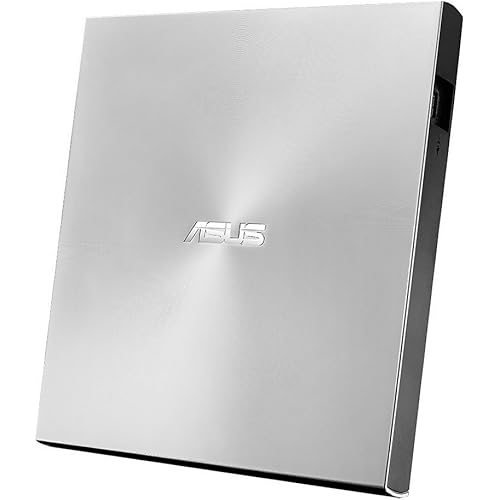
External Blu-ray Drive, Portable Blu-ray Player & CD DVD Burner – USB 3.0 & Type-C BD/DVD/CD Reader, Plug and Play, Lightweight for Windows/Mac/Linux (2 in 1)


Buy Now, Pay Later
- – 6-month term
- – No impact on credit to apply
- – Instant approval decision
- – Secure and straightforward checkout
Ready to go? Add this product to your cart and select a plan during checkout.
Payment plans are offered through our trusted finance partners Klarna, Affirm, Afterpay, Zip, Apple Pay, and Google Pay. No-credit-needed leasing options through Acima may also be available at checkout.
Learn more about financing & leasing here.
FREE 30-day refund/replacement
To qualify for a full refund, items must be returned in their original, unused condition. If an item is returned in a used, damaged, or materially different state, you may be granted a partial refund.
To initiate a return, please visit our Returns Center.
View our full returns policy here.
Recently Viewed


At a glance
- Condition
- New
- Model
- XD021-1
- Dimensions
- 5.68"L x 5.6"W x 0.75"H
- Weight
- 310 g
- Color
- Black
- Hardware Interface
- USB 3.0 Type A, USB 3.0 Type C
- Hardware Platform
- Laptop, PC
- Warranty
- 1 year manufacturer
- Works with
- Laptop, Desktop (Windows, Mac, Linux)
Features 4
- Premium External Blu-ray Drive Enjoy seamless playback with this Portable Blu-ray Player, supporting BD reading up to 6X, DVD at 8X, and CD at 24X. Effortlessly burn CDs/DVDs with low noise and energy efficiency. (Note: Can read but cannot burn Blu-ray discs)
- Plug & Play CD DVD Burner This External Blu-ray Drive works instantly for CD/DVD playback and burningjust connect via USB 3.0 or Type-C. (Blu-ray playback requires third-party software like PowerDVD or Leawo)
- Ultra-Fast USB 3.0 & Type-C Experience rapid 5Gbps transfers with high-speed USB 3.0 and dual USB-A/C connectors. Perfect for laptops and desktops (Not compatible with Chromebook, TV,Tablet, iPad, Truck and Car)
- Sleek & Portable Blu-ray Player Featuring a brushed texture shell and embedded data cable, this lightweight drive is ideal for travel, work, or home entertainment
Description
Our story is so exciting, we look forward to your visit. Important Note: 1.The Blu ray drive requires a considerable amount of power to operate, and the USB-C/Thunderbolt port of the MacBook may not provide sufficient power, especially when the drive is connected through adapters, docking stations, or hubs. So make sure the optical drive is directly connected or using an external power supply/power dock, and the dual head USB-A cable must be fully plugged in. 2.Check MacBook Connection: If using an docking station, try connecting the optical drive directly to the MacBook and changing the USB-C port on the Mac. 3.Limited native support for macOS: Although macOS typically recognizes standard DVD/CD drives and discs, native support for Blu ray disc content (especially commercial movie discs) is very limited or even non-existent. The system may recognize the 'optical drive' hardware, but cannot mount or read the file system (usually UDF) on the Blu ray disc. To play commercial Blu ray movies or read Blu ray data disks in certain formats, third-party Blu ray playback software must be installed. 4.Check the 'Disk Tool': Check if the optical drive device and disc appear. 5.Test different discs: First, play a regular DVD/CD for testing. Change to another Blu ray disc for testing. 6.Test the optical drive on another computer: determine if it is an optical drive issue or a Mac/settings issue. Troubleshooting *Method 1: Update or reinstall the driver. The drivers for CD and DVD drives are included in the operating system, so they do not require a specific driver to be installed. Uninstalling the driver and restarting the computer will reinstall the driver, which will solve most of the device driver problems. *Method 2: Run the Hardware and Devices troubleshooter (Windows 7, Windows 8, Windows 8.1 and Windows 10) You can run the Windows Hardware and Devices troubleshooter built into Microsoft Windows. The Hardware and Devices troubleshooter is only available in Microsoft Windows 7, Windows 8/8.1 and Windows 10. If External CD/DVD Drive can be recognized by your computer, the problem you are facing may be caused by the following two reasons: The product power supply is insufficient, please use a 5V charger/power bank to supplement it.(Note: For Apple computers, you must first connect the external CD DVD drive to your computer, and then connect the additional power to disc drive, otherwise the Apple computer will not recognized the device. WINDOWS 11 requires a media player (such as VLC) and a network connection. Please ensure that your disc region code is set to 1 or is region-free. If you need to play a disc that is not from region 1, please manually change the region code of the external Blu-ray drive.
Specs 22
| Special Feature | Backward Compatible, Lightweight, Plug & Play, Shock Resistant |
|---|---|
| Hardware Interface | USB 3.0 Type A, USB 3.0 Type C |
| Brand | LLMHHKYK |
| Optical Storage Write Speed | 4x |
| Optical Storage Read Speed | 8x |
| Additional Features | Backward Compatible, Lightweight, Plug & Play, Shock Resistant |
| Hardware Platform | Laptop, PC |
| Connectivity Technology | USB |
| Data Transfer Rate | 8 Mbps |
| Form Factor | Portable External Drive |
| Media Speed | 4x |
| Operating System | Windows XP/7/8/10/11, Linux Mac OS |
| Read Speed | 8 x |
| Enclosure Material | Plastic |
| Item Dimensions L x W x H | 5.68"L x 5.6"W x 0.75"H |
| Color | Black |
| Model Number | XD021-1 |
| Number of Packs | 1 |
| Manufacturer | LLMHHKYK |
| Built-In Media | External Blu ray Drive, Quick Start Guide |
| Item Weight | 310 g |
| Unit Count | 1 Count |
No specs match.
Frequently asked questions
To initiate a return, please visit our Returns Center.
View our full returns policy here.
- Klarna Financing
- Affirm Pay in 4
- Affirm Financing
- Afterpay Financing
- Zip Pay in 4
- Financing through Apple Pay
- Financing through Google Pay
Learn more about financing & leasing here.