Buy Now, Pay Later
- – Up to 36-month term if approved
- – No impact on credit to apply
- – Instant approval decision
- – Secure and straightforward checkout
Ready to go? Add this product to your cart and select a plan during checkout.
Payment plans are offered through our trusted finance partners Klarna, Affirm, Afterpay, Zip, Apple Pay, and Google Pay. No-credit-needed leasing options through Acima may also be available at checkout.
Learn more about financing & leasing here.
30-day refund/replacement
To qualify for a full refund, items must be returned in their original, unused condition. If an item is returned in a used, damaged, or materially different state, you may be granted a partial refund.
To initiate a return, please visit our Returns Center.
View our full returns policy here.

Features
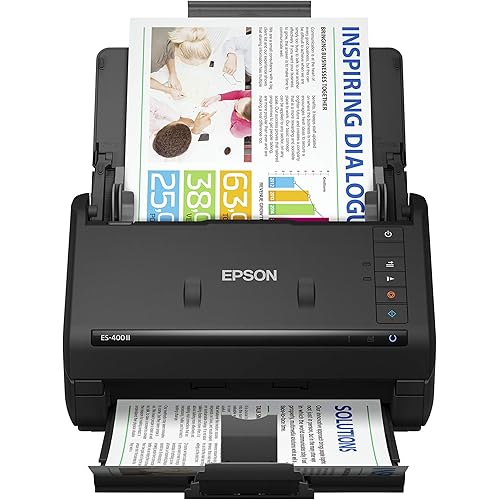
- 25 ppm, 50 ipm scan speeds scans both sides of one sheet in just one pass.
- 75-page Auto Document Feeder.
- Ships in Certified Frustration-Free Packaging
Description
From the Manufacturer The WorkForce Pro GT-S50 document image scanner offers an amazing value with its remarkable reliability, powerful performance and easy-to-use features. With a daily duty cycle of up to 1200 sheets, plus a 75-page feeder, it’s ready to tackle any task in busy office environments. Scan everything from business cards to rigid ID cards and documents up to 8.5x36. The GT-S50 easily scans both sides of one sheet in just one pass — in color, grayscale or bi-tonal. It’s never been easier to electronically capture critical documents. Whether you need a faster way to access shared documents, a more affordable way to comply with government mandates or a better way to maintain the integrity of important documents, the GT-S50 is the perfect place to start. Designed by Epson, a leader in digital imaging, the GT-S50 offers robust paper handling capabilities and quality you can depend on — all from a compact, desktop scanner. The Epson WorkForce Pro GT-S50 features 10 user- definable scan jobs displayed on 2 line x 16 character LCD. The Epson WorkForce Pro GT-S50’s versatile automatic document feeder can scan documents, business cards and plastic ID cards. User-definable scan jobs with LCD display The Epson WorkForce Pro GT-S50 features 10 user-definable scan jobs for easy one-touch scanning including Scan to PDF. The Epson Event Manager software allows you to create customized scan jobs specifying resolution, file output type, image type and whether an image is saved to a file or launched into another application. Unlike other scanners where scan jobs are displayed only as a number, the WorkForce Pro GT-S50’s 2 line x 16 character LCD displays scan jobs with job titles and settings making it easy to choose and start a scan. Compatibility and integration with document management applications In order to fit into any document management environment, the Epson WorkForce Pro GT-S50 both Epson Scan TWAIN and EMC Captiva ISIS drivers for compatibility with key document management standards and software applications. The WorkForce Pro GT-S50 has also been certified by Kofax, a leader in document imaging software. Versatile high-speed scanning The Epson WorkForce Pro GT-S50 features a 75-page automatic document feeder capable of scan speeds up to 25 ppm simplex, 50 ipm duplex (200 dpi, A4-size, Speed Priority scanning mode). With its dual CCD sensors, the WorkForce Pro GT-S50 is able to scan both sides of a sheet in just one pass. The ADF can accommodate documents up to 8.5x36 inches including stacks of mixed sizes that can be automatically recognized and cropped. Adding to the versatility, the GT-S50 can scan business cards directly into the included NewSoft™ Presto!® BizCard software The ADF can also scan plastic, embossed and rigid ID cards, capturing both sides of the card in a single pass. With the included carrier sheet, the GT-S50 can also scan receipts and other small or fragile documents. The WorkForce Pro GT-S50 offers a host of features in a compact, desktop scanner. Epson Imaging Technologies The Epson scanner driver offers a host of innovative functions including automatic paper size detection, automatic hole-punch removal, automatic de- skewing, background color removal and much more. ReadyScan LED light source This energy-efficient light source uses less power, while offering greater productivity. And, there's no warmup required. Best of all, with no mercury included, this LED technology is better for the environment. Superior support and service Each Epson WorkForce Pro GT-S50 is backed by exceptional service and support. The WorkForce Pro GT-S50 includes a one-year warranty with extended warranties and overnight exchange programs also available. The GT-S50 also features an affordable user-replaceable roller assembly to keep the scanner working at peak performance even in heavy workloads. Features/BenefitsDo more - 25 ppm, 50 ipm scan speeds; scans both sides of one sheet in just one passScan stacks of documents - 75-page Auto Document FeederTackle any task with versatile paper handling capabilities — scan business cards, rigid ID cards and documents up to 8.5x36 inches (accommodates different size documents all at one time)Get reliable performance — high- volume duty cycle of up to 1200 sheets per dayEnjoy one-touch scanning — front control panel with up to 10 user-definable scan jobs including scan-to-PDFRest easy with ReadyScanTM LED technology — no mercury, uses less energy, no warmup timeManage critical documents with included software — includes ISIS and TWAIN drivers plus PDF, OCR, document management and business card management software; Kofax VRS certifiedSave on office space — compact scanner fits in any environmentConnect to your PC — compatible with Windows® and Macintosh®; Hi-Speed USB 2.0 connection What’s in the Box Epson WorkForce Pro GT-S50 document imaging scanner; Scanner installation CD-ROM and Electronic User’s Guide; Nuance ScanSoft® PaperPort® CD-ROM; Start Here poster; Hi-Speed USB 2.0 cable; AC adapter with power cable; Carrier sheet.
Scanner Type: Business Card, Document, Receipt
Brand: Epson
Model Name: WorkForce Pro GT-S50
Connectivity Technology: USB
Resolution: 200
Item Weight: 5 Kilograms
Wattage: 40 watts
Color Depth: 1 bpp
Standard Sheet Capacity: 75
Optical Sensor Technology: CCD
Scanner Type: Business Card, Document, Receipt
Connection Type: USB
Resolution: 200
Wattage: 40 watts
Color Depth: 1 bpp
Standard Sheet Capacity: 75
Optical Sensor Technology: CCD
Media Type: Business Card, ID Card, Paper, Receipt
Light Source Type: LED
Minimum System Requirements: Windows 7
Brand: Epson
Model Name: WorkForce Pro GT-S50
UPC: 778889379721 103438688922 666672932256 777785621668 010343868892
Manufacturer: Epson
Item Weight: 5 Kilograms
Frequently asked questions
To initiate a return, please visit our Returns Center.
View our full returns policy here.
- Klarna Financing
- Affirm Pay in 4
- Affirm Financing
- Afterpay Financing
- Zip Pay in 4
- Financing through Apple Pay
- Financing through Google Pay
Learn more about financing & leasing here.