Search  for anything...

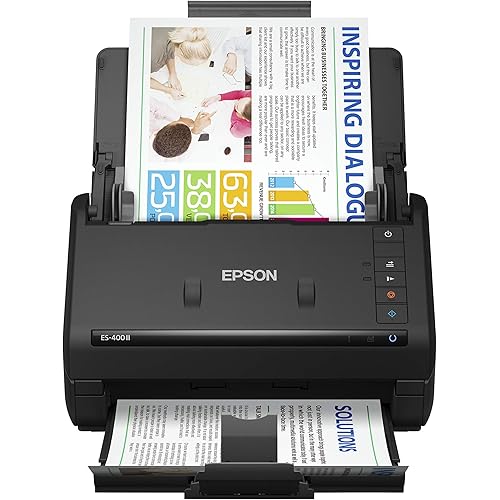
Epson RapidReceipt RR-600W Wireless Desktop Color Duplex Receipt and Document Scanner with Receipt Management Software, Touchscreen and Auto Document Feeder. Full 1-Year Limited Warranty (Renewed)

Based on 100 reviews
Condition: Refurbished - Premium
Checking for the best price...
$299.99
Holiday Deal · 41% off was $511.99

Buy Now, Pay Later


As low as $50.00 / mo
  • – 6-month term
  • – No impact on credit to apply
  • – Instant approval decision
  • – Secure and straightforward checkout

Ready to go? Add this product to your cart and select a plan during checkout.

Payment plans are offered through our trusted finance partners Klarna, Affirm, Afterpay, Zip, Apple Pay, and Google Pay. No-credit-needed leasing options through Acima may also be available at checkout.

Learn more about financing & leasing here.

Free shipping on this product

FREE 90-day refund/replacement

To qualify for a full refund, items must be returned in their original, unused condition. If an item is returned in a used, damaged, or materially different state, you may be granted a partial refund.

To initiate a return, please visit our Returns Center.

View our full returns policy here.


Availability: Only 1 left in stock, order soon!
Fulfilled by Amazon

Arrives Dec 2 – Dec 13
Order within 20 hours and 30 minutes

Available payment plans shown during checkout

Protect Your Purchase

Easy claims online, fast replacements, no fees

Checking for protection plans...

At a glance

Condition
Refurbished - Premium
Model
RapidReceipt RR-600W Renewed
Dimensions
6.7"D x 11.6"W x 6.6"H
Weight
8.2 lb
Scanner Type
Document, Receipt
Wattage
13 watts
Color Depth
24 bits
Warranty
1-Year Limited Warranty

Features 10

  • ScanSmart AI PRO Technology Intelligently convert and extract scanned information into smart digital data making your documents AI-ready
  • Export to Financial Software2 Turn stacks of receipts and invoices into categorized digital data that easily integrates into financial applications, such as QuickBooks and TurboTax
  • TrueFeed Technology Robust 100-page document feeder with paper skew and staple protection easily feeds stacks of various sized documents
  • Intuitive 4.3" Color Touchscreen Scan PC-free directly to an email account, cloud storage5 or USB flash drive

Description

Unleash the power of AI¹ with the Epson RapidReceipt RR-600W dedicated business scanner. Driven by Epson ScanSmart AI PRO technology, you’ll quickly and intelligently convert scanned information into smart digital data – making your documents AI-ready for Microsoft Copilot, Apple Intelligence, ChatGPT workflows and more. Going beyond simple document capture, the RapidReceipt RR-600W scanner utilizes an extensive data model of various invoices and receipts to quickly turn stacks of unorganized paperwork into categorized digital data that easily integrates into financial applications such as QuickBooks and TurboTax². The RapidReceipt RR-600W helps increase your productivity with fast scanning up to 35 pages per minute³, delivering 10 times faster duplex scanning than a multifunction printer⁴. Plus, advanced features like a 100-page Automatic Document Feeder and the ability to create searchable and editable PDFs. While the built-in 4.3" color touchscreen allows for PC-free scanning directly to an email account, cloud service⁵ or USB drive. One of the smartest investments you can make for your business, the Epson RapidReceipt RR-600W business scanner, powered by ScanSmart AI PRO, enables you and your business to stay organized and efficient by unleashing the power of AI.

Specs 19

Scanner Type Document, Receipt
Brand Epson
Model Name RapidReceipt RR-600W Renewed
Connectivity Technology USB, Wi-Fi
Product Dimensions 6.7"D x 11.6"W x 6.6"H
Resolution 600
Item Weight 8.2 pounds
Wattage 13 watts

Frequently asked questions

If you place your order now, the estimated arrival date for this product is: Dec 2 – Dec 13

Yes, absolutely! You may return this product for a full refund within 90 days of receiving it.

To initiate a return, please visit our Returns Center.

View our full returns policy here.

  • Klarna Financing
  • Affirm Pay in 4
  • Affirm Financing
  • Afterpay Financing
  • Zip Pay in 4
  • Financing through Apple Pay
  • Financing through Google Pay
Leasing options through Acima may also be available during checkout.

Learn more about financing & leasing here.
Top Amazon Reviews


Great fast networkable scanner
If you want to scan receipts or invoices in bulk this is a super choice. It is also awesome for scanning in bulk. It scans both sides in one pass. It is super fast. It has a great feed mechanism that is not fussy about mixed document sizes. It works great for expense report receipts. And the software is good. I also love that you can scan directly to a network folder ... show more
Reviewed in the United States on January 1, 2026 by JH685

Excellent, would recommend
Lightning fast, clear documents, easy to use
Reviewed in the United States on January 14, 2026 by NH Pain Associates

GREAT scanner, I recommend the scanner but the Presto! 6 BizCard software is TERRIBLE
OVERALL: A great refurbished scanner. I am absolutely happy with it. GOOD: Product quality, size, performance, and functions. 1. Quality: It works good (accurate and fast) and it looks good. 2. Size: It's compact yet it holds papers well. 11x17s don't fall out if tray support extended fully. 3. Performance: It's fast, yet accurate. Doesn't jamb with multiple pages, despite speed, unless there is a damaged/bent/stapled paper. It's And it's tough. Our family cats knocked it off of my desk and it didn't break anything (though individual tragedies may vary). 4. Functions: I haven't had ANY issues using this scanner with Quicken, Adobe products, MS Office Suite, or just general document scanning for archival, picture scanning, or any scanning I have done thus far. INVOICE and RECEIPT MANAGER database: It scans receipts great but the OCR needs continuous improvement. With all of the ridiculous receipt "designs" out there, I give them some patience on this. The OCR at least appears to try to learn. After 2-3 edits/corrections of some of the more flamboyant receipts I have received, I haven't had to edit them again; 75% of the time. It's been way better than others I've had in the past. DIFFICULTIES (not really "bads"): The only issues I have really run into have been with the "Automatic Double-feed Detection" feature. Sometimes, it will not scan certain types of thick, rigid, or slick papers but all I had to do was go into the scanner settings and turn that feature off and rescan the item and it scanned fine. I just had to remember to turn the feature back on afterward. That feature, and the scanner overall, is also quite sensitive to wrinkled paper edges in going in to the scanner, but not annoying so. BAD: Subcontract PRESTO! BIZCARD 6 software from Newsoft. In a word, the PRESTO! BIZCARD 6 software is TERRIBLE! Epson needs to dump their contract (if not already) and Newsoft just needs to close their doors. Their software is junk. The OCR will not recognize the fonts, names, addresses, or ANY of the information on even the most simple black & white arial font on the plainest of business cards. I have had to go in a edit the information entries for EVERY SINGLE business card I have scanned since I started using the scanner. Once you've scanned a card, you cannot rearrange or delete any of the images, for instance, if software switches the front and back of a card around, you cannot correct it, nor can you enter the information on the backs of any cards. Ridiculous! I have changed the dpi, scanned and re-scan to "train" the OCR and there's no hope of making it work. There are NO updates, nobody answers emails sent to their "help desk", and they're not even attempting to support their software. TECH SUPPORT: I haven't had to use it. EASY TO USE: It is. The native and TWAIN drivers have worked seamlessly and flawlessly with all of the software I have. TOUCH SCREEN: I have used it very little but, when I have, it's cool, functional, and not convoluted. I think they did a good job. ... show more
Reviewed in the United States on June 14, 2024 by C.Anton

This is a freakin' AWESOME scanner! Don't fret RENEWED - mine was from EPSON RENEWED.
This is a freakin' AWESOME scanner! I bought the FF-680 a few years back and liked it SO MUCH that I swore that is anything happened to it, I would just buy another - even at $600 - snap my fingers and done. I had a need for another scanner in a different location, so I bought this model (no need to do photos in this location) to save some $$$. To save even more, I decided to take a chance on this renewed version. It came in an EPSON RENEWED box (different that the original), looked perfectly new, and works flawless. What a VALUE!! Setting up presets is not well advertised, but this will write PDF's directly to a PC (or NAS) defined folder! Awesome!!! It's the perfect size for any kitchen :) ... show more
Reviewed in the United States on August 30, 2025 by Don

Don't waste your money on this one if you think the software is going to solve your problems...
Scans fine. Software is a disappointment. I wish we had sent back and purchased something else. The file transfers are covered files but takes a lot of work to get the info correct as it doesn't read receipts consistently.
Reviewed in the United States on September 7, 2025 by Liberty Bell

Great scanner
I love this scanner. It doesn’t take a lot of room. It was pretty easy to set up and figure out and it has great options for your daily work. I particularly wanted this model, because you can save in TIFF format and other Formats. It easily saves things to your PC. It saves me from jumping up and down all day going into the main scanner room. ... show more
Reviewed in the United States on August 29, 2023 by Kathy Baker

In Depth Review: Fatally Bad Software — Avoid This Mess
While the RR‑600W hardware is decent, the RapidReceipt software is the HUGE problem — fundamentally flawed at the design level and incapable of supporting real micro‑business bookkeeping. 1. No learning, no automation The “AI” claim is fiction. It never learns vendors, categories, or patterns. Every receipt requires the same manual corrections. 2. Cannot handle mixed receipts No splitting, no removing personal items, no tax recalculation. Edit anything and the math breaks permanently. 3. No tax‑year separation All receipts from all years are dumped into one undifferentiated pool. No archiving, no locking, no year folders. You must manually separate tax years outside the app. 4. Locked, incomplete categories No custom categories, no Schedule C mapping, and major categories are missing entirely. The structure is incompatible with real bookkeeping. 5. Weak OCR It fails to read obvious, bold vendor names — even “Amazon” in large type. You end up correcting basic text recognition constantly. 6. Fragile, inefficient UI Category flyouts collapse if your cursor drifts a millimeter. Batch editing, printing, and exporting are equally clunky and slow. 7. No meaningful integration with accounting tools No syncing, no rules, no API. You must re‑enter everything into proper accounting software anyway. 8. No “Select All” for exporting — every receipt must be checked manually The software forces you to click a tiny checkbox for every single receipt before exporting. There is no bulk‑select, no shift‑click, no “select all,” nothing. If you have 143 receipts, you must click 143 times. This alone makes the software unusable for any real‑world workload. ⭐ BOTTOM LINE The software isn’t just limited — it’s structurally incapable of doing the job. If you run a real micro‑business, RapidReceipt will slow you down, break your workflow, and create more headaches than entering everything manually. The scanner hardware is fine, but the software is a pure piece of garbage. Don’t waste your money. ... show more
Reviewed in the United States on January 22, 2026 by lkrogers
Checking for best price...