Search  for anything...

Epson Expression Home XP-5200 Wireless Color All-in-One Printer with Scan Copy, Automatic 2-Sided Printing, Borderless Photos, 150-Sheet Paper Tray and 2.4" Colorfull Display - Black

  • Based on 4,039 reviews
Condition: New
Checking for the best price...
$79.98 Why this price?
Save $70.01 was $149.99

Buy Now, Pay Later


As low as $13.33 / mo
  • – 6-month term
  • – No impact on credit
  • – Instant approval decision
  • – Secure and straightforward checkout

Ready to go? Add this product to your cart and select a plan during checkout.

Payment plans are offered through our trusted finance partners Klarna, Affirm, Afterpay, Apple Pay, and PayTomorrow. No-credit-needed leasing options through Acima may also be available at checkout.

Learn more about financing & leasing here.
Selected Option

Free shipping on this product

FREE 30-day refund/replacement

To qualify for a full refund, items must be returned in their original, unused condition. If an item is returned in a used, damaged, or materially different state, you may be granted a partial refund.

To initiate a return, please visit our Returns Center.

View our full returns policy here.


Availability: Only 2 left in stock, order soon!
Fulfilled by Amazon

Arrives Mar 16 – Mar 22
Order within 3 hours and 30 minutes
Available payment plans shown during checkout

Protection Plan Protect Your Purchase
Checking for protection plans...

Style: XP-5200


Features

  • Remarkable Print Quality for Home and Photo Printing Epsons leading-edge PrecisionCore technology produces crisp documents, vibrant borderless photos with rich colors, and more
  • Our Fastest Expression Home Printer Plus, a 150-sheet paper tray for convenient paper handling
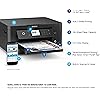
  • Stress-Free Setup and Operation Large 2.4" color display for effortless navigation, plus easy installation and operation through your smartphone or tablet using the Epson Smart Panel app (1)
  • Convenient Connectivity Supports easy wireless connections and printing from Android or iOS devices (2)
  • Engineered for Reliability Consistently delivers high-quality prints with heat-free technology and a permanent printhead designed to last the life of the printer
  • Easy, Affordable Printing Individual ink cartridges make it easy to only replace the ink you need
  • Efficient, Economical Design Automatic 2-sided printing helps you save paper and reduce paper waste
  • Hands-Free, Voice-Activated Printing Easily print on-the-go using Alexa and Siri (3)
  • Versatile Functionality Create searchable PDFs and more with included Epson ScanSmart scanning software
  • Epson Printing System Is Designed to Be Used Exclusively with Epson Genuine Cartridges Use of non-genuine ink could cause damage not covered under the printers limited warranty

Description

Enjoy fast, easy printing with the Expression Home XP-5200. Our fastest Expression Home printer to date, the XP-5200 delivers everyday documents—like to-do lists, homework, coupons and more—quickly and easily. Engineered with Epson’s state-of-the-art PrecisionCore technology, this high-performance, all- in-one solution provides exceptional image quality for remarkable prints and borderless photos for all your creative projects. Plus, it offers a convenient 150-sheet paper tray and simple installation. This product uses only genuine Epson-brand cartridges. Other brands of ink cartridges and ink supplies and not compatible and, even if described as compatible, may not function properly or at all. | 1. Requires Epson Smart Panel app download. Data usage fees may apply. | 2. Most features require an Internet connection to the printer, as well as an Internet- and/or email-enabled device. For a list of Epson Connect enabled printers and compatible devices and apps, visit www.epson/connect | 3. Epson Connect account and voice-activated account registration required. See www.epson/voice for device compatibility. | 4. For convenient and reasonable recycling options, visit www.epson/recycle | 5. SmartWay is an innovative partnership of the U.S. Environmental Protection Agency that reduces greenhouse gases and other air pollutants and improves fuel efficiency.

Brand: Epson


Connectivity Technology: USB, Wi-Fi


Printing Technology: Inkjet


Special Feature: Auto-Duplex, Energy Star


Color: Black


Model Name: XP-5200


Printer Output: Color


Maximum Print Speed (Color): 7.5 ppm


Max Printspeed Monochrome: 14 ppm


Item Weight: 11.9 Pounds


Product Dimensions: 19.8"D x 14.8"W x 7.4"H


Controller Type: Android, Google Assistant, iOS


Maximum Media Size: 8.5 x 14 inch


Power Consumption: 12 Watts


Included Components: Expression Home XP-5200 All-in-One Printer, power cord, 4 Claria® 222 Ink cartridges (1x Black ink cartridge and 3x color ink cartridges 1x Cyan, 1x Magenta, 1x Yellow)


Print media: Paper (plain)


Scanner Type: Flatbed


Max Input Sheet Capacity: 150


Max Copy Speed (Black & White): 14 ppm


Compatible Devices: Smartphones


Maximum Color Print Resolution: 4800 x 1200 Dots Per Inch


Sheet Size: Letter, A4, Legal, 8" x 10", 5" x 7", 4" x 6", 3.5" x 5", Executive, Half Letter, A6, User Defined 3.5" x 5" to 8.5" x 47.2"


Maximum Black and White Print Resolution: 4800 x 1200 Dots Per Inch


Warranty Type: Limited


Color Depth: 48-bit input, 24-bit output


Dual-sided printing: Yes


Wattage: 12 watts


Max copy resolution color: 600 x 600 dpi


Max copy resolution black-white: 600 x 600 dpi


Duplex: Automatic


Hardware Interface: USB


Ink Color: Black


Additional Printer functions: Copy, Scan


Control Method: Voice


Compatible Cartridge: T222


Output sheet capacity: 150


Number of Trays: 1


Processor Count: 1


Series Number: 5200


Total USB Ports: 1


Model Series: Expression Home


Specific Uses For Product: Home, Office


UPC: 010343968646


Printer Ink Type: Claria


Supported Media Sizes: A4, A6


Smart Home Compatibility: Smart Home Compatible


Memory Storage Capacity: 64 MB


Item Weight: 11.9 pounds


Item model number: C11CK61201


Date First Available: September 13, 2022


Manufacturer: Epson


Frequently asked questions

If you place your order now, the estimated arrival date for this product is: Mar 16 – Mar 22

Yes, absolutely! You may return this product for a full refund within 30 days of receiving it.

To initiate a return, please visit our Returns Center.

View our full returns policy here.

  • Klarna Financing
  • Affirm Pay in 4
  • Affirm Financing
  • Afterpay Financing
  • PayTomorrow Financing
  • Financing through Apple Pay
Leasing options through Acima may also be available during checkout.

Learn more about financing & leasing here.

Top Amazon Reviews


  • Scan the QR code and use the app for interface. Then it does the rest by itself!
Style: XP-4200
The trick to this printer is to scan the QR code and download the app for interface. Everything else will fall into place nice and easy. Does auto network wifi detection. It prints beautifully. No paper jams, excellent for legal letters and medical documents. Truly 5 stars all the way.
Reviewed in the United States on February 21, 2026 by Jophiel Drums Jophiel Drums

  • Was great until the firmware update
Style: XP-4200
It's difficult to do a review on this printer since I can't use it anymore and can't tell you about all the great options it's supposed to have but I will try. Wireless connectivity is unpredictable . I'm always having to go into the menu which is very tedious and reconnect and has nothing to do with my router or my modem because everything else on my network connects just fine. The print quality is questionable seems no matter how clean the inkjets are I always get streaks and error messages. This happens no matter what brand of ink I use. So, I stopped buying the expensive Epson brand if I'm going to get poor quality. The noise level well that's something you're going to have to get used to and it's very slow making the noise level last a long time however; This WAS a fantastic piece of machinery until Epson got greedy and decided to send out an update to the firmware making the printer unusable if you do not use EPSON brand cartridges ONLY. That's great except that those tiny ink cartridges don't last more than a few weeks and come with a very huge price tag not everybody can afford them. I'm nowhere near rich; it takes me a ridiculous amount of time to save money. I swear I printed about three or four documents average quality prints and already it was prompting me to buy more of their exclusive ink cartridges. Not to mention all the copies that came out with poor quality. (three). Even the black color is ridiculously priced. But EPSON knows that. Makes me regret getting an Epson. That's two printers that I have that I can't use because of their clever upgrade. A complete waste of money that I don't have. I positively can't stand this company anymore. Why not send out a firmware update so we have to use exorbitantly priced paper made of birch trees in the paper tray too? There's absolutely nothing I can do to make this printer work or be useful except to sell it, but nobody wants Epson because they're not a budget-friendly company. Buy their proprietary garbage only and you'll be fine (and broke). - Try to use affordable third-party ink cartridges and end up having a printer that does nothing except collect dust and make you regret ever spending any money on them ever again. Great job! By the way there's lots of redundant software on this printer that you'll never use, it makes it very confusing while trying to navigate through the menu as you read all the error messages. I'd suggest any other printer just not EPSON. Unless you like error messages. Glad I could help! ... show more
Reviewed in the United States on February 19, 2025 by clintkeep

  • Good printer
Style: XP-4200
Works great as long as you use Epson replacement cartridges. The aftermarket ones will not work in it.
Reviewed in the United States on January 29, 2026 by Selman

  • Small home printer
Style: XP-5200
This is a nice little printer for home. Prints quick and easy to use. You spend most of your money in Inks and beware, it doesn't prints if you put none Epson inks. And also it will not prints unless you replace it even it says it'll print.
Reviewed in the United States on December 18, 2025 by Sam Penn

  • Easy to set up
Style: XP-4200
This printer was easy to set up thank goodness!! Nice size and very good print quality
Reviewed in the United States on February 13, 2026 by Patty

  • Great purchase
Style: XP-5200
Great quality for price. Setup was easy
Reviewed in the United States on February 17, 2026 by Natasha

  • WASTE OF MONEY
Style: XP-5200
First of all I am a repeat customer of Epson printers, my last one was 12 years old, XP-430, time for a new one. This came highly recommended and was priced good enough for my budget. Pros: Easy to set up. It took 10 minutes from unboxing to printing. All functions work great and its easy to save to computer, or iCloud, etc. Powers up quickly. Bottom front load paper tray (LOVE THIS). Compact design. Bluetooth connection, easy to set up and connect to wifi. Cons: Extremely loud while printing. I placed it in 3 solid places, exactly the same level of noise each time. Ink runs out way to fast and is expensive to replace even for generic brands (hard to find) Black ink is base and I hardly printed anything and was notified ink was out! I trusted the reviews but never saw one that commented on noise or ink levels. It is still a great product but do your homework before purchasing if you require heavy printing or a quiet device. RE-REVIEW after a month: Started out great, untl I changed the ink, which is ridiculous. The ink tanks are expensive and run out after MINIMAL pages or printing. After installing the new cartridges, the quality was awful. I followed the prompts to clean the heads, reprint, power clean, useless. DO NOT WASTE YOUR MONEY ON THIS PRINTER!!!!! ... show more
Reviewed in the United States on April 3, 2025 by DiDo555

  • Worked well for a while, then fritzed out
Style: XP-5200
This worked well for about 18 months before it started going haywire, popping on and off of wifi for no discernible reason, freezing up in the middle of print or scan jobs, needing frequent reboots. But my biggest complaint is the expense of the ink. While the printer would accept off-brand ink when I first set it up, a firmware update changed that. Now it will only take Epsom cartridges which are running about $70 every six weeks. ... show more
Reviewed in the United States on February 7, 2026 by Cynthia Linville, Sacramento

Can't find a product?

Find it on Amazon first, then paste the link below.
Checking for best price...