Search  for anything...

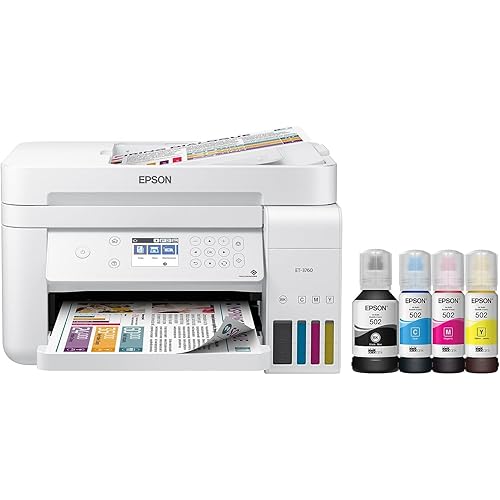
Epson EcoTank Pro ET-5850 Wireless Color All-in-One Supertank Printer with Scanner, Copier, Fax and Ethernet, White

  • Based on 894 reviews
Condition: New
Checking for the best price...
$947.50 Why this price?

Buy Now, Pay Later


As low as / mo
  • – Up to 36-month term if approved
  • – No impact on credit to apply
  • – Instant approval decision
  • – Secure and straightforward checkout

Ready to go? Add this product to your cart and select a plan during checkout.

Payment plans are offered through our trusted finance partners Klarna, Affirm, Afterpay, Apple Pay, and PayTomorrow. No-credit-needed leasing options through Acima may also be available at checkout.

Learn more about financing & leasing here.

Selected Option

Free shipping on this product

FREE 30-day refund/replacement

To qualify for a full refund, items must be returned in their original, unused condition. If an item is returned in a used, damaged, or materially different state, you may be granted a partial refund.

To initiate a return, please visit our Returns Center.

View our full returns policy here.


Availability: 16 left in stock
Fulfilled by Triplenet Pricing INC

Arrives Aug 7 – Aug 9
Order within 16 hours and 14 minutes
Available payment plans shown during checkout

Protection Plan Protect Your Purchase
Checking for protection plans...

Style: ET-5850


Set: FAX/Print/Copy/Scan


Features

  • Sold as 1 Each.
  • All-in-one printer gives you printing, copying, and scanning capability. Four-color, all-pigment four-in-one TFP2 printing technology with up to 4800 x 2400 dpi resolution. 25 ppm for color and black/white images with a monthly duty cycle of 66000 pages. 1 x USB 2.0, 1 x LAN, 1 x USB host, and Wi-Fi connectivity help enhance productivity.
  • Dimensions: 13.8"H x 16.73"W x 19.7"D. Types of media supported include cardstock, matte paper, glossy photo paper, plain paper, photo paper, and envelopes. Fax memory accommodates up to 550 pages for snag-free operation. Automatic two-sided duplexing enables hands-free two-sided copying; features an auto feeder with a 50-sheet capacity.
  • Easily manage tasks with the 4.3" touch screen. 1200 dpi optical resolution, 9600 dpi interpolated resolution, 24-bit color depth for good-quality printed text and images. Meets or exceeds ENERGY STAR, UL 60950-1, CAN/CSA-C22.2 No. 60950-1, FCC Part 15 Subpart B Class B, and RoHS standards.
  • 2-year manufacturer limited warranty.

Description

The EcoTank Pro ET-5850 wireless all-in-one offers fast Cartridge-Free Printing with easy-to-fill supersized ink tanks. You can save up to 80 percent with low-cost replacement ink bottles vs. standard-capacity color laser toner cartridges (1) – about 2 cents per color ISO page versus 14 cents with cartridges (1). PrecisionCore Heat-Free Technology delivers high-volume, print-shop-quality output, plus speeds up to 25 ISO ppm black and color (ƚ). This all-in-one with Epson DURABrite pigment-based ink delivers vibrant borderless prints up to 8.5" x 14". Each replacement ink set includes enough ink to print up to 6,000 pages (2). Plus, there’s zero cartridge waste and very low energy consumption (3). The ET-5850 features a 500-sheet front tray paper capacity and rear specialty-paper feed, plus a 4.3" color touchscreen and hands-free voice-activated printing (4). The NPD Group, Total Channel Tracking Service, U.S. & Canada, Inkjet SF/MF Printers, Refillable ink tank included, based on units, February 2019 - January 2020. Supertank printers are defined as refillable ink tank printers. Promo valid for ET-5150, ET-5170, ET-5180 ET-5800, ET-5850, ET-5880, ET-16600 or ET-16650 printers purchased from 10/1/2021 to 3/31/2025. Product must be registered within 30 days of purchase. Limit four 542 ink bottles per claim. Each claim cannot contain multiple bottles of the same color. Retain your empty 542 ink bottle for submission along with rebate form. Promotion applies to ink only. Printer covered by Epson 2-year ltd warranty with registration. For promo participation, you must register your product. See manufacturer’s website for details. Ƚ Black and color print speeds are measured in accordance with ISO/IEC 24734. Actual print times will vary based on factors including system configuration, software, and page complexity. 1. Actual savings and costs will vary considerably based on print tasks, print volumes and usage conditions. Savings and cost per ISO page are based on the cost of replacement ink bottles and the cost of enough standard-capacity color laser toner cartridges to achieve the total page yields of the ink bottles using the manufacturers' online prices and yields for the best-selling similarly featured color laser printers, available at retail, priced at $999 or less (USD) with speeds of 40 ppm or less per industry-available data as of July 2019. Savings of up to $600 (USD) and cost per ISO page of about 0.09 dollars (USD) for XL-capacity color laser toner cartridges based on the same methodology. 2. Part of the ink from the included bottles is used for initial setup; yields are lower than those of replacement ink bottles. Replacement and included ink bottle yields based on the ISO/IEC 24712 pattern with Epson’s methodology. Actual ink yields will vary considerably for reasons including images printed, print settings, temperature and humidity. Yields may be lower when printing infrequently or predominantly with one ink color. All ink colors are used for printing and printer maintenance, and all colors must be available for printing. 3. Based on comparing manufacturers’ reported TEC values of the best-selling, similarly featured color laser printers priced about 999 dollars (USD) or less with print speeds of 40 ppm or less as of July 2019. 4. Epson Connect account and voice-activated account registration required. 5. Most features require an Internet connection to the printer, as well as an Internet- and/or email- enabled device. 6. Wi-Fi CERTIFIED; level of performance subject to the range of the router being used. Wi-Fi Direct may require printer software. 7. 12 months of standard limited warranty or 80,000 plain paper sheets (whichever happens first). For an additional 12-month extended service plan (total of 24 months or 80,000 plain paper sheets, whichever happens first), register your product and use Epson genuine ink bottles. See Limited Warranty for details. 8. SmartWay is an innovative partnership of the U.S. Environmental Protection Agency that reduces greenhouse gases and other air pollutants and improves fuel efficiency.

Specs & Other Info

SpecificationDetails
BrandEpson
ConnectivityWi-Fi Enabled
Printing MethodInkjet
Key FeatureEco-friendly Refillable Ink Tank
AppearancePristine White
Product LineEcoTank Pro ET-5850
Output TypeColor
Color Print SpeedUp to 25 pages per minute
Monochrome Print SpeedUp to 25 pages per minute
Weight39.2 pounds
Dimensions8"D x 14"W x 5"H
User InterfaceAndroid-compatible
Max Paper Size8.5 x 14 inches
Energy Usage19 Watts
Package ContentsEcoTank Pro All-in-One, Power Cord, Ink Bottles (Black, Cyan, Magenta, Yellow), Setup CD
Supported Media TypesEnvelopes, Plain Paper, Glossy Photo Paper
Scanner FeatureSheetfed
Input Capacity500 sheets
Black & White Copy Speed25 ppm
CompatibilityComputers, Laptops
Paper Sizes Supported8.5 x 14 inches
Power Requirement19 Watts
Print DuplexingAutomatic
InterfacesUSB, Ethernet
Print Resolution4800 x 2400 dpi
Functional CapabilitiesPrint, Copy, Scan, Fax
Operation MethodsTouchscreen & Voice Commands
SeriesEcoTank Pro
Initial Release DateMarch 26, 2020
OriginIndonesia

Frequently asked questions

Yes, the Epson EcoTank Pro ET-5850 can print in both black and white and full color. It's designed to deliver professional-quality prints for all your documents, photos, and graphics.

Absolutely, the EcoTank Pro ET-5850 supports wireless printing. You can easily print from your computer, smartphone, or tablet without needing a physical connection to the printer. It also supports printing via Ethernet for a more stable network connection.

Instead of traditional ink cartridges, the EcoTank Pro ET-5850 uses large, easily refillable ink tanks. This system allows for a much higher volume of prints per fill, reducing the cost per page and the frequency of ink purchases. This is particularly cost-effective and eco-friendly.

Yes, the EcoTank Pro ET-5850 is an all-in-one device, meaning it can function as a printer, scanner, and copier. It also includes fax capabilities, making it a versatile office machine suitable for a range of tasks.

Top Amazon Reviews

🚀 Abunda's Overview

This is our summary and key points to consider based on customer reviews.


The Epson color printer/copier/scanner/fax machine enjoys overwhelmingly positive reviews for its impressive range of features including exceptional print quality, low running costs due to the two-year free ink promo, and its versatile connectivity options. Users highlight its ease of setup, fast printing speed via ethernet, and portability. Although one review mentions poor print quality and misfeeds, this seems to be an outlier compared to the overall satisfaction experienced by most users, making this printer highly recommended for both small businesses and personal use.

Pros

  • 🖨 Easy to set up and portable design
  • 🚀 Very fast when using an ethernet connection
  • 🌈 Incredible color rendering and print quality
  • 💵 Exceptionally low running costs with free ink for two years
  • 🤝 Versatile connectivity options (Wireless, Ethernet, Bluetooth, USB)
  • 📄 Reliable for heavy-duty tasks with features like automatic 2-sided copy and scan to SharePoint

Cons

  • ⚠️ One report of poor print quality and paper misfeeding
  • 🕒 Possible delay in starting to print and slower printing than expected for some
  • 📏 Some concerns over alignment for double-sided print jobs

Should I Buy It?

If you're looking for a reliable, feature-rich printer that offers excellent print quality and cost-saving benefits through low running costs, this Epson printer is a great choice. Despite a few reported drawbacks, the overwhelmingly positive feedback suggests it’s a worthwhile investment for both small businesses and home offices. If your priorities include high-quality print outputs and efficient operation, this model comes highly recommended.


  • Great Investment Printer
Style: ET-5850 Set: FAX/Print/Copy/Scan
This is a great overall printer, especially for a home office or small business setup. It prints quickly, handles everyday documents with ease, and the EcoTank system is very convenient and cost-effective over time. Honestly, it could even hold its own in a regular office environment because of how efficient and fast it is. It is also easy to connect to from a phone, laptop or computer. It was compatible with all the devices and computers in my household, even those with Windows 10. That said, if your main goal is printing high-quality photos, this wouldn’t be the best option Epson offers. Photo quality is decent, but not exceptional. If photo printing is important to you, I would recommend looking into the Epson 8550 instead. Overall, a solid, reliable printer for everyday use—just not the top choice for photo-focused needs. ... show more
Reviewed in the United States on March 23, 2026 by Carrie

  • Excellent Epson, worth the investment!
Style: ET-5800 Set: FAX/Print/Copy/Scan
First, this is a big printer so double check the measurement specs before purchasing if space is an issue. First impressions: very well built, especially comparing to ET versions such as the ET-4800 ( see my review on that one for details). This is a sturdy printer, you can feel it when you lift the scanning bed, pull out the paper trays, etc. Printing quality: excellent right out of the box. I didn’t need to do an extensive alignment or cleaning during setup, everything printed perfectly and was photo quality. Setup was easy. Although it has a fax feature, I don’t use that so I didn’t need to set it up. Printing: using the rear paper trays, it prints on 100lb card stock very easily. I recommend only loading a few pages at a time to avoid any issues. I loaded 5 pages and made prints without any issues. 65 lb card stock was also easy to print on using the back paper feed tray and I loaded 8 sheets without an issue but know it could probably handle a few more. Just remember that the thicker the paper the more chance of having it jam with multiple sheets in the rear paper try. AND, only use the rear tray feed for cardstock or other thick paper. The actual paper tray drawers, there are two and you can set them up for different sizes and types of paper, very convenient. Now the cool detail: most printers have a flimsy plastic slide tray to catch the prints as they come out of the printer. Not this one. This has a really amazing tray catch that comes out of the printer automatically (it is motorized), and when you are done there is a little illuminated icon on the screen that looks like the printer, you press it and the tray retracts. Pretty cool detail. The screen: very easy to use and you can actually see it, unlike the postage stamp size screen they used in the ET-4800. All features are very easy to find and select and the icons are illuminated. Using this screen, setup was very easy. Ink: again a very good feature and very well thought out. The bottles are keyed so they fit in the receptacle. Simply unscrew the cap, tip them over (they won’t spill or leak) and place them in the correct color, the bottles automatically fill the tank. When done filling, remove the bottle and put the cap back on, again they won’t spill or leak because they have a mechanism that prevents it from doing so. Overall: excellent printer, expensive but over time the ink savings alone help ease the sticker price. It is heavy and sturdy, has wireless capability so you can put it anywhere and print with ease connected to your wireless network, has the ability to print from android and IPhone with an app, and it has amazing prints. This is one printer I highly recommend. ... show more
Reviewed in the United States on June 2, 2026 by Brian

  • No more expensive ink cartridges
Style: ET-5800 Set: FAX/Print/Copy/Scan
Great printer. I am sick and tired of HP giving me problems with their ink cartridges. I discarded my HP office Jet and replaced it with this Epson printer. Easy to set up. Came with two sets of ink bottles. Easy and clean to fill tanks with ink. The screen on my old HP Office Jet printer was so small and difficult to use. This Epson printer has a very large LCD screen which can tilt if you want and very easy to use. Separate paper trays for letter and legal or other sizes. Print, scan and fax. Connect via cable or WiFi. I wish I had purchased this sooner. ... show more
Reviewed in the United States on April 19, 2026 by Amazon Customer

  • Error handling is extremely poor
Style: ET-5800 Set: FAX/Print/Copy/Scan
This printer will throw errors even though things are working. Some examples are: 1) Printing from an Apple device you will get a “printer busy“ error, even though the print goes through. 2) When connecting to Wi-Fi, the printer will send a “password incorrect” error message, even though it connects to the Wi-Fi. 3) The windows desktop application cannot find the printer, even though you can print to it from that same machine. When calling Epson for Support, you will find people who insist you do things like go through the WPS procedure even though you tell them your router does not support WPS. You will be forced to go through steps until they say something like “now press the WPS button on the router“ when they will agree with you that your router does not support WPS. They will also take you a very long way to get to a ping command because that is what their documentation tells them to do, even if you’re well aware of how to start a ping in a much quicker way. Print quality and speed seem to be very good but, at this price point, the error handling issues and lack of adequate support are unacceptable. The result in a lot of frustration, wasted time and wasted paper/ink. ... show more
Reviewed in the United States on May 15, 2024 by Luke

  • Very nice and fast printer, but some info...
Style: ET-5850 Set: FAX/Print/Copy/Scan
The printer is nice and very fast printing regular documents in color or black and white. Printing photos is slower but still pretty faster than other printers I have seen. The model I purchased was the ET-5850, it came with 2 sets of full size ink bottles. When you set up the printer one set will fill the tanks. You think run through setup on the display and it will take 9 minutes to prime the system. This is initially getting the ink from the tanks to fill the empty tubes to the print heads. When this is done (takes 9 minutes) the tanks will be ½ full. Good thing you have the second set. The size in the images shows the depth of the printer to be 31 inches, it's not, it's about 19 inches with the back tray closed and the output tray retracted. Installing the driver way very simple. I did not use the driver disc as I'm running the latest OS on my computers. My Mac's all found the printer and set them up. (Note: I run in dark mode on my computers and when the driver installs it as the back version of the printer for the icon we is very hard to see in dark mode. I was able to change it to the image that matched the color my printer, but that takes some under the hood tinkering.) Both of my Windows computers also found and set up the printers without any issue. You can also set up an email address for your printer that people can email you documents to it. The Epson website gives you a lot of control over this. You can change to a custom name before the @ in the address or use the random one they picked. You can also limit who can send to your printer. That is something that I liked on my old HP this one replaced. Two items that I think they need to fix: The output tray comes out automatically when you start to print. It does not retract automatically, there is a symbol on the control panel that you tap to get it to retract. They should have made it so that when you take what was printed that it automatically retracts as it sticks out pretty far. The web interface isn't great. If you have ever used the web interface for a commercial copier, then you know what I mean. For example, when putting in contacts for faxing/scanning/emailing, the interface doesn't allow you to put in email addresses. There is an option to select the type of contact, fax, email, etc, but if doesn't give you a box to put in the email address. If you add the entry on the display for the device its self then you can put in the email. You can then go back to the web interface and edit the entry and the email address. Crazy right. Luckily I didn't have many to put in. If they could five those two items I would give it 5 stars. I'm going to email Epson my thoughts and see what happens. ... show more
Reviewed in the United States on March 14, 2025 by James W Pyle III

  • Really Great Printer!
Style: ET-5880 Set: FAX/Print/Copy/Scan
I purchased the Epson ET-5880 for our small office to fulfill our need for a good color printer. I read a number of a reviews about the printer before making the purchase. Most were positive, so I went ahead and ordered the printer. I'm very pleased with this printer. I had no problem connecting it to our network. Installing the drivers on four computers was easy as well. I should note that the printer comes with a CD for installation, but I chose to use the NEWER drivers that were on Epson's website instead. You should do that as well. Filling the ink tanks on the printer was very simple. Not so much as a drop of ink was spilled. The ink bottles are keyed so that one cannot put the wrong color ink in a tank no intended for that color. Once filled, the unit goes through a charging process (Epson's term) to get ink to the print heads. Yes, it uses a little ink, but Epson also supplied a second set of ink bottles so that the ink tanks are full after the charging process. The printing is very fast, yielding high quality print. I suggest using 22 or 24 pound paper, especially if printing on both sides of the paper. I was particularly interested in seeing how this printer would handle scanning. I do a lot of two-sided scanning. The scanning software, SCAN 2 and SCANSMART, both worked well. SCAN 2 gives the user lots of options, but might be overwhelming to a newer user. The SCANSMART software is more visual and gives the user enough features to adjust and/or crop images as needed. The software does provide the option of creating a searchable PDF file, which is something I like as I deal in contract documents. Of course, one can print from a cell phone or tablet if desired. There's even a remote print feature where one can print via email from anywhere where there's an Internet connection. Overall, I'm pleased with this printer. It's not inexpensive, but it will easily meet the needs of a small office. ... show more
Reviewed in the United States on December 31, 2024 by David Smith

  • Update Update
Style: ET-5880 Set: FAX/Print/Copy/Scan
Packaging could be improved because printer was shipped in its retail box. The printer somehow survived the cross country trip at the expense of internal foam packaging. The printer does a very good job but of course it should because it's new. The paper output drawer is somewhat curious because it extends automatically but you have to manually push it in. Set up not exactly straightforward because printer started up with error messages (no paper) when actually full. This Epson has two paper trays. OEM ink is pricey, over $90 for 4 bottles. There are a lots of generic inks available but Epson wants you to buy theirs with a warning. The amount of ink this printer consumes is still being evaluated because upon set up, the ink empty printer must be setup and it does draw down the eco tanks level. This printer is fast but not as fast as the HP576DW it replaces. Wifi connection is reliable and printing using a mobile device is very good. More to come. I've just learned that the aforementioned powered output tray does retract with an on screen button. Ink consumption seems reasonable but the price is still high. Amazon has now reduced this printer 40%. Timing is everything. ... show more
Reviewed in the United States on December 10, 2023 Reviewed in the United States on December 10, 2023 by Retaile

  • Title: The Perfect printer for me.
Style: ET-5800 Set: FAX/Print/Copy/Scan
It was a good purchase price and was easy to assemble. The Front Panel USB is useful for working with memory stick pictures. I like the rugged dual paper trays and two sided printing capability. Long lasting ink that does not dry up and has a low cost ink refill. I like the high speed compared to many printers. ... show more
Reviewed in the United States on March 21, 2026 by S. E. Ryan

Can't find a product?

Find it on Amazon first, then paste the link below.
Checking for best price...