Search  for anything...

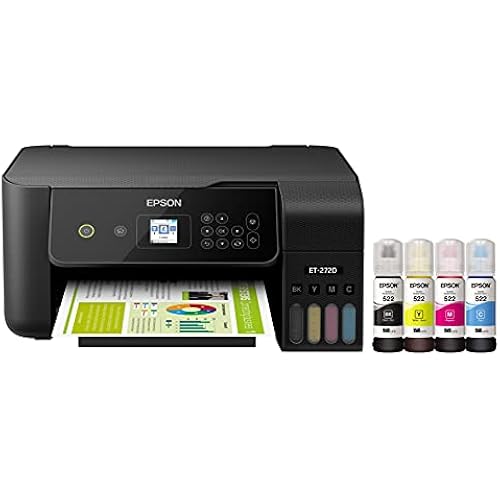
Epson EcoTank ET-4950 Wireless All-in-One Color Supertank Printer with up to 3 Years of Ink Refillable Tanks, Perfect for Office, 18 PPM, 2.4" Colorful Touchscreen, Auto Document Feeder - White

  • Based on 0 reviews
Condition: New
Checking for the best price...
$423.00 Why this price?
Save $76.99 was $499.99

Buy Now, Pay Later


As low as / mo
  • – Up to 36-month term if approved
  • – No impact on credit to apply
  • – Instant approval decision
  • – Secure and straightforward checkout

Ready to go? Add this product to your cart and select a plan during checkout.

Payment plans are offered through our trusted finance partners Klarna, Affirm, Afterpay, Apple Pay, and PayTomorrow. No-credit-needed leasing options through Acima may also be available at checkout.

Learn more about financing & leasing here.

Free shipping on this product

30-day refund/replacement

To qualify for a full refund, items must be returned in their original, unused condition. If an item is returned in a used, damaged, or materially different state, you may be granted a partial refund.

To initiate a return, please visit our Returns Center.

View our full returns policy here.


Availability: 15 left in stock
Fulfilled by Betta tech

Arrives Mar 25 – Mar 29
Order within 19 hours and 52 minutes
Available payment plans shown during checkout

Protection Plan Protect Your Purchase
Checking for protection plans...

Features

  • Introducing the EcoTank ET-4950-The Ultimate Home Office Printer. Say goodbye to expensive cartridges with the Epson EcoTank ET-4950, the newest innovation from a recognized leader in photographic printing. Combining simplicity with a modern design, the ET-4950 features advanced technology that enhances both performance and print quality, making it an ideal choice for productive office printing-including content created by AI. Powered by PrecisionCore Heat-Free technology, the ET-495
  • INCREDIBLE VALUE - Each replacement ink bottle set is equivalent to about 90 individual cartridges
  • UP TO 3 YEARS OF INK INCLUDED IN THE BOX - Comes with enough ink to print up to 6,600 pages black/5,500 color for worry-free printing and fewer out-of-ink frustrations
  • SIMPLE INK REFILLING - Supersized ink tanks and uniquely keyed EcoFit bottles make refilling ink simple-no mess, no stress and no ink bottle mix-ups
  • THE #1 BEST-SELLING SUPERTANK PRINTER - Epson invented EcoTank to revolutionize the way people print; weve sold 100 million EcoTanks worldwide and this is our 7th generation of cartridge-free printers

Description

Introducing the EcoTank ET-4950—The Ultimate Home Office Printer. Say goodbye to expensive cartridges with the Epson EcoTank ET-4950, the newest innovation from a recognized leader in photographic printing. Combining simplicity with a modern design, the ET-4950 features advanced technology that enhances both performance and print quality, making it an ideal choice for productive office printing—including content created by AI. Powered by PrecisionCore Heat-Free technology, the ET-4950 offers a duty cycle that’s twice as robust as its predecessor³. And unlike conventional thermal inkjet printers, its unique permanent printhead is engineered to last the life of the printer. Designed to be simple and error-free, refilling ink is a breeze with large ink tanks and uniquely keyed EcoFit bottles—no mess, no stress and no ink bottle mix-ups. And with enough ink in the box to last up to three years⁴, you'll enjoy affordable, worry-free color printing without the hassle of frequently replacing cartridges. Featuring Ethernet and Wi-Fi for seamless connectivity, along with the user-friendly Epson Smart Panel app⁵, you can easily print, scan, and more directly from your computer or wireless mobile device⁶. Choose Epson EcoTank, the World’s 1 Selling Supertank Printer². With more than 100 million units sold globally⁷ across seven generations of innovation, EcoTank consistently delivers affordable, photo-quality prints, making it a reliable choice for all your printing needs.

Brand: Epson


Connectivity Technology: Ethernet, USB, Wi-Fi


Printing Technology: Inkjet


Special Feature: Auto Document Feeder, Auto-Duplex, Network-Ready, Refillable Ink Tank


Color: White


Model Name: EcoTank ET-4950 White


Printer Output: Color


Maximum Print Speed (Color): 9 ppm


Max Printspeed Monochrome: 18 ppm


Item Weight: 16.1 Pounds


Product Dimensions: 13.7"D x 14.8"W x 9.4"H


Maximum Media Size: 8.5 x 14 inch


Power Consumption: 15 Watts


Included Components: EcoTank ET-4950 all-in-one, manual, power cord, 1 bottle of 502 Black (127 mL) and 1 bottle each of 502 Cyan, Magenta, Yellow (70 mL)


Print media: Paper (plain)


Scanner Type: Flatbed, Sheetfed


Max Input Sheet Capacity: 250


Max Copy Speed (Black & White): 18 ppm


Maximum Color Print Resolution: 4800 x 1200 Dots Per Inch


Sheet Size: 3.5" x 5", 4" x 6", 5" x 7", 8" x 10", 8.5" x 11", 8.5" x 14"


Maximum Black and White Print Resolution: 4800 x 1200 dots_per_inch


Warranty Type: Limited


Color Depth: Input 48-bit color/Output 24-bit color


Dual-sided printing: Yes


EU Spare Part Availability Duration: 3 Years


Maximum copies per run: 99


Wattage: 15 watts


Max copy resolution color: 4800 x 1200 dots_per_inch


Max copy resolution black-white: 4800 x 1200 dots_per_inch


Duplex: Automatic


Hardware Interface: Ethernet, USB


Ink Color: Black


Additional Printer functions: All In One


Compatible Cartridge: Epson 502 ink


Number of Trays: 1


Total Ethernet Ports: 1


Number of USB 2 Ports: 1


Total USB Ports: 1


Model Series: EcoTank


Specific Uses For Product: Office


UPC: 198390000905


Printer Ink Type: Epson 502 ink


Smart Home Compatibility: Smart Home Compatible


Item Weight: 16.1 pounds


Item model number: C11CL40202


Date First Available: July 7, 2025


Manufacturer: Epson


Frequently asked questions

If you place your order now, the estimated arrival date for this product is: Mar 25 – Mar 29

Yes, absolutely! You may return this product for a full refund within 30 days of receiving it.

To initiate a return, please visit our Returns Center.

View our full returns policy here.

  • Klarna Financing
  • Affirm Pay in 4
  • Affirm Financing
  • Afterpay Financing
  • PayTomorrow Financing
  • Financing through Apple Pay
Leasing options through Acima may also be available during checkout.

Learn more about financing & leasing here.

Top Amazon Reviews


  • Quality printing, great monochrome print speed and holds a lot of ink
As with any printer, there are ups and downs. There are definitely more ups than downs, but this is not the panacea for printers, yet it is the best we have had. Let's start with the basics, which is what are most important, print quality and speed. The print speed is fast for monochrome printing and I really appreciate that. The print speed is average for color and that's fine. We definitely print more monochrome than color, so for us, 90% of our prints will be faster. While it advertises no warm up time, there is some lag between pressing "print" and printing, maybe that is transmission time, but just be aware that it may not be instantaneous. With all this said, this printer is the best in class that I have owned for speed, especially once it starts. Quality is perfectly fine too. If you do a LOT of photo quality prints, you might upgrade one level higher and get the 400 dpi version. I have not found any way to get 400 dpi on this one. For us that is probably a once or twice a year small gripe, so again, for the vast majority of prints, this will be as high a resolution as you will need. It does not come out grainy or pixelated. I appreciate the epson app, and yes you should download it to set things up. It goes through detailed step by step so you never question what is happening or what you should do next. With that said, we got bogged down in the set up phase. Mid set up, there was a nasty paper jam that took 20 minutes to clear and it screwed up the installation process and it became far more convoluted than it had to. Overall set-up took us probably 45 minutes. This was a poor experience and since other reviews have mentioned paper jams, I think Epson ought to look into this. Outside of this though, their set-up process is at least well coordinated. Wireless connectivity has been great. The set-up took care of all of that initially. We have not had to fight with finding the printer, it being offline, or not ready to go. This has worked seamlessly for both our desktop and our mobile devices. Although we have had it only a few days, this is promising. Adding ink was a breeze and I love that you can see the ink fill levels and add color one by one instead of having to replace all colors because one color is running low. This holds a LOT of ink, and reasonably priced so it really should last quite a while. This is a huge upgrade from our old ink cartridges. 5 out of 5 stars here The durability is perhaps only a 4 out of 5. There are a lot of moving parts. Trays come out automatically although i have no idea if we are supposed to manually move them or not. Some of the internal areas to access sound like you are breaking them when you lift something. It sounds like plastic snapping although nothing technically broke. I think there could be some enhancement here. I don't think any trouble issues would actually cause the printer to stop functioning, but there is more for improvement here. Also, after the initial paper jam mentioned earlier, everything has been flawless as far as function goes, so I am actually quite happy as far as ongoing performance is concerned. Lastly, we bought this on sale for Thanksgiving Sales, and found this to be a reasonable price with a discount. It is a little expensive at MSRP, but there will be substantial savings in the long run on ink. So overall, I am happy with this. I would say there is a bit of a learning curve as you figure out how and when to feed paper initially, but this has been a substantial step up from the cartridge printers that I am used to. Hope this helps. ... show more
Reviewed in the United States on December 3, 2025 by Bryan D Gebhart

  • BEST PRINTER YET!!
LOVE THIS PRINTER!!!! I had this same printer 2 or 3 versions ago. It was a workhorse! I think the software must not have been supported by Epson anymore. This old printer stopped connecting to the internet... sometimes lol. I realized it was time for an upgrade. This is the latest version of the same printer. They have REALLY upped their game!! The ink tank design is absolutely brilliant! I used to use gloves because of the mess. This time...no gloves! The ink bottle is like it's smart! It comes out only when it is filling up the tank. I'm sure if I squeezed it, it would come out. But just turning the bottle upside down the ink doesn't come out! The ink setup was seamless! Sooooo easy! The whole setup was so easy! You download the app, and it takes you step by step. My kid could have done this. The design of the printer is beautiful. Love how it has a smaller foot print and the top is flat. They really got some brilliant engineers in designing this one. I'm super impressed. If you have never had a tank printer, you have no idea what you are missing! I used to spend hundreds of dollars on ink cartridges a year. Do they even sell those types of printers anymore? I fill up ink now maybe twice a year. Now with how simple this is, it takes less than 3 minutes literally! You can print hundreds if not thousands of pages. Love, love, love this printer!!! ... show more
Reviewed in the United States on November 19, 2025 by Gwen

  • Absolutely Impressed! Flawless IMHO
I needed to replace my Epson WorkForce WF-3520 that I has for13 years. (November 20. 2012) It was an awesome printer but finally started to give me some problems so I decided to replace it. I looked at all of the "BIG TANK" products from the big three. I ended choosing this printer and love it. Has all of the features that I loved and needed from my WF-3520 and then some. It does 2 sided printing, 2 sided scanning with ADF and a very nice flatbed. Found that setting this printer up with the app on my phone was so easy! That app works flawlessly. I enabled remote printing and tried printing with it at home from my work location. worked perfectly. Also love that the whole printer stays covered till use so the dust doesn't get in to the ADF. If you print something and the printed paper tray isn't open, the printer opens the front door and rolls out the tray to catch the printed paper. I never turn the printer off. I just let it go in the sleep mode. The paper tray holds 250 sheets of 20# paper. You can go a very long time without having to reload the paper. I printed a few different borderless photos on several types of photo paper with awesome results. Very easy access to the maintenance tank for when you have to replace it. I purchased 3 extras to have on hand. I print several times a week so I never have to worry about the printer head drying out or clogging I hope. The touch screen display is large and make it ease on my older eyes. I also like how you can adjust the angle of the display and control panel so you can see it more easily. I use a Mac Mini and connection my Mac to the printer was so easy. I scan and print from all of my devices including my iPad. The app software is awesome. very flexible and thorough. In the setting on the app I enabled the remote print feature. You get tons of ink. I plan one only using OEM ink because you only have to buy it once a year or longer. The print quality of the OEM ink i excellent. All in all, IMHO, it is one of the best home/small business printer/scanner I think you can find. Hope this review is helpful. ... show more
Reviewed in the United States on January 8, 2026 by Eric Champine

Can't find a product?

Find it on Amazon first, then paste the link below.
Checking for best price...