Search  for anything...

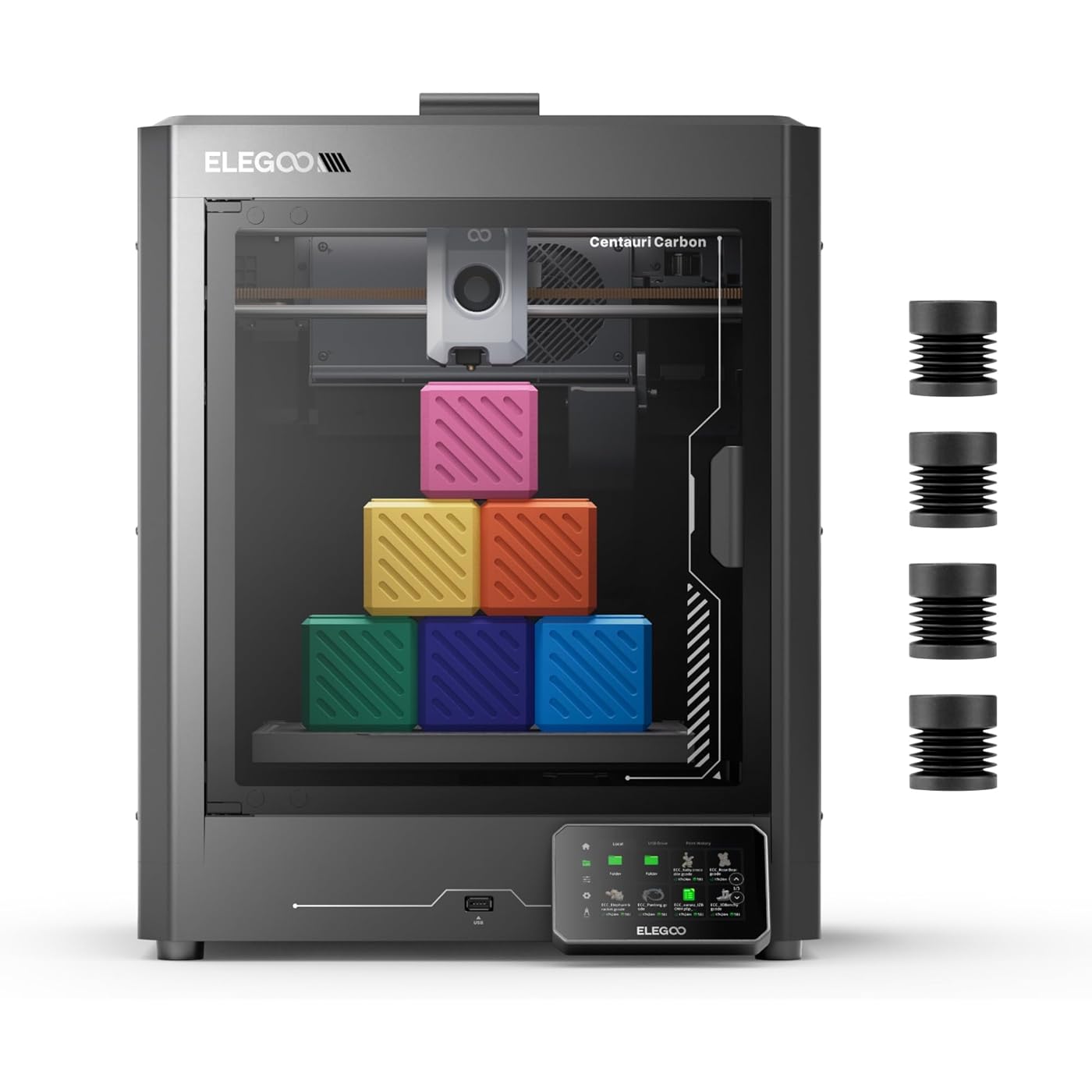
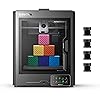
ELEGOO Centauri Carbon 3D Printer, CoreXY 500mm/s High Speed Printing with Auto Calibration, 320°C Nozzle and Built-in Camera, Ready to Print Out of the Box, 256x256x256mm Printing Size
  • Based on 864 reviews
Condition: Used - Like New
Checking for the best price...
$299.99 Why this price?
Save $160.00 was $459.99

Buy Now, Pay Later


As low as $50.00 / mo
  • – 6-month term
  • – No impact on credit to apply
  • – Instant approval decision
  • – Secure and straightforward checkout

Ready to go? Add this product to your cart and select a plan during checkout.

Payment plans are offered through our trusted finance partners Klarna, Affirm, Afterpay, Zip, Apple Pay, and Google Pay. No-credit-needed leasing options through Acima may also be available at checkout.

Learn more about financing & leasing here.

Selected Option

Free shipping on this product

This item is eligible for return within 30 days of receipt

To qualify for a full refund, items must be returned in their original, unused condition. If an item is returned in a used, damaged, or materially different state, you may be granted a partial refund.

To initiate a return, please visit our Returns Center.

View our full returns policy here.


Availability: In Stock.
Fulfilled by Amazon

Arrives Sunday, Sep 6
Order within 14 hours and 12 minutes
Available payment plans shown during checkout

Protection Plan Protect Your Purchase
Checking for protection plans...

Size: Centauri Carbon


Features

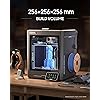
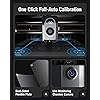
  • Print Right Out of the Box: ELEGOO Centauri Carbon arrives fully assembled and pre-calibrated, ready to go right away. With auto bed leveling, intuitive touchscreen controls, and 256x256x256 mm/10x10x10 build volume, its built for users of all skill levels. Whether you're a beginner or seasoned maker, enjoy smooth, frustration-free printing from the start
  • Built for High-Speed Printing: Unlock ultra-fast printing with its advanced CoreXY structure, achieving up to 500 mm/s print speeds and 20000 mm/s2 acceleration. Combined with a high-flow hotend and powerful heated bed, you can produce large, detailed parts rapidly and reliably
  • High-Performance Material Ready: Equipped with a 320C brass-hardened steel nozzle and enclosed chamber with enhanced cooling, Centauri Carbon is optimized for advanced filaments like carbon fiber reinforced filament and more. Create parts that are strong, lightweight, and heat-resistant, ideal for drones, automotive, and athletic applications
  • Rock-Solid Die-Cast Frame for Precision: Centauri Carbon 3D printer features a rigid, integrated die-cast aluminum frame that minimizes vibrations and maintains exceptional stability, even at high speeds. Combined with automatic vibration compensation and pressure advance, it ensures smooth first layers, and consistent, high-quality prints
  • Smart Monitoring & Flawless Printing: Monitor your prints in real time with the built-in chamber camera and dual LED lighting. Capture time-lapse videos and make remote adjustments with ease. The upgraded dual-sided plate features a new PLA Specific Surface with excellent adhesion and minimal warping, ensuring perfect PLA printing even at lower heatbed temperatures

Description

3D Printer Starter Kit Filament Storage Kit PLA Filament PLA Plus Filament Rapid PETG Filament Rapid TPU Filament ASA Filament ELEGOO develops the high quality, cutting-edge and user-friendly 3D printers, and provides the dedicated servce in the consumer 3D printing industry. At ELEGOO, we go beyond being a 3D printer company. We recognize the crucial role businesses play in fostering a sustainable ecosystem. We believe in the power of innovation and sustainability to shape a better world.

Brand: ELEGOO


Material: Aluminum


Color: Black


Product Dimensions: 15.67"D x 15.9"W x 19.29"H


Item Weight: 17.5 kg


Product Dimensions: 15.67 x 15.9 x 19.29 inches


Item Weight: 38.5 pounds


Item model number: Centauri Carbon


Date First Available: June 19, 2025


Manufacturer: ELEGOO


Frequently asked questions

If you place your order now, the estimated arrival date for this product is: Sunday, Sep 6

Yes, absolutely! You may return this product for a full refund within 30 days of receiving it.

To initiate a return, please visit our Returns Center.

View our full returns policy here.

  • Klarna Financing
  • Affirm Pay in 4
  • Affirm Financing
  • Afterpay Financing
  • Zip Pay in 4
  • Financing through Apple Pay
  • Financing through Google Pay
Leasing options through Acima may also be available during checkout.

Learn more about financing & leasing here.

Top Amazon Reviews


  • Good product, lengthy tech support process for USA, happy with product performance
Size: Centauri Carbon
My original feeling towards this product has changed over the last several months of interaction with their technical support. The printer was replaced by them after 2 months of diagnostic work, some of which was difficult for me to perform (I am an engineer, but my hands and eyes have deteriorated over the last several years). The first unit died after 6 days (of a LOT of printing) with the "cannot communicate with hot end..." messages. I live on the west coast of USA and their technical support does not respond until the next morning. Fortunately for me, I am normally awake from 1:00 PM to 4:00 AM so we were in the "same time-zone." I would receive responses within 18 hours of my email. They shipped me a newly designed USB-C cable and the carrier board that it plugs into on the extruder mechanism. It did not help. They then said I will need to replace the motherboard. This took 7 weeks of interactions and testing (I have approximately 30 emails from/to them) to get to that point. I do not think the engineering of the underside of the printer was well laid out. Belts interact several times with the cabling. Two of the wires are stretched too tightly and bundling the cable group into the printer was very difficult to duplicate After the 4th time of going through that process I just removed the sleeve and used several zip ties. While cutting one of their zip ties-I clipped one of the wires and had to splice in a short patch (one of the groups of wires that was stretched too tightly). I complained to them that I did not feel comfortable replacing the mother board and told them that my engineering background in diagnosing computer issues told me "this unit is going to have more problems in the near future, even if we did accomplish solving the current problem." They agreed to send me a replacement printer after they received the current unit. Hint: ALWAYS keep shipping boxes for 1 year after your purchase (write the date of disposal on the outside of the box and save it). They received the unit quickly (it was shipped to Las Vegas) and they sent out the replacement within 3 days. The printer was shipped form Sacramento (northern California). The replacement came with a new version of the USB-C cable and a newer version of the mother board. It was missing replacement nozzles that my original purchase had (and I unfortunately shipped back with the first printer). The setup worked perfectly. However, I must have used some bad filament and I had a serious jam in the print head (it started with a tangle on the reel). I did not have a 6mm socket to remove the old nozzle and I stripped the old one using a pair of pliers. I ordered replacement nozzles from Amazon and go the printer working within a couple of days. After the jam, When I tried to load filament it would not work. I disassembled the extruder gearing system and discovered a lot of residue filament that was preventing it from engaging. After i cleaned that out, and reported to tech support, I was able to load filament. They agreed to send me a replacement part which I received in 4 days. I have completed about 300-400 hours of printing (primarily Rapid PETG, but also some PLA+) without errors. In summary:: 1) They are using poorly produced products (USB-C cable). 2) They have insufficient pre-shipment testing 3) They need to have "parts" in local warehouses instead of having to overnight/rush-ship. 4) If they cannot have tech support in the US, maybe they could have a small staff in Europe to help with the time-delay. I actually do not understand why they use the USB-C cable connection to the fastest and continuously moving component in the printer. USB-C is designed for plugging into a PC (or phone) that is sitting in one place and not moving (Apple now uses USB-C but NOT for their headphones!). This type of connection used to be locked JST connectors that would hold a connection securely, changing to that design was a poor decision. I am VERT happy with the printer's performance. The adhesion to the heated printing plate is excellent (much better than my previous printer-a Creality and AnyCubic). For the price I do not see anything in this class. I did not choose to use the AMS system as I think this adds too much printing time and waste of filament. I wonder what they use for their professional high end printers and how much they had to compromise to produce this printer price class. I am happy with their tech support. Living on the west coast I am used to companies telling me "we are going to reboot our servers in NYC at midnight"-wait that's 9:00 PM for me, not convenient! Or, "can we call you tomorrow at 8:00 AM? No, that's 5:00 AM for me!" It is very likely I will buy more product from Elegoo in the future (I hate that every piece of software thinks I am mis-spelling Elegoo!). I have spent most of my work experience in the medical and DOD aerospace fields. Most people think "mil-spec" means that the part is of a higher quality. That is un-true. Military or medical specifications means: 1) you need to test 2% of the 200,000 M1.5x4mm screws you are sending us and you cannot have more than 5 failures in that "lot" of product before you ship it out; 2) you must document: who you purchased the entire quantity from and who did they purchase the primary composition of the material (steel, aluminum, plastic, etc.) from. 3) 95% of electronic device failure is related to a bad cable or connector (or design of such). 2% is a major component like a power supply or motor. 1% is a single component (transistor, diode) that has failed (buying the cheapest one you can source out). 1% is something the user did to trigger the failure (but might not be "their fault", they just did something unexpected). Remember the commercial jet that had an engine fall off because the bolts holding it to the wing had not been tested to the "break force" as specified? I was at a distributor when that triggered FBI to randomly audit other purchases of similar fasteners-yes they drive up in black cars, wear black suits and sun-glasses. Even "O-rings" have a life-span and cannot be sold after their cure date. I hope this lengthy review helps people make a decision if they want to purchase from Elegoo. I do recommend their products. ... show more
Reviewed in the United States on June 1, 2026 by TomMynar

  • Best Printer for the Price
Size: Centauri Carbon
I've been using it for about half a year and I love it. However I will admit there are limitations to this printer, likely due to being budget. Pros: Extremely cheap (compared to competitors) Good print quality Decent speed Enclosed printer Prints multiple filaments (though I would only recommend pla because others can release volatile compounds if not vented properly) Multicolor is an option IF you buy the multicolor adaptor from elegoo separately. I have not used it though and it prevents the top lid from being used on the printer, still fine for pla. Easy setup Good plate adhesion (usually, sometimes included glue should be used) 256x256x256mm build volume (note that the full build volume can only be achieved by uninstalling the filament cutter. I was confused what the exclusion area was until I found out it was due to the cutter taking up build space in the corner of the plate) Intuitive slicing software, good for 3d printing beginners Cons: Built in light is functional but not great for time-lapses Built in time lapse is functional, but low quality. Would recommend using a different camera and doing your own time lapses if you intend to. Wifi connection works, but is inconsistent. Sometimes it will work great and connect to my computer instantly, however it has been showing up as offline even when on as of late. Remember you can always use the included USB drive for your prints instead of wifi. Printer vibrates a lot and fans are pretty loud, meaning it should probably be in a separate room if the noise is bothering to you or if you plan to do prints overnight. From personal experience, 2 doors is enough audio shielding to completely eliminate noise. 1 door mutes the majority of it. I have my printer on a rubber paver from the hardware store and it mutes the noise from the printer vibrating mostly. Certain filament brands (especially the lower quality ones that snap easily) require build plate glue to have the first layer print correctly. I mostly use elegoo filament and it sticks pretty much every time without glue, but something to keep in mind if buying other brands. The lid on the printer can get in the way of the filament tube so printing a riser is required if you need to have the top on while printing. Luckily, there are easy to print online models both for a riser and for a glass top holder if you don't need a top (like me, just printing pla) Remember to take into account your personal needs before buying, as most people will get more than enough value from this printer as any other. If you are looking for a bambu alternative which is enclosed, cheap (it was just as expensive as the bambu alternative while still being enclosed, at least at the time I bought it), and easy to use, this is the printer for you. The only real deal breaker which you might think of is if you need a huge build volume, though this size is already good enough for most prints, plus, many projects can be printed in multiple pieces then assembled. ... show more
Reviewed in the United States on July 17, 2026 by Gavin Hulse

  • I Bought a Printer, Not a Repair Project
Size: Centauri Carbon
I Bought a Printer, Not a Repair Project I strongly regret buying this ELEGOO printer. The printer developed a serious hotend/nozzle problem and became unusable. I contacted ELEGOO support and followed their instructions. They sent me a replacement hotend, I installed it, recalibrated the printer, performed automatic bed leveling, and continued testing. The replacement hotend failed again after only a few prints. Since then, I have spent months sending photos, providing files, checking settings, replacing parts, recalibrating, testing, and repeatedly explaining the same problem to customer service. After all of this, I am still waiting for a permanent solution. One of the most frustrating parts is that I tested a G-code file that came from the original USB drive supplied with the printer. ELEGOO later told me that the file was configured for PLA while I was using PETG, and they blamed the failure on the parameter mismatch. However, they also acknowledged that this file came from their original USB drive and said they would review the file labeling to avoid similar confusion in the future. So after months of troubleshooting and repeated failures, the customer is still expected to take responsibility and continue troubleshooting. I bought a printer. I did not buy a repair project. My question is very simple: How long should a customer have to wait before being able to normally use a machine they already paid for? If I need to pay for a repair or part, tell me clearly what I need to pay for. If the printer needs repair, repair it. If it needs replacement, replace it. If it cannot be restored to normal working condition within a reasonable time, refund the customer. Instead, I have experienced months of delays, troubleshooting, repeated emails, and no clear permanent resolution. This has been one of the worst after-sales service experiences I have had with a product at this price. Before buying this printer, I strongly recommend that potential buyers consider not only the specifications, but also what may happen if something goes wrong. A printer is only useful if you can actually use it. Based on my experience, I cannot recommend this product. If ELEGOO eventually provides a fair and permanent solution, I will update this review. ... show more
Reviewed in the United States on August 10, 2026 by Tom

  • Fantastic 3D printer at a great price
Size: Centauri Carbon
I'm rather impressed with this 3D printer! I wasn't sure what to expect from a machine that cost $300 but I was astounded for a number of reasons. Unboxing and setup was super easy! Simple enough instructions (although why they have to print so frickin' small is beyond me - not great for my declining eyesight! lol) and the machine's self-setup is very easy. It runs through its little sequence and balances everything ready for printing. Make sure you have a good stable surface because there will be a fair degree of machine shaking if you don't and this *could* affect print quality. Elegoo's slicer software is incredibly intuitive - you can connect the machine to your LAN via WiFi and this allows you to run the machine and send files without the need for a USB cable, which I appreciated as this makes machine placement relative to PC unrestrained. I have been using Fusion for building my models (available with a free personal license as long as you're not doing it as a business) and then I can import the file into Elegoo's software, called "ElegooSlicer", make whatever settings I want in terms of wall thickness, infill %, infill pattern etc, and then export the GCode (which is what the machine uses to know how to print the item) and then just send the job to the printer, all wirelessly. I used AI a tiny bit to learn how to do certain things, but mostly the software was easy to work out (I have never done any 3D printing before but I do have a laser engraver so there is some tacit knowledge there). I don't have any experience to compare with, but I've been super happy with the print quality. If I wanted extremely smooth sides for very precise moulding or something then a sanding a priming would be necessary, but apparently this is always the case with filament printers (as opposed to resin). All in all, I think this is a fantastic product and I'm very happy with my purchase. I'm using it to print moulds for vacuum forming plastic for my various hobbies and it's working out great so far! ... show more
Reviewed in the United States on March 2, 2026 by Simon Garstin

  • Great Printer and for the price it's a fantastic value
Size: Centauri Carbon
I was looking to replace my Monoprice Maker Select 3 which was a great learning experience with something faster and had an enclosure so I could print ABS without it warping off the plate. I looked at the QIDI and Bamboo and Crealty printers. All of them look good. I liked the QIDI and the Crealty printers for their larger size but I had just purchased some other toys for myself and I was looking to save a buck. Even the 799 price for the low end of the other printers was too much and I didn't want to wait, so I compromised for the smaller print size of this Elegoo for less than half the price of the others and was still quite a bit larger than my old printer. The package arrived in 2 days and I remarked to my wife that it was one of the better packaged deliveries I have ever ordered from Amazon. When I saw the package on my doorstep it was upside down, so I think it was a good thing it was packaged so well because the box had the appearance of going through some hardship on the way to my doorstep. Being pretty careful, I unboxed it in about 10 minutes and the printer was undamaged. Overall, the unboxing was one of the more pleasant experiences I have had. In about 30 - 45 minutes, I started the included benchy print. It printed in 18 minutes and some change. It was better than my best effort on the old printer right out of the box. I got it with the vibration feet, and it makes me laugh because this thing shakes like crazy when it's really printing. I would assume whatever was being printed would be out of shape due to the machine quivering while it's printing, but it turns out some good results. I'm not sure at this point if the vibration feet really make any difference or not. The included filament was enough to print the benchy with a little left over. On my next print, I used that to test the ability to run out of filament and load new filament and continue printing. I wasn't sure how to do it, but it was intuitive enough that I did not even look at the directions. The printer stopped when it ran out and I loaded new filament and told the printer to continue and off it went. I could see a little whisker of filament where the stop was but it's tiny. The one issue I have had so far was when I fired up the Elegoo slicer software. The interface looks decent, and it looks like it has quite a few more features than my Monoprice CURA slicer I have been using but when I tried to slice the included Eiffel Tower stl it crashed twice on my old windows 10 laptop. (old I3 with 16 GB RAM) I tried another simpler stl file I created myself and it sliced that just fine. I'm guessing my old laptop just doesn't have the oomph to slice something that complicated. So far, I could not be happier with my purchase. It is certainly possible to be printing in 30 minutes from starting to open the box. (There is a self test that may put you over that because it takes a while to auto level the bed and test all the fans and heaters) It's probably as close to open the box and print as you can get and make sure the machine is calibrated. I have only tried the included filament and an old spool of Elegoo PLA+ I had on hand and that seems to work really well. But I hope to try some fully enclosed ABS printing soon. 5 Stars because so far, it's just worked. If the software continues to be a problem for my laptop that could knock it down a star. But other than that, 2 hours in, it's as advertised, and I paid about 50 bucks more for this printer than I did my monoprice. I would definitely buy it again. This printer is pretty heavy so if you aren't a brute, you may want someone to help you pull it out of the box. You don't want to break those nice panels before you even get it out of the box! ... show more
Reviewed in the United States on September 11, 2025 by stephanie

  • Prints themselves are not bad but the filament swap is terrible
Size: Centauri Carbon
This printer is not bad for beginners. It is an affordable printer and actually has a camera unit on it so you can see your prints. The initial setup is not too bad. I would be careful when taking it out of the box. A lot of it is made of glass and you do not want to drop the glass. The top actually comes off if you want to view the print from the top. It is also very heavy. There are screws holding the bed down. Also be careful when installing the screen. The ribbon cable is hard to install and fragile. The screen is touchbased to make it easier. Upon initial setup, it does all of the first parts which is leveling the bed and checking the filament. It also does bed leveling when you first start the print. It does come with a small roll of white filament. It is enough to print the sample boat. There are other sample files placed on the printer. I would recommend printing the container attachment for the back where the spool gets pooped out. It actually is a good container. You do need to loosen the bolts on the back a little bit but then you just pop the container on. There was a software update for the printer. It does take 30 minutes or so to do all the setup. The printer filament installation is not too bad. I would be careful with the front of the feeder. There is a sensor there and can easily be knocked off if not careful. It does turn a blue light on when you feed the filament through. There is a mode to click for swapping filament. Honestly that is where my problem lies with this unit. It does not purge the nozzle during the filament swap process. It is a straight forward process where you initiate the setup and follow the direction. I tried increasing the temperature and it still does not extruded the old filament out. It basically cuts it and I install the new one but it does nothing to push out the old one. The only thing i could do was install the new filament and have it print something small to get rid of whatever was left. The nozzle does go to the purge slide but nothing comes out. It is rather annoying as everything it says possible jam and I though this was a unit defect but another unit had the same problem. Only way I found around it is to print something small. That just feels like a lot of time wasted when it should just extruded it out during the filament swap. I have to do it every time I swap colors. I did not see any setting that allows me to print a block to remove color. The device does a good job with reading the plates. So if you flip it, it will auto level again. The printer has no software to prevent bad print from happening so you have to be adamant about watching it or have 3rd party software to prevent blob of death. It does come with all the tools you may need to do light maintenance. There is a light inside to help you see your prints at night. The camera is just 360p but that is all I need to see the print. The software is okay. One thing i found difficult was deleting printers. I could not do it when I changed wifi so that is a tad annoying. It always resets to previous save setting so be aware of that. The wifi connection is not bad and it saves the print on the printer to make it easier for you to reprint. You do need to do all the prep on the software before sending it to the printer as it will not put in the supports for you and such. The printer does vibrate and is very loud so put it somewhere that you cannot really hear it. It is easy to remove the plate. It is durable and flexible to help remove the 3d print. Overall i think for the price the printer works great. If its a single color as well then it will also work really well. I was able to print a bunch of small figures and it works great. The software is not perfect though. The 3d printer prints well but the extruder filament swap is terrible. I tried different ways that would not require me to print a small piece but it does not work. It could have a setting that does it all for you during the process. It does go to the back area where I assume it is trying to push out the old filament but nothing comes out. It keeps saying jammed too even when I hear the nozzle higher and do it again. I am stuck just printing something to get the previous color out. The camera and lights are nice to see the print but it does not have any warning software to stop bad prints. I did also see they were going to release a multifilament attachment but honestly I am not too hopeful how well that i will work considering it does not even purge well through simple swaps. Regardless it is a good single color 3d printer for a beginner. ... show more
Reviewed in the United States on June 25, 2026 by RedAkuma82

  • Best 3D Printer Bang for Your Buck
Size: Centauri Carbon
If you’re looking for a fast, reliable, and truly beginner-friendly CoreXY printer that also performs at high speed, this one delivers. ⚠️ Always keep hands clear of moving parts and the hotend while the printer is powered on or heating. ⚠️ Use the printer in a well-ventilated area, especially when printing ABS due to fumes. ⚠️ Never leave children unsupervised around the printer when it is actively printing. I’ve been running the ELEGOO Centauri Carbon 3D Printer, CoreXY 500mm/s High Speed Printing with Auto Calibration, 320°C Nozzle and Built-in Camera, Ready to Print Out of The Box, 256x256x256mm Printing Size nonstop for 8–10 hours a day, and I can confidently say this machine is incredibly easy to use and extremely reliable. The auto leveling system is one of the best features. It’s truly “set it and forget it.” The calibration process is automatic and consistent, which removes a lot of the frustration that usually comes with first-layer tuning. For someone who wants performance without constantly tweaking settings, this is perfect. I’ve been using ELEGOO’s preset slicer settings for ABS, and they are spot on. No guesswork, no endless temperature tuning — just load the filament, select the preset, and print. The filament quality from ELEGOO has been honest and consistent. I haven’t had clogging, under-extrusion, or random layer shifts. Every issue I encountered was 100% user error — and once I corrected it, the printer performed flawlessly. What really stands out is how simple it is to get started. There is **no assembly required on any of the gantries (X, Y, or Z). That’s huge. Out of the box, you: * Remove the three silver metallic shipping screws on the bottom * Install the screen in the front * Power it on That’s it. It’s ready to print. The instruction quality is actually very good — clear, organized, and beginner friendly. On top of that, there are plenty of helpful setup and review videos on YouTube, so even first-time users won’t feel lost. One of the coolest features is the **built-in camera**. Not only can you monitor your prints remotely, but you can also record them. It’s awesome for time-lapses and checking progress without hovering over the machine. For someone printing 8–10 hours a day like I do, that feature is extremely useful. I personally use it, and my kids use it too. It’s genuinely fun to operate. The CoreXY system handles high-speed printing smoothly (up to 500mm/s) without sacrificing quality. After weeks of heavy daily use, I’ve had zero mechanical issues. It just works. Abbreviated Setup Instructions (Quick Start) 1. Remove printer from packaging. 2. Remove the three silver metallic shipping screws from the bottom. 3. Install the touchscreen on the front mount and connect cable (if not pre-attached). 4. Verify all internal foam and protective materials are removed. 5. Load filament into the extruder. 6. Power on the printer. 7. Run Auto Calibration / Auto Level from the menu. 8. Select ELEGOO slicer profile (e.g., ABS preset). 9. Start your first print. Ready to go in minutes. ... show more
Reviewed in the United States on February 14, 2026 by Lambs Tech Forge

  • Awesome for a complete beginner like me
Size: Centauri Carbon
I ordered this as a complete novice and the past few days have been incredible. Upon the printer’s arrival I immediately downloaded a free personal use copy of Fusion and set out designing a few little fun parts and tools. As I learn more about the printer’s intricacies I may update the review but here are my initial impressions: I ordered this one specifically for the expanded filament options and started printing PLA-CF right away. This printer runs it wonderfully but plate selection is important. It was extremely easy to set up but printing from a computer is not totally straightforward. My process is to export my F3D file to STL and open that in the slicer. Set all your parameters and slice, and then you can export that as a gcode file that you can then import into the printer using the web interface which is found by typing the printer’s IP address into your browser, assuming everything is connected over WiFi. I can’t believe I’m saying this but an app would be cool. But I got a great deal on this printer and it’s been working flawlessly aside from adhesion issues with one file. That adhesion issue was fixed by switching to the CF specific build plate. I still have a lot to learn but I’m having a ton of fun so far. This is obviously an incredibly capable machine that will serve me well for many years even in today’s rapidly evolving tech landscape. I don’t generally get into new tech until it’s mature and my time has come for 3d printing and CAM. I should have started way sooner but I’m having a blast. Update 3/12. Made my first semi serious mistake trying to print gf nylon through the stock nozzle. Big mistake. The nozzle got irreparably clogged and I determined the quickest fix was to replace the entire extruder. Amazon sells aftermarket ones for very cheap with overnight shipping and they work great. Replacing it is nerve wracking. The two connectors for the heating element and thermostat are tiny. The heating element plug has dual clips that must be lifted up at the same time. The thermostat fits really tight, and you need surgeon hands to get it out without bricking the printer. Thankfully I’m not a surgeon, but I am a master carpenter. Good enough. The aftermarket extruder works every bit as good as the OEM, but the replacement procedure is sketchy. I’d take a star off if I wasn’t so happy with everything else. I’m waiting for some bigger nozzles to come in before trying the pa6 gf again, and now I have a spare OEM hothead for a dedicated larger nozzle setup. ... show more
Reviewed in the United States on March 7, 2026 by Eric

Can't find a product?

Find it on Amazon first, then paste the link below.
Checking for best price...