

Search  for anything...

ECOVACS Goat A3000 LiDAR PRO Robotic Lawn Mower, Dual LiDAR Navigation

  • Based on 123 reviews
Condition: New
Checking for the best price...
$2,499.98 Why this price?

Buy Now, Pay Later


As low as / mo
  • – Up to 36-month term if approved
  • – No impact on credit to apply
  • – Instant approval decision
  • – Secure and straightforward checkout

Ready to go? Add this product to your cart and select a plan during checkout.

Payment plans are offered through our trusted finance partners Klarna, Affirm, Afterpay, Zip, Apple Pay, and Google Pay. No-credit-needed leasing options through Acima may also be available at checkout.

Learn more about financing & leasing here.

Selected Option

Free shipping on this product

30-day refund / replacement

To qualify for a full refund, items must be returned in their original, unused condition. If an item is returned in a used, damaged, or materially different state, you may be granted a partial refund.

To initiate a return, please visit our Returns Center.

View our full returns policy here.


Availability: In Stock.
Fulfilled by Amazon

Arrives Sunday, Oct 25
Order within 3 hours and 37 minutes
Available payment plans shown during checkout

Protection Plan Protect Your Purchase
Checking for protection plans...

Color: A3000 LiDAR PRO:up tp 3/4 acre


Features

  • Wire-Free Robotic Lawn Mower with Dual-LiDAR Navigation - GOAT A3000 LiDAR PRO is a wire-free robotic lawn mower that requires no perimeter wire or RTK antenna. The HoloScope 360 Dual-LiDAR system automatically maps your yard and maintains precise 2 cm positioning accuracy even under trees, along fences, or in shaded areas where GPS-based mowers lose signal.
  • Edge-to-Edge Cutting with Built-In TruEdge Trimmer - This robotic lawn mower features an integrated edge trimmer for clean borders along sidewalks, driveways, fences, and flower beds. Designed to reduce manual string trimming after mowing and deliver a consistent, finished lawn appearance.
  • 32V High-Power System for Thick American Grass - Built to handle Bermuda, Zoysia, Fescue, and St. Augustine grass. The 32V high-performance platform and dual-blade disc system provide strong cutting torque and fast blade rotation, helping the mower cut through dense, fast-growing grass and uneven terrain.
  • 7500 mAh Large-Capacity Battery with 189W Fast Charging - Engineered for medium to large yards, GOAT A3000 is equipped with a 7500 mAh high-capacity battery and 189W fast charging system. It fully recharges in approximately 70 minutes, allowing extended runtime and reduced downtime for efficient, scheduled lawn maintenance.
  • Smart App-Controlled Lawn Care with Custom Zones - Manage your robotic lawn mower through the ECOVACS app. Edit maps, create multiple mowing zones, set no-go areas, adjust cutting height and speed, and define travel paths between zones. Ideal for complex yard layouts and personalized lawn care schedules.

Brand: ECOVACS


Power Source: Battery Powered


Material: Plastic


Color: A3000 LiDAR PRO up tp 3/4 acre


Style: GOAT A3000 LiDAR PRO


Item Weight: 64.5 pounds


Cutting Width: 12.99 inches


Operation Mode: Automatic


Product Dimensions: 30.24"D x 17.01"W x 22.83"H


Number of Items: 1


Brand Name: ECOVACS


Model Number: GOAT A3000 LiDAR PRO


Number of Items: 1


UPC: 850077202346


Unit Count: 1 Count


Manufacturer: ECOVACS


Item Type Name: GOAT A3000 LiDAR PRO


Manufacturer Part Number: GOAT A3000 LiDAR PRO


Color: A3000 LiDAR PRO up tp 3/4 acre


Style Name: GOAT A3000 LiDAR PRO


Item Weight: 64.5 pounds


Cutting width: 12.99 inches


Item Dimensions D x W x H: 30.24"D x 17.01"W x 22.83"H


Power Source: Battery Powered


Operation Mode: Automatic


Maximum Adjustable Cutting Height: 3.6 inches


Battery Average Life: 70 minutes


Minimum Adjustable Cutting Height: 1.2 inches


Number of Positions: 5


Material Type: Plastic


Item Highlight: For Lawns Up to 3/4 Acre, Fast Charging, High-Efficiency Mowing up to 400 m²/h, Built-in TruEdge Edge Trimmer, App Control


Frequently asked questions

If you place your order now, the estimated arrival date for this product is: Sunday, Oct 25

Yes, absolutely! You may return this product for a full refund within 30 days of receiving it.

To initiate a return, please visit our Returns Center.

View our full returns policy here.

  • Klarna Financing
  • Affirm Pay in 4
  • Affirm Financing
  • Afterpay Financing
  • Zip Pay in 4
  • Financing through Apple Pay
  • Financing through Google Pay
Leasing options through Acima may also be available during checkout.

Learn more about financing & leasing here.

Top Amazon Reviews


  • Awesome upgrade from 1st Gen Robotic Mowers!
I'm going to review this from the perspective of coming from a 1st generation Mammotion Luba 1 1000 (4.5 Ah, AWD, RTK only, no LiDAR). When I first got the Luba 1, it took great effort getting the RTK antenna placed where both my front and back lawns could be mowed by it without interference. One of the biggest issues I ran into was multiple recharges and zone coverage (it listed 1/4 Acre or 10890 sqft) - the Luba 1 was locked to a maximum of 3 zones. I also keep the mowers in my garage to combat theft and having to build a water proof housing for power. I would manually have to drive the mower out of the garage, let it sit in a mapped zone, then let it go do its thing - as you can see in some of the screenshots, the equivalent in the Mammotion app would be Area1 + 2, Area 6, and the others. The back yard would leave the battery at 40%, and the front yard (Areas 3+4+5) would require two full charges. Having it be old, I decided to avoid another machine with an RTK antenna (although it is extremely nice) and go for a Lidar based system. Enter the GOAT A3000 - Setup was extremely easy following the quick start guide. As you can see from some of the pictures, I have "needs" work sidewalks where there is a drop and concrete slabs that are elevated due to tree roots. I'm also missing some grass due to dog urine (but i digress). When doing the "Auto Mapping" the robot would go away from areas that didn't have full grass, and on on some of the unlevel surfaces, I had to manually redo the maps, but it was about the same setup as I had to do with the Luba 1. Mowing- My Luba 1 had the same issue where I think it mowed lines at true north (you can see what I mean with the screen shot that shows 2688 sq ft and it mowing Area 4) - this was super annoying, which leads to the next issue - you can correct it in the App - but it took several attempts. There's an option to rotate the map, but that wasn't it. You need to go to "Area Mowing Mode" and there you manually have to edit each area. All the other options allow for numeric or slider entries, but the angle is goofy and it doesn't tell you what you selected until after you click okay - the degree is also variable - I had to manually set it to 0, then tune each of the 6 areas to 97 degrees, which was a PITA, but once done its set. Similar to the Luba 1 - lawn edges were wishful thinking. I need to take a weed wacker to it once a week. I was hoping the weed wacker attachment would take care of this, but I haven't seen it run in Auto mode - I may have to manually run an edging session? TBD. Also - if you look at one of the pictures, there's a bush, however the object detection avoids it - I need to figure out how to let it ignore some objects and mow. Connectivity - My Luba 1 was awful - if using bluetooth, I practically needed to be right next to the mower when manually controlling via Bluetooth, and it constantly dropped WiFi. The connectivity of this robot is stellar! You can view whats going on with a camera, and be at a reasonable distance when controlling it - this is like dialup versus fiber optic - hats off to Ecovacs! Mobility - As you can see in the pictures, on the last mow I did, the robot was perpendicular to the side walk - how this happened, no idea, but it sent out a SOS message and I went out to help it. Several times when mapping, the mower would bottom out (again, crappy sidewalks that need maintenance) - this is where I wish it had bigger front wheels and AWD - in 2 years of mowing, my Luba 1 got stuck once. Overall, this is a solid value for the features that you get. I was skeptical from some of the reviews, but I've had great connectivity, never had an issue connecting or using the app (I'm on Android). Hopefully Ecovacs reads this and fixes the area rotation and I figure out the edging/bushes. The one improvment I won't see, and hopefully Ecovacs does in their next revision is bigger front wheels & AWD. But I 100% recommend this. Sorry for the long review ... show more
Reviewed in the United States on June 18, 2026 by Pauly

  • Pass on this mower. Ecovacs doesnt know what theyre doing yet
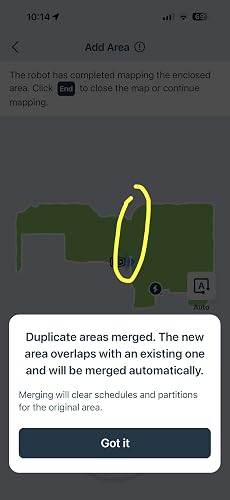
I mow my elderly neighbor’s yard along with mine. There is a fence dividing our properties. After i mapped my backyard i went through the gate to map his. Once finished mapping the app repeatedly says the two areas overlap (they dont) and that it will merge the two areas together into one large area, as if the huge fence is not there. There is no way to not accept this. It forces you to merge them. I tried multiple times and even mapped my neighbors yard 2 feet away from the fence line. It still merges them! The app gives you the ability to place a dividing line wherever you want. So I put a divide where the fence is in order to split the areas. I then needed to add a pathway from my yard, through the fence gate, and into the neighbor’s yard. But the APP will NOT let you add a pathway and will tell you that adding a pathway requires two or more areas. There ARE two or more areas! The app doesnt care and you cant do it. Since there is no path for the mower to follow it doesnt know how to get to the neighboring yard and will go up and down the fence line looking for a way to enter until it gives up and stalls, sending you an alert that it cannot make it back. So every time i want to mow their yard i have to manually drive the mower through the gate and into the middle of their mapped yard and tell it to mow. But after its finished or needs to charge it cant get back to my yard so i have to manually drive it back. EVERY SINGLE TIME! This gets annoying fast. And the trimmer is a total gimmick. It doesnt get close enough to the edge to actually do anything. It’s a joke. If you want to just remove the trimmer and the huge black hump from the unit so u can just use it as a regular robot mower YOU CANT. The mower will NOT run if the trimmer is removed. Fantastic. When Manually Controlling the mower using the single joystick in the app the result is a jerking and surging robot. Not at all smooth to drive. It only moves quickly when going straight. It turns and reverses SOOO SLOW. The app is clunky and obtuse. To make changes to how to mower functions or to issue a new command you have to click a bunch of unnecessary things to get there bc all the most needed controls are buried within the app. I’m coming from a Mammotion mower and while it wasnt perfect it was far easier to use and navigate. MUCH more polished. After your blood pressure raises and you’ve pulled all your hair out every single time you use the thing it actually mows pretty good. But it’s so frustrating and head scratching to use that I’m sending to back to Amazon for a refund. Its not worth it. Id rather it mow a little worse and not feel like i need to take an antidepressant each time I need the mow. My recommendation is PASS on this one until ECOVACS figures out what the heck they are doing. ... show more
Reviewed in the United States on July 1, 2026 by JL

  • The Robot Wizard That Saved My Weekends
Purchased: July 25, 2026 Property Size: ~0.5 Acres (13,507 sq. ft. of lawn) Setup Time: Under 24 hours to full autonomous wizardry. Let’s be honest: spending hours behind a push mower in the summer heat is nobody’s idea of a good time. Enter Gandalf the White, my Ecovacs GOAT A3000 LiDAR Pro. I had him out of the box, assembled (literally three screws), mapped, and executing his first flawless mowing mission by July 26. For anyone on the fence about whether robot mowers actually work in the real world, here is the honest, boots-on-the-ground truth after putting Gandalf through his paces: Setup & Navigation (No Antenna Eyesores): Mapping my 13,500+ square-foot lawn could not have been simpler. Because the A3000 uses a 360° Dual-LiDAR and AI vision system instead of perimeter wires or towering satellite antenna poles, mapping the property via the ECOVACS HOME app felt like playing a video game. Connecting it securely to my dedicated 2.4 GHz IoT Wi-Fi network went smoothly once I set up the credentials. The "Secret" to Robot Lawn Perfection: Remember, Gandalf is a precision maintenance wizard, not a brush-hogging tractor. Before his first run, I gave the lawn one final baseline cut with my traditional mower to get it to my ideal height. Since then, I have him scheduled to mow every other day, and he performs with bulletproof consistency. Carpet-Like Stripes & Healthier Turf: Because he cuts frequently and only trims millimeters off the grass tips at a time, the grass never goes into shock. It acts as a continuous micro-mulch, and over the past month, the lawn looks noticeably thicker, greener, and healthier. Plus, the laser-straight striping lines look so crisp that my neighbors constantly stop on the street to ask if it works as well as it looks. The answer is 100% yes. Smart Weather Logic: If rain rolls in mid-run, Gandalf’s built-in rain sensor immediately triggers a retreat to the docking station. He sends a push notification to my phone and politely waits a full three hours after the rain stops so the turf has enough time to dry before resuming his journey. Zero Boundary Drama: He has never once gotten stuck, wandered off the property, or tried to make a break for the neighborhood road. He hugs the borders right down to the pavement and stops on a dime for obstacles. Built-in Security: Between the custom PIN lock, tilt/lift sirens, and cloud pairing, stealing him would be completely pointless—he instantly turns into a 30-pound white paperweight for anyone without the master code. The Bottom Line: Gandalf has completely handed me back my weekends. If you have a half-acre yard and want a manicured golf-course look with zero sweat, this mower is worth every single penny. As Gandalf would say to weekend lawn chores: "You shall not pass!" ... show more
Reviewed in the United States on August 22, 2026 by E. Sloan

  • Time saver
One of the most impressive smart yard tools I’ve owned. Setup was much easier than I expected, especially since it doesn’t require complicated boundary wires like older robotic mowers. The LiDAR navigation maps the yard accurately and helps the mower move efficiently without constantly bumping into things or missing random patches of grass. The cut quality has been consistently great. It leaves the lawn looking clean and even, and the edge trimming feature does a much better job than I expected from a robotic mower. I also like being able to adjust the cutting height directly through the app and schedule mowing times without needing to think about it. The app itself is simple and responsive, which makes the overall experience feel very polished. Battery life has been solid for my yard size, and the fast charging helps it get back to work quickly when needed. It also handles thicker grass and slight slopes better than I thought it would. One of the biggest benefits is just how much time it saves. Instead of spending weekends mowing, I can basically let it maintain the lawn automatically while I focus on other things. if you want a premium robotic mower with smart navigation, strong performance, and genuinely convenient automation, this model delivers. It feels like one of those purchases that actually changes your routine in a noticeable way ... show more
Reviewed in the United States on May 13, 2026 by Nick

  • 2 Months after ownership of my GOAT...Billy
Ive had this mower in service now for about 2 months. I have a fairly flat and level lawn although it is bumpy, even when i pushed mowed my mower would bounce all over but thats my lawns fault. I have Kentucky blue grass here in the Midwest. Let me first say that the cut quality of the lawn is great! it goes in strait rows and even makes nice mow lines! i have mine set to cut on a diagonal pattern and have it set to alternate the pattern each week so the grass always looks nice! Initially when i got this mower i used a combination of manual and auto mapping and i do think that if you have a surface thats level with the grass like a sidewalk that seems to work best with manual mapping, as does next to a fence line so you can get a closer cut. I did end up having to delete my map and make a new one a couple of times after i figured out how things worked. I will say that when mapping it uses a BT connection to your phone which is great and the signal works from pretty far away which is also fantastic but it sure does make the phone battery drain fast, not a big deal but just so you are aware, dont map with a low phone battery, also when you are driving it straight it goes nice and fast but if you need to turn i wish that it would be a bit more responsive and faster but going straight is nice! I had one issue where it seemed to get to close to the curb next to a street drain and it flipped over into the street. This could have been a mapping issue on my part but it never did it before so im not sure. Ive only had it go into the street one other time near this drain. I asked ecovacs about it and they said they would cover the damage to the lidar under warranty, which the damage was very minimal, just some scratches on the lidar dome, it stil functioned but they recommended a replacement which that process went great. I would say ecovacs customer service is another reason to own this, or any of their vaccums of which i just ordered 4 from ecovacs, one for each level of my home for prime day! After getting my replacement i redid my map again now with an even better understanding of how everything works, i created a couple of low avoidance zone areas and now the mower gets closer to bushes than it did before. I will say the trimmer feature while it does work could use a bit of work to get closer, so dont get this mower based off the trimmer feature alone. It works but just not quite as well as id hoped but perhaps a firmware update could fix that. I also wish there would be a setting to have it trim right after it gets done mowing in addition to its separate trim schedule. I now have been running my replacement 2 weeks without any issue, it doesnt get stuck and it doesnt fall off any curbs. I now feel like i can trust it and just let it do its thing. I do wish that the software would remember that theres a fence in my backyard and not try and navigate the mower through it because it knows theres a object on the map, its logic doesnt seem to remember that when it comes to itself navigating, only when it gets close will it see it, but it doesnt seem to negatively affect anything except makes you think why go this way when you know you cant. Not a big deal just minor complaint here. I could possibly fix this with splitting the zone but since things are working well i havent messed with it. Being able to manually draw trimming lines wherever you want would be nice such as around my garden beds, shed and fence line. I think i have to create a no go zone first to do this but i havent tried that yet, I feel like one shouldnt have to create a no go zone for a building as you cant drive through the building anyway hence the want for a custom ability to create a trim path but it really just comes down to an understanding of the software and how things work. to me a no go zone is an area that the mower COULD go but you dont want it to. If you address your yard such as any holes, fill them with dirt or create a no go zone around them if large enough and you trim any large bushes so the thing can go under and go around it well you shouldnt have any issues and i can very much recommend this mower. I do love the dual offset blades so theres no missed strips or mow hawks! You wont find this in many other mowers. Its lidar so no wires, no gps or rtk, it really is very easy and quick to setup and get going. No more sweating my butt off in 90F weather in high humidity mowing. this gives me my time back which is great! One more thing, dont expect this thing to mulch up leaves so ill be keeping my push mower and manually going over the leaves this fall to mulch them up, not what this is for, this is for every day maintenance and it works great at that! if next year they came out with a 4 wheel drive version, made the trimmer feature work a bit better/follow closer this thing would be easily king of the robot mowers! You could even say GOAT Greatest of All Time Mowers, Its even won best mower by the hookup and other YouTubers ... show more
Reviewed in the United States on June 25, 2026 by Mitch

  • Not ready for primetime
It's a cool idea whose time has come. It is not, however, a product which is ready for real life. I am sure it works fine in a lab but it failed me, badly, both on my slopes and in the flat sections of my yard. First, the good: It navigates well. It is a huge imrpovment over the GPS and wire types. LIDAR works well and the app is more responsive with info than it is with the evocavs robovacs, which often stack notices from hours ago. That said, it's not a great machine. It is let down primarily by the decision to make it RWD vs. AWD. The free-rotating casters at the front make hillsides impossible. Attached is a picture confirming my steepest grade falls within the confines of the stated max incline the machine can handle. What I found in reality is that any bump, at all, sends the nose wildly off course and leads to over-corrections that cause the machine to spin out and sometimes roll over on a steeper (but still within the MANUFACTURER'S stated tolerance) slope. If this was the robot's only failing, maybe I could forgive it. I am, after all, coming within the 90%+ range of what it's supposed to handle on a hill. But, on flat sections, I found the bot consistently missed huge strips, leading my lawn to look like a teenager learning to shave his face--patchy and not clean. I can understand the hill issue with RWD. That's poor design to mate the ability to do that incline with no control over the nose of the bot. Bad move by ecovacs. The flat yard performance, however, is really quite pathetic to see strips of ignored, uncut grass on flat parts. Not good value at the price point. Kind of ridiculous, actually. Returned and waiting for the Roborock AWD model. ... show more
Reviewed in the United States on April 29, 2026 by C. Shuler

  • Ecovac Goat A3000 Highly Recommend
Overall I would probably give this mower 4.5 out of 5. I have an extremely flat, centipede lawn that is about a 1/3 of an acre and this mower does an excellent job mowing it. The trimming feature still needs a lot of work but I feel this will improve over time. Setup of the mower is driving the mower with your phone around the entire yard, this took me roughly an hour to do. The App and interface need some improvements but I have also seen this improve already with updates so I think it will continue to get better. What pushed me from 4 stars to 4.5 was the excellent customer service I have received from Ecovac. I felt like the first unit I received had battery degradation and they made replacing it as easy as possible. One caveat I did have to deal with was getting tangled line from the sod in my yard (see picture) but I think this would happen with any mower so I am just stating to expect to deal with that the first few mows. Overall I am very please with this purchase. It has taken 3 hours worth of work and turned it into about ten minutes and the overall quality of the cut is better than what I would get from my previous push mower. Highly recommend. ... show more
Reviewed in the United States on July 31, 2026 by PhD Kinesiology

  • Great idea, but needs some work… NOT for large yards!!!
First off, I’d like to start by saying that I am somewhat of an Ecovacs fanboy… It all started back when I upgraded to the DEEBOT N8 Pro+! That was such an improvement over the vacuum that I had at the time, the Coredy R750, which was already a significant upgrade from my Roomba 618. Then, I did a bit of an early upgrade to the DEEBOT N20 Plus to get the bagless auto-empty bin. I will say, the mop was a big improvement, however with the switch from dToF (direct Time-of-Flight) LiDAR system on the N8 to the LDS (laser distance sensor) LiDAR system on the N20 was a bit of a sidegrade, if not a bit of a downgrade, however in practical terms it turned out to be roughly equal, so I wasn’t unhappy with it. Then, I started watching the evolution of the auto-clean mopping systems, but I was never very impressed with spinning disc setups. But as soon as I saw the DEEBOT X11 OmniCycle with its roller mop AND a bagless auto-empty bin, I jumped on it! And, boy, am I glad that I did! I really love that thing! I also hate mowing the lawn, so I’ve also been watching the evolution of robot lawnmowers as well. I really didn’t want to do a perimeter wire and I also didn’t think that RTK [Real-Time Kinematic (GPS/GNSS)] would be a great option for me either given my reasonable amount of tree coverage. So, when I learned about the GOAT A3000 LiDAR Pro that uses LiDAR AND has a string trimmer attached as well, I figured I’d give it a shot given my history with Ecovacs! So, here are a few of my observations and wishlist items after getting it set up in my yard. Once I got it set up in the app, the first thing that I noticed was that it doesn’t show the battery percentage or have quick options like the vacuums do on the home page! Also, there is there no spot mow option like the vacuums, in case you have a specific subsection of an area that you want to attend to without having to mow the whole area. For example, if there’s one area of grass that is inside of another area that grows faster than the rest of the grass, or if something happened, like the robot got stuck and completely drained the battery and couldn’t resume where it left off, and you just want to finish that section without having to do the whole area again! (I brought this to Ecovacs attention and they said that they will pass this idea on to the development team) I started out trying to set my front yard and back yard as two separate areas, however as they are directly connected, I kept getting an error when I was trying to set a new starting point that was inside or directly next to an area that was already set. So, in the set up guide, it may be helpful to mention that if there is no hard separation between two areas, you should map the whole area and the devise it into the different subsections in the app. But, that being the case, I remapped my yard to try and include the entire area, thinking I would would subdivide the areas in the map. I got more than 3/4 of the way done, and was met with an error message that said “Mapping failed - To ensure successful mapping, the area must be smaller than 150m(492.13ft) in both length and width.” as shown in my pictures. So, I figured that it was because I was trying to map my ENTIRE property as one area, and that would be bigger than the 150m limit. So, I then remapped my front yard and back yard together, and that worked perfectly. I then added a new area of a small yard by my driveway, and that worked perfectly. So, I then tried to add the long, narrow area along my driveway again, this time as a separate area, but I got that exact same message in the exact same area of the yard, and It was just 61.625 ft (18.783 meters) short of being able to map my entire yard! Then I thought, that is a fairly long, narrow area, so let me split it into two smaller areas and merge them afterwards. So, I remapped the area going about 10-15 feet before where I had gotten that pop-up the last two times, and that also worked just fine. Then, I thought I’ll put the starting point at the furthest away point so I won’t have the issue like I did when initially trying to create areas for my front and back yards right next to each other, and, as I’m guiding it towards the furthest point to hit the START button, I get that same pop-up at exactly the same area as the previous two attempts! So, I’m not exactly sure how it is measuring this, or if it had any relation to the charging station, but I gave up on trying after 3 failed attempts! The issue that I have with this is that it is marketed to accommodate up to 0.75 acre of lawn, yet everything that I mapped, per the app, was only 20,574 sq ft, which is only 0.427 acre, so it SHOULD be easily able to accommodate that extra little strip of grass, but it can’t! Then, when trimming it doesn’t get near close enough to the boundary line to actually trim (as seen in the video)! It did do a pretty decent job on the front yard. You can see where it had mowed with the stripes and the strip in the middle that it left in between my two septic lateral disasters that it got later on. However, I still wanted to see what it would do with the back yard, and knowing that the robot vacuums with LiDAR do just fine in the dark, I set it up to mow overnight as I was sleeping… Well, unfortunately I woke up in the middle of the night to a “The robot is trapped. Please set it free.” message. Obviously, I didn’t want to go out in the middle of the night to rescue it, so I just left it and went back to sleep. When I woke up in the morning the robot was dead, and I had to carry it back to the charger. You can see where it was… It had gone outside of the mapped area and into a creek bed. As you can see, it had torn up a decent chunk of the ledge trying to get back up. I figured that it was just because it was at night. The app initially said mowing complete, but then the log was blank. So, I tried to mow the same area again, and, surprisingly, it came back up and said I could resume. So, I did, and guess what, it went back to the exact same spot and drove immediately off the edge back down into the creek bed like it did in the dark, so light did not matter, but what I don’t understand is why did it even go there?!? However, this time it let me mark that area as a hazard on the map! As you can see the stuck point is beyond the boundary line, so why did it cross it?!? I put the boundary right on the edge of where I want it to trim and it keeps 6-12 inches away from that boundary, yet on this boundary, I specifically kept it ~6 inches from to edge to keep this from happening, but yet it goes more that 6-12 inches past the boundary and falls down a ledge!?! Also, I don’t know if it has any to do with the overall distance from the base and/or an obstacle in such a narrow patch of grass, but I also tried trimming that long, narrow strip that I was unable to completely map, and it made to maybe 25-30 feet in next to a tree, then acted like it was stuck, then said mowing complete with like 3/4 of the area left to trim. You can see the dark green along the border is what it still had to trim. I mentioned that I contacted Ecovacs and they sent me a picture with a line across my whole property telling me that it was longer than the 150m limit. So, apart from not being able to completely map my less than 3/4 acre yard and the trimmer being next to useless as it is (and I do think they will likely improve this with updates), I do think this is a handy gadget, and it would be nice to not have to mow the yard anymore! So, I’m now going to try the Navimow X430 to see if it truly lives up to its 1 acre claim, and can get me closer to what I had hoped this robot would be! ... show more
Reviewed in the United States on June 19, 2026 by S. Shaver

Can't find a product?

Find it on Amazon first, then paste the link below.
Checking for best price...