Search  for anything...

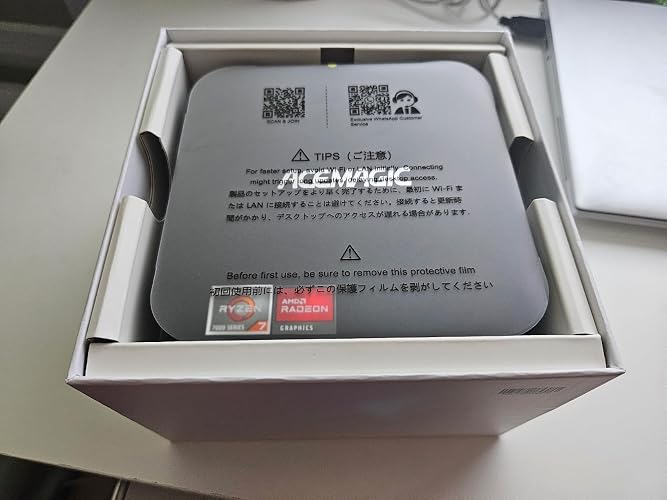
ACEMAGIC K1 Gaming Mini PC Ryzen 7 7730U 7nm,8C/16T Upgraded 7640HS/6800H up to 4.5Ghz 16GB 512GB M.2‑2280 SSD Mini PC Windows 11 Pro DP/HDMI*2/Triple 4K Display Micro Desktop Computers

  • Based on 723 reviews
Condition: New
Checking for the best price...
$499.00 Why this price?

Buy Now, Pay Later


As low as / mo
  • – Up to 36-month term if approved
  • – No impact on credit to apply
  • – Instant approval decision
  • – Secure and straightforward checkout

Ready to go? Add this product to your cart and select a plan during checkout.

Payment plans are offered through our trusted finance partners Klarna, Affirm, Afterpay, Zip, Apple Pay, and Google Pay. No-credit-needed leasing options through Acima may also be available at checkout.

Learn more about financing & leasing here.

Selected Option

Free shipping on this product

FREE 30-day refund/replacement

To qualify for a full refund, items must be returned in their original, unused condition. If an item is returned in a used, damaged, or materially different state, you may be granted a partial refund.

To initiate a return, please visit our Returns Center.

View our full returns policy here.


Availability: In Stock.
Fulfilled by Amazon

Arrives Saturday, Jul 25
Order within 14 hours and 44 minutes
Available payment plans shown during checkout

Protection Plan Protect Your Purchase
Checking for protection plans...

Size: 7730U 16+512GB


Features

  • [AMD RYZEN 7 7730U PROCESSOR] ACEMAGICIAN Micro PC is equipped with AMD Ryzen 7 7730U processor (8C/16T, 16M Cache, up to 4.5GHz). Compared with AMD Ryzen 5(7630U/5825U/5700U), K1 MINI PC 7730U CPU performance +35%, GPU +38%, more powerful performance and smoother running
  • [MINI PC PERFECT FOR LIGHT GAMING] Powered by AMD Zen3 Ryzen 7 7730U and AMD Radeon Graphics(680M), our mini computer delivers up to 3.4% better performance in multitask computing compared to previous Zen 2 processors. Play your favorite Casual games like DOTA2 and more with ease
  • [16GB LPDDR4X RAM + 512GB M.2 SSD] Built-in 16GB LPDDR4X onboard memory delivers stable multitasking performance. Two M.2 2280 slots are reserved for expansion, supporting additional NVMe SSD installation to scale total storage up to 4TB.
  • [COMPACT DESIGN & EFFICIENT COOLING] The compact 5 5 1.6 inch chassis saves plenty of desktop space. Dual-outlet cooling structure, large heatsink fins and high-speed silent fan work together to sustain long-term stable performance. This mini PC pre-installs Windows 11 Pro system, and the package includes HDMI cable, power adapter and VESA mounting bracket.
  • [4K TRIPLE DISPLAY OUTPUTS] Mini PC office supports triple display output with HDMI, DisplayPort and Type-C ports. The GPU adopts Radeon Graphics, the clock speed is 2200MHz, supports ultra-realistic 4K visual effects, which can provide incredible clarity and maximum work efficiency

Description

Purpose: ACEMAGICIAN aims to provide global customers with high-quality products and high-quality after-sales service, and become an outstanding representative in the mini pc industry. About: ACEMAGICIAN is a company established in 2005, focusing on the research, design, production and sales of high-quality hardware, especially in the field of mini pc. We have our own R&D and strong production team and pursue excellent quality.

Brand: ACEMAGICIAN


Operating System: 11 PRO


CPU Model: AMD Ryzen 7


CPU Speed: 2 GHz


Cache Size: 8 MB


Graphics Card Description: Integrated


Graphics Coprocessor: AMD Radeon Graphics


Memory Storage Capacity: 256 GB


Specific Uses For Product: Everyday Use


Personal computer design type: Mini PC


Operating System: 11 PRO


Specific Uses For Product: Everyday Use


Personal Computer Design Type: Mini PC


Color: black


Additional Features: GAMING, OFFICE, EDUCATION, HOME THEATER, AUTO POWER ON


Optical Storage Device: 512 Gb


Hard Disk Description: SSD


Hardware Interface: HDMI


Power Consumption: 28 Watts


Item Dimensions: 5.19 x 5.19 x 1.96 inches


Specification Met: MINI PC


Video Output Interface: HDMI, DisplayPort, Type-C


Hard Disk Interface: Solid State


Style Name: 7730U 16+512GB


Biometric Security Feature: MINI PC


Cooling Method: Air


Compatible Devices: Mouse


Power Plug Type: Type A - 2 pin (North American)


Total Expansion Slots Quantity: 12


Security Features: MINI PC


Video Output: HDMI, DisplayPort, Type-C


Graphics Description: Integrated


Graphics Coprocessor: AMD Radeon Graphics


Graphics Card Ram: 16 GB


Graphics Ram Type: DDR5 SDRAM


Graphics Card Interface: Integrated


Screen Size: 1


Display Resolution Maximum: 3840x2160


Display Type: MINI PC


Aspect Ratio: 169


Resolution: 4k


Native Resolution: 3840 x 2160


Connectivity Technology: Bluetooth, HDMI, USB


Wireless Compability: Bluetooth


Wireless Technology: Bluetooth, Wi-Fi


Wireless Network Technology: Bluetooth, Wi-Fi


Speaker Description: Headphone


Speaker Type: MINI PC


Brand: ACEMAGICIAN


Model Number: AM06PRO


Model Name: K1


Built-In Media: 1 x HDMI Cable, 1 x Mini PC, 1 x Power Adapter, 1 x User Manual, 1 x VESA Mount with Screws


Processor Brand: AMD


Model Year: 2025


CPU Model Number: Ryzen 7 770U


Warranty Description: Our 2-YEAR warranty and friendly customer service


Video Processor: AMD


UPC: 630504303699


Manufacturer: Shenzhen CYX Industrial Co., Ltd.


Cache Memory Installed Size: 8 MB


Memory Storage Capacity: 256 GB


RAM Memory Installed: 24 GB


RAM Memory Technology: DDR5


Ram Memory Maximum Size: 24 GB


Memory Speed: 2000 MHz


RAM Type: DDR4 SDRAM


Memory Clock Speed: 5500 MHz


Memory Slots Available: 1


Processor Series: AMD Ryzen 7


Processor Speed: 2 GHz


Processor Socket: FP7


Processor Count: 8


CPU Model Speed Maximum: 4.3 GHz


Total Usb Ports: 6


Total Number of HDMI Ports: 1


Number of Component Outputs: 3


Total Thunderbolt Ports: 2


Human-Interface Input: Buttons


Keyboard Layout: QWERTY


Frequently asked questions

If you place your order now, the estimated arrival date for this product is: Saturday, Jul 25

Yes, absolutely! You may return this product for a full refund within 30 days of receiving it.

To initiate a return, please visit our Returns Center.

View our full returns policy here.

  • Klarna Financing
  • Affirm Pay in 4
  • Affirm Financing
  • Afterpay Financing
  • Zip Pay in 4
  • Financing through Apple Pay
  • Financing through Google Pay
Leasing options through Acima may also be available during checkout.

Learn more about financing & leasing here.

Top Amazon Reviews


  • Good miniPC but not without some issues
Size: 7730U 16+512GB
Good mini PC for the price. It is good for what it is and runs applications very well. It set up easily and quickly, so no issues there. It has a very small footprint and is very quiet. It has generous ports and being capable of connecting 3 monitors is admirable, one even being a DP port. It is pretty fast for such a small PC, not the fastest, but very good for its specs. Two issues that keep this from being a 5-star review; Updates went smoothly (although when first starting the PC the updates had to be via WiFi and not the network port, per their instructions… reason unknown/not given). When doing the next system update, this particular PC would not install the update at all, even downloading the update and doing a manual update did not fix the issue. This still has not been resolved. All of the other 5 computers that are on the network updated without issue. The second issue was with networking with my other computers on the network. Using the setup user account, the miniPC would not connect to other computers on the network nor could it be seen by any of the other computers. After researching this, a second account was created and that allowed all other computers to see and connect to it. It also connected with all the other computers on the network properly. The reason for not being able to connect using the original user account is unknown still. Aside from these two issues, it appears to be a good reliable PC and I hope it is durable as well. Its benefits of having so many ports are what provided the decision to purchase. I decided to add a larger SSD and found a couple of issues. Doing a clone or migration of a new SSD and installing it in the HD0 slot did not work for me. I had to use the clone SSD in the HD1 slot before it would work. After trying different configurations, using different M.2 SSDs, I found that installing ANY SSD other than the original SSD would not work in the HD0 position. So I can only conclude that the original SSD in the HD0 slot is the only SSD that will work in the HD0 slot. I looked in the UEFI for a way to switch the boot sequence from HD0 to HD1, but that proved fruitless. Only Windows Boot Manager allowed me to switch the boot from HD0 to HD1, however, I still could not use a different M.2 SSD in the HD0 slot. Conclusion: If I ever need to change the HD0 SSD to a new drive (ie. the original SSD goes bad), I will not be able to do that. The HD0 slot will then be useless. Update: I decided to return this particular unit, which was accepted without question. I did, however, purchase another unit of the same kind (that's how much I really like this miniPC). The setup went pretty smoothly, yet when doing the Windows Updates this unit again hesitated failed the first time, yet completed OK the second attempt. I am a bit concerned about the next Windows System Update, whether or not it will actually complete without issues. Other than that, I have not had any issues with the new miniPC. I did NOT try to install the second SSD as the boot drive, but DID install it as a "storage" drive and redirected all of the Windows Library folders to go to the new drive. This is working out great. As for the next Windows System update (24H2), I'll have to see if it has a problem or not and will update this review as soon as it either completes or fails (probably next month). All other updates (ie. driver, .NET, Windows Defender, etc) completed without issue. One note in the "Product Information" for this miniPC, the specs state that this unit has 2 Thunderbolt connections, which it does NOT have. It has a USB-C 3.2 Gen 2 port, but that is not the same as a Thunderbolt. Thunderbolt ports have a lightening bolt next to the port. There are, however, 4 USB-A 3.2 Gen 1 ports and 2 USB-A 3.2 Gen 2 ports available. All in all, I like the miniPC, but will see how Windows System updates go in the future. I am still rating it a 4 at this time. Update after latest Windows System update KB5060829: The miniPC updated perfectly on its own, no interference needed. Therefore, I am giving this computer a 4.9 rating (it will show as a 5.0, but it did have its initial issues that required a return of the first miniPC). I do really like it and the second/replacement miniPC has been very stable and consistent in operation. ... show more
Reviewed in the United States on June 4, 2025 by George V.

  • A super mini PC at a super price
Tl;dr highly recommended. Background: I was looking to replace my existing very large tower PC (c. 2015) with something that was a) more up-to-date and b) less power consuming. To be clear, I have been transitioning to an M1 MacBook Pro and QNAP NAS, and I no longer need to do image and video processing on the PC. So my mid-level nVidia GPU and lots of hard drives were no longer requirements. I was willing to give up the BluRay writer as well. But the Windows PC was still an important part of my multi-level backup strategy. Namely, I keep a copy of all photos, videos and documents on the PC, synchronized using GoodSync from my NAS, and from there I let Backblaze handle cloud backup. (Backblaze won’t sync from network shares.) The Ace Magician AM06 Pro had a number of appealing features for me. The tiny size was, of course, a big asset. And I do mean tiny. The ability to add a 2.5 inch SSD was mandatory. And the second NIC allowed me to connect my QNAP NAS directly to the PC using 2.5GbE. While this was a step down from my previous 10GbE NIC, that was no longer really necessary. While there are other mini PCs that have a 2.5GbE NIC now, there are very few that have a second NIC, let alone at this price. Oh, and price, which in this case equates very nicely to value. I ordered the mini PC, and my experiment began. Before I ordered a large SSD, I wanted to see if this was going to work for me. I plugged in the DisplayPort to one of my monitors that had a free DP connection, connected my Logitech mouse and keyboard using their dongle, plugged the 1GbE into my home LAN, and we’re off to the races. Right out of the box, the system came up in seconds, running the Windows 11 OOBE. A few questions later and the system connected to my Microsoft account. Everything seemed fine, so I started with any Windows updates that might be available. There were only a few, so I let that process complete. At this point, I made no changes to the BIOS and no changes to the default Windows configuration. Now I needed to add Hyper-V support, and I expected to need to change a BIOS setting or two. But no, not necessary, virtualization support was already enabled! I moved a VM over from my other system - with some difficulty that had nothing to do with the mini PC, but I got it sorted out. Then I connected and configured a private network for the 2.5GbE NIC to my QNAP directly, Jumbo frames enabled. No problems there. I ran a short stress test and I could hear the fan spin up. It’s not a pleasant sound, but I don’t plan on stressing the PC. The next day I came back to continue on the transition, and found the PC had shut down. Oh, no! Very curious, I determined it was after exactly 3 hours of idle time. Hmm, I had disabled sleep. But crafty Microsoft, the power plan still had hibernation set for 180 minutes. Grr. Set to Never now. A few more days, and it was time to move on to phase 2: add a 4TB SSD. I know the description says that 2TB is supported but I could not think of why the limit (and I have 40+ years in the storage business under my belt). Suddenly a sale price directly from WD appeared, and I proceeded with that. Adding it was a little hairy - the ribbon cable (included) to the motherboard connector looked fragile, and took some care. I knew that at first (before any power applied) I didn’t have it just right and I took my time until I got it. Power up, perfect, no issues, 4TB now available. I won’t go into great detail about the rest of my configuration other than to say after 10 days, the old tower was powered down, the new AM06 Pro handling everything I needed. I think you get the point now. My experience has been overwhelmingly great. In the process, my constant power load dropped by more than 60W as reported by my UPS - this was expected. But no review is complete without some “cons”: The power switch. I can’t tell you how many times I inadvertently touched it and my system shut down. I had to device an approach to make sure this didn’t happen again. My “Server Rack” (photo) keeps me - and more importantly, my cat - from hitting it. I hope Ace Magician does not repeat that design. It looks cool, but asking for trouble. I should drop a star for this, but I won’t :) The power supply. OK, this is not going to cost them a star. When you have such a small PC, the big brick with detachable cord is out of place. I started looking for a tiny USB-C GaN charger to replace it. My first try (a 3 port unit) didn’t go so well as it shut down in 30 seconds every time I powered it up. Someone on the minipc forum tried a bunch of these and found the one that worked: a single USB-C port, Anker Nano II 65W. Same overall rating as the supplied PS. The actual power draw of the PC (in my use case) is more like 20-30W. But this is important: the new GaN charger - added just today - is far more efficient, and switching to it dropped another 20+W from my overall total. Wi-Fi performance. Meh. I don’t care, I don’t need it, you might. I disabled in Windows. A second NVMe slot would be “nice to have”. EDIT: One additional note The included VESA bracket did not work for me as I have my monitors mounted on arms. If you are considering mounting behind a monitor, you might need a different sort of bracket. Back to my conclusion: buy it. Incredible value. Seriously. Addenda: Summary of changes I made from out-of-the-box configuration 1. Disabled hibernation! I blame Windows 11 for this, it was not a default in Win10. 2. One BIOS setting: After a day or so, I could hear the fan spin up sometimes. Poking around in the BIOS, I found fan control was set to “Manual” and there were optional settings. But I figured I would try “Automatic” before getting too geeky, and that’s worked well for me. No more whining! 3. Disabled the Wi-Fi NIC (in Windows). 4. Removed Chinese fonts. No offense, it’s just not one of my languages and I don’t expect to learn it. ... show more
Reviewed in the United States on March 30, 2023 by JeffGo

  • Excellent performance, expandability, and value for the money!
This is a review of the Ace Magician AM06 PRO (Ryzen 5 5600U) Photos included with review: 2 photos show size comparison to common items (a mouse and a 3.5" hard disk). 2 phots showing available ports. 1 Photo shows location of internal components. 2 photos show how to properly install the SATA drive cable. The Hardware This system utilizes an AMD Ryzen 5600U CPU. This CPU packs a surprising punch for a CPU that sips so little energy. It's amazing what AMD has accomplished here. This CPU has 6 cores and 12 threads. It also includes AMD Radeon graphics. Others have already commented on the raw performance metrics, so I'll concentrate on providing general information and a few tips for getting the most out this system. General System Information Please see the first two photos that illustrate how compact this system really is. You will find the usual compliment of ports on the system which include two USB 3 ports, one USB 3 type C port, two USB 2 ports, HDMI, Display Port, and a 3.5 mm audio jack . One unique design feature that AceMagicians have incorporated is the inclusion of not just one, but two Ethernet adapters, including one 2.5 Gbps and one 1 Gbps port. Why might this be helpful? There are several possible scenarios, but for me, I often perform testing using Windows Hyper-V. If I had only one Ethernet adapter, then I would need to share that adapter between the VMs and the primary installation of Windows. My preference is to NOT share the adapter. By having two adapters, I can assign one to my VMs and have a separate adapter available for exclusive use by the main OS. So having this feature available on a mini PC is very welcome. In addition, it just makes sense to have a 2.5 Gbps Ethernet adapter on modern systems with SSDs. Transferring data between machines with SSDs can easily saturate a 1 Gbps Ethernet so this extra speed is very welcome and matches well with a system containing SSD storage. I also like the fact that this system has a microphone built-in. That is something typically missing in most mini PCs. It allows for one less having to be plugged into the system. Another nice touch is the fact that the power connector is a USB-C type connector. That's really helpful for people like me who are always carrying USB-C power adapters around with them already. TIP: You may find that some standard off the shelf USB-C power adapters may not work to power this system. In my testing with several different adapters, I found that some of them would power the system on initially, but the system would shut down within a few seconds of being turned on. I found that the latest line of Anker GaN and GaN prime adapters (available here on Amazon) work fine with this system. When purchasing an adapter, make sure that it has a minimum of 65W output power and that it supports 19V (20V) output. I suggest a unit with a single USB-C output because plugging in a second device may momentarily interrupt power to the Mini PC which you obviously do not want to happen while it is running. What's really amazing is how all this processing power and all these ports are incorporated into such a small case. As you look through included images, take note of the size of this system in relation to some common items such as a pair of glasses and a computer hard disk. Initial Setup The initial setup of the system is very quick and simple. AceMagicians have preinstalled a pristine, clean, Windows 11 Pro installation on this system with no bloatware. I really appreciate this because it makes ensures that you have Windows running at peak efficiency without a bunch of stuff that you will never use slowing the system down. TIP: After you get the system up and running, make sure that you have an internet connection. I would suggest allowing the system to install all available Windows updates. Once updates are done, open an elevated command prompt and then run these commands: MD C:\Exported_Drivers pnputil /export-driver * C:\Exported_Drivers This will make a backup copy of all system drivers. I would suggest copying or moving that folder to a thumb drive, external HD, etc. for safekeeping. Then, if you ever perform a fresh installation of Windows, you can simply open Device Manager, right-click on the computer name at the top of the device tree, select "Add drivers", and point it to your backup copy of the drivers. This will install all the drivers. Note that when the display driver is being installed, the screen may go blank for a few seconds. This is normal. Expandability Clearly, AceMagicians has thought about servicability with this system. Simply loosen four phillips type screws on the bottom of the unit and the bottom cover pops right off. There is no need for any prying, wedging, or force of any kind. With the bottom cover removed, access to the SSD and RAM is extremely simple. This system utilizes dual channel DDR4 3200 Mhz SODIMMs and can be expanded to 64 GB, should you wish to do so. Note that the SSD is an NVMe module with a 2280 form factor. Beneath the SSD is the Realtek WiFi module which can be upgraded should you wish to do so. My personal preference is to use an Intel AX210 WiFi 6e module. TIP: The system comes with ribbon cable to SATA connector to allow you to add a 2.5" disk in addition to the M.2 SSD that is already installed. However, my system came with no instructions for installation. Reasons for Purchasing a Mini PC There are many reasons to consider a Mini PC: 1) The complete system is a very cost-effective solution. This system is very reasonably priced. Why spend a fortune on a computer when you can purchase an entire system in a small box at an affordable price? 2) More than enough speed and power to rapidly accomplish all the tasks that most people perform. A Mini PC is ideal for people who use Word processing, browse the web, perform some mild to mid-level gaming, perform photo and video editing, and much, much more. It is true that if you want to play the latest, cutting-edge, high-end games, you will need more power than a Mini PC will offer, but that is not the case for many individuals. 3) Space savings: It's almost difficult to explain just how remarkably small these systems are. It's probably best to look at some of photos that I have included to get a really good sense of the size. Because of the small size, these units will occupy very little space on your desk. Since they include a VESA mount, they can also be directly attached to the back of any monitor with a VESA mount. In that case, they will occupy no desk space! 3) Energy efficient: Because these systems are so energy efficient, they won't drain your wallet. 4) Expandability: Many persons are surprised at the level of expandability that such a small system can provide. This system comes with 16GB of RAM, which is a generous amount more than sufficient for most tasks. However, if you wish, this system may be expanded up to a whopping 64GB. As for storage, a 512GB NVMe SSD is included with the system. However, even here you have options. A 2.5" drive can also be added to the system and the NVMe could be swapped for a larger unit if so desired. 5) External connectivity: This system allows the connection of up to 3 monitors simultaneously using the DisplayPort, HDMI, and USB-C connectors. Naturally, you will also have access to additional devices via the USB ports. Even network connections are plentiful with WiFi and Bluetooth, as well as both a 1Gbps Ethernet port AND a 2.5Gbps Ethernet port. Summary I can whole-heartedly recommend this system. My initial thinking was that I could use it for some offline data storage and some very light tasks, but after realizing how much better the performance was compared to what I expected, I decided to promote this system to a more important role in my digital life. If you are considering a Mini PC, I think that you will be pleasantly surprised by the performance and value that this little beauty provides. ... show more
Reviewed in the United States on March 29, 2023 by HannesS

  • Issues With HDMI, Linux, But Very Good Otherwise
I bought this mini PC to use as a Linux computer. When it arrived, I got rid of the Windows 11 installation and installed Linux, and it turns out that the MT7902 Wifi chip on the PC is not currently supported in Linux, there is no driver for it. I'm not the most advanced Linux user, but there is a 3rd party driver that I tried and failed to install. Ethernet worked OK, so it can still connect to the internet that way, but that's something to note if you're interested in using it for Linux. Also, strangely only the included HDMI cable seems work with this computer (I tried 2 others), and it only worked on my older 1080p monitor, not my 4k TV I tried to hook it up to. Not sure why that is, but when it didn't work there was just a black screen. This is what I'm taking a star off for. Other than that, the computer is fast, quiet while running, and very compact. The packaging it came in was nice, and overall was a very good deal. ... show more
Reviewed in the United States on September 7, 2025 by S. P.

  • The Acemagician AM06 Pro mini-PC packs a lot of features and performance into a tiny footprint
I recently purchased the Acemagician AM06 Pro and have been so impressed with this little machine I decided to give it a thorough review for those out there who may be considering buying one. This was a replacement for a 7th generation Intel NUC I used for media streaming and light gaming on my living room TV and I couldn’t be happier with my purchase. Specs The specs of this mini-PC are extremely impressive considering the cost. The PC come with an AMD Ryzen 5 5600U processor (6 cores / 12 threads, 16MB L3 Cache, and boosts up to 4.2 GHz), built in Radeon RX Vega 8 graphics, 16GB high-speed DDR4 ram, a 512GB NVMe SSD, and the ability to add an additional 2.5” SATA hard drive. I/O for the system includes 1 x HDMI Port, 1 x DP Port, 1 x 2.5Gbit and 1 x 1Gbit RJ45 LAN, 2 x USB 2.0 Ports, 2 x USB 3.0 Ports, 1 x USB Type-C Port, and one audio-in/out jack. The HDMI port, Display Port, and USB Type-C Port can all be used to drive a monitor, so you could use this mini PC in a three monitor setup if you wanted. The timings for the memory in this system according to CPU-z are 22-22-22-52 @ 3200MHz running in dual channel. The case measurements for this mini-PC are about 5.19” square and is approximately 2.13” tall. Build quality The build quality of this machine if very good. The system is easy to open (4 screws) and upgrade the memory or storage if desired. The whole thing weights just over a pound (1lb 4oz) and just feels solid sitting in my hand. I think the design of the case looks great and I really like the subtle red glow around the power button. Performance The performance of this PC is amazing and blew my NUC out of the water. In Cinebench R23 I got 7124 in the CPU multi core benchmark, and for the Unigine Valley graphics benchmark I got a total score of 1822 at high settings, 720p, and 2x anti-aliasing. At 1080p I got a total score of 926 at high settings and 2x anti-aliasing The Radeon RX Vega 8 graphics chip in this system is one of the better integrated graphics chip designs out right now and it has opened up a lot more titles I can now play from my Steam library on my living room TV. The NVMe for this mini-PC is pretty zippy too, in Crystal Disk Mark I got around 2050MB/s reads and 1550MB/s writes. Power / Sound The fan on this mini-PC is whisper quiet. I recorded the fan noise with my iPhone dB sound meter from about a foot away and got around 36 dB when it was at idle. Under load when running the Cinebench R23 benchmark, it climbed and bounced between 39 and 40 dB. The power draw on the PC was just 6W at idle and 37W when running the Cinebench R23 CPU benchmark. Final thoughts Overall, the Acemagician AM06 Pro mini-PC packs a lot of features and performance into such a tiny footprint. I’m completely happy with purchase and wouldn’t hesitate to recommend it to a friend. Hope this helps anyone out there thinking about buy one. Cheers. ... show more
Reviewed in the United States on March 25, 2023 by Fuelrod

  • A powerful small unit with the worst support ever.
Edit: I have now called, emailed and tried to webchat. Even in the webchat they did not respond. This is ridiculous. If you expect any sort or warranty or support, this is not the vendor or the product for you. Edit: Worst customer service experience from any vendor I've had. I emailed and called 4 times, and it's been almost 2 weeks with no response. Cancelling 2 stars. Before I begin, let me put down some credentials here. I work in I.T. I've done desktop/server support for decades and now develop software. So, let's suffice it to say that I consider myself an expert in technology. I wanted to replace a desktop unit I have in the living room. It's bulky and a bit outdated. So, I've been shopping around and looking to use a much smaller unit. This item fits that bill perfectly for obvious reasons. Now, I wanted something that would be comparable in CPU power and in RAM...and maybe a little GPU power in case I want to game a little. I also don't want to pay a gaming system price. Well, when I saw this for an extremely reasonable price, I could see that on the spec sheet, it checks all of the boxes. My previous experience with systems like this though is that they have all the right numbers but when you actually put them into the field, they crap out performance-wise. This was not the case here. This system is exactly as advertised. A powerful mid-grade system. It's small, it's quiet and it's solid state. The only moving part on this thing is the fan. It's very responsive and is perfect for all the reasons I went looking for this system. This is one of the best purchases I could recommend to someone looking for a system that's not quite a gaming system, but will do Sims 4 on high quality without breaking a sweat. It has but one downside I've found but it is not a dealbreaker in my opinion, and I don't remove a star for it. It is Wifi5, which was clearly listed in the specs. I knew it when I ordered it. This means the best speed I get wirelessly is about 100MB. A Wifi6 chip would have been 10x faster, but I understand...cost cuts have to come somewhere. If it ever becomes a big deal, I can always get a USB adapter to get Wifi6 speed. tl;dr It's worth it. Edit: I decided to crank up the Sims 4 to Ultra mode and check out the FPS rating. 20 hours of play and it averages 126.7 fps. This thing solidly performs. I decided to buy a 2nd system that I'll be beefing up with 32gb of ram and an addition 1tb drive to run my external drives I use as a NAS & Plex Server. By my calculations, swapping from a standard PC setup with a 650watt p/s to this will save enough electricity cost to pay for itself in about 6 months.It's almost a free upgrade. Edit: 8 Month update. The SSD in the unit died on me for no apparent reason. I have the system hooked up to a UPS and there were no brownouts. I am still happy with this unit, replacing the SSD is super simple and getting a quality replacement with twice the size will only be about 50 dollars. I would still recommend this to a friend. ... show more
Reviewed in the United States on March 8, 2023 by Mark

  • Awesome MIni with Plenty of Power! (fan did need replacement)
Size: 7730U 16+512GB
This thing has been a great add to my setup. It is very quite and the performance has been great. I did have a fan issue and the support from AceMagician has been great. They offered the replacement fan at no extra cost. They stand behind their product for the long term.
Reviewed in the United States on June 17, 2026 by Robert W

  • The company backs their product, and it works more than adequately for home plus function.
I've had great success using these as I also bought one for my wife. She has had zero problems, and I had a power cord issue which the company stood behind and promptly replaced. I'd buy from them again in a heartbeat. The disclaimer is that I use mostly for research, a little gaming for old guys, online ministry, and the occasional video conference. It holds all my phone's pictures, my limited music library and offers no resistance to streaming Netflix, Prime, or Viki. My uses are not business oriented though I doubt many applications would find this a good and safe home. ... show more
Reviewed in the United States on July 15, 2026 by D. P. Sargent

Can't find a product?

Find it on Amazon first, then paste the link below.
Checking for best price...