Search  for anything...

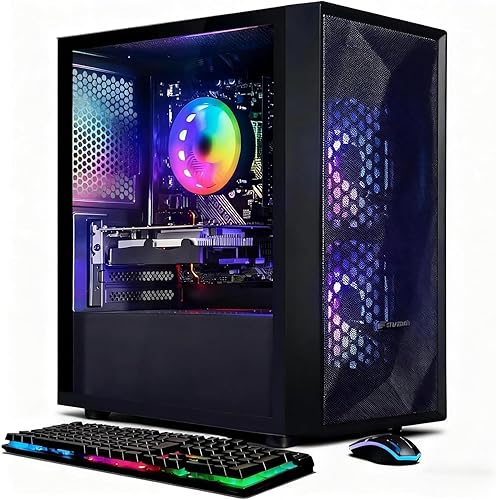
CyberpowerPC Gamer Supreme Liquid Cool Gaming PC, AMD Ryzen 7 3800X 3.9GHz, GeForce RTX 3060 12GB, 16GB DDR4, 1TB NVMe SSD, WiFi Ready & Win 10 Home (SLC8260A5)

  • Based on 857 reviews
Condition: New
Checking for the best price...
$1,999.00 Why this price?
Save $665.99 was $2,664.99

Buy Now, Pay Later


As low as / mo
  • – Up to 36-month term if approved
  • – No impact on credit to apply
  • – Instant approval decision
  • – Secure and straightforward checkout

Ready to go? Add this product to your cart and select a plan during checkout.

Payment plans are offered through our trusted finance partners Klarna, Affirm, Afterpay, Zip, Apple Pay, and Google Pay. No-credit-needed leasing options through Acima may also be available at checkout.

Learn more about financing & leasing here.

Free shipping on this product

30-day refund/replacement

To qualify for a full refund, items must be returned in their original, unused condition. If an item is returned in a used, damaged, or materially different state, you may be granted a partial refund.

To initiate a return, please visit our Returns Center.

View our full returns policy here.


Availability: Only 4 left in stock, order soon!
Fulfilled by TinVIA Technology

Arrives Aug 13 – Aug 19
Order within 18 hours and 12 minutes
Available payment plans shown during checkout

Protection Plan Protect Your Purchase
Checking for protection plans...

Features

  • System: AMD Ryzen 7 3800X 3.9GHz 8-Core | AMD B550 Chipset | 16GB DDR4 | 1TB PCI-E NVMe SSD | Genuine Windows 10 Home 64-bit
  • Graphics: NVIDIA GeForce RTX 3060 12GB Video Card | 1x HDMI | 1x DisplayPort
  • Connectivity: 6 x USB 3.1 | 2 x USB 2.0 | 1x RJ-45 Network Ethernet 10/100/1000 | 802.11AC Wi-Fi | Audio: 7.1 Channel | Keyboard and mouse
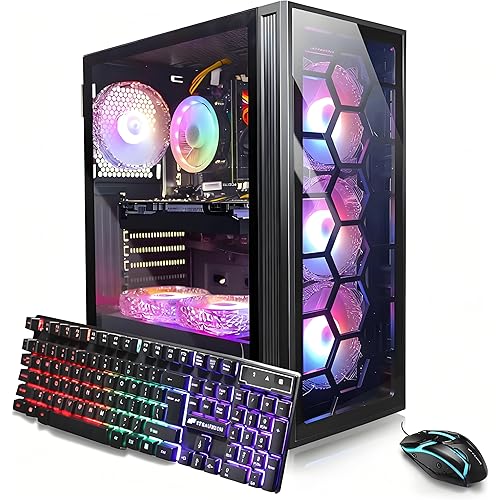
  • Special feature: Liquid Cooling | Tempered glass side case panel | Custom RGB case lighting | USB Gaming Keyboard | RGB 7 colors gaming mouse
  • 1 year parts & labor | Free lifetime tech support

Description

Get the pinnacle of gaming performance with the CYBERPOWERPC Gamer Supreme series of gaming computers. The Gamer Supreme series features monstrous processing power combined with the latest and greatest graphics cards to handle even the most demanding games on the market. An immense RAM allows you to easily tackle system-intensive applications such as video editing, and ensures a lag-free multitasking experience. A lightning-fast SSD boot drive provides quick load times for your most used games and applications. The Gamer Supreme series looks as stunning as it performs, as all these high-end components are packaged in a striking, sleek chassis.

Specs & Other Info

SpecificationDetails
Intended UseGaming
ManufacturerCyberpowerPC
PC DesignTower
Operating SystemWindows 10 Home
Storage Capacity1 TB SSD
Installed Memory16 GB DDR4
ModelGamer Supreme Liquid Cool
Components IncludedKeyboard & Mouse
CPURyzen 7 3800X, 3.9 GHz
GraphicsNVIDIA GeForce RTX 3060 with 12 GB RAM
Wi-Fi Connectivity802.11ac
USB 2.0 Ports2
USB 3.0 Ports6
Product SeriesGamer Supreme Liquid Cool
Item Model No.SLC8260A5
Hardware PlatformPC
Item Weight36.3 pounds
Dimensions23.62 x 12.6 x 23.62 inches
ColorBlack
Processor ManufacturerAMD
Number of Processors8
Memory TypeDDR4 SDRAM
Launch DateFebruary 25, 2021

Frequently asked questions

The CyberpowerPC Gamer Supreme Liquid Cool Gaming PC is equipped with an AMD Ryzen 7 3800X 3.9GHz processor, NVIDIA GeForce RTX 3060 12GB graphics card, 16GB DDR4 memory, a 1TB NVMe SSD for fast storage, and comes WiFi ready with Windows 10 Home installed.

Yes, with its AMD Ryzen 7 3800X processor and GeForce RTX 3060 graphics card, the CyberpowerPC Gamer Supreme is capable of running high-end games at high settings, VR applications, and can handle heavy multitasking smoothly.

Yes, the CyberpowerPC Gamer Supreme features a customizable PC case that allows for easy upgrades. You can upgrade components like the RAM, storage, or even the GPU and CPU to keep up with new technology and game requirements.

Yes, the CyberpowerPC Gamer Supreme comes with a 1-year parts and labor warranty along with free lifetime tech support, ensuring that any issues you might have with the system can be resolved.

Top Amazon Reviews

🚀 Abunda's Overview

This is our summary and key points to consider based on customer reviews.


The CyberPower PC desktop has received glowing reviews for its high performance, particularly in gaming and multimedia applications. Users have praised its AMD Ryzen 7 3800X processor, GeForce RTX 3060, and the fact that it comes with 16GB RAM and a sizable SSD, enabling smooth and fast operation for various demanding tasks. The ease of upgrading components and the efficient cooling system with customizable LED fans were also highlighted as major benefits. While the keyboard and mouse received mixed reviews, the overall consensus is that the computer offers great value for its price, delivering a powerful computing experience suitable for a wide range of activities from professional work to high-end gaming.

Pros

  • 🚀 High-speed performance and reliability for gaming and multimedia tasks.
  • đź’ľ Ample RAM and SSD storage for fast processing and boot times.
  • 🎮 Superior graphics with the GeForce RTX 3060 allowing for gaming at Ultra High resolutions.
  • ⚙️ Easy upgradeability and customizable LED cooling fans for personal preference.
  • 🔌 Multiple USB 3.0 and 3.1 ports for fast data transfer and easy connectivity.

Cons

  • 🔑 Keyboard and mouse might not suit everyone's preferences due to stiffness and size.
  • đź’˝ Limited internal slots for adding more hard drives without extra hardware.
  • 🎴 Lacks an integrated card reader, requiring an external adapter for media transfers.

Should I Buy It?

Yes, if you're in the market for a robust and versatile desktop PC capable of handling high-demand computing and gaming tasks with ease, the CyberPower PC desktop comes highly recommended. Its pros significantly outweigh the minor cons, making it a solid investment for both gaming enthusiasts and professionals looking for a powerful computing solution.

  • First PC
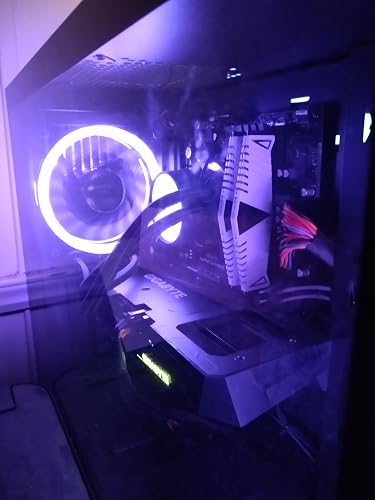
Ordered Thursday at 1am and received Saturday! Couldnt really find a better pc for the price. Everything came as advertised. Box came a little beat up but the computer itself was well protected and did not have a scratch. So far i am happy with my purchase. After downloading a few games (black mesa, beam ng, MS flight simulator, and a few free steam games) I am more than happy with my purchase. Runs every game listed smoothly at max settings 1440 4k 60hz on my samsung qled. I really notice a substantial improvement over my ps4 pro. Flight simulator is the only game that has slight issues at highest settings in 1440 resolution. But thats expected. Super fast browsing speeds. Came with no bloatware. Windows came installed all I did was hook it up to tv and power and I was ready to go. Now i have a great pc to start with and upgrade as the years go by and gpu become more available. Looking just for a 3060 on average is about $900. Came with 4 case fans and the cpu cooler and one additonal fan for the radiator. It comes pre assembled two fans on the radiator for the cpu. I might move one to the top vent and just leave one fan on the radiator. But definitely worth a purchase. And i mean to get the pc within 40 hours is great. Some companies tell you 3-4 weeks before they even start looking at your order than however long it takes to get some parts. Amazing. I was initially worried based off the negative reviews until i watched a kid turn the main power switch off in the back and pretend his computer came bad and wouldnt turn on. To clarify for anyone that is interested mine came with a evga 600w 80 plus gold. Psu. Asrock b550am gaming mb. Gigabyte 3 fan rtx 3060. And the liquid cooler is a cooler master. Just listing my specs because I know I was looking for these answers before I bought. (Just note they may have different brands in each pc) 3 Week update. Absolutely zero real issues. i do want to add advice to anyone that may read this. My computer never got super hot, 80 c was top temp and that was rare. However my advice is to take a fan off the aio cooler. it does not need two fans to blow across the radiator. I moved the one fan to then top of the case to suck out all the hot air that rises. I also moved the radiator to the top fan in the front thus allowing my cool house air to blow across it rather than the hot air getting pulled through in the back. my idle temps have dropped from 32 to 26. While gaming if it goes above 70 thats rare. It made a big difference. You do not have to do this. You can leave as is and it is fine. But i like to play around with things and am mechanically inclined (not hard at all). For the top fan you can use the screws from the front fan since youll be using the longer screws that come with aio to refasten the front fan. Just be careful with hoses the last thing you want is a ruptured line. But i mean its not glass. But I am loving this thing and the more i look online the more i feel this was one of the best deals i couldve gotten at this price point. Best buy had a 3070 model that i kinda wish i saw but it seemed like a tradeoff and youre getting the same value. Do you want the 3070 with the cheaper mobo and worse airflow with heat issues. or do you want the 3060 with the 550 mobo and usb C and i well designed case for airflow. My mouse did come with top buttons mashed in but it does not affect anything i need so i didnt call and ask for replacement. The mouse has plenty of other buttons you can map. But in the long run ill invest in a nicer quality mouse. It was just nice to get a keyboard and a mouse since ive been on console since the original saints row days. If youre thinking about it i suggest you pull the trigger because the price already jumped nearly $150 in 3 weeks and it may be sold out for awhile (like the best buy model) I cannot express enough how happy i am with this purchase. ... show more
Reviewed in the United States on July 17, 2021 by Anthony

  • Great Performance
I’d been thinking about upgrading my PC for the last year, and I finally decided to get a new PC when my old computer just couldn’t handle all the computing and multimedia demands I was putting on it. After a lot of searching on the Internet for a fast and reliable machine, I decided on a CyberPower PC desktop to meet all my needs. I have not been disappointed! The machine has an AMD Ryzen 7 3800X processor that easily handles all the demands I put on it for work and home projects. For processing-intensive analysis programs, this system runs really fast, especially since it comes with 16GB RAM and a sizeable SSD. I’m not running CAD applications, though this computer has handled everything I’ve run on it. The GeForce RTX 3060 is fantastic for gaming and multimedia applications. I’m able to play all the games I have at Ultra High resolution and my experience has been very smooth. I also stream multimedia and participate in a lot of virtual meetings, and this machine lets me do that and perform other tasks at the same time (while paying complete attention to the meetings, of course). The keyboard and mouse are high performance gaming peripherals. I like them, but they may not be everyone’s favorite: the keys on the keyboard sit high and are stiff, which is good for someone like me who likes resistance when typing. The mouse is on the large side, but it’s wired and 1600 DPI, and it responds very easily. I have not customized the mouse, but the various buttons can be programmed, if that’s what I wanted to do. The computer case is nice, with a transparent front end and a view of LED-outlined fans. There are four fans – three in front and one in back – whose color and brightness can be controlled by preinstalled software provided by CyberPower. I have it set to slowly changing color in a soothing frequency, but you can set it to spaz-mode, if that’s your preference. The internals are straightforward and easy to change, if desired. With the graphics card in place, there’s two more PCI slots (one x16 and on x4). Power cables are tied up and tucked inside an enclosure at the bottom of the case, so I had to open the case on both sides to extract the cables necessary to add a couple of hard drives. To that end, there’s only two locations to add HDs/SSDs, which is on the side of the power cable enclosure, which makes it easy to hook them up. If you need more drives for some reason, then you’d need extra hardware. With multiple USB 3.1 and 3.0 ports, the interfaces to my USB sticks are fast. I also like that there’s two USB 3.0 ports and audio I/O ports in front and on top, so they’re easy to access. The only I/O “missing” is a card reader, so you’ll need an adapter for your SD or other media card. On a final note, this machine came with Windows 10 Home. I almost immediately upgraded to Windows 11, as the desire to have a machine that runs Windows 11 was one of my upgrade requirements. This CyberPower PC runs Win 11 like a champ! ... show more
Reviewed in the United States on November 11, 2021 by Peach

  • Worked right out of the box!
I usually build my own pc's but its been 10 years and I didn't want to take the time and piece one together so I decided to go with this one. I chose this pc for the graphics card. If I was going to spend this much on an expensive machine I wanted it to pay for itself. With the 3060 this machine mines an average of $100 dollars a month using nicehash. I like the nicehash software it safely overclocks the system and has a built in gaming mode which when activated pauses the mining and leaves the system overclocked. I also play Skyrim and Fallout 4 with no problems and with max settings. When I have issues with the system it's always with Tod Howard's creations not the pc (It just works) LOL I've only had one issue and it was with the WIFI card. Out of the box It wouldn't work with the two antennas provided so I put an extension cable on, left the other antenna off and it works with one antenna mounted a 2 ft above the pc. Not sure what the issue was but my signal would disappear with both antennas directly on the back of it It has an Asrock b550am mother board which you cant find any info on. I managed to find a page with all the drivers and manual on the MB. Link is in the picture (took me a lot of digging and finally found the link in a reddit post). Don't expect to find anything about this PC on cyberpowerpc's website or the MB on Asrock's website. Another tip don't delete the the led controller software thinking its bloatware and if you do only Asrock led version 1.0.65 will work with the bios. I enjoy this pc its a good gamer and mining around $100 a month it should take about 17 months to pay for itself. ... show more
Reviewed in the United States on September 12, 2021 by Big Nate

  • Please BEWARE!!!!!!!
BEWARE!!!!!!!!! Alright, this is my first ever review. I don’t know write them cause usually I’m pretty soft spoken when people mess up something for me. But I am very upset. First of all, the build was put together like complete doggy doo doo. Fans would NOT turn on. Ended up being an issue with the cables not being fully plugged in to the PowerSupply... easy fix had to take to my local repair shop. Now what really irks my soul. I WAS GIVEN A BAD GPU. A Brand new 3060... completely useless... granted, when I called cyborpower, they did say they will replace it for free. I had to pay for shipping to them, and then I will receive another 3060 when they receive mine. Will update this when/how long it will take to get a new GPU from them. Only reason I gave tech support so high was because of the new graphics card they’re giving me. Also, they’re customer support takes forever!!! Was told a 6 min wait... that turned into 47:31 min wait. EDIT: took about 2 and half weeks to get a new card. When I did finally receive it, everything worked like a charm. ... show more
Reviewed in the United States on May 6, 2021 by Bailey Kennedy

  • Didn't last 24 hrs without a problem
I received this item yesterday and on startup in ran fine. It seemed like a good deal with good hardware for the price point relative to building one right now. Within 24 hrs it crashed, went into the bios menu, and now I can't boot windows. I've tried all the fixes I know of without extra hardware. Including reseating the drive, formatting and reinstalling windows. And I'm still stuck in bios. The nvme is clearly dead, and the customer support hours are pretty slim. I'll update this review once I have gotten in contact with them, but even then I'll need a fast response and solution to be even remotely satisfied, especially if I'm dropping two grand on their product which didn't last a day... Edit. So after getting a hold of customer support and over a month later they got me a new drive. In the time since I put my own new ssd in it to be able to use it. But now I have the new one as well. The computer runs very well. Did need a good bit of fan configuration since the case airflow is not planned perfectly but nothing that can't be fixed easily. Overall it's a solid computer, it was the only was to get a 3060. It's able to handle red dead 2 on ultra settings in 1080 very well. Just be thorough about checking that everything is set up right. And be prepared for some troubleshooting. ... show more
Reviewed in the United States on May 16, 2021 by matthew

  • Only time will tell.
I've only just gotten and set up my new PC but so far I love it. the entire package includes the system unit along with a mouse and keyboard. The accessories themselves are a nice addition though because I had already purchased a new keyboard and mouse I will be keeping the ones with the PC as back-ups. I did check them out though and while Cyberpower could have sent a cheap mouse and keyboard (or none at all) they opted to send a pretty nice LED backlit keyboard and Gaming mouse. They both seem like, should the need arise that I need replacements, I won't be left at a disadvantage. Moving on the the actual system unit. I had my last PC for a little over a decade and I gradually upgraded it through the years. 3 hard drives later I felt it was time to start fresh. they seem to take great care in putting together their pre-builts and packaging them. After removing the interior foam and setting everything up I have to say it's quite pretty. While I realize the lights and tempered glass are all cosmetic, they're a nice touch. with the little remote I have it set to a greenish blue hue I quite like. As for performance everything is working smoothly. I'm setting games to the Ultra or higher settings and it's handling them with ease. my hope is to continue upgrading the unit for another decade and so only time will tell. But for the time being I'm very happy with my purchase. ... show more
Reviewed in the United States on April 18, 2021 by David

  • If it looks like you lost your SSD read this
Just opened it today. Everything is working as expected. The machine is very quiet. The benchmarks are what is expected. One note, unlike another poster, mine did not come with a DisplayPort Cable. Had to supply one of my own. Update, I was having problems with the machine looking like it lost the SSD and then I couldn't get beyond the BIOS screen. I was about to return the machine. However, after a little googling I discovered that the Windows power settings had the power being cut to the hard drive when it goes to sleep. Somehow it couldn't recover from that. It was a simple windows 10 power setting change. If it looks like you lost your SSD (1) turn off the computer with the switch on the back and wait a few seconds (2) turn back on the switch and boot up normally, (3) go to Power & sleep settings, (4) select Additional power settings, (5) select Change plan settings for the power setting that is selected, (6) select Change advanced power settings, (7) under Hard disk set Turn off hard disk after to 0. Not sure why this setting was giving my build an issue, but this fixed it (much easier than returning) Update 2, Microsoft just did a windows update that reset the power settings, had to reset again. ... show more
Reviewed in the United States on May 22, 2021 by Michael L. Bernardoni

  • Alls well that ends well.
When I received the PC it powered on but that's about it. I'm not sure why but when I tried to start the OOBE it started with a "DefaultUser0" and requested a password which I did not have. I found a fix on line (old PC) but decided to contact tech support as it was a brand new ( took about 10 to 15 minutes to get through) which is reasonable to me. The technician was great he had obviously seen the issue before. We started to go through the recovery process but the PC kept shutting down. The tech suspected heat and he was right, we went into BIOS and the temp was way hot. We shut it down, he issued an RMA and my PC was on the way back for repairs, which was the liquid cooler. I honestly don't know if this was a shipping, warehouse or a QC issue, whatever the case it was frustrating to me. I actually got it back right at 7 days and all was well. The contact that I had with Cyberpower PC was great and the turn around time was phenomenal. It boils down to murphy's law. I gave them a 5 because the service I received was great. A lot of people would have automatically given this a 1 because it was DOA. I saw people jumping through hoops to make this right. ... show more
Reviewed in the United States on May 1, 2021 by Mike

Can't find a product?

Find it on Amazon first, then paste the link below.
Checking for best price...