Search  for anything...

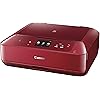
Canon MG7720 Wireless All-In-One Printer with Scanner and Copier: Mobile and Tablet Printing, with Airprint™ and Google Cloud Print compatible, Red

  • Based on 248 reviews
Condition: Used - Very Good
Checking for the best price...
$494.99 Why this price?

Buy Now, Pay Later


As low as / mo
  • – Up to 36-month term if approved
  • – No impact on credit
  • – Instant approval decision
  • – Secure and straightforward checkout

Ready to go? Add this product to your cart and select a plan during checkout.

Payment plans are offered through our trusted finance partners Klarna, Affirm, Afterpay, Apple Pay, and PayTomorrow. No-credit-needed leasing options through Acima may also be available at checkout.

Learn more about financing & leasing here.
Free shipping on this product

This item is eligible for return within 30 days of receipt

To qualify for a full refund, items must be returned in their original, unused condition. If an item is returned in a used, damaged, or materially different state, you may be granted a partial refund.

To initiate a return, please visit our Returns Center.

View our full returns policy here.


Availability: Only 1 left in stock, order soon!
Fulfilled by Shutterbug Camera Shop

Arrives Jan 7 – Jan 11
Order within 6 hours and 7 minutes
Available payment plans shown during checkout

Protection Plan Protect Your Purchase
Checking for protection plans...

Features

  • Quick and Easy Wireless Setup
  • Mobile Device Printing: Easily print from your iPhone, iPad, Android or tablet
  • Powerful Printing options: Air print, Google Cloud Print, NFC, Mopria, Canon PRINT app and more
  • CD/ DVD Printing: Enjoy the ability to create CD or DVD labels
  • Print with a touch from NFC-enabled mobile devices

Description

Wireless All-In-One Small Printer with Scanner and Copier: Mobile and Tablet Printing with Air print and Google Cloud Print compatible

Brand: Canon


Connectivity Technology: Wi-Fi


Printing Technology: Inkjet


Special Feature: Wireless


Color: Red


Model Name: Canon PIXMA MG7720 Printer


Printer Output: Color


Maximum Print Speed (Color): 10 ppm


Max Printspeed Monochrome: 15 ppm


Item Weight: 17.4 Pounds


Controller Type: Android


Maximum Media Size: 8.5 x 14 inch


Included Components: Printer


Print media: Envelopes, Paper (plain)


Scanner Type: Sheetfed


Max Input Sheet Capacity: 200


Display Type: LCD


Compatible Devices: Smartphones, Tablets


Maximum Color Print Resolution: 4800 x 1200 dpi


Sheet Size: 8.5 inches


Maximum Black and White Print Resolution: 4800 x 1200 dpi


Dual-sided printing: Yes


Max copy resolution color: 4800 x 1200 dpi


Duplex: true


Hardware Interface: PictBridge


Ink Color: color


Resolution: 4800 x 1200


Additional Printer functions: All In One


Control Method: App, Touch


Number of USB 2 Ports: 1


Total USB Ports: 1


Model Series: PIXMA


Specific Uses For Product: Office


UPC: 013803257489


Printer Ink Type: color


Global Trade Identification Number: 89


Memory Storage Capacity: 64 MB


Product Dimensions: 14.6 x 17.2 x 5.9 inches


Item Weight: 17.4 pounds


Item model number: MG7720 RED


Is Discontinued By Manufacturer: No


Date First Available: August 18, 2015


Manufacturer: Canon USA Inc.


Frequently asked questions

If you place your order now, the estimated arrival date for this product is: Jan 7 – Jan 11

Yes, absolutely! You may return this product for a full refund within 30 days of receiving it.

To initiate a return, please visit our Returns Center.

View our full returns policy here.

  • Klarna Financing
  • Affirm Pay in 4
  • Affirm Financing
  • Afterpay Financing
  • PayTomorrow Financing
  • Financing through Apple Pay
Leasing options through Acima may also be available during checkout.

Learn more about financing & leasing here.

Top Amazon Reviews


  • An Amazing Machine for the Price
This is a great piece of equipment. Works great and is fairly fast when printing. It's intuitive to use and easy to set up. I've not tried the scan feature yet, but the copy and network printing are flawless. If you are copying from a single sheet, you can't even tell that it's a copy. Also, it easily does double-sided printing. For the price, this is simply amazing. Of course, they are basically giving it away in order to get you to buy their ink, but don't do that. Buy this instead: https://www.amazon.com/dp/B01EO0E49Y/ref=cm_cr_ryp_prd_ttl_sol_4 The only minor negative things I would say is that the paper tray only holds what I would consider an average amount of paper, and Canon wants to install approximately 3.5 million useless printer related pieces of software (which are easy to either uninstall or avoid altogether). The only other complaint would be that if you accidentally open the printer, which is easy to do until you get used to it, the printer has to then think a couple of minutes before it will let you make copies. ... show more
Reviewed in the United States on October 29, 2016 by Joseph

  • It's a time machine! Come back to the 1990s!
Editing to add: I have never regretted any purchase as much as I regret buying this hunk of junk. I made the mistake of getting a new computer and changing my wireless system at home. They have opted to make it impossible to hook up the printer to a new wireless without a computer that has that horrid management software on it. It took me almost a full day to install that antiquated, space hogging software. Now I have to do it again? I have owned wireless printers since they were invented. This is the first one that refuses to allow you to set it up on wireless from the unit itself. Why? What is wrong with these designers? It is now a complete hunk of junk. I either have to spend and entire day installing that ridiculous, horrific software on a new computer or I can take a sledgehammer to the printer. I choose door number 2. Worst printer in history. Absolute worst. -----------OLD REVIEW WHEN IT HAD TWO STARS------------ The first step to understanding this printer is to get into your time machine and travel back to the 1990s. Are you ready? Did you fasten your seat belt? Here we go. When a printer comes with two (yes, two) US map sized fold-outs for the installation instructions, you know you're in for an adventure. Only not the fun disneyland type of adventure. More the "oh no we have no water as we're traveling through the desert with only a hand-drawn map" kind of adventure. Once you unfold map number one, turn it around a few times and orient yourself, you'll start with unpacking the printer. Unpacking the printer will make you weep for the planet, as you rip of more tape than they'd use to wrap and protect a priceless work of art. By the time you get down to the printer, you'll be a little disappointed to realize it's made of a bunch of very flimsy plastic parts. The cheapness of the construction is, in fact, the most modern part of this piece of equipment. Be careful not to throw away any of the Styrofoam, however, because that's where they hid the 500 ink cartridges you'll need. OK, that might be a bit hyperbolic, but there really are a lot. That's when you realize you might have made a mistake, because instead of having to replace TWO very expensive ink cartridges, you'll have to replace 500. Or at least 6. Including Grey. GREY. Seriously? OK. Plugging the thing in and turning it on is only tricky in that the little power socket is black and kind of hidden and you're a little afraid to pick up the printer again, because there is a very legitimate fear that the pressure of a human hand might be enough to crush the thing. You turn it on, and wait an interminable amount of time for it to warm up and give you the next instruction. You might want to bring a book on this adventure. You're going to spend a lot of time waiting. During this time you will get several warnings that you might tiny bits of orange plastic that have been shoved into various slots in the printer for no discernible reason. Pull them out, find more tape you missed the first time, rinse, repeat. Now you get to unwrap those printer cartridges, each of which also comes with strange orange plastic bits taped to it, on top of the shrink-wrap which covers each individual cartridge. Oh, the landfill. Weep for the landfill, people. Each cartridge is about the size of a razor blade, so make sure not to misplace any. They're very easy to lose. I know. I will have nightmares about my hunt for that tiny black cartridge labeled "yellow" for many years to come. By the time you're done with this, the printer should be done with its first of many warm-up cycles. Now you need to insert those cartridges as directed. However, really, don't. Because they ask you to press firmly until they snap into place. If you press this firmly, you will break the cartridge caddy. So you need to kind of hold on to the little strange tab on the edge of the cartridge with one hand and gently press on each individual cartridge until you see a light go on, and then hope it stays on when you release. If it doesn't (and it won't), keep repeating until it magically sticks. Oh, this, of course, is after you figure out how to even slide those puppies into the dark, invisible cavern which houses the caddy. Good luck. Bring a flashlight. Or a headlight, unless you have three hands. Now you'll be glad you brought that book, because there will be another warmup period. You'll know it's over when it spits out a test pattern using only two of the colors. You might assume your cartridges aren't working. Who knows. Maybe they are, maybe they aren't. But you'll get a black and blue test pattern. Now it's time to unfold that second map-sized instruction sheet. You get to go to your computer and go to the web and download a driver. Such joy. Those of you alive in the 90s will recognize the download interface - that old little grey box that used to pop up when you were installing software back when it was a complicated process. Only back then, you went through all of that rigamarole and it worked. This time, you'll likely get a fail. Because they forgot to tell you to go back to the computer and manually enter your wireless information. The printer screen is an old style touch screen with beeps and odd commands. Like "cableless." WTF is "cableless?" Guess what. It's not the same as wireless. Fortunately AFTER that failed install earlier, they now give you the step-by-step instructions on what buttons to push on the printer to achieve connection. DON'T make a mistake. If you do, there's no going back. You'll have to reboot the printer, and then the commands for setting up wireless are hidden three levels down. Now there is a long, breath-holding period while you hope the installation software finds the printer. Once it finally does, there are an extreme number of boxes that must be checked and "nexts" to navigate through before it will do what most printers do immediately upon plugging in: It will install. Woo hoo! Once you finally manage the install, it will ask you to download about an hour's worth of fancy imaging software. You might as well do it, because that's how long it takes the printer to warm up... again. OK, 3 hours might be a bit more of an exaggeration, and if you lived through the 90s and then never progressed, it will probably all seem very normal. When you're done with all of this, you have... a printer. That's it. It's not like you just went through a NASA launch to get something special. It's a plastic box which spits out paper with letters and pictures on it. And since that's something you only rarely need to do in modern times, you may now smack yourself in the head and wonder why you didn't buy a good old plug-and-play HP printer. ... show more
Reviewed in the United States on June 27, 2017 by Kay_Rock

  • I was afraid that I would not like the tray set up (I actually liked the old ...
I am loving this printer. I am a longtime Canon printer fan and have used them in my small home business for years. I was afraid that I would not like the tray set up (I actually liked the old style Canon's that had a page feeder in the back for photo papers and card stock). But, so far so good. I have gotten far more photos out of the ink than I was let to believe from other reviews. Not sure why. As time goes by, more sellers will be selling the cheaper versions of cartridges. I have always used after market brands of ink that are much cheaper. As time goes on the ink will become cheaper and cheaper. Not to say that I use the cheapest ink. I do pay attention to the quality of the ink. Just do your research. ... show more
Reviewed in the United States on June 23, 2016 by Practical Gal

  • Annoying set-up. Decent quality. See update.
This is a review in two parts. I bought this printer because of its capability to print to cds. That is its only purpose. The machine does have wi-fi capability although I chose the USB connection as it is faster and more reliable. Once set-up was completed, it performed/performs perfectly. Getting to that point was a "pain-in-the butt." Two Stars for installation!! The written instructions leave out some important details[like the fact that there are two paper trays one much more obvious than the other], necessitating multiple calls to Canon techs. The initial set-up comes in two parts. You can not go to part two until part one is completed-to the machine's satisfaction. Part two is a disc that will load various programs on to your computer. It didn't completely work and I had to spend an hour and a half on the phone with a Canon tech. I could not access downloaded images, thus I could not print to a cd. The tech set up a machine, did what was needed and passed me the info to get my unit up and running. I had to download a separate program and she took the time to teach me how to use it properly. Without her assistance I probably would have a large paperweight sitting on my desk. I have printed 50+ cds, varying in coverage from c. 25% to 100%. All have been perfect.That program also allows customized printing of images in cd case cover size. I also tried a full sized image, just to make sure that that part worked. It was as good as what my laser printer turns out.The cartridges are small but seem to last quite awhile. I have just replaced my first cartridge, using a non-manufacturer's refill. I chose "Arthur Imaging", available on Amazon, for my replacement cartridges. The machine accepted it and it is performing flawlessly. Five stars for operation!!! One concern--there is a separate cover directly behind the front cover of the machine. That cover hides the access to the cd print slot. You cannot open the cover until the machine tells you to. The cover is plastic and is somewhat harder than it should be to open. My concern is that if the cover mechanism breaks you will no longer be able to print cds. I am very careful opening that cover. Overall--I'd buy it again and I highly recommend it to anyone looking for a printer with cd print capability. UPDATE: This unit lasted 2yrs and 4 months!!! The print head failed two days ago. Very disappointing! 2. Nearly every time that ink cartridges were changed, it took several discs before the colors returned to "normal". It always printed slightly darker than the source image. 3. EVERY SINGLE TIME that the paper tray [the one storing the cd/dvd tray] was removed, the damn machine wanted me to identify what kind of paper I was using. That problem was solved by leaving the tray out until done then simply turning off the printer after reinserting the tray. Overall, I was satisfied with the printer. It did what I expected [usually] until it didn't. One last note--this printer was retired in 2017. It was never worth the several hundred dollars that some sellers are currently asking. ... show more
Reviewed in the United States on May 23, 2017 by Frenchy

Can't find a product?

Find it on Amazon first, then paste the link below.
Checking for best price...