


Search  for anything...

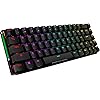
ASUS ROG Falchion Wireless 65% Mechanical Gaming Keyboard | 68 Keys, Aura Sync RGB, Extended Battery Life, Interactive Touch Panel, PBT Keycaps, Cherry MX Red Switches, Keyboard Cover Case

  • Based on 942 reviews
Condition: New
Checking for the best price...
$144.99 Why this price?

Buy Now, Pay Later


As low as $24.17 / mo
  • – 6-month term
  • – No impact on credit
  • – Instant approval decision
  • – Secure and straightforward checkout

Ready to go? Add this product to your cart and select a plan during checkout.

Payment plans are offered through our trusted finance partners Klarna, Affirm, Afterpay, Apple Pay, and PayTomorrow. No-credit-needed leasing options through Acima may also be available at checkout.

Learn more about financing & leasing here.

Selected Option

Free shipping on this product

30-day refund/replacement

To qualify for a full refund, items must be returned in their original, unused condition. If an item is returned in a used, damaged, or materially different state, you may be granted a partial refund.

To initiate a return, please visit our Returns Center.

View our full returns policy here.


Availability: Only 1 left in stock, order soon!
Fulfilled by Amazing Sales Online

Arrives Thursday, Mar 19
Order within 13 hours and 43 minutes
Available payment plans shown during checkout

Protection Plan Protect Your Purchase
Checking for protection plans...

Style: Cherry MX Red Linear


Pattern: Keyboard


Features

  • Compact 65% layout masterfully incorporates arrow and navigation keys, in a 60% keyboard frame
  • Interactive touch panel makes it easy to adjust and customize controls
  • Dual-mode connectivity via wired USB and 1 ms at 2.4 GHz RF, and up to 450 hours of battery life* for stable, long-lasting performance (*with RGB lighting off)
  • Durable and long-lasting ROG PBT doubleshot keycaps
  • Innovative keyboard cover case provides on-the-go protection

Description

COMPACT, WITHOUT COMPROMISE ROG Falchion is a 65% form-factor wireless mechanical keyboard designed to change the way you play. It has an interactive touch panel and innovative two-way cover case, and it’s the first ROG keyboard with wireless Aura Sync RGB lighting. The keys feature durable ROG polybutylene terephthalate (PBT) doubleshot keycaps and German-made Cherry MX RGB mechanical switches for precise, tactile keystrokes. ROG Falchion utilizes a gaming-grade 2.4 GHz RF connection for 1 ms report rate and offers up to 450 hours of battery life on a single charge.

Brand: ASUS


Compatible Devices: Gaming Console


Connectivity Technology: USB


Keyboard Description: Gaming, Mechanical, Macro


Recommended Uses For Product: Gaming


Special Feature: Wireless, Volume Roller, Doubleshot Keycaps, Dual Mode Connectivity


Color: Black


Number of Keys: 68


Keyboard backlighting color support: RGB


Style: Cherry MX Red Linear


Brand: ‎ASUS


Series: ‎ASUS ROG


Item model number:


Hardware Platform: ‎PC


Operating System: ‎Windows 10


Item Weight: ‎2.4 pounds


Product Dimensions: ‎12 x 3.98 x 1.5 inches


Item Dimensions LxWxH: ‎12 x 3.98 x 1.5 inches


Color: ‎Black


Number of Processors: ‎1


Power Source: ‎Battery Powered


Batteries: ‎1 Lithium Ion batteries required. (included)


Manufacturer: ‎ASUS


Date First Available: ‎January 15, 2021


Frequently asked questions

If you place your order now, the estimated arrival date for this product is: Thursday, Mar 19

Yes, absolutely! You may return this product for a full refund within 30 days of receiving it.

To initiate a return, please visit our Returns Center.

View our full returns policy here.

  • Klarna Financing
  • Affirm Pay in 4
  • Affirm Financing
  • Afterpay Financing
  • PayTomorrow Financing
  • Financing through Apple Pay
Leasing options through Acima may also be available during checkout.

Learn more about financing & leasing here.

Top Amazon Reviews


  • Great size without the compromises
Style: Cherry MX Blue Clicky Pattern: Keyboard
I have always enjoyed using keyboards with number pads and my professional life makes it mandatory. But being able to push the work keyboard to the side and pull this out for gaming has changed much of my perspective on compact keyboards. This being 65% and not 60% has made the learning curve for using a compact keyboard much easier and the volume control on the side is such a useful tool to have. I like this keyboard so much I decided to buy two of them. I have the Cherry Mx blue and the Asus Nx blue clicky models. I will say the keys feel very similar, (I don't care about sound, I almost always have headphones on, it's all about the key press feedback for me) but the space bar. I don't know why, but he Asus Nx blue space bar feels horrible, I am not sure if it is the stabilizers or the key itself, but I hate pressing it, it feels wrong. So I do not type on that keyboard ever. I use the Cherry Mx blue model for all of my gaming. It took some time to get used to especially with muscle memory needing to be built up. The battery lasts all day for me, I charge it every night since I have the lights go 100% brightness without turning off. I will say the usb dongle single is not great. So make sure you use the charging cable to bring the usb dongle closer to the keyboard. I was getting noticeable latency when having it further than 2 feet away. Also with the usb dongle being less than 6 inches away from the keyboard, playing a game like league of legends that require very accurate key presses in a very short amount of time, the wireless feature is not recommended. Whenever I play league I connect the keyboard to the cable so I can get zero latency. If not entire key presses will not register. ... show more
Reviewed in the United States on April 14, 2022 by Richard Lopez

  • Top-notch NX switches, great build quality, but a few minor downsides
Style: Cherry MX Red Linear Pattern: Keyboard
To start off, I want to point out that this keyboard (if you purchase the NX red option) has some of the smoothest linear switches that I've ever used. I have used many $400+ custom keyboards, some of which I hand build myself and lubed, all using various linear switches (the Zeal Tealios being the top of the line). ASUS's NX red switches come factory lubed (not the same as hand lubing) but are insanely smooth and consistent. I think these are easily my second favorite switches that I've ever used on any keyboard, custom or prebuilt. Compared to your average Cherry red keyboard, this keyboard is far smoother, less scratchy, and surprisingly, it sounds much less high pitched and plasticky. I love the way this keyboard sounds. The RGB is very nice, and the layout is also great. The only significant problem that I would point out is that the layout is non-standard, which ends up meaning that you cannot use most custom keycap sets with this keyboard, unless they are one of the extremely fancy few keycap sets that come with options to buy specific space bar lengths. The software is typical of any gaming keyboard. You have to use ROG Armory crate, which I don't mind because I use all-ROG parts in my custom computer, since they are the highest end most of the time. If you want a keyboard with smooth linear switches, good RGB, great macro customization, a 65% layout, the option for wireless connection, and a ROG aesthetic, then this is perfect. Edit: My initial model came with a scratch on it, but I simply returned it. There will always be defects in some products. ... show more
Reviewed in the United States on December 29, 2021 by Nicholas

  • Almost Perfect
Style: Cherry MX Red Linear Pattern: Keyboard
Pros: 1. Very nice keyboard: materials, size, battery (in full Light it takes maybe 10-20 hours on WiFi before it reaches 20%), Light Modes, keyboard cover when not in use. Cons: 1. Armoury Crate software only available on Windows; some features, like some specific Light Modes, are also only available on Windows; 2. Keyboard modifiers: - Fn + Left Alt: triggers Macro registration mode, so if you have to trigger a macro that needs both Fn and Alt modifiers - like Alt + F1 - you need to use the Right Alt in order not to enter the Macro registration mode; - Fn + Right Ctrl: trigger contextual menu, so if you have to trigger a macro that needs both Fn and Ctrl modifiers - like Ctrl + W - you need to use the Left Ctrl in order not to pop up the contextual menu; - to summarise: if you want to trigger Ctrl + Alt + F1, when the Fn-Lk is off, you need to use Left Ctrl + Right Alt + Fn + 1; - this is a smart way to add extra functionality on to the modifiers when used together with Fn, but it gets sometimes difficult to trigger a combination; the alternative is to define Macros for the most used combinations; 3. The slider can be accidentally touched sometimes (e.g. keyboard not on a horizontal surface), but you can disable the slider with Fn + Tab. ... show more
Reviewed in the United States on April 15, 2021 by Sebastian

  • One of the best 65% keyboards
Style: Cherry MX Red Linear Pattern: Keyboard
Yes yes I get it... a lot of kewbs out there would say their keyboard is way better, way more customizable than this keyboard. And it is true but for me there is a lot going for this keyboard. 1. Size: this keyboard 65% layout keyboard are very different than others custom-made one there because I feel like it is smaller. 2. Connection: not a whole lot of custom-made keyboards are wireless but this one is. It also can be use wired with USB-C connection and a storage for your usb dongle when you need to take the keyboard with you for traveling. 3. Macro: one of the reason I like 65% keyboard because they do include arrow keys so it worked out great for me who can use this keyboard for goin up and down on my coding homeworks. But one advantage this keyboard also have over the others is the side volume-up and volume-down slider. It is awesome, it does take time to get use to that and it does not seem very sensitive but it better than I have to hit function + other keys for volume. 4. Built: custom-made keyboard can be made with multiple different materials: like wood, plastic, aluminum, etc. But this keyboard is already made with seem to be high quality aluminum case and also include a plastic wrap in case you need to take the keyboard somewhere. Overall this keyboard fits everything that I need and I love it. ... show more
Reviewed in the United States on March 23, 2021 by Nguyen

Can't find a product?

Find it on Amazon first, then paste the link below.
Checking for best price...

