Search  for anything...

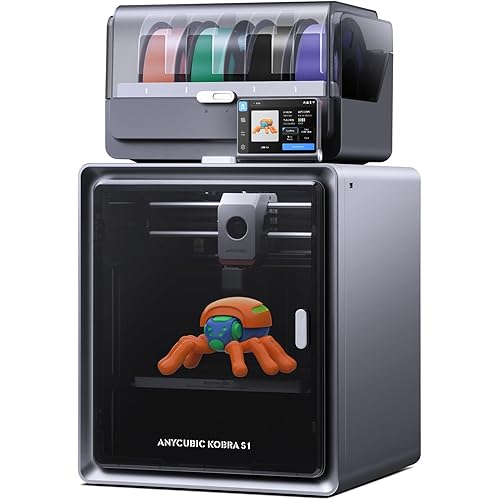
Anycubic Kobra S1 ACE 2 Pro Combo Multicolor 3D Printer, Native 4 Color

  • Based on 22 reviews
Condition: New
Checking for the best price...
$549.99 Why this price?
Save $80.00 was $629.99

Buy Now, Pay Later


As low as / mo
  • – Up to 36-month term if approved
  • – No impact on credit to apply
  • – Instant approval decision
  • – Secure and straightforward checkout

Ready to go? Add this product to your cart and select a plan during checkout.

Payment plans are offered through our trusted finance partners Klarna, Affirm, Afterpay, Zip, Apple Pay, and Google Pay. No-credit-needed leasing options through Acima may also be available at checkout.

Learn more about financing & leasing here.

Free shipping on this product

30-day refund / replacement

To qualify for a full refund, items must be returned in their original, unused condition. If an item is returned in a used, damaged, or materially different state, you may be granted a partial refund.

To initiate a return, please visit our Returns Center.

View our full returns policy here.


Availability: In Stock.
Fulfilled by Amazon

Arrives Tuesday, Oct 6
Order within 9 hours and 9 minutes
Available payment plans shown during checkout

Protection Plan Protect Your Purchase
Checking for protection plans...

Features

  • Built in 4-Color Multicolor Printing Includes ACE 2 Pro for 4-color printing right out of the box; connect up to 4 ACE 2 Pro units to unlock 16-color printing, enabling more realistic models, creative prototypes and detailed multicolor projects
  • High-Speed CoreXY Performance Fully enclosed CoreXY structure combined with Kobra OS delivers stable motion at speeds up to 600 mm/s; produces smooth surfaces, sharp details and reliable results for everyday printing
  • Smart Filament Management Features intelligent identification filament recognition, remaining filament estimation and automatic filament refill; automatically identifies compatible filament settings, reduces setup time and minimizes interruptions during long prints
  • Print While Drying Technology ACE 2 Pro supports simultaneous drying and printing at temperatures up to 65C; active moisture removal, sealed storage and temperature monitoring help maintain filament quality for consistent print performance
  • Broad Material CompatibilityKobra S1 ACE 2 Pro Combo 3D Printer supports PLA, PETG, ABS, ASA and other materials; equipped with a 320C quick-release hotend, LeviQ 3.0 auto leveling and resonance compensation for easier operation and greater accuracy
  • Note:ACE Pro and ACE 2 Pro cannot be used simultaneously

Description

What is the difference of the Kobra S1 ACE 2 Pro Combo and the Kobra S1 Combo? Kobra S1 ACE 2 Pro Combo comes standard with the ACE 2 Pro, supporting up to 16-color printing. The Kobra S1 Combo is equipped with the first-generation ACE Pro, which supports up to 8-color printing. What is the difference of the ACE 2 Pro and the First-Generation ACE Pro? ACE 2 Pro: 65°C drying during print; real-time temp/humidity monitoring; active moisture control & sealed storage; filament runout detection. ACE Pro (Gen 1): 55°C drying max; no humidity check, active control, or runout sensor. If I have one first-generation ACE Pro, can I use it to print 8-color with the Kobra S1 ACE 2 Pro Combo? No. The ACE 2 Pro can't be used with the first-generation ACE Pro together because the simultaneous use of Generation 1 and Generation 2 multicolor system is not supported. What materials can the Kobra S1 ACE 2 Pro Combo print with? Compatibility with PLA, PETG, TPU (95A), ABS, and ASA. TPU (95A) is only suitable for single-color printing. Due to the physical properties, must be fed directly into the printer, not with the ACE 2 Pro for multi-material printing. Is the printer noisy during operation? Standard mode: as low as 46dB Quiet mode: as low as 44dB Kobra S1 ACE 2 Pro Combo Anycubic Kobra S1 ACE 2 Pro Dryer Box Anycubic Kobra 3 Max Anycubic Kobra X Anycubic Kobra X Combo Anycubic is a famous consumer-grade 3D printing manufacturer specializing in delivering quality 3D printing products. Featuring a professional R&D team and high-end innovation technologies, we could make 3D printing more accessible to meet the demand from 3D professionals and amateurs alike. We are passionate about providing effective 3D printing solutions to unleash your creativity and help you push the limits of what's possible. A more comprehensive range of high-quality products at competitive prices To meet our users' various needs, we provided multiple options. So You can always find your suitable 3D printers in our stores whether you are a 3D printing beginner or a professional. We believe there's an innovator in everyone. We are passionate about helping you transform your ideas and creativity into reality and making you enjoy the freedom to create with 3D printing technology.

Brand: ANYCUBIC


Material: PLA, PLA+, TPU, ABS, ASA, PETG、Matte PLA、Silk PLA


Color: Black


Product Dimensions: 15.75"D x 16.14"W x 19.29"H


Item Weight: 18 kg


Product Dimensions: 15.75 x 16.14 x 19.29 inches


Item Weight: 39.6 pounds


Date First Available: May 11, 2026


Manufacturer: ANYCUBIC


Frequently asked questions

If you place your order now, the estimated arrival date for this product is: Tuesday, Oct 6

Yes, absolutely! You may return this product for a full refund within 30 days of receiving it.

To initiate a return, please visit our Returns Center.

View our full returns policy here.

  • Klarna Financing
  • Affirm Pay in 4
  • Affirm Financing
  • Afterpay Financing
  • Zip Pay in 4
  • Financing through Apple Pay
  • Financing through Google Pay
Leasing options through Acima may also be available during checkout.

Learn more about financing & leasing here.

Top Amazon Reviews


  • Fast, Feature-Rich Printer, Great Prints, One Belt Tension Gotcha
Coming from an original Ender 3 I've had since 2017, the jump in technology here is honestly staggering — this thing is heavier, faster, quieter, and packed with features that felt like science fiction on my old machine. Setup was mostly straightforward, but there's one critical thing the instructions completely skip over: check your belt tension before you even power it on. Mine was loose out of the box, and because nothing in the setup guide mentioned it, I assumed it had some kind of automatic tensioning system — it doesn't, and a failed calibration followed by the printer just shutting down sent me to Google. The fix turned out to be simple once I found it, just two screws in the back with springs behind them, loosen both and the belt snaps right into proper tension, but it cost me extra time and frustration that a single sentence in the manual would have prevented. It's a small thing, but for a printer positioning itself as beginner-friendly, skipping a step that can produce a hard failure right out of the box is a real miss, and I'd bet I'm not the only one who hit it. Auto-leveling, on the other hand, is exactly the kind of feature I wish the belt tension issue had matched in execution: simple to run and completely automatic. You can trigger it before every print or just run it when you want, and it takes care of the rest without any input from you. After years of manually adjusting bed screws and paper-testing corners on the Ender 3, not having to think about leveling at all feels like the future arrived a decade late. Connectivity has been just as painless. It was good and easy to set up from the start, and I haven't had a single connectivity issue since — not after powering off, not even after unplugging it entirely. It just reconnects and picks up where it left off. The multicolor ACE 2 Pro system is genuinely clever for keeping four spools loaded and ready to swap on the fly. Watching it automatically detect and switch filament mid-print without any manual intervention is one of those moments that makes the "staggering leap in technology" feeling click into place. Though I'll be honest that the purging and extrusion clearing during color swaps burns through filament faster than I'd like for heavy multicolor work — on a print with frequent color changes, the waste tower can end up rivaling the model itself in material used, so if that's your primary use case, a tool-changer style printer might suit you better. That said, my first Benchy came out beautifully with minimal stringing, right out of the box with essentially stock settings, which is more than I can say for the tuning sessions the Ender 3 used to demand before every serious print. The built-in camera with phone and timelapse support is a fantastic touch, letting me check in on prints from another room and turning even a mundane calibration test into a satisfying timelapse to watch back. And once that belt tension was sorted, this printer has run flawlessly, print after print, with no drift in calibration and no surprises. My old Ender 3 isn't going anywhere — it's earned a permanent spot for quick single-color jobs, the odd experiment I don't mind risking, and just for a bit of nostalgia — but this is now the workhorse of the two, and it's not even close. ... show more
Reviewed in the United States on August 26, 2026 by Ben H

  • A decent knockoff
Let's get the obvious part out of the way: it's pretty clear what printer the designers were looking at when this one was being developed. And honestly? That's not necessarily a bad thing. This is a surprisingly capable 4-color, single-nozzle printer that delivers solid results for the price. The moment you start handling it, you'll notice the materials aren't exactly premium. The plastics and overall feel make it obvious where some of the cost savings came from. Then again, premium quality usually comes attached to a premium price tag. At around $550, it might seem expensive at first glance, but it's actually one of the more affordable entries in the multi-color printing space. While it has a few quirks, I never ran into anything that I'd consider a dealbreaker. Out of the box everything worked as it should, easily. One thing worth mentioning: if you use filament clips on your spools, remove them before starting a print. I didn't realize one was still attached and spent longer than I should have troubleshooting filament feeding issues before discovering the culprit. The printer was innocent. The clip was guilty. There are also a few software rough edges. In several menus, text gets partially cut off unless you scroll, which makes the interface feel a little less polished than it could be. Fortunately, the most important part of any 3D printer is what comes out of it, not what its menus look like. I'm happy to report that it prints well. No issues when printing PETG; everything stuck like it should. Print quality has been consistently good, color changes work as expected, and overall reliability has been better than I anticipated. That's ultimately what matters most. Oh, and three gripes: 1) It comes with a 0.4 Brass nozzle (not a big deal if you're not printing to fiber reinforced filament like PLA-CF, PETG-GF, etc.) 2) The "quick swap" nozzle isn't what I'd call super easy. I'd actually call it one of the more difficult "quick swap" setups I've tested. I took a photo so you can see the connector you're supposed to plug it it which in in the back in the dark. 3) A simple nozzle change from 0.4 Brass to a 0.4 Steel nozzle hard REQUIRES you to manually reboot the machine As for value, I'd call it average to slightly below average. Not because it's bad, but because an extra $100 can open the door to some very strong competition with more refined hardware and software. Still, if this fits your budget, don't let that discourage you. It's a capable machine that performs well and offers an accessible entry point into multi-color printing. Overall, this isn't a perfect printer, but it's a good one. If you're willing to overlook a few rough edges, you'll get a surprisingly competent machine that delivers where it counts. Making can be rewarding! So go forth and make something! ... show more
Reviewed in the United States on September 16, 2026 by Matthew T.

  • Excellent starter printer, ace pro 2 replaces filament dryer
This is my first Anycubic 3D printer ever. I've had my share of older Ender 3 machines, Sovols, and more recently a Bambu Lab. I'm happy to add the S1 to my current lineup. There are plenty of unboxing and review videos online, so below is my personal experience with the printer. Getting Started: Unboxing is not that bad. The included instruction booklet was easy to follow. It took me less than 10 minutes from unboxing to finishing setup of the ACE Pro 2 and booting up. The initial calibration takes about 10 minutes. There were two additional firmware updates, one for the printer and one for the ACE Pro 2. Each took about five to ten minutes to complete. You'll have to set up an Anycubic account to complete the whole setup, by the way. The account and app allow you to monitor prints remotely and control other functions of the printer, like speed, temperature, and so on. First Look: The shell of the S1 is mostly plastic, and even the door and top cover are plastic. One thing I find odd is that the two hinges on the door have a pretty noticeable gap around them. This seems counterintuitive, since while printing you'll want to maintain a steady, heated chamber temperature, especially if you're printing filaments like ABS/ASA. I'm not sure how much these two gaps around the hinges affect internal temperature. Adding filament to the ACE Pro 2 was pretty simple. The filament tab on the screen is where you'll want to navigate when adding, removing, or changing filament. I followed the pop-up prompt to add my first filament. You can tap the "?" on the filament icon to set the designated color and filament type. Printing: I printed a test Benchy from the files available on the printer, using a new roll of Sunlu White PLA+. I also printed a test Benchy on my X1D as a comparison, using the same filament and default manufacturer settings. The Benchy file on the S1 included a raft. It printed pretty well, with some stringing on the overhangs; everything else looked good. The stringing can be fixed with a torch, or I could dry the filament overnight using the ACE Pro 2's function. Next, I printed a Voronoi vase directly from the app using default S1 settings. Again, there was some stringing in certain areas. I didn't have time to do a multicolor print for this review, but the included files have a multicolor fidget ring you can use to experiment. Just make sure you set up a poop bucket in the back to catch all of the color-changing purge waste. App Control: The app isn't as polished as Bambu Handy, but it's still easy to navigate, monitor prints, and adjust small settings like bed and nozzle temperature as needed. The camera feed is clear and sharp, but you can't go full screen the way you can with Bambu's app. The app has plenty of files you can browse and print directly from your phone, and you can even comment on and rate your previous prints. I had no issues opening the app, monitoring my prints, or updating the printer's firmware directly from my phone. Slicer: The Anycubic slicer is basically a reskinned version of OrcaSlicer without recent updates, so it's a love-hate, or more like a hate/semi-hate, relationship. You can add the printer under the Workbench tab in the slicer, assuming it's already connected to your network. 3mf files can be pulled from the Anycubic Maker online site. I didn't have any issues with the slicer at the time of this review. Final Thoughts: This is a great starter printer, especially if you're new to 3D printing or just want something that lets you "print and go." Of course, there will always be opportunities with any printer to get your hands a little dirty. I think people should include the S1 in their decision if it goes on sale, especially now that the new ACE Pro 2 essentially eliminates the need for a separate filament dryer. Anycubic recently released the S1 Max, with a larger print volume, a tempered glass door and hood, and chamber temperature control for engineering filaments, though it comes at a higher cost of about $800 currently. Hopefully the price of the S1 with ACE Pro 2 comes down a bit following that release. I have fewer than 50 hours of print time so far, but it's been holding up well and keeping pace with my X2D, A1 Mini, and Sovol SV06. ... show more
Reviewed in the United States on August 28, 2026 by Andy Do

  • A very competent 3-D printer for the money
I got this Kobra S1 multi-color 3-D printer for my volunteer work at the school. We agreed that I get, install and teach the kids how to use it, and the PTA funds the consumables. A nice circle of events because I still recall my work with a group at a big toy company over 10 years back. The task was to help with selection of the design and fabrication of a 3-D printer targeted to kids. The less than $270 price mark ($380 adjusted for inflation) had to be met. When I looked at this 3-D multicolor printer, checked the specs, read the reviews, it was amazing that an additional $200 from that mark will get you a product which is more than 10-fold increase in value (from quality, size printed, material handling, noise, and every other aspect). I understand that this progress happens with all technology, but in my case, I remember the limitations then. I tested this printer and easily concurred with most of the users reported. It is a competent printer, which I had no problems getting up and performing a few test runs. Now that I feel confident working with it and printing items, I saw recommended for the students’ age group. I’m sure that at least a few students will be fired up on 3-D printing. The rest will have to suffer through my long-winded explanations :) A great mid-range 3-D printer for my use case. ... show more
Reviewed in the United States on September 21, 2026 by S R

  • Enclosed CoreXY Precision with Active Filament Drying
I bought this printer to upgrade my fabrication capabilities for functional prototypes and custom equipment mounts. I specifically needed a fully enclosed CoreXY system capable of multi-color printing that could also actively dry technical filaments like ABS and ASA during long print runs. Pros & Cons What I Like About the Product (Pros): The standout feature is the ACE 2 Pro filament management system, which allows for seamless 4-color printing and actively dries spools at up to 65°C while the machine operates. The fully enclosed CoreXY architecture provides a stable thermal environment, crucial for preventing warping on high-temperature materials. Additionally, the 320°C quick-release hotend handles engineering-grade filaments without clogging. Drawbacks to the Product (Cons): While the machine boasts a 600 mm/s maximum print speed, pushing it to that limit with heavier files does generate noticeable vibration on the workbench. Also, the physical footprint is quite large once you attach the ACE 2 Pro module and route the PTFE feeding tubes, requiring a dedicated, deep table for setup. Setup & Unboxing: this unit is fairly straightforward but requires some floor space. The printer arrives mostly assembled, but installing the ACE 2 Pro unit and routing the four individual PTFE tubes to the toolhead takes patience. The LeviQ 3.0 auto-leveling and Z-offset calibration handle the bed tramming automatically out of the box, letting you jump into your first print in about 15 minutes. Build/Quality/Functionality The construction is robust and rigid. The CoreXY motion system handles fast travel moves with excellent precision, and the full enclosure keeps ambient drafts away from the 250x250x250mm build volume. The internal heating of the ACE 2 Pro makes a massive difference in print quality by feeding perfectly dry filament directly into the extruder, eliminating the stringing associated with moisture absorption. Care for Product To keep the motion system smooth, periodically wipe down the guide rods with a lint-free cloth and apply a light coat of synthetic lubricant. Clean the PEI spring steel build plate with isopropyl alcohol after every few prints to maintain strong first-layer adhesion. Keep the ACE 2 Pro sealed when not in use to prevent excess moisture from overwhelming the drying system. Ease of Use The 4.3-inch capacitive touchscreen provides an intuitive interface for managing filament swaps and monitoring print temperatures. Utilizing the Anycubic app for remote monitoring is convenient, though setting up the initial Wi-Fi connection took a couple of attempts. Built-in smart features like AI spaghetti detection provide great peace of mind during overnight prints. Price for Value This combo offers exceptional value for advanced hobbyists and functional makers. By pairing a high-speed enclosed CoreXY printer with a four-color heated filament dryer in one package, it eliminates the need to buy separate modular upgrades. It is a highly capable investment for rapid prototyping. Summary and Recommendation This 3D printer combo delivers high-quality multi-color results with excellent thermal stability. The active filament drying and enclosed design solve the biggest headaches of printing advanced materials. I highly recommend it for anyone needing a fast, reliable workhorse for complex, multi-material fabrication. ... show more
Reviewed in the United States on August 30, 2026 by user3840133424

  • Excellent multicolor printer for beginners and experts!
I already have four other 3D printers in my office, and this Anycubic Kobra S1 ACE 2 Pro Combo has been a great addition. I especially like that the multicolor and dryer accessory are included instead of having to buy them separately, as is common with many other printers. So far, everything I have printed has turned out perfectly. It is also easy enough to use that I would recommend it to children who are interested in learning 3D printing, with the usual adult supervision. Getting started was very straightforward because most of the printer was already assembled. I only had to remove the contents and a few screws from inside the machine, plug everything in, and get it running. I highly recommend using Anycubic's slicer software with it. OrcaSlicer does work, but it does not properly recognize the multicolor unit. You have to set the colors on the printer and then set them again in Orca, which gets annoying quickly. The main limitation is the build-plate size, although I already knew about that before purchasing it. Most enclosed printers do not have especially large build areas, and the smaller plate is fine for me because I mostly print smaller parts. Print quality has been top-notch so far, with no bed-adhesion problems, and I have not needed to use glue like I do with most of my other printers. The speed is amazing, topping out at 600 mm/s in my experience, and I have not had any filament-clogging issues. At $509.99, I think the price is fair considering the printer and multicolor dryer system are included. It is a capable setup for both beginners and experienced users, and I definitely recommend it. ... show more
Reviewed in the United States on August 24, 2026 by RDizzle83

  • Good for the money, but a little frustrating at times
I've already got a few other printers in the shop, and adding this Kobra S1 combo was a nice addition. It is a fully enclosed CoreXY, genuinely fast, and having the ACE 2 Pro four-color unit and filament dryer bundled in instead of as pricey add-ons is a big part of the value. Setup was fairly quick and easy, and my first prints came off clean with basically stock settings. The built-in camera and AI spaghetti detection are handy for keeping an eye on longer runs, though I have not had any spaghetti issues yet to test the AI detection. All that said, I have had some issues with this printer that shows why it is priced much lower than the competition. First, the top panel and the door are light acrylic rather than glass, and the stock nozzle is brass (not hardened), so I'd swap in a hardened one before running anything abrasive. AnyCubic pushes you to use their slicer, though I have found a way around that to use my normal farm software. Their slicer isn't bad, but I have 5 different printer brands in my farm so managing 5 slicers is a bit of a pain. My biggest issue so far happened when the (thin plastic) drag chain connecting to the toolhead broke which caused the toolhead to not be able to fully dock over the purge chute, Then when it would start printing it would smash the nozzle into the build plate damaging both the nozzle and gouging a big line down the middle of the plate. ... show more
Reviewed in the United States on September 11, 2026 by Words R Hard

  • Anycubic Kobra S1 ACE 2 Pro Combo Multicolor 3D Printer, Native 4 Color
I gave my first S1 a tough review as I was an early adopter and at that time Anycubic didn't have any AMS systems in stock so I was stuck with an S1 that was really limited... Well those days are gone, the S1 has matured and the AMS unit has undergone revisions and is not in stock, this unlocks the full potential of the S1! Overall I have to say the S1 is a top of the line option if you are looking for a printer to print the more exotic filaments like PETG, ABS or even TPU, being enclosed it just prints that much better for picky filaments... I really don't have any complaints, the printer works, the newer revisions of the AMS work quite well... There are of course many other similar printers and some new innovations in filament color swapping but for a legacy machine at a budget price you really can't ignore this printer, it's still a fine option... I now have multiple S1s and they are all setup for specific filaments, one setup for ABS, one setup for PETG and so on, this way I don't risk any cross contamination of plastic types... ... show more
Reviewed in the United States on September 13, 2026 by Silly Rabbit

Can't find a product?

Find it on Amazon first, then paste the link below.
Checking for best price...