





Buy Now, Pay Later
- – 4-month term
- – No impact on credit to apply
- – Instant approval decision
- – Secure and straightforward checkout
Ready to go? Add this product to your cart and select a plan during checkout.
Payment plans are offered through our trusted finance partners Klarna, Affirm, Afterpay, Zip, Apple Pay, and Google Pay. No-credit-needed leasing options through Acima may also be available at checkout.
Learn more about financing & leasing here.
Selected Option
FREE 30-day refund/replacement
To qualify for a full refund, items must be returned in their original, unused condition. If an item is returned in a used, damaged, or materially different state, you may be granted a partial refund.
To initiate a return, please visit our Returns Center.
View our full returns policy here.

At a glance
- Condition
- New
- Color
- Deep Black (4 Pack)
- Size
- 4 Pack
- Dimensions
- 1.26"L x 1.26"W x 0.36"Th
- Weight
- 28 g
- Material
- Plastic, Polycarbonate (PC)
- Number of Batteries
- 4 12V batteries required. (included)
- Warranty
- 2 Year Manufacturer Warranty
- Works with
- Requires iPhone SE, iPhone 6s or later, or iPod touch (7th generation) with iOS 14.5 or later, or iPad Pro, iPad (5th generation or later), iPad Air 2 or later, or iPad mini 4 or later with iPadOS 14.5 or later.
Features 10
- Warm Tips: Upon receiving these "Tukio tag", please watch the video about "How to connect with your iPhone" and "How to replace battery" on this page. Refer to the instruction manual included in the package for further assistance. Our after-sales team is always available to assist you.
- Tracker Everything: Key finder tracker for your key, wallet, luggage, backpack, suitcase, car, kid and more, protect lost or stolen stuff and make family life easier. Each tag weighs just 7 grams, making it lightweight and portable. It comes with a silicone protective case, a keychain, a lanyard, and other practical accessories, making it an ideal choice for everyday use.
- Tracker Anywhere: Wallet tracker allows you to view your items location by Apple "Find My" app. When distance is less than 200 feet, you can open the Find My app and tap Play Sound, and the key finder locator with sound will emit an 80-100 dB beep to help you find your stuff. When distance is greater than 200 feet, you can find items further away with the help of hundreds of millions of Apple devices in the "Find My" network.
- Tracker Your Item with Apple Find My App: How to use it? Simple one-tap setup instantly connects smart tag with your iPhone or iPad. Simply use the pre-installed "Find My" app and add the tracker tag to the "Items" tab. Then you can keep track and find your items in the "Find My" app. (Note: Only compatible with iOS devices, not Android)
- Left Behind Remind and Lost Mode: When luggage tracker is out of Bluetooth range, your iOS devices will receive a notification with the last known location, you can view the most recent location on the "Find My" app. If you preset a "Lost Mode" and retain your contact information, the tracking device allows nearby iOS devices to access your contact information and remotely provide you with the location of the rastreador.
- Replaceable Battery and IP67 Waterproof: Key tracker bulid in one CR2032 battery that enjoy up to 1 years of uninterrupted use. When the battery is low, Apple "Find My" app will notify you to replace it. The unique cover design also prevents children from opening the tracking device. With an IP67 rating, this item finders withstands immersion in water up to 3 feet for 30 minutes. Ideal for outdoor activities.
- Protecting Your Privacy: The chip in this bluetooth tracker is Apple MFI certified, all communication with the "Find My" network is anonymous and encrypted for privacy. Location data and history are never stored on tag, ensuring that your location data is encrypted to anyone else (even the manufacturer).
- Share with Your Family and Friends: New feature in iOS 17 - You can share this locator tags with up to 5 borrowers in the Apple "Find My" app, and they can see the tag's location on Apple map, so items that everyone uses can be tracked by family and friends. Borrowers will not receive tracking notifications when the tracker moves with them. Please make sure your iOS device is updated to iOS 17/iPadOS 17/macOS 14 or above.
- Packing List: This package includes 4* tracker tag, 4* protective silicone case, 4* key chain, 4* lanyard, 4* CR2032 replaceable battery (built-in), 1* user manual and friendly customer service.
- Great Gift for Finding Items: If your family or friends often lose items, then this "Tukio tag" tracker is an easy and functional gift for family and friends.
Description
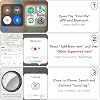
How do I add my Tukio Lucid tag device to Apple's Find My app? Press and hold the button on Lucid tag for 3s, you will hear a tone. Open the "Find My" app and tap ltems > + > Add Other ltem. "Find My" app will find your Lucid tag device. Follow the on screen prompts to complete setup. Can not connect? [Step 1] Check iPhone network & Bluetooth: Make sure the iPhone network is working properly and Bluetooth is turned on. [Step 2] Reset the tag: Quickly press the button 4 times, hold 5th press until tone for factory reset and re-pair in Find My app. Is Tukio Lucid tag certified by Apple? Yes, it is certified and works seamlessly with the "Find My" app and network. What is Apple Find My app and Find My network? Find My app is a pre-installed app on device from Apple. It allows you to locate Tukio Lucid tag via the find My network, which is a network of hundreds of millions of Apple devices to detect missing devices or items nearby and report their location. Is it possible to replace the battery in the tracker? Yes, the Tukio Lucid tag is equipped with a CR2032 battery, which you can easily replace when needed. When the battery is low, Tukio tracking device will notify you to replace the battery. At Tukio, our mission is to revolutionize the way people keep track of their valuables. Founded by a passionate team of innovators, we have dedicated ourselves to providing solutions that make everyday life convenient and smooth. Since our inception, we have proudly served thousands of users worldwide, helping them overcome the frustration of misplaced items. Choose Tukio, everything we build is built with care for you. First go to your order page, find the order number of the product in the list and contact seller. We began our journey fueled by passion and a vision. Inspired to create something meaningful, we embarked on this adventure, shaping our brand with dedication. Crafted with precision and innovation, our products stand out for their unparalleled quality. We prioritize excellence, ensuring each item delivers a distinctive and exceptional experience.
Specs 21
| Brand | Tukio |
|---|---|
| Material | Plastic, Polycarbonate (PC) |
| Number of Batteries | 4 12V batteries required. (included) |
| Product Dimensions | 1.26"L x 1.26"W x 0.36"Th |
| Antenna Location | Home, Office |
| Item Highlight | Replaceable Battery Bluetooth Tracker Compatible with Apple Find My, Item Locator Smart Tag for Keys, Bag, Luggage and More |
| Unit Count | 4 Count |
| Number of Items | 4 |
| Number of Packs | 4 |
| Manufacturer | Tukio |
| Model Number | Lucid tag |
| Mfr Part Number | Lucid tag |
| Battery Average Life | 1 years |
| Connectivity Technology | Bluetooth |
| Control Method | App |
| Audible Noise | 100 db |
| Battery Serviceability | Replaceable |
| Range | 200 feet |
| Item Dimensions L x W x Thickness | 1.26"L x 1.26"W x 0.36"Th |
| Item Weight | 28 g |
| Enclosure Material | Plastic, Polycarbonate (PC) |
No specs match.
Frequently asked questions
To initiate a return, please visit our Returns Center.
View our full returns policy here.
- Klarna Financing
- Affirm Pay in 4
- Affirm Financing
- Afterpay Financing
- Zip Pay in 4
- Financing through Apple Pay
- Financing through Google Pay
Learn more about financing & leasing here.


