Search  for anything...

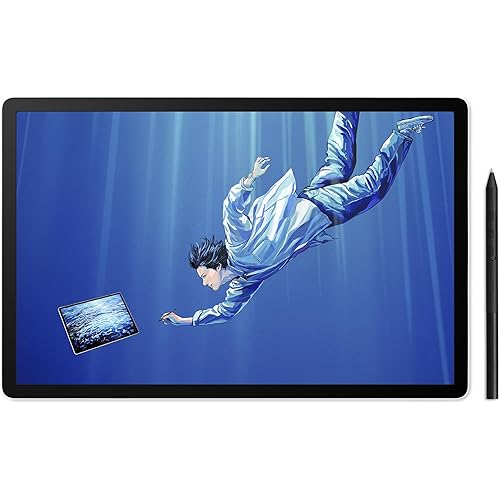
XPPen Artist Pro 24 Gen2 4K Ultra HD Drawing Tablet with Screen, Dual 16384 Pen Pressure Stylus, Wireless Keydial, 99% Adobe RGB, △E<1 Graphic Tablet with Full Laminated AG Pen Display 23.8"

  • Based on 37 reviews
Condition: New
Checking for the best price...
$1,299.99 Why this price?

Buy Now, Pay Later


As low as / mo
  • – Up to 36-month term if approved
  • – No impact on credit to apply
  • – Instant approval decision
  • – Secure and straightforward checkout

Ready to go? Add this product to your cart and select a plan during checkout.

Payment plans are offered through our trusted finance partners Klarna, Affirm, Afterpay, Apple Pay, and PayTomorrow. No-credit-needed leasing options through Acima may also be available at checkout.

Learn more about financing & leasing here.

Selected Option

Free shipping on this product

This item is eligible for return within 30 days of receipt

To qualify for a full refund, items must be returned in their original, unused condition. If an item is returned in a used, damaged, or materially different state, you may be granted a partial refund.

To initiate a return, please visit our Returns Center.

View our full returns policy here.


Availability: In Stock.
Fulfilled by Amazon

Arrives Monday, Jul 20
Order within 2 hours and 51 minutes
Available payment plans shown during checkout

Protection Plan Protect Your Purchase
Checking for protection plans...

Size: 23.8 Inch


Features

  • Future-Proofing Drawing Monitor: A 4K display reduces the "screen door effect" in VR game design, eliminating visible pixel gaps for a clearer, immersive experience. Higher pixel density allows for precise design. Choosing this 23.8-inch 4K UHD (3840x2160) graphic tablet prepares your setup for future advancements in high-resolution content, VR, and game development.It also enhances multitasking by functioning as multiple 2.5K windows, eliminating the hassle of constant zooming and window-switching
  • Calman Verified Display: This drawing tablet is Calman-verified with a E < 1, ensuring exceptional color accuracy. It covers three color gamuts, including 99% Adobe RGB, 99% sRGB, and 98% P3, enabling professional photographers, designers, and artists to achieve precise and vibrant works during post-processing. Additionally, it delivers 1.07 billion colors (8bit+Hi-FRC color depth) and 300cd/m2 Brightness, 1000:1 contrast ratio providing smooth gradients and more nuanced visual transitions to bring your creations to life
  • Dual X3 Pro Chip Styluses: Both styluses have 16,384 pressure levels and a 60 tilt function. The Slim Stylus features a lightweight, slim design with a thinner nib, smaller magnetic core, and replaceable keys, while the Smart Chip Stylus offers a pen-on-paper feel with a felt nib, two shortcut keys and a digital eraser for productivity. The pen case holds both styluses, acts as a stand, and includes 28 extra nibs and 2 detachable pen clips for easy replacement
  • Color Calibration Software: XPPen ColorMaster, powered by Calman's Aurora Color Engine, ensures consistent, professional color performance on both Windows and macOS. Each Artist 24 Pro Gen2 is rigorously calibrated and tested to ensure top-class color accuracy. It allows adjustments across three color spaces and provides a permanent color management service for Artist Pro 24 (Gen 2) users
  • AG & AF Glass: The AG etched glass minimizes glare, helping artists and designers maintain focus during long sessions. The anti-fingerprint coating keeps the surface clean for better usability. Nanoscale etching prevents pixel flash points for a smooth visual experience, while full lamination reduces parallax, making drawing feel more intuitive and paper-like
  • ACK05 Wireless Keydial: Features 10*4 customizable keys and physical dial allow for smoother workflows and faster access to frequently used functions, making it a valuable tool for streamlining the creative process. The ergonomic, one-handed design offers effortless control, reducing strain and fatigue during long work sessions
  • Upgraded Accessories: The ACS02 Stand offers single-handed angle adjustment from 16 to 72 for various drawing positions. It has vesa hole (100*100mm)on the back for optional ACS15 Stand(not included) adds height adjustment, under-desk creation, and rotation. Connect the display via USB-C, Display Port, or HDMI for easy switching between devices like MacBooks and Windows laptops. A built-in cable harness enhances stability, while multi-functional buttons allow quick brightness and signal adjustments
  • High Compatibility: Works smoothly with various systems and software. Compatible with Windows 7 (or later), macOS 10.13 (or later), Android (USB3.1 DP1.2), ChromeOS 88 (or later), Linux. Support popular digital art software such as Adobe Photoshop, Illustrator, SAI, CDR, Clip Studio Paint, GIMP, Krita, MediBang, FireAlpaca, Toonboom, Maya, and Blender3D, etc.
  • What You Get: Artist Pro 24 4K Drawing Tablet, X3 Pro Stylus, X3 Pro Slim Stylus, Pen Clip, X3 Pro Slim Stylus nibs*10,X3 Pro Stylus Standard nibs*10,Pen Case with Nibs (X3 Pro Slim Stylus nibs *4, X3 Pro Stylus felt nibs*4), Wireless Shortcut Remote and Bluetooth Receiver, Power Adapter and Power Cord, DisplayPort Cable, HDMICable, USB-C to USB-C Cable, USB-C to USB-A Cable, Glove, Cleaning Cloth, S02 Stand
  • PLEASE NOTE: It is NOT a standalone drawing tablet, you need to use it with your computer or laptop

Brand: XPPen


Connectivity Technology: Display Port, HDMI, USB


Operating System: Android (USB3.1 DP1.2), ChromeOS 88 (or later), Linux, Windows 7 (or later), macOS 10.13 (or later)


Special Feature: 4K UHD resolution (3840 x 2160), AG Nano Etched and AF Coating glass, Calman Verified Display with a Delta E<1 in sRGB, 99% of Adobe RGB, 99% of sRGB, and 98% of P3, 1.07 billion colors, Dual Precision Styluses with 16,384 pressure levels, Full Lamination See more


Model Name: MD240UH-US


Connectivity Technology: Display Port, HDMI, USB


Operating System: Android (USB3.1 DP1.2), ChromeOS 88 (or later), Linux, Windows 7 (or later), macOS 10.13 (or later)


Additional Features: 4K UHD resolution (3840 x 2160), AG Nano Etched and AF Coating glass, Calman Verified Display with a Delta E<1 in sRGB, 99% of Adobe RGB, 99% of sRGB, and 98% of P3, 1.07 billion colors, Dual Precision Styluses with 16,384 pressure levels, Full Lamination


Specific Uses For Product: Drawing,Amimation,Designing,E-Signature,Editing,Painting, Photo editing,lllustration,Online education,Document markup,Signing, Teaching,Online Education,3D Modelling,Writing,Remote Work,Graphic design,lmage


Display Type: LCD


Compatible Devices: Windows 7 (or later), macOS 10.13 (or later), Android (USB3.1 DP1.2), ChromeOS 88 (or later), Linux


Native Resolution: 3840x2160


Screen Size: 23.8 Inches


Item Weight: 19 Pounds


Active Surface Area: 236.98 square inches


Item Dimensions L x W: 29.9"L x 20.1"W


Brand: XPPen


Model Name: MD240UH-US


Built-In Media: Artist Pro 24 4K Drawing Tablet, S02 Stand, Glove, Cleaning Cloth, Wireless Shortcut Remote and Bluetooth Receiver, Wireless Shortcut Remote and Bluetooth Receiver,, X3 Pro Stylus, X3 Pro Slim Stylus, Pen Clip, X3 Pro Slim Stylus nibs*10,X3 Pro Stylus Standard nibs*10,Pen Case with Nibs (X3 Pro Slim Stylus nibs *4, X3 Pro Stylus felt nibs*4)


Target Audience: Teacher


Model Number: MD240UH-US


Manufacturer: XP-PEN


Color: Black


Frequently asked questions

If you place your order now, the estimated arrival date for this product is: Monday, Jul 20

Yes, absolutely! You may return this product for a full refund within 30 days of receiving it.

To initiate a return, please visit our Returns Center.

View our full returns policy here.

  • Klarna Financing
  • Affirm Pay in 4
  • Affirm Financing
  • Afterpay Financing
  • PayTomorrow Financing
  • Financing through Apple Pay
Leasing options through Acima may also be available during checkout.

Learn more about financing & leasing here.

Top Amazon Reviews


  • Great Quality - Better Customer Service
I upgraded from my Gen1 Artist Pro 24 in February - I had that model since 2022 and loved it. However, I wanted a pen display with a higher resolution and better color reproduction, so I bought the Aritst Pro 24 Gen2 4K. I was immediately impressed with the colors and the display quality, as well as feel of the etched glass texture beneath the pens. I could also tell the quality of the pen was vastly improved over the previous generation, with lower activation force needed, and a larger array of pressure levels leading to more nuance with my brush strokes. On top of that, the accuracy of the pen was top-notch, with virtually no parallax visible with proper calibration. Thanks to the increased accuracy, I was able to forego most brush stabilizers in my art programs. I was so happy with my purchase. That is, until my unit developed an issue wherein a single column of red pixels appeared. With my research, I was able to find out that the issue was one of the ribbon cables on the display, but without being able to open the unit myself I would have no way of repairing it. On top of that, I purchased the tablet through Amazon and paid with Affirm so I could pay for it through monthly installments. Initially I tried to contact Amazon for a replacement, who directed me to Affirm, who directed me back to Amazon. I thought I was out of luck. I ended up contacting XPPen directly and to my surprise, they ended up responding to my email within the day - previously, I'd dealt with a certain other competitor's customer service and I was lucky to get a reply in the same business week. The representatives that corresponded with me were incredible and so helpful! I was able to get a replacement model once I sent my current model back via FedEx. My current model has shown no signs of repeating the issue, and I'm so thankful that my expensive purchase wasn't wasted. I'm really glad that I decided to go with XPPen for my last two pen displays, because the quality and customer service have been top notch. I'd recommend this tablet to any professional or enthusiastic hobbyist that can afford it. It's definitely a great investment. ... show more
Reviewed in the United States on April 12, 2025 by Casey

  • Really enjoying this tablet
This has been a great drawing tablet. I really appreciate the large drawing area. Had a 16 inch tablet before this one. I wanted a bigger tablet and this fit the bill. Really having a lot of fun with this product. I am using it for a black and white comic book, so I won't review the color, hue and color matching. I did have problems with the tablet being non-responsive after my computer woke up from sleeping. I put the x-pen program in the start up menu and this seems to have fixed the problem. ... show more
Reviewed in the United States on March 24, 2026 by Patrick

  • Edit: Beautiful display!!
I've been using wacom for 20 years, and I switched from my cintiq 22 to use the xp pen 24 4k. I was really excited about it! I did, however, have issues the first time I purchased it with the display flickering. I returned it quite easily, got my refund, and I was able to try it again! A few months pass, and there is an issue with image burn in on the display. I am working with customer service to try and fix it by switching from hdmi to usb-c to usb-c, but it still hasn't worked. I would say that overall as a display for videos it works ok, but if for me, if I was to draw on it, the burn in can be very discouraging, and distracting. On the other hand, when it was working it was so beautiful, and smooth to draw on! The colors are incredible, and from going from a cintiq 22 to 4k is so amazing! I really like the felt tips, and the remote is a lot lighter to use than the wacom remote. Anyway, I hope I'm able to work things out with xp-pen, otherwise I would have given them a 5/5. I'll update this if we are able to figure things out. EDIT: I was able to speak with customer service from xp-pe directly, and after sending the broken display, they sent me a new xp pen. This one has had 0 issues so far, and everything works so well! Color are vivid and beautiful I'm excited to start drawing again. Hopefully nothing happens in terms of the screen burn, but I'm changing my review to 5 stars! Will edit again if I notice any other issues. ... show more
Reviewed in the United States on April 3, 2025 by K

  • Fantastic tablet but VERY BIG
It is rather massive, so PLEASE consider your setup before purchasing. I want to have a more mobile setup in a year from now, and likely will not be able to use this. This is one of my favorite tablets I've ever used (which is not many). I love the size and have built my whole setup around it. When I'm not drawing, it's a nice tertiary monitor. The margins around the ends are the perfect place for a ton of stickers, so naturally, I have decorated. It's definitely rather expensive but I'd say the price just about matches how much value I've gotten out of it, and will continue to get out of it. ... show more
Reviewed in the United States on May 21, 2026 by Juno

  • 5 Monitors... Full Refund 5 Monitors... Full Refund
If you have the monitor stay on a static image for a few minute, that image is burned in on the screen. It does go away by itself after a few minutes but it does not give me confidence for the screens longevity. This only became an issue after a few months of use, so you won't notice this at the start. Update: Contacted Xp-Pen and it was a hardware issue. Worked with their customer service and was able to get a replacement! I used the new monitor's box to return the defective product (shipping paid by xp-pen) and so far the new monitor is showing no issues at all! Went from a 3-start to 5 star with the new replacement and phenomenal customer service! 2nd Update: Image burn on new replacement monitor from XP-Pen - Sent an email for support to XP-Pen, waiting response. 3rd Update Customer support has been phenomenal the entire time during this process. I want to give them a 5 stars, but as this is the 3rd monitor now after 2 consecutive defective products, I cannot give them the 5 stars that they should deserve. Im hoping this one will actually last and not show image burning as the previous two. To XP-Customer service team thank you so much! 4th Update The 3rd monitor is now showing image burning issues again (After 1.5 months of daily use). At this point, I think its a hardware issue and I will be having to deal with this the entire time. Which is a damn shame. The monitor is very responsive, feels great to draw, but the consistent image burn is VERY annoying. At this point, I am just going to contact support and let them know after 3 different monitors, the issue has not been resolved. I really hope they update the monitors to have less of a image ghosting issue. Even with their phenomenal customer support, the issue cannot be resolved until their hardware is fixed. This monitor deserves a 5-star, but at its current state of consistent image ghosting, I cannot give them what they rightfully should have :( 5th Update - And hopefully the last! After getting in contact with the customer support team, they notified me that units that were shipped before March 20th from a FBA warehouses had residual image defects (the image ghosting issues). XP Pen did recall and repair the affected inventory but some fell through the cracks, and I just happened to receive them all for my first and the replacements one after the other three times in a row (they were all different, they all had different serial #). They acknowledged their mistake and took full responsibility. So for the 4th monitor, it was shipped directly from their US office and had a team to personally verify the unit to be defect free. They also threw in a complementary XP Pen Cable management bag for free! For their outstanding customer support, they fully deserve the 5 stars! Any company that upholds their warranties and take accountability for their oversight deserves all the best, success and respect from their customer base. For anyone who did buy the monitor before March 20th, I would check and be sure that it is a non-defective product, if it is, reach out to their CS team and they will make it right. Hopefully this 4th monitor will be defective free and serve me well until their next pro series upgrade! 6th Update The screen burn returned after a month of daily use... As a digital artist and photographer, this is unacceptable and I am finding their lack of quality control for this monitor to be extremely subpar. The price is great and the pen feels great! But it is becoming a hassle to contact their support and having to get a new monitor every time this issue arises... 7th update. I am now on my 5th monitor after contacting support. Their support is great, but I will not change my review score as it took too many attempts to get something as image burning fixed... I personally see myself moving to a different company after their lack of QC on their flagship monitor. 8th and final update 5 monitors. All had the same image burn issues. CS was nice enough to offer a full refund and that is what I went with. Honestly, shout out to the customer support and my representative. Wish I was using this, but the consistent image burn has made me consider to never go with another XP Pen drawing monitor ever again. ... show more
Reviewed in the United States on April 3, 2025 Reviewed in the United States on April 3, 2025 by Sam

  • Beautiful Pen Display! Beautiful Pen Display!
I came from an iPad and the Apple Pencil does not feel as sensitive as the pens from XP Pen. This is my first pen display and I absolutely LOVE IT the color is beautiful! It took me two months of watching reviews of this XP Pen model and the Huion Kamvas pro 24 4k. I ultimately went with this model it came with a few more bells and whistles for the price point. However, this model is HUGE. My husband ordered me a monitor arm for it so I can adjust it more comfortably. The XP Pen drivers gave us some issues at first but it's fixed now. ... show more
Reviewed in the United States on December 13, 2025 Reviewed in the United States on December 13, 2025 by Kay

  • High Value for Money
Turns out I had a defective product, XP-Pen insisted that I accept a replacement, and so far so good. Not only is the replacement brighter but it no longer appears to have the hardware burn in issues. This is an incredible value to performance ratio product. I have not yet run a calibration on it but it looks pretty good out of the box next to my calibrated monitor. I'm a digital sculptor and the size is in a sweet spot for zbrush users to enable both gestural shoulder based movement and wrist movement for detailing. Original Review: OK I never write reviews but I have to mention the terrible burn in. I bought this back in November. This pen display is a great size for a great price, however the burn in makes it almost impossible to use for art tasks. It's also not particularly bright. I've attempted hooking it up to both display port and hdmi. The only way to mitigate burn in is by turning the already dim monitor down to 50% brightness, and even then it won't completely go away. I suspect they've had QC issues with the panels, as the 5 star reviews don't make sense otherwise. 2/5: 1 star for price and 1 star for pen performance. ... show more
Reviewed in the United States on August 9, 2025 by Christopher J. Brindley

  • Downgrade from gen 1
I'm a professional artist, I spend about 8-12 hours a day drawing. I've always been a big fan of xp-pens products and have been using them for about 6 years. I used the Gen 1 24 inch tablet for about 4 of those years. I've recently switched to this tablet and have been using it for about a month. Apart from a few things, this tablet is a downgrade from the gen 1. I'll start with the pros. 4k screen which is amazing. Better colors, also good the slim pen amazing The remote is bad, I realize that the shift toward remotes is something that is sold as a premium option, but this is where aesthetics outweighs usability and functionality. The gen one had 10 buttons and 2 dials on either side. totaling 20 programable buttons. Double what the remote has. The remote also has a battery life, which speaks for itself. It also has the potential to get lost. There's a button in the center of the dial on the remote to allow for switching dial options. But lets be real, there are only two functions you need for the dial. Rotation and Zoom. Having two dials is a luxury that has been removed in the gen 2, and flipping through menus to do something as simple as swapping the rotation is annoying. You might be thinking, just use 2 of your 10 buttons for rotation. But I'm an animator, and trust me, I'm using all of those 10 buttons already, along with my keyboard sitting next too it. If I have a keyboard, I have no use for a remote. Having the buttons on the tablet itself also served as stability from your off hand stabilizing, and managing the buttons. Access to easy rotation of the canvas is paramount to ergonomic use. I'll be returning this machine. ... show more
Reviewed in the United States on October 10, 2025 by Amazon Customer

Can't find a product?

Find it on Amazon first, then paste the link below.
Checking for best price...