




Buy Now, Pay Later
- – 6-month term
- – No impact on credit to apply
- – Instant approval decision
- – Secure and straightforward checkout
Ready to go? Add this product to your cart and select a plan during checkout.
Payment plans are offered through our trusted finance partners Klarna, Affirm, Afterpay, Zip, Apple Pay, and Google Pay. No-credit-needed leasing options through Acima may also be available at checkout.
Learn more about financing & leasing here.
Selected Option
FREE 30-day refund/replacement
To qualify for a full refund, items must be returned in their original, unused condition. If an item is returned in a used, damaged, or materially different state, you may be granted a partial refund.
To initiate a return, please visit our Returns Center.
View our full returns policy here.
Recently Viewed


At a glance
- Condition
- New
- Color
- pink
- Model
- Artist 12
- Screen size
- 11.9 in
- Pressure Sensitivity
- 16384 levels
- Item Dimensions L x W
- 11.9"L x 11.9"W
- Warranty
- 1 Year Manufacture
- Works with
- Laptop and Desktop PC, MacBook, iMac, Android Smartphone, Android Tablet, Chromebook
Features 6
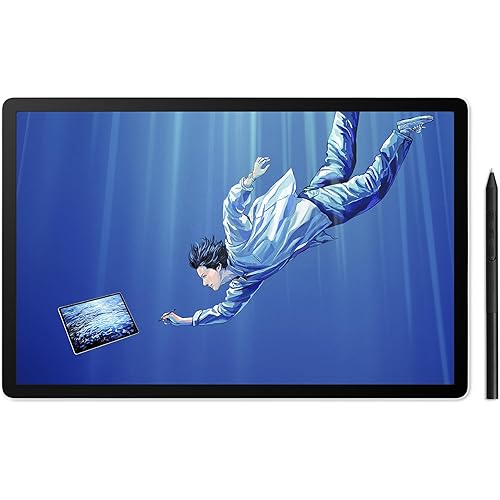
- Precision Creation with 16K Pressure & 60 Tilt Pen: Equipped with the X4 smart chip, this battery-free stylus delivers 16,384 pressure levels with 60 tilt recognition, providing a lag-free experience for comic artists and digital illustrators. Easily add depth and natural shading by simply tilting your penno need to interrupt your workflow to manually adjust brush sizes. With a low 2g activation force and 0.3mm nib travel, every stroke remains as stable and intuitive as a real sketching pencil
- Full-Lamination Graphic Tablet for Natural Feel:Graphic tablet features full-lamination technology to eliminate parallax, ensuring the nib aligns with the cursor. Whether for notes or anime art, the AG nano-etched glass of this digital drawing tablet prevents glare and provides natural friction. The AF coating keeps the display crystal clear
- 99% sRGB Accurate Color Digital Drawing Pad: As a professional drawing tablet for pc, it features a 99% sRGB gamut and OSD color management, guaranteeing what you see is what you get. You can highly trust the colors of this digital drawing pad when doing photo retouching. Strict factory calibration meets professional demands
- USB-C One-Cable for Tablet With Pen: Supporting a USB-C one-cable solution, it significantly simplifies your desk setup. When moving between dorms or connecting an Android phone, the plug-and-play feature of this tablet with pen lets you create instantly. Cross-platform compatibility ensures this drawing pad tablet delivers a seamless workflow
- Dual Rollers & Drawing Tablet Stand Included:Featuring dual roller wheels and 8 silent shortcuts, it allows one-handed control. Adjust brush size and zoom simultaneously, drastically reducing keyboard reliance. Paired with a pink drawing tablet stand, it stands out among drawing tablets, proven to significantly shorten your drawing time
- Certified Universal Compatibility: This drawing tablet guarantees flawless performance across all major platforms: Windows 7 or later, macOS 10.13 or later, Android 10.0 or later, ChromeOS 88 or later, Linux, and Windows ARM. It is rigorously tested with top software including Photoshop, Clip Studio Paint, and Krita, ensuring a stable and hassle-free experience for freelancers and students collaborating across different ecosystems
Description
Our first smart chip X3, create artistic digitizers that give you a feeling as real and natural as working with a traditional tool. 1 Year Protection Plan & Lifetime XPPen Service 1 Year Protection Plan is offered for all XPPen products, please get in touch with us to see the terms and conditions for Support, Return and Refunds. You can get in touch with us via Amazon Message if you have any question about the product. Does this drawing pad for PC work without a connection? No. It is an external monitor that must connect to a PC, Mac, or Android device to run creative software Benefits of full-lamination and 16K pressure drawing pens? Full-lamination eliminates parallax. 16K pressure captures subtle force, delivering a real paper-like smooth experience Will my drawing table be messy? How to simplify connection? Supports USB-C one-cable connection. With a full-featured port, a single cable handles power and video, keeping your desk clutter-free Are the colors accurate? Will this graphic tablet glare? Features 99% sRGB and OSD for accurate colors. AG nano-etched glass eliminates glare , provides paper-like friction, and reduces fingerprints How do the dual rollers and shortcut keys boost workflow? 8 keys and dual rollers let you adjust brush size and canvas zoom simultaneously, minimizing keyboard use and boosting efficiency
Specs 19
| Brand | XP-Pen |
|---|---|
| Connectivity Technology | Full-Featured USB-C One-Cable Connection, 3-in-1 Hybrid USB-C Interface, Plug and Play |
| Pressure Sensitivity | 16384 levels |
| Operating System | Windows 7 or later, macOS 10.10 or later, Android (USB3.1 DP1.2), ChromeOS 88 or later, Linux |
| Special Feature | 16,384 Levels Pressure Sensitivity, X4 Smart Chip Technology, Full-Laminated Screen (Zero Parallax), Nano-Etched AG Anti-Glare Glass, Dual Roller Wheels & 8 Shortcut Keys, Pink Aesthetic Edition |
| Model Name | Artist 12 3rd |
| Built-In Media | Artist 12 3rd Tablet (Pink), X4 Magnetic Battery-Free Stylus (Pink), 3-in-1 Cable (Pink), Full-Featured USB-C Cable (Pink), Foldable Stand (Pink), Drawing Glove, Replacement Nibs, Nib Extractor, Cleaning Cloth |
| Target Audience | Beginners and Hobbyists, Art and Animation Students, Digital Illustrators, Creative Professionals seeking portable secondary screens, Design Enthusiasts |
| Model Number | Artist 12 |
| Number of Items | 1 |
| Manufacturer | XP-Pen |
| Item Highlight | Full-Laminated Anti-Glare Glass Display for Digital Art, Animation, Mac, PC, Android, Designed for Artists, Beginners |
| Unit Count | 1 Count |
| Additional Features | 16,384 Levels Pressure Sensitivity, X4 Smart Chip Technology, Full-Laminated Screen (Zero Parallax), Nano-Etched AG Anti-Glare Glass, Dual Roller Wheels & 8 Shortcut Keys, Pink Aesthetic Edition |
| Specific Uses For Product | Digital Painting and Illustration, Anime and Manga Design, Photo Editing, Online Teaching and Video Conferencing, 3D Sculpting and Graphic Design |
| Screen Size | 11.9 inches |
| Item Dimensions L x W | 11.9"L x 11.9"W |
| Color | pink |
| Software Update Supported to Date | unknown |
No specs match.
Frequently asked questions
To initiate a return, please visit our Returns Center.
View our full returns policy here.
- Klarna Financing
- Affirm Pay in 4
- Affirm Financing
- Afterpay Financing
- Zip Pay in 4
- Financing through Apple Pay
- Financing through Google Pay
Learn more about financing & leasing here.
Similar Products




Top Amazon Reviews


