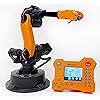
wlkata Mirobot 6DoF Mini Industrial Robotic Arm Professional Kit Programmable Lightweight Desktop Robotic Arm for K12 or 3D Printer





Buy Now, Pay Later
- – Up to 36-month term if approved
- – No impact on credit to apply
- – Instant approval decision
- – Secure and straightforward checkout
Ready to go? Add this product to your cart and select a plan during checkout.
Payment plans are offered through our trusted finance partners Klarna, Affirm, Afterpay, Zip, Apple Pay, and Google Pay. No-credit-needed leasing options through Acima may also be available at checkout.
Learn more about financing & leasing here.
FREE 30-day refund/replacement
To qualify for a full refund, items must be returned in their original, unused condition. If an item is returned in a used, damaged, or materially different state, you may be granted a partial refund.
To initiate a return, please visit our Returns Center.
View our full returns policy here.
Recently Viewed


Nidecker OG Supermatic Men's Rear-Entry Snowboard Bindings

Auliné Collection Women's Casual Work Solid Color Knit Blazer


At a glance
- Condition
- New
- Dimensions
- 17 x 12 x 8 in
- Weight
- 12.4 lb
- Material
- Metal, Plastic
- Educational Objective
- Game, play
- Theme
- 6 DOF robotic arm
- Size
- 375*335*290mm (14.8*13.6*11.5inch)
Features 5
- WLKATA Mirobot Professional Kit. This Professional Kit includes everything in the Education Kit , plus a wireless Bluetooth controller.Part list:Robot arm,Power supply & High-speed USB cable & IDC cable, Pen holding, Micro servo gripper module,Pneumatic set, Multifunctional box,Mirobot Mecha sticker,Handbook,Wireless Bluetooth controller.
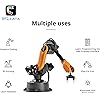
- Multiple control methods: computer terminal WLKATA Studio software control, APP mobile phone control, APP mobile phone control, three-dimensional virtual control (V-Rep Ros Matlab),Contains a matching robot controller for better and more comprehensive control
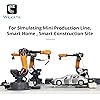
- WLkata Mirobot equipped with laser engraving, writing and drawing, handling and palletizing, mobile app control, etc. Multiple functions, reserved multiple expansion interfaces to support secondary development. Users can develop more application scenarios through software programming and hardware expansion to meet the needs of students of different ages.
- Desktop-level lightweight industrial robotic arm prototype, safe operation, comprehensive functions, freely set actions, add accessories arbitrarily, one arm has unlimited creativity!
- WLKATA is suitable for teaching and training scenarios, color sensor training, multi-fixture coordination training, joint training of six-axis robotic arms and code wheel robotic arms, scene training, painting and calligraphy art training, artificial intelligence voice training, etc.If you have any questions about installation or use, please check the manual or contact us, we will serve you wholeheartedly.
Description
WLKATA Mirobot is a cute medium for learning and demonstrate emerging robotic technologies. It is Compact, Safe and Fun, and design with 6 axis which is necessary for display nearly all of the industrial and domestic uses. Check our Website and Github community to access to the up-to-date Mirobot Education Resource (tutorials, source code, DIY guidance, models) which is free for all. The firmware of WLKATA Mirobot is based on Arduino. It is open sourced and support customizable APIs, RS485, Bluetooth and WiFi. So that users can operate through serial over USB and e.g., customize their own controller. Various Intelligent Control Methods: Multifunctional Box (Extension Module) Steps of Quick Installation Step 1: Connect the Mirobot and the Multifunctional Extender Box with the IDC cable: A A' Step 2: Connect the Multifunctional Extender Box and the laptop with the USB cable: B B' Step 3: Connect the end-effector tool to the correct port on the Multifunctional Extender Box (See the port guide below). Step 4: Connect the supplied AC power adapter to the Mirobot robot arm: C C' Step 5: Check the manual to find the corresponding download method, download & install the WLKATA Studio and CH340 driver. The users can control the Mirobot by using WLKATA Studio software to realize functions such as Joint Mode control, Coordinate Mode control, Teaching & Play, Blockly control, and Drawing, etc. wlkata Mirobot 6DoF Robotic Arm Professional Kit Programmable Lightweight Professional Desktop Robotic Arm for K12 or 3D Printer Multiple control methods WLKATA Mirobot Professional Kit WLKATA is suitable for teaching and training scenarios, color sensor training, multi-fixture coordination training, joint training of six-axis robotic arms and code wheel robotic arms, scene training, painting and calligraphy art training, artificial intelligence voice training, etc.If you have any questions about installation or use,
Specs 16
| Brand Name | wlkata |
|---|---|
| Age Range Description | Suitable for students, engineers and teachers |
| Educational Objective | Game, play |
| Set Name | Mirobot 6DoF Mini Industrial Robotic Arm Professional Kit |
| Number of Packs | 1 |
| Number of Items | 1 |
| UPC | 757842564541 |
| Model Number | Professional |
| Manufacturer | wlkata |
| Manufacturer Part Number | Professional |
| Manufacturer recommended age | 5 years and up |
| Theme | 6 DOF robotic arm |
| Material Type | Metal, Plastic |
| Size | 375*335*290mm (14.8*13.6*11.5inch) |
| Item Dimensions | 17 x 12 x 8 inches |
| Item Weight | 12.4 pounds |
No specs match.
Frequently asked questions
To initiate a return, please visit our Returns Center.
View our full returns policy here.
- Klarna Financing
- Affirm Pay in 4
- Affirm Financing
- Afterpay Financing
- Zip Pay in 4
- Financing through Apple Pay
- Financing through Google Pay
Learn more about financing & leasing here.