Search  for anything...

BIGTREETECH Panda Touch Compatible with Bambu-Lab P1P P1S X1C X1E A1 Mini 3D Printers Upgrade Touch Screen Kit Support Multi-Printers Management 2.4G WiFi Wireless Connection

  • Based on 86 reviews
Condition: New
Checking for the best price...
$62.99 Why this price?
New Year Deal · 10% off was $69.98

Buy Now, Pay Later


As low as $10.50 / mo
  • – 6-month term
  • – No impact on credit
  • – Instant approval decision
  • – Secure and straightforward checkout

Ready to go? Add this product to your cart and select a plan during checkout.

Payment plans are offered through our trusted finance partners Klarna, Affirm, Afterpay, Apple Pay, and PayTomorrow. No-credit-needed leasing options through Acima may also be available at checkout.

Learn more about financing & leasing here.

Selected Option

Free shipping on this product

FREE 30-day refund/replacement

To qualify for a full refund, items must be returned in their original, unused condition. If an item is returned in a used, damaged, or materially different state, you may be granted a partial refund.

To initiate a return, please visit our Returns Center.

View our full returns policy here.


Availability: In Stock.
Fulfilled by Amazon

Arrives Wednesday, Feb 11
Order within 12 hours and 56 minutes
Available payment plans shown during checkout

Protection Plan Protect Your Purchase
Checking for protection plans...

Style: Panda Touch


Features

  • NOTE: It is possible that Bambu-Lab may release a future firmware version which impacts the functions available from the Panda Touch. Bigtreetech will monitor all beta firmware versions and if we find a firmware version that affects Panda Touch functionality we will send out an alert via email, chat and our social channels. Buyers can then decide whether or not they would like to perform the update at the risk of losing functionality. Note that the Panda Touch warranty does not cover lost functionality due to a Bambu-Lab firmware update being performed
  • Compatibility: The BIGTREETECH Panda Touch V1.0 is currently compatible with all Bambu-Lab printer firmware versions up until: -P1P-->v01.07.00.00 -P1S-->v01.07.00.00 -X1C-->v01.08.02.00 -X1E-->v01.01.02.00 -A1-->v01.04.00.00 -A1 Mini-->v01.04.00.00
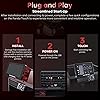
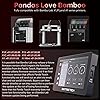
  • Easy to Install: BIGTREETECH Panda Touch V1.0 is a 5-inch plug and play touchscreen display that is customized with UX and UI systems, providing a factory touch screen experience similar to the original X1C touchscreen. The installation steps are only two steps, base installation+wiring can complete the installation, giving you a more relaxed printing experience
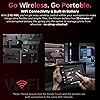
  • Two Power Supply Modes: BIGTREETECH Panda Touch V1.0 has two power supply modes. If the power switch is set to the middle position, the Panda Touch will be powered by a built-in lithium battery for convenient mobile use; Turn the power switch to the right gear, and the Panda Touch will be directly powered by the magnetic charging dock, without using lithium batteries to extend battery life
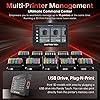
  • Control Multiple Machines: BIGTREETECH Panda Touch V1.0 provides synchronization of multiple printer functions, allowing for synchronous control of printing, adjustment of printing parameters, and status of multiple printers. It also has various control functions for Bambu-Lab printers, such as print control, fan control, heating control, print file management, basic settings (LED light switch, WiFi connection, 3D printer device information settings)
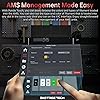
  • AMS Management: BIGTREETECH Panda Touch V1.0 provides an unparalleled intuitive experience by directly controlling AMS. On up to 10 printers, each printer supports up to 4 AMS units and 16 filament slots, allowing you to easily manage and customize filament types, colors, and printing temperatures using BTT Panda Touch. Easy multi-color printing for any Bambu-Lab 3D printer

Package Dimensions: ‎7.6 x 4.92 x 1.93 inches


Item Weight: ‎10.5 ounces


Manufacturer: ‎BIQU


Batteries: ‎1 Lithium Polymer batteries required. (included)


Date First Available: ‎June 28, 2024


Frequently asked questions

If you place your order now, the estimated arrival date for this product is: Wednesday, Feb 11

Yes, absolutely! You may return this product for a full refund within 30 days of receiving it.

To initiate a return, please visit our Returns Center.

View our full returns policy here.

  • Klarna Financing
  • Affirm Pay in 4
  • Affirm Financing
  • Afterpay Financing
  • PayTomorrow Financing
  • Financing through Apple Pay
Leasing options through Acima may also be available during checkout.

Learn more about financing & leasing here.

Top Amazon Reviews


  • works with proper tweaks
Style: Panda Touch
will not work with wpa3 wireless security that some isp require. I added a router in access point mode to solve that. Also not working last I checked with new firmware on p1s I just downgraded to one that will. I like the large and moveable display
Reviewed in the United States on August 31, 2025 by Great and mighty giggle meow

  • BROKEN FIRMWARE - Do Not Buy
Style: Panda Touch
NO LONGER WORKS WITH BAMBU PRINTERS. The firmware is outdated and is not capable of sending commands to printers, only monitoring what's happening. They have stated they will NOT be updating this, making it almost completely useless. The fact that it's still being advertised as it is is criminal. A quick search will confirm dozens of commenters on various forums lost functionality some time ago. It's a shame because it genuinely would have been a great product otherwise. However, as it stands you're paying for a product that does not deliver in any meaningful way and I would advise to stay away from Biqu/Bigtreetech as they've really shown their colors with this. One final note- Their wiki (which you are often directed to) is near unintelligible and broken. Unacceptable for a company that requires documentation for it's products. ... show more
Reviewed in the United States on December 24, 2025 by Delvin M.

  • A must have if you use the screen often. A nice upgrade to have for the P1S
Style: Panda Touch
Does what the description says. Much easier to read than the built in P1S screen. Glad to have it. Mounts and installs easily. You don't have to have it, but it's nice if you use the screen often. Looks like a good quality product and the screen is bright, sharp and full of options for your P1S.
Reviewed in the United States on May 21, 2025 by Peter

  • It’s a fancy light switch, mostly.
Style: Panda Touch
I love the way it looks. Makes the printer look fancy. However this is just a very expensive light switch. All other functions are mostly unused/ unnecessary. (There are some, but those are not used frequently ) Light function on P1S factory control is harder to access than on Bigtreetech. On Bigtreetech its on main screen, just touch it, and the light is on, touch it again….. For some reason I did not find a way to activate ams drying on Bigteetech, but it’s not to hard to activate it on factory control. Bigtreetech looses the connection to the printer every once in a while, mostly because it goes to sleep. Touch it and it will wake up, and reconnect within a minute, or sometimes two. Most of the print are sent to my printer wirelessly, from a laptop, or a tablet. So never had tried accessing files via usb stick, that can be plugged in to Bigtreetech. ... show more
Reviewed in the United States on August 18, 2025 by Mikhail Trubin

  • A Must For a Printer That Doesn't Need Upgrades
Style: Panda Touch
I can control all my Bambulab printers with ease. I learned that firmware upgrades could render it unusable, I don't plan on upgrading the firmware, I'm happy with the way the printers work. Installation is straight forward, documentation is good, plus there are many videos with step by step instructions. ... show more
Reviewed in the United States on July 17, 2025 by Ramon Padilla

  • Nice, but it didn't add any functionality.
Style: Panda Touch
I was disappointed with the screen on the Bambulab P1S, so I thought this would help because I don't like using an app to run my printer and the factory screen is horrible. Installation was super easy. Unfortunately, it didn't add any of the functions I was hoping for. With my Klipper printer with a pad, I can upload jobs to the pad and reprint the ones I wanted, this doesn't work that way. I would've been happy with a restart last job function, that wasn't an option either. It is far better than the factory screen as far as homing and changing filament, but that's not the reason I wanted it. ... show more
Reviewed in the United States on October 30, 2024 by R B

  • No more need for X1C
Style: Panda Touch
Awesome product for my P1S. Connected quickly and gives me all the display issues I was missing from the X1C.
Reviewed in the United States on November 9, 2025 by ManDoctor

  • Doesn’t work and no support.
Style: Panda Touch
This did not work with my Bambu Lab P1P printer. The worst part is that when we looked at the instruction manual for a contact number or tech support, they had used whir-out to cover up the number. No one to call for troubleshooting.
Reviewed in the United States on December 23, 2025 by Kelly A. Stogner

Can't find a product?

Find it on Amazon first, then paste the link below.
Checking for best price...