


Search  for anything...

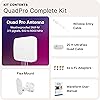
Waveform QuadPro 4x4 MIMO Signal Boosting Panel Antenna Kit | External Antenna for 4G/5G Routers & Gateways | for T-Mobile Home Internet, Verizon, AT&T (Complete Kit w/ 20' Cable & Window Entry)

  • Based on 712 reviews
Condition: New
Checking for the best price...
$499.99 Why this price?
Save $24.99 was $524.98

Buy Now, Pay Later


As low as / mo
  • – Up to 36-month term if approved
  • – No impact on credit to apply
  • – Instant approval decision
  • – Secure and straightforward checkout

Ready to go? Add this product to your cart and select a plan during checkout.

Payment plans are offered through our trusted finance partners Klarna, Affirm, Afterpay, Zip, Apple Pay, and Google Pay. No-credit-needed leasing options through Acima may also be available at checkout.

Learn more about financing & leasing here.

Selected Option

Free shipping on this product

FREE 30-day refund/replacement

To qualify for a full refund, items must be returned in their original, unused condition. If an item is returned in a used, damaged, or materially different state, you may be granted a partial refund.

To initiate a return, please visit our Returns Center.

View our full returns policy here.


Availability: In Stock.
Fulfilled by Amazon

Arrives Friday, Aug 21
Order within 21 hours and 29 minutes
Available payment plans shown during checkout

Protection Plan Protect Your Purchase
Checking for protection plans...

Size: Complete Kit w/ 20' cable & Window Entry


Features

  • CUTTING-EDGE 4x4 MIMO PERFORMANCE - Want faster data rates, greater reliability, and lower latencies? Your 5G Internet is only as good as your 5G cell signal. Join tens of thousands AT&T, Verizon, and T-Mobile customers who have dramatically improved their Internet connectivity with a Waveform antenna. With full 4x4 MIMO support and up to 9.1 dBi gain from 600 to 6000 MHz, the Waveform QuadPro supports every 4G and 5G band from every carrier, including AT&T, Verizon, T-Mobile, and US Cellular.
  • ALL-IN-ONE KIT, NEW & IMPROVED: The best MIMO Panel antenna on the market just got even better. Comes packaged with our one-of-a-kind Window Entry Cable, FlexMount, UltraFlex-Quad cable and weatherproofing boots, to make installation easier than ever and eliminates the need to drill holes in your home.
  • DIRECTIONAL, REQUIRES AIMING - Aim QuadPro at your nearest tower for blazing data speeds and unbeatable reliability, even at the edges of cellular coverage.
  • SIMPLE DIY INSTALL: Use the included FlexMount, Window Entry Cable, UltraFlex-Quad cable, SMA, and U.FL adapters, as well as our detailed install guide, to quickly and easily get your antenna online and connected to almost any 5G router, modem, or gateway.
  • T-MOBILE HOME INTERNET SUPPORT: Detailed guides for connecting to every TMHI gateway, including the G4AR/G4SE, Nokia 5G21, Arcadyan KVD21, Sercomm Fast 56WW Gateways. Also works with Verizon 5G Home Internet and AT&T Internet Air.

Antenna: Radio


Brand: Waveform


Color: White


Number of Channels: 4


Impedance: 50 ohm


Maximum Range: 3 feet


Manufacturer: Waveform


Number of Packs: 1


Unit Count: 1 Count


Global Trade Identification Number: 39


AntennaDescription: Radio


Brand: Waveform


Manufacturer: Waveform


Unit Count: 1 Count


Global Trade Identification Number: 39


Item Weight: 2.28 kg


Model Number: Complete Kit w/ 20' Cable & Window Entry


Mfr Part Number: QPRO-2U


Warranty Description: 3 Year Manufacturer Warranty


Number of Channels: 4


Impedance: 50 ohm


Maximum Range: 3 feet


Color: White


Frequently asked questions

If you place your order now, the estimated arrival date for this product is: Friday, Aug 21

Yes, absolutely! You may return this product for a full refund within 30 days of receiving it.

To initiate a return, please visit our Returns Center.

View our full returns policy here.

  • Klarna Financing
  • Affirm Pay in 4
  • Affirm Financing
  • Afterpay Financing
  • Zip Pay in 4
  • Financing through Apple Pay
  • Financing through Google Pay
Leasing options through Acima may also be available during checkout.

Learn more about financing & leasing here.

Top Amazon Reviews


  • Outstanding Performance Upgrade – Real, Measurable Results
Size: Complete Kit w/ 20' cable & Window Entry
I purchased the Waveform QuadPro 4×4 MIMO antenna to improve our AT&T Internet Air connection, and the results have been nothing short of excellent. Before installing the QuadPro, our speeds were inconsistent—especially on upload—and signal quality fluctuated depending on time of day and network conditions. After installing the QuadPro (mounted outdoors and properly aimed), we saw immediate and measurable improvements: - Download speeds doubled, now consistently around 250 Mbps - Upload speeds increased dramatically, very consistently tripling compared to before - We now see 17–22 Mbps upload on a regular basis - Signal quality (SINR) and overall stability improved noticeably - Far fewer drops, less band switching, and much more reliable performance under load This wasn’t just a speed test win—the connection feels better in everyday use. Video calls are stable, uploads no longer stall, and performance is consistent throughout the day. The build quality is excellent, the documentation is clear, and the antenna does exactly what it’s designed to do: improve both signal strength and signal quality, which is especially critical for 5G and fixed wireless setups. If you’re on cellular internet and serious about performance—especially upload stability—the QuadPro is absolutely worth it. This was one of the most impactful upgrades we’ve made to our home network. Highly recommended. ... show more
Reviewed in the United States on January 9, 2026 by Bjorn G

  • Very impressed with this company, wish Tmobile hadnt been a letdown.
Size: Complete Kit w/ 20' cable & Window Entry
I’ve had the Waveform QuadPro 4x4 MIMO antenna installed for about 17 days now, and while my overall project didn't end with the result I hoped for, the product itself is excellent. The quality of the kit is impressive, and unlike many other sets I've purchased, they actually included high-quality tools that were genuinely useful throughout the setup process. Every single component I could possibly need was right there in the box, and the instruction manual was easily one of the best I have seen in a long time—it made the entire installation process very straightforward. The customer service team was also awesome and truly helpful when I reached out (even over text). Unfortunately, the 5G home internet connection didn't end up working out for my specific location, but I want to be clear that this was entirely due to issues with the T-Mobile network coverage in my area. Signal strength and stability with this antenna was great. The failure of the internet service had nothing to do with the antenna’s performance or build quality. Despite the service not working out, I have nothing but good things to say about the hardware and the company behind it. Great compatibility even included some more diy connection options. ... show more
Reviewed in the United States on May 26, 2026 by Dylan Milroy

  • A T-Mobile Home Internet lifesaver! Just be sure to place it properly A T-Mobile Home Internet lifesaver! Just be sure to place it properly
I live in Gerogia about an hour away from Atlanta. Where I am currently situated, I basically live in a ditch with poor phone service, especially in the basement. To make matters worse, the only local option for internet is Kinetic by Windstream, which from past experiences from friends and family is terrible with poor customer service. I was excited, if a bit skeptical, to try T-Mobile Home Internet and see how well it would work for me and my family. The experience without the antenna was mediocre at best. Once we figured out what the "optimal" position was for the gateway, we got around 50 Mbps download and 10 Mbps upload on the best day. The experience was hampered by constant drops that had me second-guessing whether this was the best option for internet. Enter the Waveform MIMO 4x4 Panel. I came across this antenna looking for solutions to the problems we were having and I was immediately in love with the in-depth instructions that Waveform provided to connect the antenna to the gateway. Considering I need a decent and constant internet connection for my current job, this seemed like a no-brainer purchase, especially with other users saying it drastically improved their speeds and stability. It's a bit on the expensive side, but my mentality was that if this would work with the gateway and provide me with the internet connection I need, then so be it. I'm happy to say that this antenna was worth every penny. Like I mentioned, the Waveform online setup guide for the T-Mobile Home Internet gateway (in this case, the black Arcadyan KVD21 model) is incredibly detailed and easy to follow. Opening the gateway itself was painful and connecting the tiny pins for the antenna was anxiety-inducing (I'm pretty sure I damaged one of the connectors on the board and I most definitely voided the warranty), but once everything was put in place and the cords were coming out of the gateway, the antenna was ready to go. I was worried the panel was a dud at first because I originally put it in the backyard since that was where the only 5G towers in my area were located, according to CellMapper. While the panel was in the backyard, the speed increased slightly on downloads to 75 Mbps at most, but the upload speed went down to around 5-10 Mbps. Even worse, the drops and ping were consistently horrible. It was arguably worse than the gateway performance BEFORE I installed the panel. It was a couple of days before the start of my new job, so I was left panicking that I didn't have the internet necessary to do my job and that we would be short nearly $400 even if I returned the panel (the damage fees from T-Mobile are ridiculous!). All hope seemed lost until I discovered a tool with the T-Mobile Internet app that allows you to determine where the position of the closest 5G tower is. According to the app, the best position for the gateway was actually near the FRONT of the house, which I didn't even consider since CellMapper didn't show any 5G towers in that direction! In a last-ditch move, I decided to move the panel to the front of the house just above the garage, running the panel cable through the attic and down into the garage to connect to the gateway. Now the internet works like a dream. Connecting my phone to the gateway wi-fi, I am now getting very consistent 300 Mbps download speeds (sometimes even higher!) and around 20 Mbps upload speeds, with the connection constantly showing "Good" at the bare minimum and the SINR on the LTE and 5G bands looking fantastic. It's amazing how one change in positioning can improve the panel's ability to provide fast internet speeds. And let me tell you, this panel performs above and beyond expectations. Credit to the folks at Waveform for making this thing and providing the instructions to make it work with my current situation. Provided you have the money, tech smarts and strong constitutions needed to put this panel together, I highly recommend it for those having trouble with their T-Mobile Home Internet! TL;DR, get this thing if you want to improve your T-Mobile Home Internet connectivity! Just a few things to keep in mind: - Be sure to read all the manuals, including the one provided with the panel and the guide on the Waveform website for the gateway you are using; everything you need to know is provided in incredible detail - Prepare to sweat if using this panel with the gateway; the gateway itself is hard to open and the panel connectors are tiny meaning they can be damaged if not handled correctly (not to mention the hefty damage fees!); this process is not for the faint-of-heart or for those who are less tech-savvy - Be prepared to pay a lot of money for this; in my case, it was worth it, but hopefully this will get discounted in the future so everybody can afford it - Use the positioning tool on the T-Mobile Internet app to determine where to put the panel; once I put the panel on the outside wall facing that location, everything worked perfectly (CellMapper was not helpful in my case) - To access the T-Mobile Internet positioning tool, follow these steps: 1. On the Home screen, click "More about connection quality" 2. Choose the "Launch placement assistant" option 3. Choose "Skip Video" after pressing "OK! Let's do this" 4. For best results, use the "Share location" option; this will allow you to use the camera to get a better idea of where the 5G signal is coming from 5. Choose the Camera option on the "Signal direction results" menu; the phone will then show you a fancy pink wave indicator indicating the position of the 5G signal; this is roughly where you will want the panel to be ... show more
Reviewed in the United States on October 23, 2022 Reviewed in the United States on October 23, 2022 by Mitcheddar93

  • Well-Engineered and It Works Well-Engineered and It Works
Size: Complete Kit w/ 20' cable & Window Entry
tl;dr - very well engineered and thoroughly thought-out product. It can help you a lot if you really need it, and even help some otherwise. I opted for the "complete kit" which included 40 feet worth of cabling and a window adapter. The product itself comes very well packaged and protected. Cable ends and any exposed bolts on the mount are covered with soft rubber "nibs" (?). Boxes and packages are well labeled. Documentation is very good, meaningful pictures and diagrams included. The hardware that comes for mounting is excellent, they ship multiple sizes of wall anchors and there is an extra or two for most bolts. They even provide wrenches, real ones - the 10 mm wrench has an open end and flexible socket end (which I could have used last week when replacing a car battery in our Honda). There are multiple sizes of wall anchors for mounting. The cable itself is well-insulated and the weatherproofing boots are solid (much better than the ones I got with some home cameras I bought). I'm guessing Waveform really, really does not want me to return the product. And the way they accomplished that was to make sure I had just about everything I needed to pull off a successful install. Ok, so... does it work? Yes! I live in North Texas and my house has a bunch of trees around it, which is awesome for shade, not so much for raking and cellular reception. I am on TMobile 5G home service using C660 gateway. The south side of my house, which faces toward the cell towers, does not have a useful window for me to put the gateway. The least bad place I found was a high spot in my living room, and the download speeds were okay, but the upload speeds were atrocious. Here are three speed scenarios. The first is the default of the gateway in the living room. The second was to put the modem outside near where I mounted the antenna. The third is the antenna. Scenario 1 - Gateway in living room, not near a window 322 Mbps download, 4 Mbps upload LTE received signal strength: poor Signal Received Quality: 5G good, LTE excellent, Signal Received Power: 5G poor, LTE poor Interference to Noise: 5G poor, LTE poor Scenario 2 - Gateway outside 500 Mbps download, 41 Mbps upload LTE received signal strength: good Signal Received Quality: 5G excellent, LTE excellent, Signal Received Power: 5G poor, LTE poor Interference to Noise: 5G excellent, LTE good Scenario 3 - Antenna 581 Mbps download, 69 Mbps upload LTE received signal strength: good Signal Received Quality: 5G excellent, LTE excellent, Signal Received Power: 5G good, LTE good Interference to Noise: 5G excellent, LTE good So, gateway in a bad place is bad. Gateway in a good place is much better, but even in my best case scenario, the Waveform had 10+% faster download and 50+% faster upload speeds. Some tips for folks who are installing this: - I attached the mount to a roof soffit. The provided anchors didn't work well because there wasn't enough wood for them to really "bite" into. Toggle bolts worked much better for me - When joining cable ends together, make sure to use the 8 mm wrench to tighten the connection before sliding the waterproof boots over. The boots take enough force that they can undo hand-tightened connections. If you see your benchmarks drop all of a sudden, this may be the cause (it happened to me) - Buy the window entry cable, even if you are not going to run the cable through a window. I spent a day or so piloting the antenna in different places around my house, and the window adapter can also be used to run the cable under a door (so you don't have to leave the door open while testing) - All of the cables have 1-4 labels, which is good, but they are not color coded or anything like that, so you really have to look carefully when connecting things - The well insulated cables do not flex a lot, even the ends that go into your gateway/modem. With TMobile's C660, the wires mount pointing up, so you will need to find your stand if you are not using already, and you will have to apply some gentle but firm force to get the cables positioned ... show more
Reviewed in the United States on October 11, 2025 Reviewed in the United States on October 11, 2025 by Jason

  • Worth the money!!! Worth the money!!!
Size: Complete Kit w/ 20' cable & Window Entry
IT WORKS!!! Can’t get a land line so went with this set up. It improved speeds a lot, specially upload and stability, no more lagging while gaming. Comes with everything you need. After installation it only took a few minutes to find what was the best angle/direction to point it at.
Reviewed in the United States on April 16, 2026 Reviewed in the United States on April 16, 2026 by Amazon Customer

  • Fantastic product with even better support
This antenna has been a godsend. When T-Mobile rolled out N41 in my area, my 5G TMHI became a nightmare. On N41, I could typically get tolerable download speeds, but I have 7 Nest cams constantly uploading and I need to be able to VPN into work without a painful lag, so I really need decent/stable upload speed which was non-existent. I must be in some sort of purgatory spot where the trash can wants to connect to N41 when it shouldn’t, so I tried tricking it back to N71 with very inconsistent success (i.e. obscuring the line-of-sight to the tower so it would fail back to N71). After teetering on the edge of calling it quits and ordering Starlink, I decided to give the 4x4 MIMO a try since it’s less expensive than dishy. My plan was to use the antenna to force N71 via some fiddling I saw on a youtube video, and if that didn’t work, I’d return the 4x4 MIMO and order Starlink. Long story short, the antenna boosted my N41 signal considerably so I didn’t pursue forcing N71. Here are some rough speeds pre/post antenna on N71/N41: Pre-antenna N71: ping~40ms; >100Mbps down; >20Mbps up Pre-antenna N41: terrible across the board - if I could do a speedtest successfully, the ping was >800ms; down may be ok; up was worse than dial-up Post-antenna N41: ping ~32ms; >150Mbps down; ~15Mbps up — and this has been very consistent - I’ve gone as high as 250Mbps down, but 150 is probably closer to the average Post-antenna N71: didn’t pursue I should also mention that I didn’t permanently install the MIMO antenna yet. It’s sitting next to the trash can pointing out my workshop window which has a low-e coating or something that attenuates the signal. What I’m trying to say is that I have seen incredible results with almost no effort and much room for further improvement. Also worth mentioning is that the N71 speeds I was seeing before the antenna were on a downward trend as T-Mobile brought more customers online in my area. That’s part of the reason I opted to stick with the improved N41 rather than trying to force N71 after getting the antenna. The Amazon listing probably mentions this somewhere, but the support folks at Waveform are fantastic. If you provide your address, they do a deep dive to figure out where your tower is and recommend the best orientation as well as the best mounting location on your property. If you aren’t familiar with cellmapper.net, this is absolutely critical, because the best antenna in the world isn’t going to do any good if it’s not pointed where it needs to be, and trial and error can be very frustrating. Even a few degrees can make a big difference. I considered buying this months ago, and I have been kicking myself for not pulling the trigger. If you’re on the fence, jump off and do it. I can guarantee you will not regret it. P.S. - read the install instructions carefully. The 4 little antenna cables are difficult/frustrating to attach (like extremely difficult), and I didn’t feed them through the bottom grate that you have to take off (and then put back on). Upon reassembly, my impatience got the best of me, so rather than go through connecting those 4 wires again, I just cut a hole in the grate with a Dremel and fed them through backwards. T-Mobile will probably rake me over the coals for that when I eventually have to return the trash can…I’m hoping that’s not anytime soon. And for the record - the difficulty is a function of the trash can design - not something Waveform has any control over. Thanks, Waveform!!! ... show more
Reviewed in the United States on January 11, 2024 by David P Loveland

  • Transforming My Internet Experience Transforming My Internet Experience
I recently upgraded to blazing fast 5G internet using the Waveform 4x4 MIMO Panel Antenna Kit, and I have to say it's been a game-changer for my internet connectivity. I'd give this kit a solid 4.5-star rating. Here's why: First and foremost, this kit is an all-in-one solution optimized for a simple DIY install. The package includes everything you need, from the antenna mount to various adapters like SMA, TS9, and U.Fl. The detailed installation guide made the setup process a breeze, and I was up and running in no time. It's a great option for those who prefer to take matters into their own hands. One standout feature of this kit is its support for T-Mobile 5G home internet. The detailed guides provided make it easy to connect to various TMHI gateways, including the Nokia 5G21, Arcadyan KVD21, and Sercomm Fast 56WW Gateways. This level of compatibility is a huge plus, ensuring that you can get the most out of your T-Mobile 5G internet service. What's truly impressive is the kit's compatibility with a wide range of modem and router manufacturers, including NETGEAR, PEPLINK, CRADLEPOINT, MOFI, and more. As long as there's a way to connect external antenna ports, the MIMO antennas in this kit can help you achieve dramatically faster internet connectivity. It's a versatile solution that can accommodate various setups. The ultra-high performance 4x4 MIMO technology ensures optimal 5G speeds. I installed this kit with my T-Mobile home internet, and the difference in upload and download speeds was remarkable. It provided a significant boost in performance, making streaming, online gaming, and video conferencing a seamless experience. It supports every 4G and 5G band from every major carrier, so you can trust it to deliver reliable and fast internet connectivity. The only minor issue I encountered was the length of the cable. It could have been longer to provide more flexibility in finding the ideal spot for the antenna without compromising the location of the indoor router receiver. However, even with this small setback, I managed to find a good spot that improved my speeds by around 60 percent, which is still a substantial upgrade. In summary, the Waveform 4x4 MIMO Panel Antenna Kit is an excellent investment for anyone looking to enhance their 5G internet experience. It's easy to install, compatible with various equipment, and delivers remarkable speed improvements. While the cable length could be improved, the overall performance and versatility of this kit make it a worthwhile purchase, and I highly recommend it to anyone seeking faster, more reliable 5G internet. ... show more
Reviewed in the United States on November 8, 2023 Reviewed in the United States on November 8, 2023 by Jaime

  • Can Make Huge Difference for Receiving T-Mobile Home Internet, with Patience and Trial and Error Can Make Huge Difference for Receiving T-Mobile Home Internet, with Patience and Trial and Error
I was eager to try out T-Mobile Home Internet when it recently became available in my location. The prospect of getting unlimited wireless internet using a single device that receives 5G cellular signals was very appealing. When I got the device and tried it out, though, the reception was very weak, no matter where in my house I placed the gateway. My house is surrounded by quite a few trees, which undoubtedly was a factor in reducing the signal quality. I tried various options to improve the signal, which was often as low as 1 Mbps download, or even worse. I called T-Mobile technical support to try to locate the best tower to aim at, and I tried two different cell signal boosters, neither of which helped at all. From watching YouTube, particularly the Nater Tater channel, I learned about this Waveform 4x4 MIMO panel antenna. I was reluctant to try this option, because it requires disassembling the T-Mobile gateway and installing several fairly delicate wires that have to be connected to the four leads of the antenna. After running out of other options, I plunged ahead with this approach, with great assistance from my wife, who is good at handling delicate electronic devices. She disassembled the gateway (we have the Arcadyan version of the T-Mobile gateway) and attached "pigtail" wires to the connectors inside the gateway, which are hard to reach and hard to attach wires to. Eventually, she achieved firm connections, and I started testing the antenna in various places around the house. To make a long story short, I finally settled on the location shown in my photo, which is a sort of balcony reached from the third floor of the house. After a couple of weeks of testing, I didn't notice enough improvement to make the service really usable, but then I happened to watch one of the Nater Tater YouTube videos, in which Nate mentioned an alternative order for attaching the four pigtails to the four antenna leads. That order is D-M-M1-M2. At first, that order didn't produce a real improvement, but then I turned the antenna in various directions to see what would happen, and I finally saw a dramatic improvement in download speeds. Now I get a maximum download speed of about 140 Mbps in the early morning, and it averages around 40-80 Mbps at different times of day and night. There still are some worse slowdowns in the afternoon, especially between 3:00 and 4:00 p.m., presumably because of deprioritization of internet signals when more people are using their T-Mobile cell phones. Overall, though, the T-Mobile wireless internet service is very useful whenever I need it, and I can now keep the service without feeling that the speeds are too slow. I can't say enough about the Waveform technical support staff, who were tremendously supportive during my weeks of testing, frustration, and trial and error. They offered several helpful suggestions, and even sent me an alternative type of antenna to test to see if that would bring an improvement. The only caveats I would mention are that, at least for me, it was not an easy task to disassemble the gateway and attach the antenna leads properly. You have to be patient and willing to do delicate and potentially frustrating work. Also, doing this may cause problems down the road when you ultimately return the gateway to T-Mobile, who clearly would not approve of taking the gateway apart in this manner. Also, it can be quite tricky to find the best location for the antenna and the best direction to point it in. In my case, I ended up purchasing an extension pole that can be inserted into the J-pole assembly that came with the antenna. When the antenna was attached to that pole, it was quite easy to turn the pole to change the direction of the antenna, to test how the signal approved in various directions. Overall, if, like me, you live in an area with marginal cell reception and a lot of trees, it can be very worthwhile to try this antenna, provided you are prepared to dedicate some effort over a period of time until you achieve success. ... show more
Reviewed in the United States on November 29, 2022 Reviewed in the United States on November 29, 2022 by Alexander S. White

Can't find a product?

Find it on Amazon first, then paste the link below.
Checking for best price...

