Search  for anything...

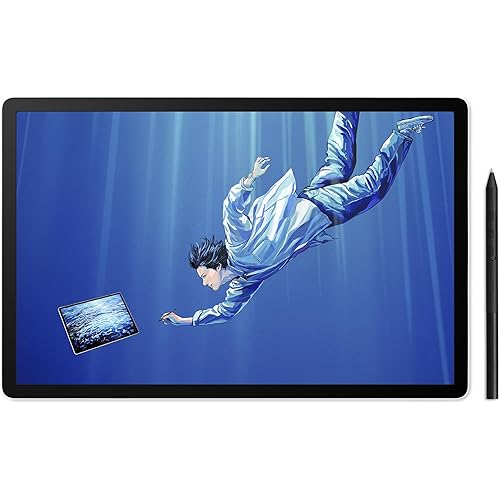
Wacom Intuos Pro Drawing Tablet, Small 10.6" x 6.7" Wireless Graphics Art Tablet with Pro Pen 2 & Touch Ring, Digital Drawing Pad for Mac and Windows PC

  • Based on 4,004 reviews
Condition: Used - Like New
Checking for the best price...
$169.95 Why this price?
Save $730.04 was $899.99

Buy Now, Pay Later


As low as $28.33 / mo
  • – 6-month term
  • – No impact on credit to apply
  • – Instant approval decision
  • – Secure and straightforward checkout

Ready to go? Add this product to your cart and select a plan during checkout.

Payment plans are offered through our trusted finance partners Klarna, Affirm, Afterpay, Apple Pay, and PayTomorrow. No-credit-needed leasing options through Acima may also be available at checkout.

Learn more about financing & leasing here.

Selected Option

Free shipping on this product

This item is eligible for return within 30 days of receipt

To qualify for a full refund, items must be returned in their original, unused condition. If an item is returned in a used, damaged, or materially different state, you may be granted a partial refund.

To initiate a return, please visit our Returns Center.

View our full returns policy here.


Availability: In Stock.
Fulfilled by Beach Camera Same Day Shipping

Arrives Friday, May 15
Order within 18 hours and 10 minutes
Available payment plans shown during checkout

Protection Plan Protect Your Purchase
Checking for protection plans...

Size: Small


Features

  • Professional Graphics Tablet: Illustration tablet features 6 ExpressKeys, touch gestures, programmable buttons; ideal for creative professionals like graphic designers, image editors, illustrators
  • Precision Pen Performance: Included Pro Pen 2 features tilt recognition, virtually lag-free tracking, 8192 levels of pressure sensitivity, and 2 customizable switches for easy access to shortcuts
  • Productivity Boosting Tablet: Tailor the drawing pad with multi-touch gestures, customizable ExpressKeys, Touch Ring, and pen side switches for optimal efficiency
  • Compact Bluetooth Design: Compact design along with touch gestures give you a broad range of ways to create; seamlessly connect any Mac or Windows PC with USB or Bluetooth
  • Includes: Wacom Intuos Pro Bluetooth small drawing pad, battery-free Pro Pen 2, pen stand, 10 replacement nibs for pen, USB cable, and quick start guide

Description

The Intuos Pro graphics drawing tablet helps you illustrate, edit images, or design with natural creative control on an approximately 7" active area. For creatives who want a small but high quality graphic tablet, this drawing pad boasts a compact footprint and, at less than 1 pound, is easily portable. Designed for long working hours, this super slim tablet is an ideal choice for creative professionals and educators in the classroom. With the multi touch surface, you can zoom, scroll, and navigate around your work as simply as using your smartphone. Customize the digital art tablet with 6 application specific Express Keys and two pen side switches that you can program for your favorite keyboard shortcuts. The tablet's Touch Ring makes quick work of canvas rotation, brush size, cycling through layers, and other functions. Our professional pen tablet has a paper sketch to digital feature and is made from premium anodized aluminum and fiberglass composite resin for durability and strength. The intuitive creative pen tablet works with Windows and macOS via Bluetooth or the included USB-C cable, and comes with the super-responsive Pro Pen 2, giving you the precision and control you desire.

Brand: Wacom


Connectivity Technology: Bluetooth


Pressure Sensitivity: 8192 Levels


Operating System: Windows


Special Feature: Bluetooth


Connectivity Technology: Bluetooth


Pressure Sensitivity: 8192 Levels


Operating System: Windows


Additional Features: Bluetooth


Specific Uses For Product: Drawing


Display Type: LCD


Compatible Devices: Mac, PC


Native Resolution: 1920x1080


Screen Size: 9 Inches


Item Weight: 15.84 ounces


Active Surface Area: 6.30" x 3.94"


Item Dimensions L x W: 6.7"L x 10.6"W


Color: Black


Brand: Wacom


Model Name: Intuos Pro


Built-In Media: Graphics Tablet


Target Audience: Student, Teacher


Model Number: PTH460K0A


Global Trade Identification Number: 52


Manufacturer: Wacom Technology Corporation


UPC: 753218986252


Item Type Name: Graphics Tablet


External Testing Certification: ,


Warranty Description: 2 years


Frequently asked questions

If you place your order now, the estimated arrival date for this product is: Friday, May 15

Yes, absolutely! You may return this product for a full refund within 30 days of receiving it.

To initiate a return, please visit our Returns Center.

View our full returns policy here.

  • Klarna Financing
  • Affirm Pay in 4
  • Affirm Financing
  • Afterpay Financing
  • PayTomorrow Financing
  • Financing through Apple Pay
Leasing options through Acima may also be available during checkout.

Learn more about financing & leasing here.

Top Amazon Reviews


  • Industry Standard, Worth the Price
After poring over reviews for less expensive tablets I finally decided to purchase the more expensive Intuos Pro (medium size). While pricey, it does not disappoint. It suits my needs perfectly as a 3d artist who suffers from wrist and joint pain. I moved from a mouse to a trackball years ago, and while it helped, it did not alleviate the problem. The pen-tablet combo is even better, for while some movements remain repetitive, many are mitigated through the multiple ways of accomplishing similar tasks. I still pull out the trackball when doing simple things like typing/navigating documents etc., but am using the stylus more-and-more for a variety of applications as I become used to it. PROS: ● Intuitive settings interface ● The included stylus is easy on the hands (mine are large, but not huge: long thin fingers) ● Bluetooth or Type C connection for wireless or wired use (nice when it works) ● Mid-size tablet is a perfect size for everything I do (the large would be too much for my tasks) ● Pen comes with several replacement nibs ● Tablet surface is sensitive and feels natural to write on for me ● Has a user friendly "Touch" feature that turns it into a giant track-pad with programmable hand gestures (works really well for me) ● "Touch" feature can be disabled with the flick of a switch ● On-tablet programmable buttons, as well as pop-up menus for all or select apps ● The option to replace the standard (medium) drawing surface (smooth, medium, rough) CONS: ● Sometimes the driver stops working (so far not often). Pulling its USB and then plugging it back in takes care of this, and when that fails a reboot is necessary--annoying when in the middle of a work-flow. EDIT: The bluetooth has consistently broken the tablet drivers--so much so that I stopped using the wireless option. It would be a great feature, if it worked without having to restart the system constantly. My bluetooth adapter works without a hitch with my other devices, so the problem seems to be Wacom's drivers. When plugged in (not using bluetooth) the drivers are much more consistent. Apparently Wacom drivers seem to be an issue with other reviewers as well--hopefully these issues are addressed through updates. ● The side buttons on the new model are stiff, requiring a bit of pressure to toggle/keep toggled. Repetitive tasks are then more difficult, especially when hand fatigue sets in. As a result I find myself using the keyboard for shortcuts with my left hand while working the stylus with my right. Wacom would do well to lighten the mechanical switch, or provide the option for user defined pressure settings. ● The "Touch" feature can only be disabled through the mechanical side switch. Some applications do not distinguish well between pen and hand input, making the touch feature undesirable when a stylus is necessary. It is a bit annoying to have to physically toggle a switch when one is using keyboard shortcuts, pop-up menus, etc. Wacom would do well to also include a programmable shortcut etc. for touch on/off (I believe the older version of the Intuos had this feature, but without the mechanical switch--which I do like). ● The included medium grade drawing surface seems to be wearing out my nibs prematurely. If I end up spending a lot on extra nibs I will take the plunge and replace the surface with its smooth variant, but would rather save the money. For now I am carefully refining my used nibs with 1000 grit sandpaper, which works well-enough. In spite of these annoyances, I am satisfied with this tablet. Hopefully the next permutation by Wacom will be even better (especially driver stability). ... show more
Reviewed in the United States on September 13, 2017 by NAHNAH

  • Great product and great use.
So combine this with the carry case for the extra protection. It's pretty comfortable, and was easy to set up, didn't have to do much to get started on drawing. The sensitivity is pretty good, and I would recommend a microfibre cloth to clean the surface (a glasses cleaning cloth works great btw) It comes with plenty of nibs for the pen, and the drawing ability is great, you can use your finger, or the provided pen. It's pretty good! This is nice if you want something a bit smaller than your keyboard, but not overly small, but it's not too big either. ... show more
Reviewed in the United States on December 21, 2025 by Geoffrey Green

  • Great tablet, works as well as my iPad Pro!
I want to preface this review by stating that I have never used anything like an actual Cintiq or similar. The closest comparison is my iPad Pro, which I had been using to creating fantasy art digital paintings for a good two years as of this review. My switch to a Wacom Intuous Pro was spurred by the fact that I'm now doing more complex illustrations and I really need the power of desktop Photoshop. Not iPad Photoshop, but he real deal app! I love Procreate, but Photoshop has the true power that I need when working on my drawings. Yes, you can draw and compose and paint all day long on the iPad Pro with Procreate, but I needed more processing power and, quite frankly, more layers! I previously had a Wacom Intuous 3, like probably 12 years ago or so. I used it back then, but never got into digital painting like I have in the last two years. I have no problems going from using the Apple Pencil which draws directly on the screen vs. using the Wacom Pen 2, down on my desk with myself staring at the screen. In fact, I think there is a slight advantage for me personally because now I no longer have a tendency to hunch over the iPad. It just seems to work for me just fine. I like to use my Wacom Intuous Pro M in tandem with the Apple Magic TrackPad 2. There are times when I connect via Bluetooth and my Wacom has a lag. I find that if I turn off the trackpad, then turn it back on, the Wacom pen and trackpad work without disrupting the either. I do find that I need to turn off my Magic Mouse entirely however. Yes, I like to work with both the Apple trackpad and mouse, I think it keeps my wrists from going bad and it just keeps my brain guessing, I suppose. You know, using multiple inputs for moving the cursor around and all. All in all, I would recommend this to anyone, the Wacom Intuos Pro M. I had one of the smaller Intuos, and it was fine, but the Pro has much more sensitivity, thanks to the Wacom Pen 2. The nib does wear down faster than I remember, but it doesn't really bother me. I think the pressure can be adjusted, but I really haven't messed with it. Should beginners use this? I think for the level of control, levels of pressure, it might take away the frustration with using a cheaper tablet. It's like when I was learning to paint traditionally: when I went from student grade paints and brushes to pro grade materials, there really was a difference in how I could manipulate the paints and use a brush that actually held its point. I imagine working on a Cintiq with Photoshop would be just as awesome or maybe even more. But, I will say that the level of control I feel I have using the Intuos Pro M in Photoshop to draw, sketch, paint is so spot-on, that using the Intuos Pro M will save me hundreds of dollars when compared to a Cintiq. ... show more
Reviewed in the United States on July 14, 2020 by Reneartink

Can't find a product?

Find it on Amazon first, then paste the link below.
Checking for best price...