Search  for anything...

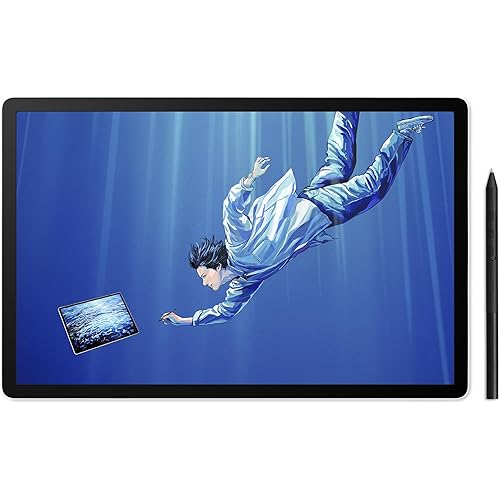
Wacom Cintiq Pro 27 Creative Pen Display (4K Graphic Drawing Monitor with 8192 Pen Pressure and 99% Adobe RGB (DTH271K0A), Black

  • Based on 631 reviews
Condition: New
Checking for the best price...
$3,499.95 Why this price?

Buy Now, Pay Later


As low as / mo
  • – Up to 36-month term if approved
  • – No impact on credit to apply
  • – Instant approval decision
  • – Secure and straightforward checkout

Ready to go? Add this product to your cart and select a plan during checkout.

Payment plans are offered through our trusted finance partners Klarna, Affirm, Afterpay, Apple Pay, and PayTomorrow. No-credit-needed leasing options through Acima may also be available at checkout.

Learn more about financing & leasing here.

Selected Option

Free shipping on this product

FREE 30-day refund/replacement

To qualify for a full refund, items must be returned in their original, unused condition. If an item is returned in a used, damaged, or materially different state, you may be granted a partial refund.

To initiate a return, please visit our Returns Center.

View our full returns policy here.


Availability: Only 10 left in stock, order soon!
Fulfilled by Amazon

Arrives Friday, May 8
Order within 23 hours and 12 minutes
Available payment plans shown during checkout

Protection Plan Protect Your Purchase
Checking for protection plans...

Size: Wacom Cintiq Pro 27 - 27 inch


Features

  • Featuring 8,192 levels of pressure sensitivity, 3 side switches, and the ability to customize by swapping the included grips or adjusting the weight and center of balance, the Wacom Pro Pen 3 is Wacoms most advanced pen yet.
  • The beautiful 27 display features 4K UHD resolution (3840X2160 pixels), exceptional 10-bit color, 99% Adobe RGB and 98% DCI-P3, and twice the refresh rate of any previous model,120 Hz, allowing the user to be fully immersed in their creation.
  • With the conveniently placed 8 customizable ExpressKeys, easy-to-adjust on-screen menus, and improved multi-touch and pen gestures, you can find what works best for you and easily set things up to work the way you want them to.
  • We integrated 4x standard 14 inch mount options so Its easy to attach another mount for your phone or camera or even add the Wacom extension table so your reference materials are in easy reach. Plus, the pen tray makes sure all your nibs and grips are to hand, whenever you need them.
  • Bonus software: Register your Cintiq Pro & receive a 3-month trials of Capture One, Clip Studio Paint EX, Toon Boom Harmony & Storyboard Pro, and MASV file transfer service; Offer available for customers located in the Americas

Description

Wacom Cintiq Pro 27 Creative Pen Display (4K graphic drawing monitor with 8192 pen pressure and 99% Adobe RGB.

Brand: Wacom


Connectivity Technology: mini DisplayPort, HDMI, USB Type-C, USB Standard-A


Pressure Sensitivity: 8192 Levels


Operating System: Windows 10 and later, macOS 10.15 and later


Special Feature: Multi-Touch Screen


Connectivity Technology: mini DisplayPort, HDMI, USB Type-C, USB Standard-A


Pressure Sensitivity: 8192 Levels


Operating System: Windows 10 and later, macOS 10.15 and later


Additional Features: Multi-Touch Screen


Specific Uses For Product: 3D Modelling, Animation, Designing


Display Type: LCD


Compatible Devices: Windows 10 and later, macOS 10.15 and later


Native Resolution: 4K UHD (3840x2160 pixels)


Screen Size: 27 Inches


Item Weight: 15.9 Pounds


Active Surface Area: 23.5 x 13.2 inches


Item Dimensions L x W: 1.2"L x 25.1"W


Color: Black


Brand: Wacom


Model Name: Wacom Cintiq Pro 27


Built-In Media: Wacom Pro Pen 3, tray, 4x standard ¼ inch mount options, Bonus software (3-month trials of Capture One, Clip Studio Paint EX, Toon Boom Harmony & Storyboard Pro, and MASV file transfer service)


Target Audience: Teacher


Model Number: DTH271K0A


Manufacturer: Wacom Technology Corporation


UPC: 753218985057


Item Type Name: Graphics Tablet


External Testing Certification: Não aplicável,


Warranty Description: 2 year manufacturer


Frequently asked questions

If you place your order now, the estimated arrival date for this product is: Friday, May 8

Yes, absolutely! You may return this product for a full refund within 30 days of receiving it.

To initiate a return, please visit our Returns Center.

View our full returns policy here.

  • Klarna Financing
  • Affirm Pay in 4
  • Affirm Financing
  • Afterpay Financing
  • PayTomorrow Financing
  • Financing through Apple Pay
Leasing options through Acima may also be available during checkout.

Learn more about financing & leasing here.

Top Amazon Reviews


  • Best Pen Display I've ever used
Size: Wacom Cintiq Pro 27 - 27 inch
The most enjoyable pen display I have ever used. After one year of using it almost every day, I absolutely love drawing with it. It's such an enjoyable experience. I feel like I have so much pen control and the etched glass feels amazing to draw on. The touch is an okay experience. I only use it for zoom and moving the canvas around. I have to turn off touch to draw on Clip Studio Paint, and remove all other gestures for it to be usable for me. But pinch to zoom and moving the canvas are pretty important to me though since I started from an Ipad Pro. It's a huge beautiful display. The 120hz is a really nice bonus in my opinion even for drawing. It just feels like a treat compared to 60hz drawing displays. And then I can also use it for gaming as well. It's pretty nice. The sound noise is as noticeable as my PC that's running Noctua NF-A12s. When listening to music, I don't notice it at all. It's not that bad. I have only ever used an Ipad Pro, Kamvas 13, and a movink but it blows all of those out of the water. Although it rightfully should, considering how expensive this display is. I would definitely recommend this if you can afford it. I wouldn't recommend the stand though. That stand is expensive for what it is, and it still has wobble unless you plant it on the table and put a cloth pad underneath like I do. I'm not an artist that moves the screen a lot though so it's good enough for me. Try an Ergotron or go a little more for a XOOT. ... show more
Reviewed in the United States on April 6, 2025 by Jacob Nguyen

  • Thought I Would Never Need a Cintiq...
Size: Wacom Cintiq Pro 27 - 27 inch
I'm a professional artist and have avoided getting a Wacom Cintiq due to the price. Instead, I'd been using off-brand interactive screen displays, my last one being the Dell Canvas 27. I'd used the Canvas for years and loved it, though it was never perfect. Since Dell stopped supporting the Canvas a few years back, I thought it best to get a different interactive pen display in case Windows updates caused the old drivers to cease to work. I really liked the size of the Canvas 27, but it seemed that no one other than Wacom had a 27" interactive pen display. So, I bit the bullet and bought this, hoping I wouldn't regret my decision. The fact is, drawing and painting on the Cintiq Pro 27 is by far the best experience I've ever had. It's smooth, fluid, and simply a joy to work with. I thought the Canvas was a better alternative when I'd purchased it because I didn't really think there could be that much difference in experience. I freely admit I was wrong. The quality of line, the effortlessness of drawing/painting on the Cintiq is unparalleled. For anyone who thinks that these off-brand pen displays can compare ... they can't. Don't get me wrong, they are good. Even great. And they are certainly not near as expensive. But the experience using the Cintiq simply blows them away, from my limited experience having owned and used a few different brands. Having said that, the Cintiq Pro 27 is not perfect. While I like the pen (the adjustable weight really helps it), it seems cheap, which is surprising considering it's importance and what you pay for this entire unit. The buttons on the left and right side (at the back) are useless. They are just not comfortable nor convenient to work with. The pen holder is ... bad. I don't use it. If you screw it into one side or the other, you block use of the buttons (but since you probably won't use them anyway, perhaps that's not a big deal). That's pretty bad design, imo. If you place the pen holder at the top, then you block some of the air vents used to cool the Cintiq. Again, bad design. Not sure what they were thinking when they made this thing. I've heard people complain about the fan noise using the Cintiq Pro 27. I don't even hear it. So, it's a total non-issue for me. I'm giving this 5 stars because it's an utter joy to draw/paint on and the small form factor makes it pretty light overall, which makes it easy to move about on the monitor arm I have it attached to. ... show more
Reviewed in the United States on September 4, 2023 by Monkey Frog

  • There's a reason why it's industry standard
Great drawing experience - no parallax or lag, great pressure sensitivity that can be adjusted, and the Pro Pen 2 is ergonomically designed (my favorite digital pen of all time). The hardware is slim and looks nice on a desk, making for a wonderful drawing and painting experience. You may hear some complaints about the screen. The screen has etched glass on top to add some resistance for a more natural drawing experience (think about drawing on paper vs drawing on completely smooth glass - the etched glass bridges the two experiences). That means when you compare the screen to say, a super HD monitor or Apple product, you'll notice the Cintiq Pro is slightly fuzzy by comparison. For me, it was only strange for about the first hour of using it. After that, I stopped caring and started creating! I haven't been bothered by it since. There is a reason why the Cintiq line is industry standard - it can get some serious work done. I love how fast and yet how precise I can draw and paint on this. Works perfectly for Mac and PC (Mac will require power cord and USB-C connection; PC will require power cord, USB-C to A, and HDMI to work - all included in the box). There's nothing that can stand up to this kind of quality on the market! ... show more
Reviewed in the United States on June 2, 2022 by Amazon Customer

  • Great product
Size: Wacom Cintiq Pro 17 - 17 inch
Best investment for an artist/illustrator!
Reviewed in the United States on March 20, 2026 by Cecilia B

Can't find a product?

Find it on Amazon first, then paste the link below.
Checking for best price...