Search  for anything...

TobenONE USB C Docking Station 3 Monitors, Driver-Based, 13-in-1 Dual 4K Laptop Dock with 2 HDMI, VGA, 4 USB 3.0, 65W Charger, RJ45, Audio, for MacBook M1-M5 Pro/Max/Neo, Mac mini, Dell, Lenovo, HP

  • Based on 666 reviews
Condition: New
Checking for the best price...
$159.99 Why this price?

Buy Now, Pay Later


As low as $26.67 / mo
  • – 6-month term
  • – No impact on credit to apply
  • – Instant approval decision
  • – Secure and straightforward checkout

Ready to go? Add this product to your cart and select a plan during checkout.

Payment plans are offered through our trusted finance partners Klarna, Affirm, Afterpay, Zip, Apple Pay, and Google Pay. No-credit-needed leasing options through Acima may also be available at checkout.

Learn more about financing & leasing here.

Free shipping on this product

FREE 30-day refund/replacement

To qualify for a full refund, items must be returned in their original, unused condition. If an item is returned in a used, damaged, or materially different state, you may be granted a partial refund.

To initiate a return, please visit our Returns Center.

View our full returns policy here.


Availability: In Stock.
Fulfilled by Amazon

Arrives Aug 14 – Aug 15
Order within 12 hours and 36 minutes
Available payment plans shown during checkout

Protection Plan Protect Your Purchase
Checking for protection plans...

Features

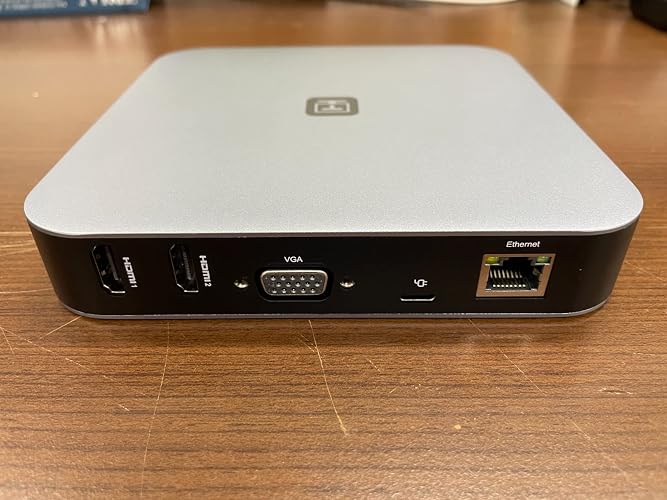
  • 13-Port All-in-One Universal Docking Station: This powerful universal laptop docking station packs 13 essential ports, 2HDMI, VGA, 2USB-C, 4USB-A 3.0, Gigabit Ethernet, SD/TF card slot, 3.5mm Audio In/Out, and 60W power supply. Sturdier, more stable, and with a sleek unique design compared to basic dual-monitor docksperfect for M1/M2/M3/M4 MacBook users and anyone needing all-around daily connectivity
  • Triple Display Support Dual 4Ultra-Clear Visuals: Unlock multitasking productivity! This triple monitor docking station supports triple displays (dual 4K@30Hz + 1 1080P) for macOS and Windows. Use HDMI 1 & 2 to enjoy crystal-clear dual 4K streamingexpand your laptop desktop to 2 or 3 screens at once, making work, study, and creative tasks way more efficient
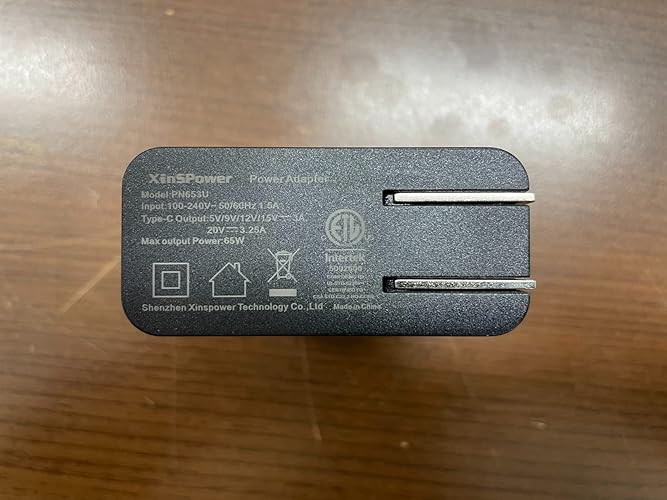
  • 65W Safe & Stable Power Supply: The USB C docking station comes with a 65W power adapter that delivers up to 57W fast charging for your laptop. Built-in over-voltage, over-current, and short-circuit protections ensure safe, stable chargingno more worries about device damage while powering your MacBook M1-M5/MacBook Neo/HP/Dell/Lenovo or other laptops
  • 5Gbps Fast Transfer & Multi-Device Connectivity: In this TobenONE docking station, 4USB 3.0 ports (5Gbps) let you connect hard drives, printers, scanners, and more external devices. The SD/TF card reader supports simultaneous read/write-essential for bloggers and media professionals needing quick file transfers from memory cards. No more juggling multiple adapters
  • Wide Compatibility with macOS, Windows & ChromeOS: Works seamlessly with laptops having full-featured USB-C or Thunderbolt 3/4/5 ports, including 2016-2026 MacBook Pro/Air, Mac mini M1/M2/M2 Pro/M4/M4 Pro, Dell Latitude 5480/XPS 15, HP Elitebook 800 G4, Lenovo Yoga 910, Surface Pro 7, etc. Note: Laptops only supporting data/power can only extend dual monitors via HDMI 2 + VGA
  • Important Notice: The latest driver was released on February 2, 2026. Please visit the InstantView official website to download the latest SM76X driver. Failure to do so may result in issues such as inability to extend dual screens or screen stuttering. If you encounter difficulties downloading, please contact us

Brand: Tobenone


Color: Grey-65W power adapter


Hardware Interface: 3.5mm Audio, Ethernet, HDMI, USB 3.0, VGA


Compatible Devices: MacBook Neo, MacBook Pro/Air with M1, M2, M3, M4 chip, M1 Pro/ Max, M2 Pro/Max, M3 Pro/Max, M4 Pro/ M4 Max, Intel chip, Mac mini M1, M2/M2 Pro, M4/M4 Pro, Dell, Surface, Lenovo, HP, ASUS, Samsung, etc Windows & ChromeOS laptop with full-featured USB C/ Thunderbolt 5/ Thunderbolt 4/ Thunderbolt 3/ USB 4.0 ports See more


Total USB Ports: 4


Product Dimensions: 5.9"L x 5.9"W x 1.05"H


Number of Ports: 13


Item Weight: 28.57 Ounces


Total HDMI Ports: 2


Wattage: 60 watts


Hardware Interface: 3.5mm Audio, Ethernet, HDMI, USB 3.0, VGA


Compatible Devices: MacBook Neo, MacBook Pro/Air with M1, M2, M3, M4 chip, M1 Pro/ Max, M2 Pro/Max, M3 Pro/Max, M4 Pro/ M4 Max, Intel chip, Mac mini M1, M2/M2 Pro, M4/M4 Pro, Dell, Surface, Lenovo, HP, ASUS, Samsung, etc Windows & ChromeOS laptop with full-featured USB C/ Thunderbolt 5/ Thunderbolt 4/ Thunderbolt 3/ USB 4.0 ports


Total Usb Ports: 4


Number of Ports: 13


Total Number of HDMI Ports: 2


Wattage: 60 watts


Item Dimensions L x W x H: 5.9"L x 5.9"W x 1.05"H


Item Weight: 28.57 Ounces


Color: Grey-65W power adapter


Brand: Tobenone


Manufacturer: MOKE INDUSTRIAL LIMITED


Model Number: UDS015DG


Mfr Part Number: UDS015DG


Item Type Name: USB C Docking Station Dual HDMI


Warranty Description: 24 Month


Frequently asked questions

If you place your order now, the estimated arrival date for this product is: Aug 14 – Aug 15

Yes, absolutely! You may return this product for a full refund within 30 days of receiving it.

To initiate a return, please visit our Returns Center.

View our full returns policy here.

  • Klarna Financing
  • Affirm Pay in 4
  • Affirm Financing
  • Afterpay Financing
  • Zip Pay in 4
  • Financing through Apple Pay
  • Financing through Google Pay
Leasing options through Acima may also be available during checkout.

Learn more about financing & leasing here.

Top Amazon Reviews


  • Excellent work around M1 chip limitations for Macbook Air 2020 Excellent work around M1 chip limitations for Macbook Air 2020
Color: Grey-65W power adapter
I just received and connected my new UDS-015D USB C Docking Station to multiple monitors. I am very happy with the performance of the device. My monitor displays are very sharp, and mouse/documents movement between screens is very smooth. I have Windows-based HP work laptop and my personal Macbook Air 2020 laptop with M1 chip. The M1 chip has a limitation to display to only one external monitor. This limitation is not a limitation anymore if you use this docking station. I connected this unit to three 27" inch monitors, and the performance is superb. The unit is designed for business environment where quality and reliability is a priority. I work remotely, so this is exactly what I need for my Windows work HP laptop. At the same time, I reconnect only one usb type C cable to my Mac laptop and enjoy all three monitors within seconds. I had to install InstantView drivers to both: Windows and Macbook laptop - but it takes about a minute of your time as the drivers are accessible for instalation as soon as you connect the docking station to your laptop. The unit screams quality: it designed very estetically, does not get hot even with multiple video streams and performs very smoothly. It is not a surpise as the docking station is capable to project the laptop screen to multiple huge-size TVs providing a very high-resolution. The unit is well-worth each penny, and I highly recommend it. ... show more
Reviewed in the United States on February 17, 2023 Reviewed in the United States on February 17, 2023 by outsider

  • Functioning w/ Three Monitors on Macbook Pro M1 Chip
Color: Grey-65W power adapter
I have a Macbook Pro with the M1 chip. I needed a device to allow me to run three monitors (at the time 27 inches) in addition the my Macbook screen. I tried at least one other product that did not work. After conducting a bunch of research, I decided to give this docking station a try. In order of importance, this is why I love the product. This device has two HDMI ports and one VGA port. It had been a while since I used a VGA port, so I wasn't sure it would work. Sure, would having three HDMI ports have been easier, maybe. But I happen to have an old VGA cable lying around, so fortunately, all three ports worked perfectly for my purposes. I am a lawyer and work with a lot of Adobe, Word and Excel files. I constantly have multiple windows open and am cutting and pasting things from one document to another. I needed screen space. This product gave me that space. Additionally, I am using all four USB A ports. One for my postage scale. One for my external keyboard. On as a charged for my mouse, as needed. And one as a charger for my airpods. This product also charges my laptop. Recently, I switched to to 32 inch monitors. I notice one of the HDMI ports seemed to flicker and it wasn't the cable or the monitor. I thought it was the docking station. I emailed them. It turns out it wasn't the hub, rather I was able to resolve the issue by going to my display settings and resetting the resolution. It works perfectly. Great customer service! ... show more
Reviewed in the United States on February 21, 2024 by Timur Berberoglu

  • Works for the M1 MacBooks Works for the M1 MacBooks
Color: Grey-65W power adapter
I had an extra display monitor but of course Apple doesn't let you "just" plug in an adapter with two HDMI ports to use two displays with the M1 chip laptops. Our office IT consultant recommended this Tobenone dock as an affordable option to make it work. The company sent an email ahead of the product with some info about downloading the necessary InstantView driver and the computer settings you need to input to make this work with multiple screens. The packaging also provides a QR link to the software and simple directions--the process only takes a couple of minutes. Because the workaround software uses a screen-recording route, you can't watch streaming content like Netflix with this activated, but it's pretty easy to toggle off the screen-sharing software to stream on the primary screen, then toggle it back on to return to multiple-display mode. It's also handy to have a couple of extra USB ports handy for charging iPads or a bluetooth keyboard. If I had any complaints so far, it would be that the arrangement of ports makes for a mess in the front. The "host" cable (leading to my MacBook Pro) plugs in in the front, plus anything you leave plugged in (like external speakers or a webcam) leave a mess of cables draped over the device. A better arrangement would be to have the "host" port to the side, as well as ports for stuff that stays plugged in. ... show more
Reviewed in the United States on March 18, 2025 Reviewed in the United States on March 18, 2025 by Kzoogal

  • Great Docking Station!
Color: Grey-65W power adapter
Before I even received this docking station, I got a note from tech support saying that I needed to be sure to install the video drivers. In today's plug-n-play world, that isn't always something we think about, so the reminder was great. I was replacing a Mokin hub that I purchased a couple years ago that died, and there were issues with that one early on with it getting really hot when there were 2 HDMI connections plugged in at the same time. That is certainly not the case with this TOBENONE hub. Since plugging it in (and installing the drivers) it works great - 2 HDMI monitors and it's barely warm. Video quality is great, and the USB ports (handy to have on the front) have been flawless. The only drawback (reason for 4 stars) was that I didn't realize that driver-based video hubs are not able to display videos from sites with HDCP 2.2(High-Bandwidth Digital Content Protection). One of the HDMI ports is plug-n-play, so disabling the screen extension/mirroring (takes 2 clicks) allows the video to play on the monitor in HDMI1. Overall, a great value for the money! ... show more
Reviewed in the United States on April 14, 2023 by Joe Lehn

  • So far does just what it's supposed to, easily, quickly
Color: Grey-65W power adapter
I bought this mainly to get dual displays with my Macbook Air M2 and that's what I now have. It was totally plug and play, since I downloaded and installed the driver in advance. It comes with two USB-C cables, one for power, one to connect to the Macbook, as well as a very nice power supply that charges my Macbook more quickly than the factory charger. While the second display, not being notively supported by Apple, isn't quite as bright as the first, I could fix that with the monitor's controls. However, I want to continue using the same two displays with my Windows desktop, so I'm not messing with brightness, contract, etc. I got a couple VWRHAR HDMI switches on Amazon, which makes it super easy for me to switch displays between Macbook and Windows. I haven't yet used any of the other ports, but I see no reason why they wouldn't work based on all the other reviews. Next I'll connect an external hard drive for automatic Time Machine backups every time I plug in the Macbook. ... show more
Reviewed in the United States on May 14, 2023 by Longtime Reviewer

  • Hub for connecting more external monitors on M1 and M2 Hub for connecting more external monitors on M1 and M2
Color: Grey-65W power adapter
I am using Apple MacBook Pro 13 with M2 chip. As is known, MacBooks with M1 and M2 chips can connect only one external monitor. The UDS-015D has HDMI1, HDMI2, and D-SUB output ports. Through SiliconMotion's chip, you can also connect monitors to HDMI2 and D-Sub, so you can connect a total of three external monitors. (HDMI2 supports up to 3840x2160@30hz, D-sub supports up to 1920x1080@60hz) Although HDMI2 and D-Sub have a structure that compresses video signals through USB and outputs them to a monitor, the picture quality is not particularly degraded. There is almost no CPU usage on a static screen, but if a video like YouTube is played in full screen, the siliconmotion chip application uses about 20% CPU usage, but I think it is a sufficiently understandable level. In addition, there are four USB 3.0 ports, SD Card and Micro SD Card readers, 3.5mm audio & microphone ports, and one gigabit Ethernet ports. And as a bonus, it also comes with a 65W PD charger and two USB-C cables. I'll have to use it for a longer time to know, but after using it for a day, it worked well without any particular problems. ... show more
Reviewed in the United States on December 21, 2022 Reviewed in the United States on December 21, 2022 by Niceshim

  • Hooray! Works Perfectly for My Macbook Pro 2020 (M1 Chip)! Hooray! Works Perfectly for My Macbook Pro 2020 (M1 Chip)!
Color: Grey-65W power adapter
I had a dual external monitor set up working very well until I was issued a Macbook Pro 2020 (M1 Chip) with my new job. I was not familiar with Macbooks but did a lot of digging and found out the M1 chip does not support this function natively. I tried two other docks before buying this one (one was the Dell 3100 and I couldn't get the DisplayLink SW to work properly, and the connector to the computer was USB-A, ugh!). After reading a bunch more articles online and surfing Amazon I found this dock. What sold me is the sleek design, the fact it has 2 HMDI ports and also 4 USB-A ports to cover all of my peripherals, and lastly the set up video (which I watched several times before purchasing). Set up was exactly as described in the video and only took minutes. I have been using it for 2 weeks now and it's pretty awesome. No flickering or any other problems, using both monitors as extended screens of my laptop. If I had to list some CONs: - the included USB-A cables don't plug in as smoothly as other cables I own. -maybe this is a design limitation but since the ports are on opposite sides of the device, I see all of of my peripherals plugged into the front and it's not exactly pretty. I could do more cleanup in the cables but still won't be super clean looking. ... show more
Reviewed in the United States on August 2, 2022 Reviewed in the United States on August 2, 2022 by Amazon Customer

  • Update: trick needed yo work with Ventura! - Works as Advertised, could use better online support.
Color: Grey-65W power adapter
Latest update (October 26, 2022): I got a prompt response from TOBENONE ([email protected]). They asked me to follow this procedure (they didn't say, but I made sure to uninstall and remove the previous version of the driver I had installed): 1>remove all devices 2>reboot your laptop 3>connect the dock and the laptop 4>connect the power supply to the PD port of the laptop 5>connect other devices to the dock. After step 5, I installed the latest version of the driver, downloaded from TOBENONE's site (version 3.12 at this writing). I ran the InstantView application after I installed it, and the dock and monitor are now recognized again, and it all works as expected. While I continue to think that the instructions could be clearer, and that the connection between dock, monitor and Mac should not break so easily, I am still happy with the way in which the dock enables be to connect to the second monitor at full high resolution. Interestingly enough, after upgrading to Ventura I discovered that I could use the second monitor through SmartCast/AirDrop, same as connecting an iPad with Sidecar. It worked well enough, but only 1920 x 1080 maximum resolution is supported that way. With the dock I can use 3840 x 2160 resolution, which gives a a lot more real estate, and the definition is just gorgeous. If connectivity, instructions, and a better structured support system are improved, there's no reason why this shouldn't be a full 5-star product. ----- I upgraded my Mac to Ventura, and the driver stopped working altogether. I downloaded and installed the latest version of the driver available, and nothing. The monitor is no longer recognized. I'm heartbroken! Support, as previously noted, is a widespread mess of not very useful information. ----- Definitely the issue with not recognizing the external HDMI monitor has to do with turning the Dock off. I had to disconnect power from the dock because I bought a longer USB C cable for the power connection. The cable that comes in the box is just 3ft long, and that was limiting where I could place the dock. The 6ft cable I bought lets me place it out of the way in the top part of my desk. Anyway, when I powered dock and computer back on, I was back to InstantView driver software insisting that no monitor was connected. I had to remove the software, restart the computer, reinstall the driver, and now it works again. Not that hard, and not even that time consuming, but kind of annoying all the same. It's kind of inexplicable that a machine this sophisticated isn't able to remember its settings if turned off, to the extent that the driver software has to be reinstaled. ----- It's been a few days since my initial review, and I'm happy to report that the "Monitor not detected" message has not come up again. In the interim the laptop has been to sleep many times, has been turned off, and at one point I even disconnected the hub altogether, and every time the two external monitors came up fine on restart. It seems that my initial problem might have been a one-time glitch, but even it it is an occasional one, I can now say that it would be spaced far enough in between that I could live with it. As it stands, however, it all has been working well. A last couple of things to note: On full restart, it takes a few seconds to the driver app to boot, so the HDMI monitor is not instantly up. BUt it does come up after about 20 seconds or so of most of the rest of the software having loaded. I have also noticed that there seems to be a certain slowness or odd rendering issue related to the image refresh. Most of the time this is not noticeable, but I have had some web pages where parts of the image seem to go blank for a few seconds when they should have refreshed. I assume this has to do with the fact that the dock is working to do something that the MacBook itself is not doing, and it has not really been a significant annoyance of impediment for me. But I have a feeling that this could be an issue for people who need intensive, fast display activity. In my case, because I just need the large external displays for work that involves mostly web pages, spreadsheets and text documents, I am quite happy with the way the dock is working, and just with the fact that I can use my two large monitor with my MacBook Air M2. My comments in my original post about the only support stand, though. It is not easy to find, and when found, it is confusing and difficult to navigate. ----------- The initial experience was very good. I got this thing, rather against my will, after realizing that my brand-new MacBook Air M2 was not going to support the two external monitors that my old MacBook Pro managed directly. (By the way, the machine is running Monterey v12.6 as I write. ) For this purpose, the dock’s setup was easy enough and exactly as advertised: I connected all the cables, connected the dock, and right away a virtual drive appeared on the computer’s desktop, with the installer file needed to drive the second monitor through the HDMI port. Granted the required access permissions, and the two monitors were up and running as with my MacBook Pro: two extended large external monitors, plus the laptop’s screen - perfect. Furthermore, my largest monitor is in fact an HD 4k TV, which the MacBook Pro could only drive at 1920 x 1080. With the dock, it now runs at 3840 x 2160, which is just awesome to display and edit my photos. So, so far so good, and as of yesterday I would have given a 5-star review. Since I installed the dock and the driver, I have put the MacBook to sleep a few times, and even restarted one, and it all continued to work. Then all of a sudden today, after a wake up, the large monitor plugged to the HDMI port would not come up. The application just said that no monitor was detected, even though I had changed nothing. Things soured a bit for me when I attempted to find support for this thing, and had to dig around for a while until I found something- essentially a number of links with FAQs that didn’t really solve anything for me. In the process I was also baffles to find that there are apparently two different drivers that are supposed to work with the dock, but no clear indication about the relationship between them, and what would determine that you choose one over the other. In any event, installing the other driver didn’t make any difference. Changing the HDMI cable didn’t make any difference. In the end, I removed all the driver software (both versions), and reinstalled the original one by following the same initial installed steps, and sure enough, the monitor was recognized again and is working right now. So, again, the dock works as advertised for my purpose, and the installation was not difficult. It does annoy me that support is not easy to find, it is not straightforward, and seems to document a different driver than the one that comes with the dock. The waste of time is not welcome, and if this keeps happening every couple of days, it could become a major problem - so the dock is on probation, and I’ll try to update in a week or two after I have a better idea of how well it holds up. Beyond my basic need to drive two external monitors, the dock incorporates a whole bunch of other ports for which I don’t really have any need: ethernet port, VGA port, SD and mini SD card ports, earphone plug and four standard USB 3 ports, plus the one USB C port used to connect to the computer. I would have been far happier, and considered the dock a far better value for money if two or three of those other ports had been USB C instead. As it stands, it has at leas three or four ports that I am highly unlikely to use ever. But I could have used two additional USB C ports right away for my backup drives. This seems to be a good, well-designed product. It’s just one that I never expected or wanted to use - I was perfectly happy with the little highly-portable hub I had for my MacBook Pro. This side of my unhappiness is obviously on Apple, not Tobenone, and I am glad that somebody had a solution for my problem. But it could have come with better support, and it would have been nice to have the option of a cheaper hub/dock with fewer ports, or at least a different selection of ports more suitable for my needs. ... show more
Reviewed in the United States on October 9, 2022 by Alex Rogers

Can't find a product?

Find it on Amazon first, then paste the link below.
Checking for best price...