Search  for anything...

LISEN 10-IN-1 Docking Station for Steam Deck OLED&ROG Ally X&Legion Go, Dual Cooling Fan 5 USB Ports and 4K@60Hz, 100W Charging Port Support ROG Ally 30W Mode, Gigabit Ethernet Fit for Steam Deck OLED

  • Based on 1,204 reviews
Condition: New
Checking for the best price...
$79.98 Why this price?
Save $50.01 was $129.99

Buy Now, Pay Later


As low as $13.33 / mo
  • – 6-month term
  • – No impact on credit to apply
  • – Instant approval decision
  • – Secure and straightforward checkout

Ready to go? Add this product to your cart and select a plan during checkout.

Payment plans are offered through our trusted finance partners Klarna, Affirm, Afterpay, Zip, Apple Pay, and Google Pay. No-credit-needed leasing options through Acima may also be available at checkout.

Learn more about financing & leasing here.

Free shipping on this product

This item is eligible for return within 30 days of receipt

To qualify for a full refund, items must be returned in their original, unused condition. If an item is returned in a used, damaged, or materially different state, you may be granted a partial refund.

To initiate a return, please visit our Returns Center.

View our full returns policy here.


Availability: 18 left in stock
Fulfilled by Amazon

Arrives Thursday, Aug 6
Order within 19 hours and 6 minutes
Available payment plans shown during checkout

Protection Plan Protect Your Purchase
Checking for protection plans...

Features

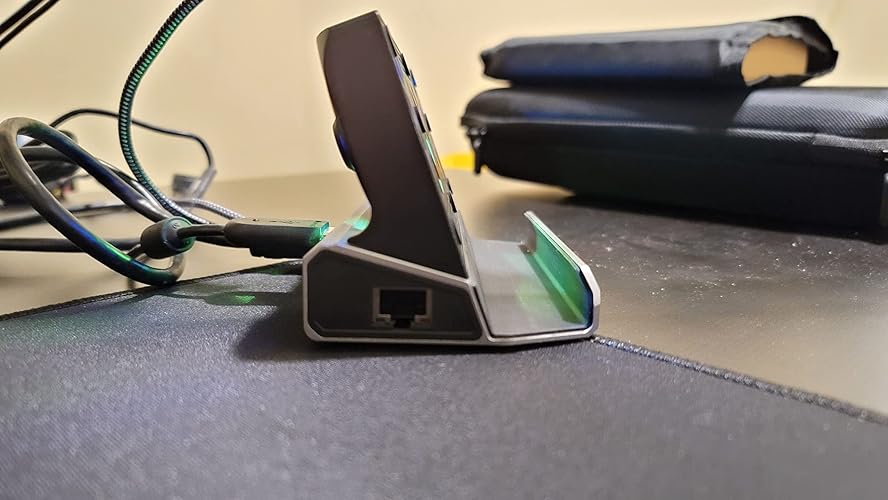
  • 13-IN-1 Steam Deck OLED Dock: LISEN's Docking Station transforms your Steam Deck OLED/ASUS ROG ALLY X/Lenovo Legion Go's USB Type-C into 10 ports & 3 features: HDMI 2.0 (4K@60Hz), Gigabit Ethernet (1000Mbps), SD/TF (U3), 2 USB3.0 (5Gbps), 3 USB2.0, USB-C PD (100W).Additionally, the dock is equipped with dual cooling fans for effective heat dissipation, ensuring a seamless gaming experience. The package also includes a 40Gbps extension adapter and 4 grip caps for enhanced control and comfort.
  • Dual Cooling Fan System: The dual cooling fan system in our Steam Deck OLED Docking station revolutionizes heat management by accelerating the influx of cooling air. This enhanced cooling efficiency not only significantly extends the battery life of your Steam Deck but also safeguards it against overheating-related issues. Say goodbye to the woes of system crashes or lost frames, and embrace a consistently smooth gaming experience.
  • 4K@60Hz HDMI Output: The Steam Deck Dock comes with a 4K@60Hz HDMI 2.0 output. When you connect an external 4K monitor, it can provide you sharper and smoother visual experience, so you can enjoy the visual feast on your games.
  • Full Charging Speed: Supporting up to 100W power delivery, this docking station ensures your Type-C game device charges at maximum speed. Note: Steam Deck max charging speed is 45W, while ROG Ally reaches 65W.Upgrade your Rog Ally BIOS to version 323 and experience seamless compatibility with the 30W Turbo Mode of your ROG Ally X . Unleash the full potential of your gaming device.
  • Doing Responsibly and Sustainably: As a responsible company, Lisen operates sustainably, to high environmental and social standards. We continue to embed sustainability ever deeper in the way we do business in our own operations and beyond, together with our suppliers. LISEN Docking Station also comes with 12 months warranty. Our expert team always stands by your side

Description

Can it support ROG XBOX ALLY X Turbo 30W mode? The Upgraded LISEN ROG XBOX ALLY X dock perfectly supports Turbo 30W mode, just make sure you use a charger with 65W or above Why does the Ethernet not work? After the SteamOS is upgraded, you need to manually enter the desktop mode and connect the wired network. Turn off Wi-Fi, or set the wired connection priority Why does the TV not recognize my sound barrier and deactivate the CEC device? In the Steam settings, click Audio, there is output, and click "External Devices", and the audio can be transmitted to the TV How to use the storage function of the Steam Deck docking station correctly? You need to adjust from game mode to desktop mode, open the system tray to see the latest inserted memory card at the bottom. The storage function of the docking station in desktop mode can be used normally Can the docking station be used for cases with Kickstand? NOT compatible with Protective Case with Kickstand, Please ensure that the thickness of your protective case is less than 2mm

Brand: LISEN


Color: Grey for Steam Deck & ROG Ally X


Hardware Interface: Ethernet, HDMI, MicroSD, USB 2.0, USB 3.0, USB Docking Station


Compatible Devices: Valve Steam Deck, ASUS ROG Ally, Lenovo Legion Go,Switch OLED, iPad Pro, Android Phone


Total USB Ports: 5


Product Dimensions: 3.27"L x 5.91"W x 12.6"H


Number of Ports: 10


Item Weight: 340 g


Total HDMI Ports: 1


Wattage: 100 watts


Hardware Interface: Ethernet, HDMI, MicroSD, USB 2.0, USB 3.0, USB Docking Station


Compatible Devices: Valve Steam Deck, ASUS ROG Ally, Lenovo Legion Go,Switch OLED, iPad Pro, Android Phone


Total Usb Ports: 5


Number of Ports: 10


Total Number of HDMI Ports: 1


Wattage: 100 watts


Item Dimensions L x W x H: 3.27"L x 5.91"W x 12.6"H


Item Weight: 340 g


Color: Grey for Steam Deck & ROG Ally X


Brand: LISEN


Manufacturer: LISEN


Item Type Name: LISEN 13-in-1 Steam Deck Station


Model Number: V262A


Mfr Part Number: LISEN


Warranty Description: 2 Year Manufacturer


Frequently asked questions

If you place your order now, the estimated arrival date for this product is: Thursday, Aug 6

Yes, absolutely! You may return this product for a full refund within 30 days of receiving it.

To initiate a return, please visit our Returns Center.

View our full returns policy here.

  • Klarna Financing
  • Affirm Pay in 4
  • Affirm Financing
  • Afterpay Financing
  • Zip Pay in 4
  • Financing through Apple Pay
  • Financing through Google Pay
Leasing options through Acima may also be available during checkout.

Learn more about financing & leasing here.

Top Amazon Reviews


  • Awesome all around tv gadget
I love that I've been able to finally have an all in one dock for my iPad, phone, and nintendo switch. I use all these devices fairly equally so I had been looking for something that can do all three of these to output to my tv. Between playing with emulators, editing photos, or playing switch games it all outputs onto the TV in such high quality and works without any additional software which is incredibly nice for me. Before getting this, I had to either connect to the switch dock, a special cable for my iPad or the dex dock for my phone - now I can just easily swap devices and not mess with the hdmi cables for a cleaner look on my TV stand! The fans that comes with it are also so essential that I never thought about until I saw this dock, since my devices would get hot - especially my phone when I would emulate video games! The fan operates quietly with one button, all the output connections are solid built in. If I had to make a complaint, I would say the cable to connect the devices is a little too tough when it comes to bending it to connect to each device (it's very resistant), and wish it was a little softer, though I suppose that will give it a very strong lifespan. I'd definitely recommend this if you're looking for one tv dock to fit all your device needs. I can't wait to try this on my future steam deck as well!! ... show more
Reviewed in the United States on July 23, 2023 by Mike

  • The Swiss Army Knife of Steam Deck Docks
Lisen knocks it out of the park with this powerful multi-purpose Steam Deck docking station. Not only has this 10-in-1 dock worked flawlessly and exceeded my expectations, but it supports a mind-melting number of plug-in devices, and unlike most other docks, has two very powerful and [actually] functional fans to keep the Deck cool while docked. These fans can be toggled on/off with the press of a button located on the back of the docking station. The cradle's depth is perfect enough that there's some breathing room between the back of the Steam Deck and the docking station to allow for proper air flow and for the fans to do their job. And even with the Spigen case on our Steam Deck, there's still room to breathe. After having tested multiple games and transferring large files, the Steam Deck never once got hot. The Lisen Docking Station also comes with a two pairs of thumb grips...and while a nice gesture, they're not necessarily needed as they're more novelty than anything. However, Lisen did think to include a rather nice 40Gbps USB-C to USB-C extension adapter that accomodates a number of different case styles. You may want to exercise a little caution taking the Steam Deck in and out of the docking station as the front corners aren't entirely covered by the inset rubber cushion, and are a bit sharp. This could lead to scratches on the screen if you're being hasty or careless with your Steam Deck. I hope that this gets addressed in a future product update or version. All of the other pros like an included Gigabit ethernet port and offering 4K/60Hz HDMI output outweigh any minor issues I had with the device. Definitely worth picking up if you own a Steam Deck or are planning on getting one in the near future. Oh, and the dock's HDMI output will also work with some tablets and mobile devices too. ... show more
Reviewed in the United States on April 14, 2023 by Alix

  • Where's the RGB Light's?
My kid love this thing. He never took his rog off the dock after I got him the monitor keyboard n mouse. He recently broke his old one - hdmi eventually stopped working. I'm here trying to find it again. Did you guys stop selling the one with rgb lights.?
Reviewed in the United States on July 20, 2026 by jay

  • Sturdy and effective dock, with some quirks
The dock itself is a fantastic value. Having an additional cooling solution to be able to not worry about thermal throttling on your steam deck, especially if you're using cryoutilities to maximize your performance per watt. The IO is also fantastic. Maybe overkill, not sure when I'll use all of the different usb ports, but the ethernet and sd cards ports are a welcome addition. With the build quality being rock solid as well. It isn't perfect, however. Which is expected given the price tag. The fan, much like other similar setups, is a simple binary off/on switch. This isn't too surprising, I'm not sure either the steam deck or ROG ally offer ways for external hardware to monitor temperatures. This isn't including how this could effect price either. TLDR: What this means, is your will want to turn on the fan when you sitting down to play, and turn it off when you're done. But the main catch is that the noise this fan introduces. It's running at max the whole time with audible coil whine. It could be worse, but it is a minor annoyance. Lastly is some of the IO. The usb connection to your device hardwired into the dock itself. So if the cable goes bad for whatever reason, the dock is effectively useless. Would have appreciated a removable cable here instead. As well as an ethernet port that isn't at a right angle. Not as bad as the type-c cable being baked in, but I did end up needing a right angle adaptor to make my setup work. Overall, a great dock at a fantastic value. Would love to see a revision to try at something more seamless and quiet. Maybe a more premium option for variable fan speeds? One can dream. ... show more
Reviewed in the United States on July 29, 2023 by Nicky

  • It's pretty awful
It's pretty awful and I don't understand why. 1st off, I'm using a brand new 100 watt Anker power brick. In handheld mode, it charges pretty fine, and I can use the 30watt power mode, no problem. In the dock however, I only get access to the 25watt option and a notification on my Ally that battery may discharge despite being plugged in. And it does discharge. The PD port is somehow delivering less power than my 20 watt bricks, but this dock gets even worse: In 30watt mode with my ROG laying on my lap, the temperature report doesn't exceed 56°C. In the dock, even with the fans aligned with the ROG's intake openings, the internal temperature climbs to 74°C. Were the fans installed the wrong way? Because that's the only explanation. So already this dock has failed to keep my Ally powered, failed to let the Ally go full power, and makes my Ally run hotter than if I didn't use the dock. My Ally literally performs better in every way using a $15 HDMI dongle than using this dock. Also my wireless mouse does not work on any surfaces with its dongle plugged into this dock. It works fine with another dongle, but with this dock, my mouse only tracks on my skin, not even on a mouse pad The only thing that didn't give me trouble was the SD card slot and keyboard. They work fine but everything else is just awful. Seems like the dock is well built, but if it can't enhance my Ally's experience, then it's literal manufactured e-waste. ... show more
Reviewed in the United States on January 1, 2024 by Rotty

  • Switch Deck too
I recently purchased the LISEN Docking Station for my Nintendo Switch and Steam Deck. I am very impressed with it. It is a well-made, sturdy dock that allows me to connect my devices to a variety of peripherals, including my monitor, TV, keyboard, mouse, and external hard drive. The dock also includes a Gigabit Ethernet port, which allows me to get a fast and reliable internet connection. I have been using the LISEN Docking Station for a few weeks now and I have had no problems with it. It is easy to set up and use, and it has worked flawlessly with my devices. I primarily use it with my OLED Nintendo Switch. Here are some of the pros of the LISEN Docking Station: Well-made and sturdy Easy to set up and use Compatible with a variety of peripherals Gigabit Ethernet port for fast and reliable internet connection Good cooling for your console Some of the cons: The price is a bit high The dock does not come with any cables Overall, I am very happy with the LISEN Docking Station. It is a well-made, sturdy dock that allows me to connect my Nintendo Switch and Steam Deck to a variety of peripherals. ... show more
Reviewed in the United States on May 15, 2023 by Kaylee Dawn

  • This also works with my Samsung tablet and phone
I bought this product to use with a Samsung cell phone I have. I always found it hard to work from my little phone screen or even trying to hook up the phone to a big screen and then trying to connect additional peripherals to it (mouse/keyboard/etc). I have bought several devices in the past and didn't have much of an expectation for this one, other than the price. I won't lie, I was very surprised to see how easy I was able to turn my Samsung phone in to a (for lack of a better word) computer!. This docking station allowed me to connect a monitor (via HDMI), a keyboard, a mouse, and even extra USB accessories to my phone just by using one cable. The attached pictures show how my phone screen looked using the dock. One of the most useful items I have purchased. This product works with any device that uses USB-C connection. As viewed in the pictures, the device also has 2 fans to keep the device cool while in use. Having this docking station allows me to hock up my phone or my tablet to an external monitor and external peripherals without any hassle. If you you're like me and have electronics that you would like to be able to manipulate as a computer, then this is the docking station for you. It's cheap when compared to other devices in the market and it is plug-and-play. Do yourself a favor and get this dock. You won't regret it. ... show more
Reviewed in the United States on March 26, 2023 by rangerprato

  • Always has to be plugged in…
I got this for my ROG Ally, and its worked great. I mostly needed it for of its SD slot, USBs and ethernet port, so I don’t get much use out the fans. They work fine when I do use them, albeit noisy. My only problem is that it cant power itself, or use the Ally’s power. I thought it would only need to be plugged in if the fans were on, but this dock needs to be plugged in even if youre only using one usb slot. I have not had this issue with other docks, which draw minimal power from the ally. It makes it clunky to use, less portable, and makes my Ally hotter since it’s charging the whole time. I barely use it because of this huge drawback, and it makes the price unjustifiable. ... show more
Reviewed in the United States on April 7, 2025 by Orange Marmalade

Can't find a product?

Find it on Amazon first, then paste the link below.
Checking for best price...