Search  for anything...

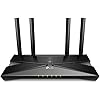
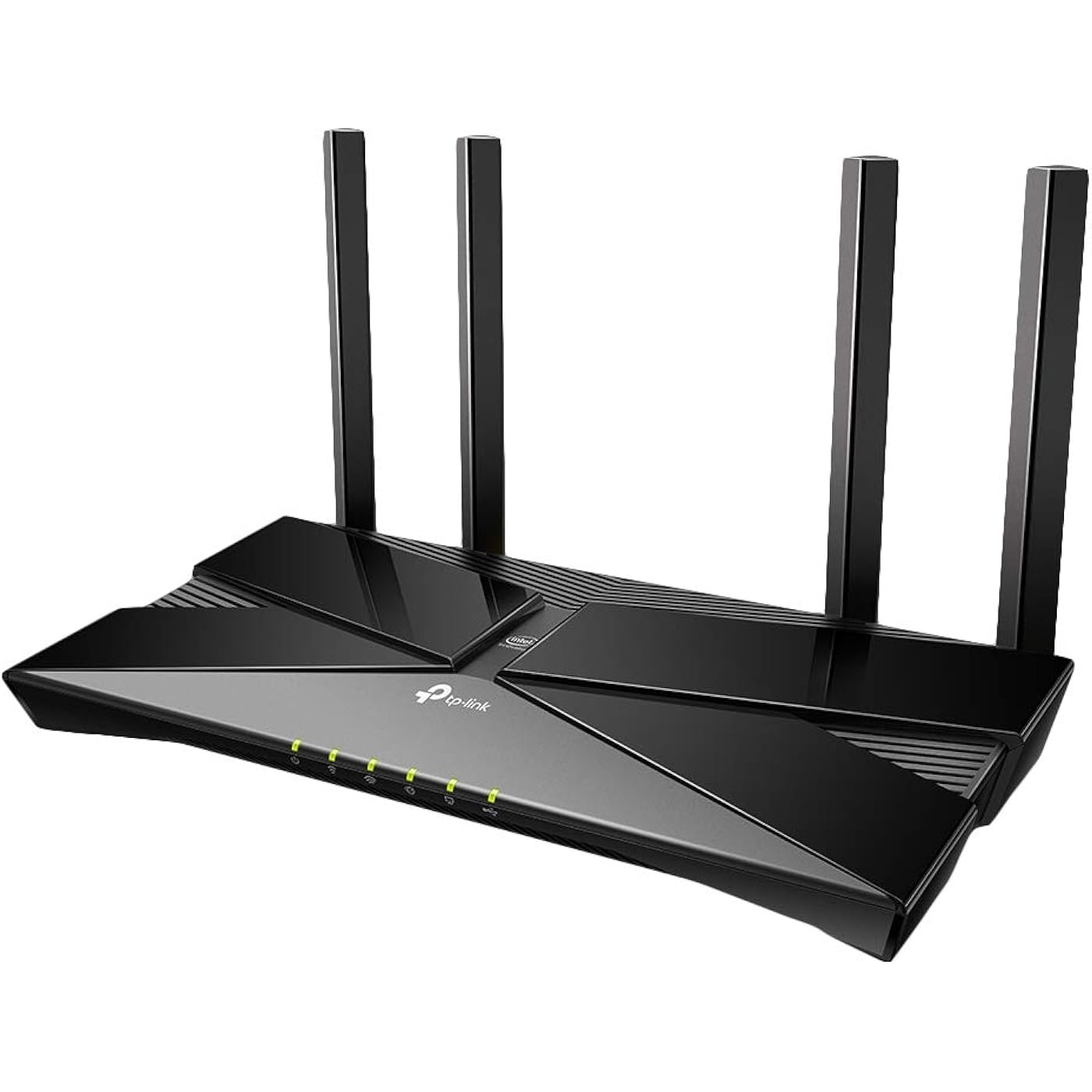
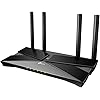
TP-Link WiFi 6 AX3000 Smart WiFi Router – 802.11ax Router, Gigabit, Dual Band, OFDMA, MU-MIMO, Works with Alexa(Archer AX50)
  • Based on 9,240 reviews
Condition: New
Checking for the best price...

Buy Now, Pay Later


As low as $16.67 / mo
  • – 6-month term
  • – No impact on credit to apply
  • – Instant approval decision
  • – Secure and straightforward checkout

Ready to go? Add this product to your cart and select a plan during checkout.

Payment plans are offered through our trusted finance partners Klarna, Affirm, Afterpay, Zip, Apple Pay, and Google Pay. No-credit-needed leasing options through Acima may also be available at checkout.

Learn more about financing & leasing here.

Selected Option

Free shipping on this product

30-day refund/replacement

To qualify for a full refund, items must be returned in their original, unused condition. If an item is returned in a used, damaged, or materially different state, you may be granted a partial refund.

To initiate a return, please visit our Returns Center.

View our full returns policy here.


Availability: Only 2 left in stock, order soon!
Fulfilled by UnrealDeals (SERIAL NUMBERS RECORDED)

Arrives Saturday, Aug 8
Order within 12 hours and 56 minutes
Available payment plans shown during checkout

Protection Plan Protect Your Purchase
Checking for protection plans...

Style: AX3000


Features

  • Wi-Fi 6 Router: Wi-Fi 6 (802. 11ax) technology achieves up to 3x faster speeds, 4x capacity and 75% lower latency compared to the previous generation of Wi-Fi 5 while the power of Intel's dual-core CPU ensures your experience is smooth and Buffer-Free
  • Next-gen 3 Gaps speeds: 4-Stream Dual Band router reaches incredible speeds up to 3 Gaps (2402 Mbps on 5 GHz band and 574 Mbps on 2. 4 GHz band) for faster streaming and gaming like you have never experienced before.
  • Connect more devices than ever before: simultaneously communicate more data to more devices using revolutionary OFDMA technology
  • Minimize lag icate more data to more devices using revolutionary OFDMA technology Breathable leather lining Minimize lag For all devices and applications: experience ultra-smooth entertainment whether you are streaming 4K videos, gaming onlineFor all devices and applications: experience ultra-smooth entertainment whether you are streaming 4K videos, gaming online, or even video chatting with up to 75% reduced lag
  • Increased battery life for devices: target wake time technology reduces your devices Power consumption to extend their battery life
  • Advanced security: Protect your network and connected devices with a free lifetime subscription to TP-Link HomeCare featuring next-level antivirus, robust parental controls, and QoS
  • Works with all internet service providers, such as AT&T, Verizon, Xfinity, Spectrum, RCN, Cox, CenturyLink, Frontier, etc.( a modem is required for most internet service providers)

Description

Wifi6 router AX3000 dual Band Gigabit Router. External Power Supply : 12 V/2 A.

Brand: TP-Link


Model Name: Archer AX3000


Special Feature: Alexa compatiblem, Beamfoaming, Internet Security, Parental Control, QoS, WPS


Frequency Band Class: Dual-Band


Wireless Communication Standard: 802.11ax, 802.11b, 802.11g, 802.11n


Compatible Devices: Laptop, Personal Computer, Smartphone, Tablet


Recommended Uses For Product: Gaming, Home, Office, Security


Included Components: Router, Power Adapter, Network Cable, QIG


Connectivity Technology: Ethernet, USB, Wi-Fi


Color: Black


Other Special Features of the Product: Alexa compatiblem, Beamfoaming, Internet Security, Parental Control, QoS, WPS


Frequency Band Class: Dual-Band


Wireless Compability: 802.11ax, 802.11b, 802.11g, 802.11n


Compatible Devices: Laptop, Personal Computer, Smartphone, Tablet


Antenna Location: Gaming, Home, Office, Security


Connectivity Technology: Ethernet, USB, Wi-Fi


Antenna Type: Fixed


Operating System: OpenWRT


Security Protocol: WEP, WPA-PSK, WPA2-Enterprise


Number of Ports: 5


Control Method: App


Data Transfer Rate: 2402 Gigabits Per Second


LAN Port Bandwidth: 10/100/1000 Mbps


Voltage: 12 Volts


Maximum Upstream Data Transfer Rate: 2976 Megabits Per Second


Number of Antennas: 2


Smart Home Compatibility: Smart Home Compatible


Router Firewall Security Level: High


Wi-Fi Generation: Wi-Fi 6


Has Internet Connectivity: Yes


Router Network Type: wireless router


Connectivity Range: 2500 Square Feet


Is Modem Compatible: No


Connectivity Protocol: ethernet, wi-fi


Coverage: up to 2,000 square feet


Controller Type: iOS


Frequency: 5 GHz


Brand: TP-Link


Model Name: Archer AX3000


Built-In Media: Router, Power Adapter, Network Cable, QIG


Model Number: Archer AX50


UPC: 845973088781 845973089252


Global Trade Identification Number: 52


Manufacturer: TP-Link


Mfr Part Number: Archer AX50


Unit Count: 1.0 Count


Warranty Description: 2 year manufacturer


Item Weight: 1.2 Pounds


Item Dimensions L x W x H: 12.99"L x 9.65"W x 2.95"H


Color: Black


Has Security Updates: Yes


Frequently asked questions

If you place your order now, the estimated arrival date for this product is: Saturday, Aug 8

Yes, absolutely! You may return this product for a full refund within 30 days of receiving it.

To initiate a return, please visit our Returns Center.

View our full returns policy here.

  • Klarna Financing
  • Affirm Pay in 4
  • Affirm Financing
  • Afterpay Financing
  • Zip Pay in 4
  • Financing through Apple Pay
  • Financing through Google Pay
Leasing options through Acima may also be available during checkout.

Learn more about financing & leasing here.

Top Amazon Reviews


  • Very powerful wifi router.
Style: AX3000, Dual-Band
Before I get into my review I want to say that I know a lot about internet and wifi equipment.I have 8 devices connected to my network. Now I will start my review. I purchased a wifi 6 router that the company rockspace made. Now I did like their wifi 5 home mesh system. I still have that product sitting in my closet. However I was disappointed in their wifi 6 router. Here is a link to the review I wrote on it. https://www.amazon.com/review/R17KHWR84OT3X8/ref=cm_cr_srp_d_rdp_perm?ie=UTF8 Well I decided to do some research on other wifi 6 routers. I read a lot of good things about this tp-link wifi 6 router. I liked the specs it provided so I decided to give it a try. This is my first tp-link router. I received it in the mail unhooked the other router hooked this one up and started setting it up. I must say the setup process is simple. You can either do it from a browser on a pc or you can download their app and do it from there. They give you two options to set up the wifi networks. You can either have it set to one single ssid (this will combine 2.4ghz and 5ghz into a single wifi connection.)and it will connect your devices to which network is best for the device or you can have it the traditional way and sperate the 2.4ghz and 5ghz wifi. After I set up my wifi network I went in and changed the channels from auto to what worked best in my environment. I do recommend changing the channels from auto to what gives you the less interference from neighboring wifi channels as that will give you the best performance over your wifi. After I got all my settings where I want them it was time to run a speed test on my desktop pc. It is connected to the router by a cat 5e ethernet cable. The modem is connected to the router by a cat 6e ethernet cable. I pay for 400mbps and 20mbps upload(spectrum internet) I ran my speed test a couple of times to make sure the results were consistent. My speed results were 521.92mbps download and 28.15mbps upload. Those are great speeds and way way above what I pay for. I do a lot of gaming and this router did excellent. It lowered my ping in games and gaming overall felt a lot smoother. It provides great performance over ethernet. 5ghz review starts here. To test my 5ghz network I will be using my iphone 12(WiFi 6 compatible device). I started out by testing the speeds right next to the router. The results were 482.8mbps download and 32.6mbps upload. My next test would be in my kitchen which is right outside of my room. I started the speed test. The results were 477mbps down and 23.2mbps upload. The next test would be in the laundry room which is threw my kitchen but you can see my room and the router perfectly from there. My speed test results were 417.3mbps down and 23.1mbps upload. So far the 5ghz network provides excellent speeds over distance.(Old wifi routers I had would drop a bar of signal or two at those spots and would struggle to give me a good speed over 5ghz) My next testing spot would be in my garage which isn't far from my house at all. The results were 285mbps down and 24.8mbps upload.(old wifi routers I had would only give me 1-2 bars of signal in the garage and speeds were horrible) My next testing spot would be in the front of my house. Now their is two walls in between the front of my house and the router. The speed test results were 276.5mbps down and 22.7mbps upload. At all of these spots I tested the 5ghz wifi at I had full bars of signal and not once did they drop to 1 or 2 bars of signal. Overall the 5ghz band delivers excellent speeds and gives great coverage. 2.4ghz review starts here. To test the 2.4ghz network I will be using my google pixel 4a 5g(Non wifi 6 compatible). Since I will be using the same spots to test in I'm gonna put it into a list view. 1. Next to the router- 132mbps down and 23mbps upload 2. Kitchen- 124mbps down and 21.8mbps upload 3. Laundry room- 127mbps down and 23.1mbps upload 4. Garage- 81.7mbbps down 21.8mbps upload 5. Front of my house- 77.8mbps down and 18.8mbps upload While I was connected to the 2.4ghz in all these spots I did not lose any bars of signal at all. The speeds were great for being on the 2.4ghz connection. 2.4ghz connection is known to have the best range and not that great of speeds but with this router speeds are excellent for this connection. My thoughts. After all my testing was done I was very happy with this router. This router has out performed all my old routers I have ever used. However it does get a little hotter then I would like but it doesn't get hot enough to worry about it causing a fire etc. I recommend putting some space between the back of it and where it's going to be placed so it can have some more airflow. I like how they have a app for the router also. It makes it easier to see what devices are on the network instead of always needing to log in on a computer to check everything. I personally don't have anything bad to say about the router except for the heat issue other then that I defiantly recommend this router. ... show more
Reviewed in the United States on April 18, 2021 by grady tighe

  • Might be the best AX (wifi 6) router of 2019 Might be the best AX (wifi 6) router of 2019
Style: AX3000, Dual-Band
Bought to replace an aging R7000 Netgear Router ( developed a habit of "DNS server is not responding" error. ) TL;DR Pros: -price -ports -no reboots required after setting changes Cons -no default admin / admin account like old routers -cant turn off QOS ( hasnt effected my network though) -lesser known brand So this purchase was the culmination on about 40 hours of research. I was a die hard Netgear owner for about 15 years. i decided to try something new for a few reasons. 1. new routers are stupidly expensive. most Wifi 6 routers with any reasonable hardware are going to run $270+ 2. firmware issues are reported for both of the popular Netgear and Asus routers. lots of negative reviews. 3. "gamer" price increase just because it is branded as "gamer" 4. sometimes trying new things is good. I settled on this TP-Link for a few reasons 1. Wifi6 (AX####) if im going to get somthing new, i might as well get the newest technology (even know none of my devices can use it yet) 2. it had a usb 3.0 ( most routers do at this point but it was on my list anyways due to network storage) 3. less that $200 4. gig+ Ethernet ports 5. its a name i know of ( top 5 networking companies Netgear, Cisco, Asus, TP-Link, D-Link) Anyways on to the review. Design: pretty slick. thinner / smaller than i expected. antennas swivel with a little effort, but stay put when your finished moving them. attaches to the wall with two screws ( not included ) the holes on the back of the device are roughly 8 1/2 inches apart. has an option to turn the LED's off at certain times Setup: initial log in was done with a cable and my laptop, the rest of the setup was completed once i replaced it on the wall where my old router was ( hard wires / cable modem location ) pretty standard set up. my router was defaulted to 192.168.0.1. once i got to the page i was prompted to set up a password. i later changed my network to use 192.168.1.1 ( like my last router) there was some quick set up first run type questions it asked. i later went in a specified permanent ports for my wired desktops which was a breeze. i also updated the firmware which was painless. one major pro with this was you can make changes to the router configuration, and you never need to reboot the router ( firmware being the only rebooting action of all the settings i changed. ) Speed: wired connections were reading 500mbps to the xfinity.speedtest.net which is what im paying for speed wise. my google pixel 2 wireless speed test to the google site was reading 320 mbps. i cant complain here, so im pretty happy with that. networked storage: i plugged in our families 256GB photo archive thumbdrive to the router, was getting consistent 30mbps transfer from desktop to thumbdrive. pretty happy with that, as its about as fast as i get when its plugged into my desktop. All and all im pretty happy with it, will keep this review updated as time goes on. ... show more
Reviewed in the United States on November 22, 2019 Reviewed in the United States on November 22, 2019 by Diorella Foster

  • Streamlined Whole Home Router - UPDATED 3/2/2021
Style: AX3000, Dual-Band
I have had it up and running for a day now with no issues at all. We will see how it holds up to time. Since Netgear gimped their nighthawk series with bad firmware and no longer let you downgrade, I had to get a new router that would support FIOS 500/500 speeds and cover my whole home. The whole device looks very clean and professional. The interface is very reminiscent of Linux-based DD-WRT custom software. It has all the features you could ask for for a home network and even a business. However, the QOS and Alexa features require a 3rd party app and account. I will not use those as I don't like anything having backdoor access to my router. The only thing I can say I would change is the Wireless scheduling feature. Their iteration of the feature only turns ALL the wifi off and not individual 2.4 or 5GHz signals. I would use this function to control access to the streaming devices in the house so the kids could not use their streaming devices during a certain time as they are all on 5GHz. That could easily be fixed with a firmware update in the future. Signal strength is on par if not better than the Nighthawk R8000, and wired speeds are better with this TP-Link. To boot it has 802.11AX capability if in the future I get a device that can support that specification. For $150 this router exceeds my expectations and completely beats my old Nighthawk R8000. If Netgear decides to fix their firmware I may give them a try in the future. Right now, TP-Link has my business. Extra features I really like are the night mode and the reboot function. Since our router has to be in the master bedroom the night function is perfect by shutting off the lights at night so it doesn't disturb your sleep. The reboot function is nice because you can restart the device at a scheduled time at any interval. ALL routers have to reboot time and again to get our connectivity back or even better signal back. This TP-Link does it for you, even in the middle of the night while your sleep to keep your network fresh and clean. One nerdy feature it has is VERY in-depth logging, you can pick your security level to log. Granted this router stands the test of time, TP-Link has a solid product. I use their powerline adapters too for my work equipment, those work great as well! UPDATE 1 - SO, the router lasted 6 hours then overheated, which caused the wifi to go in and out until after a few hours it shut off altogether. If this router lasted it would have been good. Returning for refund. UPDATE 2 - Decided to give a new router a try thinking I got a dud. This time however I'm going the extra mile and using a laptop cooler with it. So far it has lasted 24 hours of my normal household usage. I have OFMDA and Wifi AX turned off as nothing in my house uses them. I have the latest Firmware and I am running high transmit power. Let's see if this router can keep up. TP-Link made a good router with very bad cooling, they should really make a cooler for this router and redesign the case. UPDATE 3 - Item works just fine with an external cooler. However, upon rebooting the external cooler would shut down and not come back on then the router again started overheating and shutting down. If TP-Link wants to sell these AX routers they need to redesign the case to allow better airflow and possibly put a small fan in them. Returned item. Still on the lookout for a new router. ... show more
Reviewed in the United States on February 28, 2021 by Nathaniel Vieira

  • TP-Link WiFi 6 AX3000 Smart WiFi Router (Archer AX50)
Style: AX3000, Dual-Band
I just upgraded to this router after using a TP Link (Archer) c3200 for the last few years. First, let me say I have used TP Link routers for the last 20 years or so and I have always found them the best for my needs. So on to this router. The instructions were very easy for most anyone to follow, even if you have a minimal knowledge of networking. This router has loads of features and tutorials from QoS, security, easy set up and customer support (which I haven't used). I especially like the QoS feature that allows you to set priorities for your networked items. It's easy to choose the items you want to set priorities like streaming, surfing or whatever else you want. You will need to set up an account with TP Link to enjoy some of the features. The added feature for Alexa makes it it easy to change your priorities from one to another without having to log into the router and change things manually. This router is backward compatible with earlier network protocols. It is dual band with 5Ghz and 2.4Ghz. We rely on streaming for our TV (local and cable channels), HBO Max, Amazon Prime, Netflix and Hulu TV. We are able to stream 4K TV without lagging or network interruptions (providing your ISP isn't garbage like ours). When losing internet, we receive a popup on our TV via the router that tells us that our signal is lost. Overall, I really like this router and I'm still a bit in the learning curve of all the capabilities and features this has to offer. I would definitely recommend this for a great, inexpensive upgrade that helps you unlock all you can do on your network. ... show more
Reviewed in the United States on January 25, 2021 by Brian Reid

  • Very good router AX50 AX3000, very good value.
Style: AX3000, Dual-Band
I usually go with a top of the line router but since the AX11000 is not available on Amazon and the AX6000 is quite expensive for just another WiFi band and (4) additional Ethernet ports, I decided to try out this Dual-band WiFi 6 router. This replaced my aging (but very reliable) TP-Link Archer C3200 which was a very good and very reliable 3-band WiFi router and was still running ok but I wanted to try out a new, more powerful router with WiFi 6 capability to see how much they've improved. Well, I can tell you that they've improved A LOT! I used all (3) bands on the old C32000 to combat interference and was a little reluctant to move to a (2-band) model. My fears were unfounded. This AX50 v1.0 (which is the true model #) not the AX3000 as it's branded and sold under. I'm not sure why TP-Link has the AX3000 and the AX50 and markets them independently when they are supposedly the same model/version but they do have different Firmware. The only differences I see between the what looks to be older AX3000 and the AX50 is that the newer AX50 has a USB 3.0 port compared to the USB 2.0 on the AX3000 and was happy because it looks like the AX50 is getting newer firmware updates. Before fully configuring, I updated the Firmware to the latest by downloading the FW from TP-link's support website. I can tell you that WiFi signal strength, quality, speed and reliability has improved greatly and I don't miss the 3rd band. I don't run it in SmartConnect but rather configure a specific SSID for the 2.4 GHz and another SSID for the 5 GHz radios. Thing to keep in mind that I found. If you enable QoS for a device, it will limit the full download/upload speeds, even if the QoS device is not online nor communicating. I'm not saying it's bad, I just found this by trial and error so fyi if you enable QoS and see the performance of your WiFi and Wired devices become impacted at less than what your ISP is providing. As soon as I disabled QoS, everything went normal. I would say that this could be handy to assign QoS to your iPhone if you handle Business Zoom, WebEx, Skype calls via WiFi calling on your mobile phone for work so that it won't drop out while speaking/listening. I will come back and update the review as I put it through it's paces and reliability of it. I was so impressed by the old TP-Link C3200 stability that I decided to stick with TP-Link and this AX50 is a GREAT value for 150 bucks. Probably one of the best values out there for a WiFi 6 router. ... show more
Reviewed in the United States on September 26, 2020 by JMPATLANTA

  • So disappointed
Style: AX3000, Dual-Band
I really wanted to like this router, but it fails to connect to my modem, and the tech support to try and diagnose the problem is woeful. I bought this to replace a working but geriatric Apple Airport Extreme. In theory, this should have been as simple as power it up, make sure it works using all default settings, then change the SSID. Easy, right? Wrong. Powering it up worked, and both wifi's were enabled, but it doesn't like my modem for some unexplained reason. The message I see in the web UI is "WAN port is unplugged" which is not very helpful. The cable I plugged into the WAN port is the same cable that was plugged into my Airport WAN port, so I know it works fine. Searching for this error message led me to some tplink support pages that didn't help at all, so I tried to contact tplink directly. Due to Covid, they only have 2 hours/day of live phone support, which is fine - can't hold that against them. Live Chat? Sure, lets try that. After a surprisingly short wait (5-10 minutes), I started chatting with Rikka, who walked me through all of the things I'd already tried, then pointed me at a page that I would never have found on my own. Finally, some progress, maybe? Plugging a cable from one LAN port to another essentially locks up the router. Even with a direct, cable connection, I can't get to the web UI. So, time to report back to Rikka... Sadly, no. About 3 minutes after being asked to try the LAN to LAN thing, my session was terminated with an overtime! message. I'd already seen this message earlier in the chat: We haven't received your reply for 4 minutes. Please kindly note that the chat will be closed automatically if there is no response within 8 minutes. so I wasn't terribly surprised that I'd been disconnected, but 3 minutes is not 8 minutes, so thats kind of annoying . And, of course, the obligatory: The number of customers before you in the queue: 6 Ah well. We've all been trained to accept the fact that support is really just a stand-off between us and the company we're trying to talk to (looking at you Comcast & AT&T). But they picked up my initial chat pretty quickly, so maybe tplink isn't quite in that class? Well, that was more than 50 minutes ago, and there are no updates to say whether there are still 6 people in the queue, or 20. Oh, and you only get to send one message after you're disconnected. My "Hello?" apparently doesn't make the grade. If I try and send another message, I get this: Please wait for the customer service to respond Look, I get that customer service is always bad. And I didn't really expect much when I started chatting. But being cut off and thrown into limbo is bad, even by the standards we've all come to expect. I almost never write reviews, but I've wasted hours of my time trying to get this thing working, and want to warn you that if you run into problems, you might be burning a lot of time too. Update, September 7: After chatting with a different support person (twice, we were cut off), I was told that the problem was that my ethernet connection was not compatible with this router, because my ethernet comes into my house over a POE connection. So, on a hunch, I ordered a 4 port GB switch to put between my POE and the AX50, and magically, it can now see my WAN connection. I've been running it like this for a week or so, and so far so good. This feels so wrong though. Why the AX50 can't use the unpowered ethernet cable coming out of a POE power supply I do not know. As far as using the AX50, the signal strength is certainly stronger than my old Airport extreme, so I see more consistent performance when I'm further away from the router, and my phone is noticeably faster (wifi 6 I suppose). In that respect, the router is doing its job. The management UI is mostly OK, and does its job, but feels like every page was designed by a different team - as an example, some pages seem to be able to show you the name of a client, and some don't. There is no good reason that you shouldn't be able to see the names everywhere. This is annoying, but I can live with it. One huge frustration I had was that I set up my Airport to extend the network at the far end of the house, and my laptop (MacBook Pro) would not switch between the two WAPs - once it had found one, it would hold on to the connection no matter where I was. I could force it to switch by rebooting one or the other WAPs, but that then messed up every other wifi device in the house. It turns out that I had different security levels set on the two WAPs, and Mac OS didn't like that. Switching both the the same level has cured this problem. Another hour wasted trying to diagnose a silly wifi problem. So, the upshot of all of this is that I now have a setup that works fine, so far, but took an ungodly amount of time to get going, and needs a do-nothing switch to work at all. I thought about bumping this to a 2 or 3 star review, since the router is doing what I bought it to do, but I can't get past the fact that I had to jump through so many hoops to get there. The AX50 is not a bad router, and if I had a more typical WAN connection I might not have had the connection problems I had, which would have saved me from having to deal with tp-link support. But I did, and so I have to rate my entire experience. ... show more
Reviewed in the United States on August 26, 2020 by J. Gifford

  • New AX55 better than AX50
Style: AX3000, Dual-Band
UPDATE 11/16/21: I purchased another AX3000 - the updated Archer AX55 model. My plan was to use the original - reviewed below - as an access point downstairs to improve coverage. I have not set this up yet. The newer model AX55 is an improvement over the AX50. It doesn't run hot. It seems like the range is better. I have it in my upstairs home office on one side of my 2500 sq ft house and get an OK signal downstairs in my family room. Set up is the same as the AX50. I use an external drive connected to the USB3 port on the back. Seems to work better than AX50. I haven't measured the speed but I put movies on the drive and can stream them without problems on my big screen downstairs in my family room. I am using hard-wired ethernet to my TV. All in all, the newer AX3000 AX55 model is an improvement on the AX3000 AX50 model. Good mid-range router. Does a pretty good job in my 2500 sq ft 2-story home. For most, this is all the router power you will need. Gamers may want to spend more for a gaming router. ORIGINAL AX50 Review The jury is still out. Replaced my Spectrum router hoping for better coverage in my 2500 sq ft 2-story home. The router is in my home office, 2nd floor at one end of the house. I have the 200 Mbps Spectrum plan. Pros: Easy setup Improved coverage over Spectrum Lifetime security software App and Online setup options are pretty good So far, no dropped signal or reboots Cons: Runs hot Antennas not removable Was hoping for stronger signal downstairs I also purchased Costco's Netgear Nighthawk RAX45 AX4300. Seemed to have slightly better coverage. Didn't run hot. Removable antenna. PROS: Runs cool Removable Antenna Pretty good coverage App & Online setup good features CONS: Security app (Netgear Armor) $70/yr - $45 first year Coverage is good but not Wow! Just slightly better than TPLink I changed a setting and the router wouldn't reboot. Tried factory reset, no luck. I'm returning the Nighthawk to Costco. Not worth fooling with a replacement. TPLink AX50 is good enough, cost $125 vs $145 (on sale). Lifetime security software vs. $70/yr Netgear. Whole-house coverage is good enough for my needs. I have my TV, Receiver, Security cameras all hardwired. I ran an Ethernet cable from upstairs, outside wall to downstairs, drilled a hole in the Familyroom wall, pushed ethernet cable through the wall, and connected it to a 7 port ethernet port. Then connected as many things as possible with Ethernet - not having to rely on wireless. My phone gets plenty of signal and bandwidth throughout the house. Bottom Line: TPLink AX50 is a good router for the money. Will handle the majority of your needs in a 2500 sq. ft. home. Runs hot, so make sure good ventilation (prop up for more space underneath). Good value for most people. Not the best out there but for this price, probably the best. ... show more
Reviewed in the United States on August 8, 2021 by R. Richardson

  • WOW
Style: AX3000, Dual-Band
I have spectrum. I used to have 400 mbps internet. Before this router I was getting speeds of 475 mbps on wifi and 595mbps hard wired. I was using my own equipment (not there's). I upgraded my speed to the gig for spectrum. I needed to use their modem 3.1 because my own modem of 3.0 was not getting the speeds. So I was using my own router it can support the gig internet speed but it did not. I was just getting wifi speed of 475 mbps still and hard wired speed of 575. Now, I am still using their modem of 3.1 and i purchased this router tplink Archer AX50 (WIFI 6). Before I turned it on, I also unplugged the modem. Once everything was plugged in I powered everything up. Started to program the router and selecting the channels for it etc etc. Very easy process. Did the internet speed test on wifi and it gave me speeds of 775mbps and repeated it again and it went up to 799mbps. I have a 2 story house. The room farthest from the router before I was getting 110 mbps. Now with this Tplink router and the internet upgrade my speed went up to 500mbps. Big difference and the amount of walls the signal travels was amazing. I also have 2 wifi/ethernet extenders for my office to keep everything hard wired and before ther upgrade the computer hard wired with the wifi/ethernet extenders the speed was at 150mbps..and with the gig internet it is going up to 500mbps. I will take that. The tplink router I have my ps4 xbox 1**4k bluray player**4k samsung smart tv hard wired on the router. Both my game systems I was getting speeds of 900mbps. My smart tv loads very quick to watch netflix, hulu, hbo max. This is important to keep in mind. Some of the electronics out there will not have the wifi to get up to the gig. Specially if it is old model. Also, with wifi you will not be getting exactly the gig. With spectrum their "gig " is 940mbps. NOt the actual 1000mbps. I am assuming that if you want to boost up your speed and get a better signal this router will do the trick. Very light and very compact. I mounted the router on the wall and pointed the antennas towards the middle of the room (better reception). ... show more
Reviewed in the United States on March 8, 2021 by Joe

Can't find a product?

Find it on Amazon first, then paste the link below.
Checking for best price...