


Search  for anything...

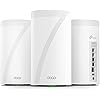
TP-Link Deco 7 Elite BE85 Tri-Band WiFi 7 BE22000 Whole Home Mesh System - 12-Stream 22 Gbps, 2X 10G + 2X 2.5G Ports, Wired Backhaul, 8X High-Gain Antennas, VPN, HomeShield, Free Expert Help (3-Pack)

  • Based on 2,231 reviews
Condition: New
Checking for the best price...
$1,191.99 Why this price?
Save $108.00 was $1,299.99

Buy Now, Pay Later


As low as / mo
  • – Up to 36-month term if approved
  • – No impact on credit to apply
  • – Instant approval decision
  • – Secure and straightforward checkout

Ready to go? Add this product to your cart and select a plan during checkout.

Payment plans are offered through our trusted finance partners Klarna, Affirm, Afterpay, Apple Pay, and PayTomorrow. No-credit-needed leasing options through Acima may also be available at checkout.

Learn more about financing & leasing here.

Selected Option

Free shipping on this product

FREE 30-day refund/replacement

To qualify for a full refund, items must be returned in their original, unused condition. If an item is returned in a used, damaged, or materially different state, you may be granted a partial refund.

To initiate a return, please visit our Returns Center.

View our full returns policy here.


Availability: Only 10 left in stock, order soon!
Fulfilled by Amazon

Arrives Monday, Mar 23
Order within 5 hours and 51 minutes
Available payment plans shown during checkout

Protection Plan Protect Your Purchase
Checking for protection plans...

Size: 3 Pack


Style: WiFi 7, BE22000


Features

  • Ultimate BE22000 Tri-Band Wi-Fi 7 SpeedsDeco 7 Elite BE85 is designed with the latest Wi-Fi 7 technology, featuring Multi-Link Operation, Multi-RUs, 4K-QAM, and 320 MHz channels. With speeds of 11520 Mbps on the 6GHz band, 8640 Mbps on the 5GHz band, and 1376 Mbps on the 2.4GHz band, the 3 pack mesh covers up to a colossal 9,600 Sq.Ft, connects over 200 devices without dragging down performance and delivers unparalleled Wi-Fi performance.
  • Pro-Grade Dual 10G WAN/LAN PortsEquipped with two 10G WAN/LAN portsone RJ45 port and one SFPplus Fiber/RJ45 Ethernet combo portDeco 7 Elite BE85 provides flexible support for both fiber and copper connections. The additional two 2.5G ports and a USB 3.0 port make it an ideal solution for future-proofing your home network.
  • Simultaneous Wireless plus Wired BackhaulThrough TP-Link's self-developed technology, Deco 7 Elite BE85 can connect to wireless and wired backhaul simultaneously, taking full advantage of the WiFi 7 technology and giving you a faster speeds and wider coverage.
  • AI-Driven Seamless RoamingThe Deco Mesh forms a unified network with a single network name. With built-in AI-Roaming technology, it creates the ideal WiFi solution with its advanced algorithms and self-learning. Walk through your home and enjoy seamless streaming at the fastest possible speeds.
  • TP-Link HomeShieldTP-Link's premium security service keeps your home network safe with cutting-edge network and IoT protection. Free features: 1. Basic Network Security including Security Scan and IoT Device Identification 2. Basic Parental Controls 3. Quality of Service 4. Basic Weekly/Monthly Reports. Visit TP-Link website for more information.
  • VPN Clients and Server SupportedAllow devices in your home network to access remote VPN servers without needing to install VPN software on every device. Deco BE85 can run both the VPN and ordinary internet connections at the same time, delivering security and flexibility.
  • Easy Set Up and Management Set up and manage your mesh router in minutes with the free Deco App available for both Android and iOS devices.
  • Extensive CompatibilityTP-Link Deco products are extensively compatible and can work together to form a Mesh Wi-Fi network. It is also backward compatible with all WiFi generations and works with any internet service provider (a modem is required for most internet service providers).

Description

Get ready for lightning-fast WiFi with Deco BE85 mesh system, utilizing the latest WiFi 7 technology for unprecedented speed and efficiency. Tri-band channel with WiFi 7 exclusive features, 8 high-performance antennas, and 2 internal cooling fans ensure reliable connections and maximum performance. Connect to wireless and wired backhaul simultaneously, while enjoying flexible support for both fiber and copper connections on 10 Gbps speeds. Expandability options include 2 x 2.5 Gbps ports and 1 x USB A 3.0 port. Get the Deco BE85 for unmatched WiFi performance.

Brand: TP-Link


Model Name: Deco BE85(3-pack)


Special Feature: Access Point Mode, QoS


Frequency Band Class: Tri-Band


Wireless Communication Standard: 802.11.be, 802.11ac, 802.11ax, 802.11g, 802.11n


Compatible Devices: Smartphone, Tablet


Recommended Uses For Product: Home


Included Components: 1 RJ45 Ethernet cable, 3 Power adapters, 3 x Deco BE85 unit, Quick Installation Guide


Connectivity Technology: Ethernet, USB, Wi-Fi


Color: White


Product Dimensions: 5.04 x 5.04 x 9.29 inches


Item Weight: 9.66 pounds


Item model number: Deco BE85(3-pack)


Date First Available: May 14, 2023


Manufacturer: TP-Link


Frequently asked questions

If you place your order now, the estimated arrival date for this product is: Monday, Mar 23

Yes, absolutely! You may return this product for a full refund within 30 days of receiving it.

To initiate a return, please visit our Returns Center.

View our full returns policy here.

  • Klarna Financing
  • Affirm Pay in 4
  • Affirm Financing
  • Afterpay Financing
  • PayTomorrow Financing
  • Financing through Apple Pay
Leasing options through Acima may also be available during checkout.

Learn more about financing & leasing here.

Top Amazon Reviews


  • Easy basic out of the box setup and powerful coverage and speed
Size: 3 Pack Style: WiFi 7, BE33000
I have been waiting for three years to reestablish my WiFi in my home following a fire that destroyed my previous WIFI MESH network. Extremely easy to setup once you login to your account. The only issue I experienced and it was an annoying one that could have been resolved with a preemptive statement in their instructions for logging into the TP app. It requires 2-factor authentication and will only use an email address and not a cell-phone SMS text message. They have difficulty in sending the emails to a regular email provider like Comcast. The 2-factor wait time times out long before you receive the code in an email… if you ever do. It was the only issue that I have encountered thus far. I found the first level support less than sufficient to explain why I could not get logged in, though he did insist that I needed to have a google or yahoo email but did not explain why. We spent over an hour and then he transferred me to his manager who said we would have to wait for the second tier support to call me in the morning. Which to their credit they did… but just after hanging u p with support, I tried to login from my iPad and I had face recognition setup and it bypassed the 2-factor email requirement. YAY that I didn’t need to revert back to the rental modem/router. The interface is intuitive though different approach than Comcast branded solution. Haven’t done much accept setup the bands and named the equipment. I have all network bands configured except you cannot separate 5&6 they are banded together as one for MLO. I have a guest, MLO, and IOT network setup for the SmartHome devices. All seem to have reconnected that were connected previously and 2 more have connected that had failed to connect with a single modem/router on the extreme end of the WiFi network. I have a 4k 4 story home so I really needed this. Two are on the on the 3rd floor on opposite ends of the house connected via Ethernet. The third is connected wirelessly on the first floor directly below the second unit. Coverage is terrific and performance a boost over the Comcast rented - modem/wifi router. I will update this as I explore more options and pursue network security options. Bottom line is simple out of the box setup and configuration with great coverage and speed. Only downside is they are L A R G E units so plan your placements ahead of time. ... show more
Reviewed in the United States on December 18, 2025 by Helen R. Planchak

  • Pricey, but performs outstandingly
Size: 3 Pack Style: WiFi 7, BE22000
Installed 5 of these in a large house where WiFi demand was high in parameter rooms and opposite corners. Usage includes gaming PC’s, numerous TV’s streaming, Office laptops, numerous iPads and iPhones, etc. Even installed one in my garage near the driveway so I get coverage there and in the front yard. Coverage has been outstanding. My internet speeds tests have been blazing fast in every part of the house. Signal strength has been very strong. The app gives great visibility into which client devices are connected into which Ecco unit. And, connect preferences can be tailored. I use the app much more than I ever imaged I would to check on things and it is really easy to use and well thought out. I must say the whole system has been fantastic and exceeded my expectations. The units operate dead quiet. When initially setting up, I did have some questions and contacted support who easy to get a hold of and were very helpful. Needless to say, I love this system! ... show more
Reviewed in the United States on January 9, 2026 by Mr. Seeking Quality Goods

  • I implore you, don't buy a TP-Link Mesh System
Size: 3 Pack Style: WiFi 7, BE22000
As a current owner of a 2nd-generation Eero mesh system, I have been very happy with the brand. It has consistently delivered reliable wireless internet across my home with no issues whatsoever. However, the WiFi 5 technology is now 6 years old and I had set my sights on upgrading and future-proofing my wireless mesh network. For months, I waited for the TP-LINK BE85 or BE95 to go on sale. Despite the mixed reviews these mesh units have received online, I thought it would be worth the gamble to see if it improved my home network. On Amazon Prime Day, the price of the BE85 3-pack dropped to $799, which was the perfect opportunity for me to finally grab these. Within 10 hours, I set up and then returned the TP-LINK BE85 mesh system THE GOOD Installation was a breeze and took under 15 minutes for all three units. The app does a great job of guiding you through the setup. As soon as you have the main unit connected, the other two are already programmed to connect. Essentially, they become plug-and-play. Each Deco unit is rock solid in construction. It has 2x10Gbps and 2x2.5Gbps ports. This is great to have should I ever consider upgrading to a 2GB Internet service, which is not likely, but still futureproofing. The Decos also has a USB port to connect and network an external drive, which I found to be one of the most compelling features. After installation and network connection, I put the mesh unit in AP mode as two of the units had backhaul ethernet connections. I have a 1GB Internet feed I was elated to see significant wireless speed increases across my entire home with no dead spots. My speed increased to an average of 200mbps per location I tested. When I was within 6 feet of one of the wired Decos I would get a 600mbps connection (compared to 312mbps with the Eero). Further away from the nodes, I would see wireless speeds of 250mbps (compared to 54mbps with the Eero). I should note here that, according to the Deco app, I believe everything was connected to the 2.4Ghz/5 Ghz network so I don't even know if my devices were taking advantage of WiFi 6 or WiFi 7. Since I used the same SSID and password of my Eero mesh, almost everything immediately connected to the new network. THE BAD My five Nest cameras disconnected. Surprisingly, my Ring cameras remained connected. I am pretty confident I could have manually removed and then added each of the Nest cameras to the new mesh network, but that is a huge hassle given the fact it can't be done through the Nest app. I have to get up on a ladder and rescan the QR code on each camera which is a major, major hassle. I would have done it, however, if not for the next issue... My devices were constantly disconnecting and then reconnecting to the network for 10 hours post-installation. This included my iPhone, my laptops, and my Amazon devices. I did extensive Google research and played around with some recommended changes in the Deco app. This included turning off roaming and manually telling each connected client to disconnect from the mesh network, none of which helped. Mind you, these were all TP-LINK support recommendations. I even updated the firmware, which did nothing. I did come across something that made me decide I needed to return this Deco mesh system... Countless -- and I mean countless complaints on Reddit and other message boards about network instability with many of the TP-LINK Deco mesh systems. Don't believe me? Google, "TP-LINK DECO DISCONNECTS" and you will be horrified with the results that you find. These things are essentially trash. For so many people to have the same mesh network instability that I am currently experiencing, tells me that this is a highly unreliable brand. And, sure, there are many positive reviews on Amazon (as well as bad ones), and generally only people who have issues with their products end up posting a bad review --- but it's still very obvious to me that this is not a reliable product. Many posts I read indicated that customers who returned their TP-LINK looked to move to Eero. CONCLUSION I am back on my old Eero system. Everything is working fine, albeit I'm back to slower wireless speeds, which for the moment, is okay. I would consider upgrading to the Eero Pro 6+ mesh units (at around $300 for a 3-pack on sale), but I am not certain they will give me significant gains as the more powerful Deco units did. Then there's the Eero Pro 7 Max. It will probably come down to $1k for a 3-pack soon, but it's not getting very good reviews. I may just have to suck it up and remain with my 2nd generation Eero mesh system until better hardware gets released. ... show more
Reviewed in the United States on October 10, 2024 by Ronald Epstein Ronald Epstein

Can't find a product?

Find it on Amazon first, then paste the link below.
Checking for best price...

