Search  for anything...

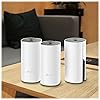
TP-Link Deco Whole Home Mesh WiFi System – Up to 5,500 Sq.ft. Coverage, WiFi Router/Extender Replacement, Gigabit Ports, Seamless Roaming, Parental Controls, Works with Alexa(Deco M4 3-Pack)
  • Based on 10,937 reviews
Condition: New
Checking for the best price...
$144.00 Why this price?
4th of July Sale · 42% off was $249.99

Buy Now, Pay Later


As low as $24.00 / mo
  • – 6-month term
  • – No impact on credit to apply
  • – Instant approval decision
  • – Secure and straightforward checkout

Ready to go? Add this product to your cart and select a plan during checkout.

Payment plans are offered through our trusted finance partners Klarna, Affirm, Afterpay, Apple Pay, and PayTomorrow. No-credit-needed leasing options through Acima may also be available at checkout.

Learn more about financing & leasing here.

Selected Option

Free shipping on this product

This item is eligible for return within 30 days of receipt

To qualify for a full refund, items must be returned in their original, unused condition. If an item is returned in a used, damaged, or materially different state, you may be granted a partial refund.

To initiate a return, please visit our Returns Center.

View our full returns policy here.


Availability: 18 left in stock
Fulfilled by Techno Market

Arrives Jul 17 – Jul 23
Order within 5 hours and 19 minutes
Available payment plans shown during checkout

Protection Plan Protect Your Purchase
Checking for protection plans...

Style: Wi-Fi 5 3-Pack


Features

  • JD Power Award ---Highest in customer satisfaction for wireless routers 2017 and 2019
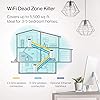
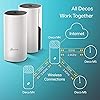
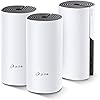
  • Better Coverage than traditional WiFi routers: Deco M4 three units work seamlessly to create a WiFi mesh network that can cover homes up to 5, 500 sq. ft. No Dead Zone anymore
  • Seamless and Stable WiFi Mesh: Rather than wifi range extender that need multiple network names and passwords, Deco M4 allows you to enjoy seamless roaming throughout the house, with a single network name and password
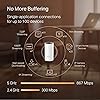
  • Incredibly fast AC1200 speeds makes the deco capable of providing connectivity for up to 100 devices
  • With advanced Deco Mesh Technology, units work together to form a unified network with a single network name. Devices automatically switch between Decos as you move through your home for the fastest possible speeds
  • Robust Parental Controls: Limit online time and block inappropriate websites according to unique profiles created for each family member. Easy to keep your children safe while theyre online
  • Setup is a breeze with the Deco app available on your Android or iOS device. Turn on/off guest WiFi with Alexa voice commands
  • Industry leading 2 year and 24/7 technical Support

Description

Maximum wireless transmission rates are the physical rates derived from IEEE standard 802. 11 Specifications. Range and coverage specifications along with the number of connected devices were defined according to test results under normal usage conditions. Actual wireless transmission rate, wireless coverage, and number of connected devices are not , and will vary as a result of 1) environmental factors, including building materials, physical objects and obstacles, 2) network conditions, including local interference, volume and density of traffic, product location, network complexity, and network overhead and 3) client limitations, including rated performance, location, connection quality, and client condition.

Brand: TP-Link


Model Name: Deco M4 (3-Pack)


Special Feature: Fast Charging


Frequency Band Class: Dual-Band


Wireless Communication Standard: 802.11a, 802.11ac, 802.11b, 802.11g, 802.11n


Compatible Devices: Personal Computer


Recommended Uses For Product: Home


Included Components: Network Cable, Power Supply, QIG


Connectivity Technology: Wi-Fi


Color: 3 Pack


Other Special Features of the Product: Fast Charging


Frequency Band Class: Dual-Band


Wireless Compability: 802.11a, 802.11ac, 802.11b, 802.11g, 802.11n


Compatible Devices: Personal Computer


Antenna Location: Home


Connectivity Technology: Wi-Fi


Antenna Type: Internal


Operating System: Android


Security Protocol: WPA2-PSK, WPS


Number of Ports: 2


Control Method: Voice


Data Transfer Rate: 1200 Megabits Per Second


LAN Port Bandwidth: 1000 Mbps


Maximum Upstream Data Transfer Rate: 867 Megabits Per Second


Number of Antennas: 3


Smart Home Compatibility: Smart Home Compatible


Wi-Fi Generation: Wi-Fi 5


Connectivity Range: 5500 Square Feet


Is Modem Compatible: No


Connectivity Protocol: wi-fi


Coverage: 5,500 square feet


Frequency: 5 GHz


Brand: TP-Link


Model Name: Deco M4 (3-Pack)


Built-In Media: Network Cable, Power Supply, QIG


Model Number: Deco M4 (3-Pack)


UPC: 840030700125


Global Trade Identification Number: 25


Manufacturer: TP-Link


Mfr Part Number: Deco M4 (3-Pack)


Item Type Name: wifi router


Unit Count: 1.0 Count


Warranty Description: 2 Years


Item Weight: 3 Grams


Item Dimensions L x W x H: 3.57"L x 3.57"W x 7.48"H


Color: 3 Pack


Frequently asked questions

If you place your order now, the estimated arrival date for this product is: Jul 17 – Jul 23

Yes, absolutely! You may return this product for a full refund within 30 days of receiving it.

To initiate a return, please visit our Returns Center.

View our full returns policy here.

  • Klarna Financing
  • Affirm Pay in 4
  • Affirm Financing
  • Afterpay Financing
  • PayTomorrow Financing
  • Financing through Apple Pay
Leasing options through Acima may also be available during checkout.

Learn more about financing & leasing here.

Top Amazon Reviews


  • Solid economical buy for home Wifi mesh system needs with good signal bandwidth Solid economical buy for home Wifi mesh system needs with good signal bandwidth
Style: Wi-Fi 5 3-Pack
This review is about TP-Link Deco Whole Home Mesh WIFI System – Seamless Roaming, Adaptive Routing, Up to 5, 500 Sq. ft. Coverage, Works with Alexa(Deco M4 3 Pack). Need: Setup mesh router system for WIFI on my two-storey 3000 sq.ft home. Price: I started with Google Wifi system (3-pack) but ended up preferring the TP-link system primarily because of the price-point (approx, $300 vs $150). Setup: Connect to ISP-provided router (disable WiFi if it has one). The provided setup installations via downloaded TP-Link mobile-app are thoroughly straight forward. One thing to note is that the positioning of the each mesh-router would depend on the layout of the house (location of walls/other signal-blocking obstacles, Wifi-needing devices etc.). Some competitors have option that indicates the strength of the mesh setup as to whether if a router needs to be re-positioned). I myself did the manual way of identifying the places where router needs to be placed, did the setup via the app and then moved throughout the house doing internet-speed tests. Once you do some trial and error, and feel comfortable, it should hold good then onwards (provided your ISP-provided-bandwidth is good enough). The speeds provided (upload/download Mbps) by each router is at par with my ISP-plan speeds. Notable Aspects: I created dual networks (2.4Ghz, 5Ghz). You may configure WiFi-devices to connect to both/one. Yo may very well assign static IPs which is probably required for camera-security-system setups (involving cameras, receiver, switches etc.). I operate the system in 'Router' mode where it is responsible for IP-assignment. Also, you may assign priority to some devices like mobile-phones, laptop etc (so, they aren't bandwidth-throttled by other competing devices. There are 2 ethernet ports on the back (one obviously to connect to ISP-provided router) and the other may be used in cases where direct LAN access is needed for any devices (I use one to connect to my mobile-carrier-signal-booster). You may stick some devices to a particular router (eg: Ring doorbell) or by default, beam-forming with have devices connect to router generating max-signal-strength. In cases where you may want to reboot the system, it is possible to do so via the mobile-app. The mobile-app is mostly functional with some occasional lag (like when renaming some connected devices, it sometimes takes 2 tries to achieve it, also when refreshing the connected devices list it takes 5-10 seconds for the devices list to refresh etc.). Attaching few snaps. Overall, hardly any complaints after 6 months of usage. I'll update this review if I notice anything substantial. ... show more
Reviewed in the United States on June 28, 2020 Reviewed in the United States on June 28, 2020 by Varun

  • STOP THINKING...JUST GET IT!
Style: Wi-Fi 5 3-Pack
By far the best ISP WiFi router alternative for the money. Before this I tried so many options to boost the junky ISP Wifi router signal. We have a house with 2 floors and the ISP router was constantly cutting out and dropping signals. The only strong area was just in front of the router. Now we have a strong signal through tour the whole house, in the backyard and even in the garage. You can even buy more nodes if necessary, but most won’t need it, three should cover most average size houses nicely. And the best part is that there haven’t been any complaints about slow WiFi since I installed the system, (dads you know what I’m talking about). Also, setup was really simple. I heard that some other systems might have been challenging, which is one reason I chose the TP Link. Directions are pretty clear and there are lots of YouTube videos to walk you through the setup (but you really won’t need it), setup is a snap. They also look nice, no need to hide them like most other routers. Seriously, stop debating and just get it. I was not paid to do this review. I bought the system out of necessity and after several months of service with no hiccups in service, I’m 100% satisfied with my purchase would absolutely recommend the product to anyone who is frustrated with their lousy coverage from their ISP WiFi router. Just buy it. You won’t regret it. ... show more
Reviewed in the United States on February 28, 2020 by Freeway

  • Great coverage, but a few devices had issues connecting
Style: Wi-Fi 5 3-Pack
In general it is really nice to have complete high-speed wifi coverage across my house, and I get good wifi signal now in corners of the house that had difficulty with streaming 4k video previously. Now my speed test application shows great upload and download speeds throughout the entire house and outside into the yard. The setup of the devices themselves was extremely easy - no real issues at all. Very "plug and play". I'm marking it 4 stars primarily because I had quite a bit of trouble getting certain wifi-connected devices in my house to connect to the new router, primarily because the original firmware and/or mobile application didn't offer the ability to turn off the 5ghz channel. I had trouble getting my weather station, Philips Hue hub, and Amazon Cloud Camera to connect to the Deco, and I'm still unable to connect the Cloud Cam while I have the Fast Roaming turned on, so I have to live without that functionality. It seems like part of your QA process would be to make sure "Internet of Things" (IoT) devices can connect easily, since that's a key part of usability. It took me literally days to get everything connected, and I'm relatively advanced in terms of my knowledge of networking. I had to spend time doing lots of research on various forums and trial and error to get different devices connected. And of course as soon as I had everything working, literally the next day an update came out that added the option to turn off the 5Ghz band. This is necessary because certain devices that only require the 2.4Ghz band have trouble connecting to the Deco because the Deco only has one SSID (wifi name) for both bands, so if you can't turn off 5Ghz, it seemed like devices would always get confused or if the device connected to wifi by using an app on my phone, there was no way to force my phone to only connect to the 2.4Ghz channel on the router. For example with my weather station, I had to literally set it into pairing mode and then run down my driveway, far enough to be outside the range of the 5Ghz signal for my iPhone Xs to switch to the 2.4Ghz band (2.4Ghz has better range and penetration so it goes further, but the iPhone will always default to 5Ghz if it can, because it's much faster) and once I did that, the app that came with my weather station could sync the weather station to the 2.4Ghz band of the router. If the option to turn off 5Ghz was there originally, this wouldn't have been a problem. So overall a really solid router, and it appears they are working to improve the firmware and app. But it felt like it maybe wasn't quite fully baked yet and they hadn't done enough testing with different devices to either support easy connection for these devices, or at least provide technical support on their website to guide users on how to connect different IoT devices. I think if I had to do it again I probably would have bought the same router (especially since it was on sale) but TP-link needs to up their game with regards to QA and Tech Support. ... show more
Reviewed in the United States on August 13, 2019 by Bob P.

  • Excellent coverage, easy set-up (maybe Amazon can get the right reviews on the right item)?
Style: Wi-Fi 5 3-Pack
Wow! Went from traditional cable company wired house to a wireless system, cut the cord too. I went from two wireless modems, one as an extender, to this TP-Link Deco M4. Two of the three units are on the first floor, one unit upstairs. Wireless signal in the basement works off of the units on the first floor. Previously I would get drops and slowdowns on my ROKU sticks with the traditional wireless modems. Now with this M4 system I get excellent wireless on every device in the house, and there are plenty! Set up was simple, just required a bit of patience while the units connected to themselves. Follow the instructions when it says to connect the units while having them close to each other (same room), then relocate them as needed. I have one unit in the far corner on the first floor, this is hard wired to a cable modem in the basement. A VOIP device is also hard wired to this unit and a telephone lead is wire. into the house phone wiring. A second M4 unit is on the other side of the house connected wireless to the first unit. This is wired to a 5 port switch and feeds a laptop, printer, back up hard drive, and a wire to a smart TV in another room. The third M4 unit supplies signal to the top floor of the house: ROKU, cell phone (wireless plan: Republic), Alexa dot, and a tablet or two. The TP-Link M4 is affordable and works great for a home wireless system. (two old routers slowly croaking made a change necessary) also: each of the three unit can act as the main router, too easy. ... show more
Reviewed in the United States on April 19, 2019 by JAKE

  • Getting better. Much better.
Style: Wi-Fi 5 3-Pack
--Updated on 8/12/2020 The system has been working great, it get the job done. Again, it gets the job done. The system doesn't come with a lot of functions, and the parent control doesn't work all the time, but it's great for the money. Highly recommended. --Updated on 11/4/2019: Parent control is unreliable. Not recommended. --Updated on 9/6/2019: Customer service emailed back. Claimed there are "devices limitations", each profile should have less than 16 devices. We only have 3 devices. Still waiting for the solutions. --Updated on 8/29/2019: We finally registered the product. Opened a ticket. The product stopped working. When we tried to "Pause" the internet on the mobile app, it doesn't work. When it shows "paused", actually not paused. When It shows "unpaused", it actually paused. We try to register this product so we can get the warranty. TP-Link won't let us register the product. Showing: "Product Not Found. Please Contact Support at (866) 225-8139" Called the number, they claimed they "manually" added the serial number to their system. And asked me to wait for their email, before get any warranty service. Not email show up yet. Will keep updating. ---Original Review Why you should NOT buy this: 1. Parent Control not working. It tracks all the traffics and sum them up all together to calculate "Screen Time". Example: you open one website for 1 minutes, the website makes connections to 4 other URLs, it counts 4 minutes. If you do one hour screen time, this device counts it more than 3 times. Very misleading. Besides the basic "time out" function, the other Parent Control functions not working, or I don't know how to use them. 2. Streaming got issues. We have two TVs connections, the streaming lags poorly if we use two TVs at the same time. We don't know which TV connects to which node, but keep buffering/lagging. We don't know what's the issue. 3. Management interfaces. User is not allowed to assign devices to Mesh nodes. Actually user doesn't know which nodes it connects and won't able to pick. Maybe the Mesh is "auto pick the best signal", we still want to see which devices connecting to which Mesh nodes at any given time. Unfortunately, this Mesh doesn't show it. It does NOT come with a website to manage, only the phone app. 4. Bottom line: --If all you want is to boost the speed, this is good value product. --If you want to see the activities, or any management features, don't buy this product. For the price, it's a good buy. I will keep it. However, I will NOT recommend this to my friends. ... show more
Reviewed in the United States on June 24, 2019 by Michael

  • May save your marriage.
Style: Wi-Fi 5 3-Pack
Prior to TP-Link Deco, I lived a life full of angry women (wife and four daughters) who constantly chastised, berated and blamed me for wifi outages, poor connection speed and inability to stream their favorite shows. I felt emasculated, inadequate and an overall failure as I was told that wifi and all electronics was my job. Step one was to change from ATT uVerse as they had poor 25 mbps download speed in my neighborhood. Done. I moved to Spectrum with 400 mbps download thinking my woes would be cured. Nope. I had poor home coverage as our house is larger than average. Even after adding a Nighthawk router to replace the inadequate, buggy router from Spectrum, I still fell short and was barely getting any signal on my third-floor office. After calling in a Spectrum technician, we discussed a Mesh network and he said it was mandatory. I researched systems and bought the TP Link system. Setup was simple and despite having to hookup what seemed like 100 devices (laptops, wifi-tv's, Blink security, ipads, Kindle's, phones, desktops, Energy consumption meter, etc.) it was 100% worth the trouble. My speed in the house is consistently fast and is also reliable. My wife now speaks to me again and brags of my wifi and technical prowess. I sometimes catch her giving me that approving look that all men yearn for. I believe it has improved her libido as well. My daughters no longer hold their heads in shame when their wifi-entitled friends come over. TP Link is to thank as my home is now a blissful wifi-paradise. ... show more
Reviewed in the United States on December 17, 2019 by John Brown

  • Mesh WIFI is awesome. TP Link Deco M4 was inexpensive and works great. Awesome upgrade.
Style: Wi-Fi 5 3-Pack
I have a three story home that used to have dead spots. I have a powerful ASUS router which just could not reach everywhere due to the construction materials of my home. I was curious about Mesh WIFI and bought these because they were inexpensive (approx $170 for three). They were super easy to set up and place around my house. They need power but only the main unit needs an ethernet connection. In the past, WIFI repeaters were super buggy and also reduced the overall bandwidth of a network. MESH wifi uses more radios to allow the mesh devices to communicate on one dedicated band, and the rest of your network on the others. The result is no speed loss and great coverage. TP Link says the network can handle up to 100 devices. I use various smart light bulbs, power outlets, Echos, rachio, MyQ Garage controller, streaming devices, cell phones etc... we have approximately 40 devices on the wifi network. I have not had it for long, but I have been testing a lot since I got it. So far I'm getting Full speed everywhere in the house and every device works - even my Lifx bulbs which only work on 2.4Ghz networks. ... show more
Reviewed in the United States on January 20, 2020 by XXLERATE, Inc.

  • Superb product!
Style: Wi-Fi 5 3-Pack
I don't write many reviews for products (too busy) but had to stop and let people know this product is excellent! The company did an outstanding job with this "WiFi Extender". Our house is a Cape Cod with an attached garage and bonus room above the garage. We've tried multiple routers to get a good signal up to the bonus room but northing really worked. We already had a NetGear modem/router combo and when the TP-Link Deco arrived, I downloaded their iOS App which guided me through the steps to setup the 3 Decos. It was incredibly easy and only took about 15 minutes to setup all three! We put one in the living room (connected to the NetGear modem/router), one in the kitchen, and one in the bonus room (2nd floor). After setting up the TP-Link Deco mesh, I logged into the NetGear modem/router and turned off the WiFi. The WiFi signal strength is now at 100% throughout the entire house and download speeds range from 120Mbps to 250Mbps. The mobile app is really nice and shows all devices connected along with their upload/download stats. You can configure router settings, blacklist devices, configure parental controls for individual family members, set Quality of Service per device, see monthly reports, and more. By far the best WiFi router I've ever seen! ... show more
Reviewed in the United States on April 15, 2020 by Stephen S.

Can't find a product?

Find it on Amazon first, then paste the link below.
Checking for best price...