Search  for anything...

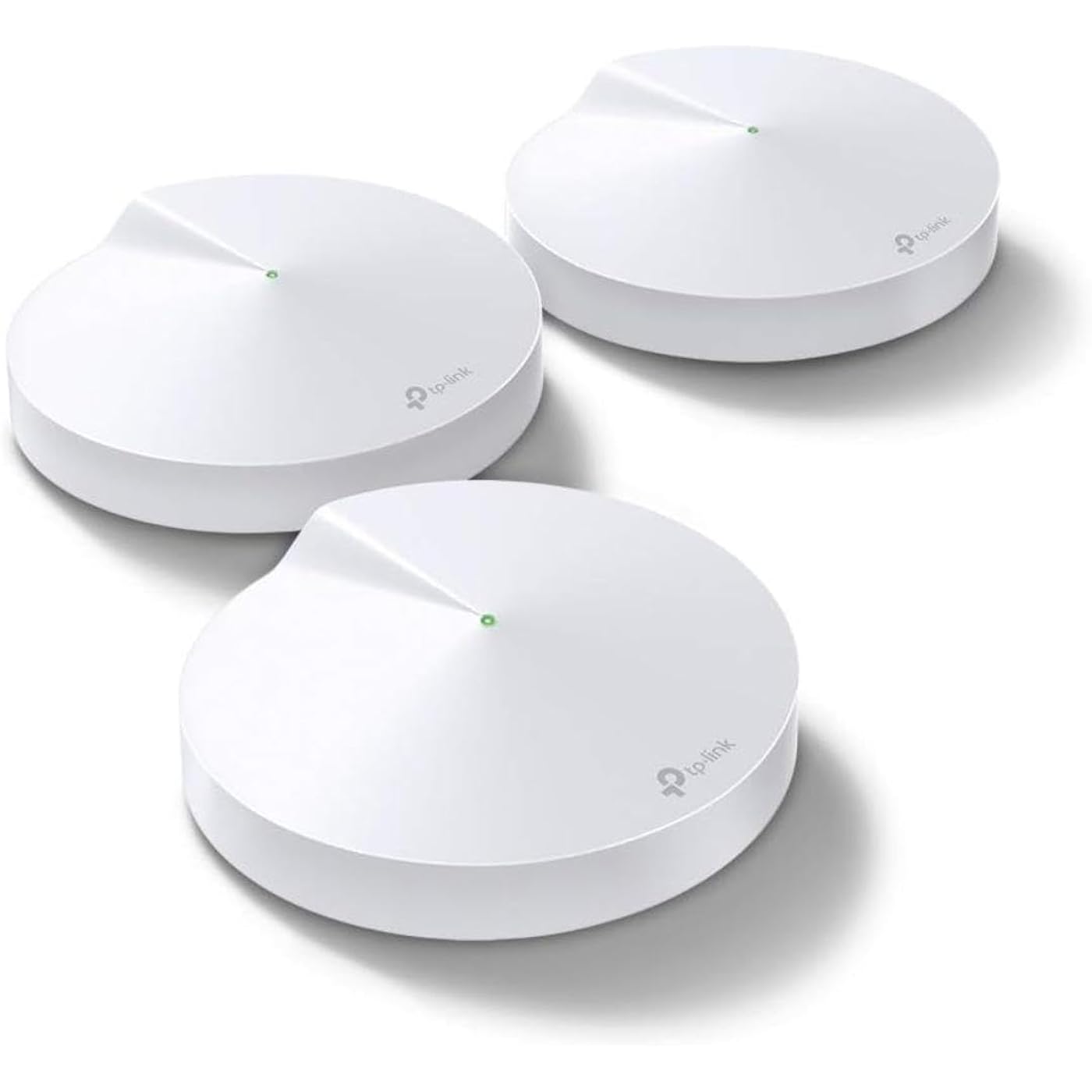
TP-Link Deco M5 Mesh WiFi System - Up to 5,500 sq. ft. Whole Home Coverage and 100+ Devices,WiFi Router/Extender Replacement, Anitivirus, 3-Pack
  • Based on 27,667 reviews
Condition: New
Checking for the best price...
$139.97 Why this price?
Save $50.02 was $189.99

Buy Now, Pay Later


As low as $23.33 / mo
  • – 6-month term
  • – No impact on credit
  • – Instant approval decision
  • – Secure and straightforward checkout

Ready to go? Add this product to your cart and select a plan during checkout.

Payment plans are offered through our trusted finance partners Klarna, Affirm, Afterpay, Apple Pay, and PayTomorrow. No-credit-needed leasing options through Acima may also be available at checkout.

Learn more about financing & leasing here.

Selected Option

Free shipping on this product

FREE 30-day refund/replacement

To qualify for a full refund, items must be returned in their original, unused condition. If an item is returned in a used, damaged, or materially different state, you may be granted a partial refund.

To initiate a return, please visit our Returns Center.

View our full returns policy here.


Availability: Only 10 left in stock, order soon!
Fulfilled by Amazon

Arrives Saturday, Feb 28
Order within 15 hours and 36 minutes
Available payment plans shown during checkout

Protection Plan Protect Your Purchase
Checking for protection plans...

Style: Wi-Fi 5 AC1300


Size: 3 Pack


Features

  • If you're looking to ditch your traditional router extender setup for a whole Home Wi-Fi system, put the TP-Link Deco M5 Wi-Fi system on your short list PC mag said
  • Better coverage than traditional Wi-Fi routers: Deco M5 uses 3 units working seamlessly to create a mesh network that can cover homes up to 5,500 square feet. No dead zone anymore
  • Seamless and Stable Wi-Fi: Rather than Wi-Fi range extender that need multiple network names and passwords, Deco M5 allows you to enjoy seamless roaming throughout the house, with a single network name and password
  • TP-Link unique Adaptive routing technology automatically chooses the fastest path for every device and allows for more flexible placement than a satellite system
  • Secure Wi-Fi Mesh Network: Protect your network and connected devices with a free lifetime subscription to TP-Link HomeCare featuring Next-level Antivirus, Robust Parental Controls, and QoS
  • Easy to setup: Download the TP-Link Deco app, plug in your system, and follow the instructions to get your new home network up and running in minutes. Works with Alexa as well
  • Each Deco M5 has 2 Gigabit Ethernet ports(6 in total for a 3-pack) and supports Wired Ethernet Backhaul for better speeds. Any of them can work as a Wi-Fi Router. Works with all internet service providers, such as AT&T, Verizon, Xfinity, Spectrum, RCN, Cox, CenturyLink, Frontier, etc.( a modem is required for most internet service providers)

Description

Each Deco M5 Unit has 2 Gigabit Etherent Ports, Supports WAN/LAN auto-sensing, it can work as a WiFi Router. All TP-Link Deco Mesh WiFi can work together.

Brand: TP-Link


Model Name: Deco M5(3-pack)


Special Feature: Access Point Mode


Frequency Band Class: Dual-Band


Wireless Communication Standard: 802.11a/b/g/n/ac


Compatible Devices: Android 4.4 or later iOS 9.0 or later


Recommended Uses For Product: Home


Included Components: 1x Ethernet Cable, 3x Deco Units, 3x Power Supplies


Connectivity Technology: Ethernet


Color: 3 Pack


Product Dimensions: 4.72 x 4.72 x 1.34 inches


Item Weight: 1.32 pounds


Item model number: Deco M5(3-pack)


Is Discontinued By Manufacturer: No


Date First Available: April 11, 2017


Manufacturer: TP-Link


Frequently asked questions

If you place your order now, the estimated arrival date for this product is: Saturday, Feb 28

Yes, absolutely! You may return this product for a full refund within 30 days of receiving it.

To initiate a return, please visit our Returns Center.

View our full returns policy here.

  • Klarna Financing
  • Affirm Pay in 4
  • Affirm Financing
  • Afterpay Financing
  • PayTomorrow Financing
  • Financing through Apple Pay
Leasing options through Acima may also be available during checkout.

Learn more about financing & leasing here.

Top Amazon Reviews


  • Great WiFi Signal in Chicago! Please read....
Style: Wi-Fi 5 AC1300 Size: 3 Pack
I read all the reviews before I bought, talked to a family friend who is an electrical engineer, talked with a friend who deals with computer systems for companies, and then just took a gamble! Installation was super simple. We just built a new house. With basement, it’s about 4,500 sq ft. Our modem is in the back corner of the house, in the basement. Even though we up’d our Xfinity signal to 1,000 Mbs, the signal in our house was pretty sad. Because of COVID, we have 2 kids virtual learning, me virtually teaching with 3 computers, and my wife doing secure law office work downstairs. We also have an extensive Ring camera system working around and through the house. On top of that, we have OneLink Safe & Sound devices on on all 3 floors! There’s a lot of stuff going on here. The first test I did I was standing a room away by the front door, which is around a corner from the unit. The signal speeds were off the charts! Then I went to the garage and driveway(pic1&2), amazing! I re-set up the ring camera out there to the TP mesh system and did a speed test through the Ring app. Much different numbers, but the signal was the highest it’s ever been without an extender in the garage (pic3)! Next, out of curiosity, I went to the sidewalk out front, check out the signal through TP app (pic4&5)! I then redid the camera on the side of the house by back porch (pic6&7). I took both Ring and TP readings - they differed, but that Ring test was the highest I had ever gotten! So, out of curiosity, I went into the backyard by the property line. See the numbers (pic8&9)! I then got on the ladder and redid the center camera. The Ring numbers were off the chart (pic10)! In our house the farthest point was my daughters bedroom. We called it the dead zone. Tonight’s reading seemed unreal, so I tested the speeds with Xfinity’s app. The 3rd numbers down was the speed test before I installed the mesh system. Look at the numbers now. I did it twice just to see if it was a fluke? She’s never had numbers that high, EVER (pic11)!! Lastly, I tested our master bedroom (pics 12&13), used both apps. Once again, amazing numbers! Placing the devices...I ignored the apps suggestions. I ran a hardwire from the back basement room up through a small hole in the first floor where the refrigerator has its water pipe coming up. I placed it on the wall to create a wide range of signal to be able to spread itself out (pic14). I then placed the second one on the 2nd floor in the middle of the hallway (the only outlets we have up there are near the floor (pic15). Signal works great! The 3rd one I placed in our unfinished basement. We do have some outlets higher up on the wall, so I placed it in the middle of the room (pic16&17) to get maximum WiFi coverage without anything blocking the signal. Now, it should also be noted, if you’re still reading this, that we live 10 minutes from the airport and planes fly over our house all the time. It messes with the signal of our WiFi, but not anymore! I swear this system covers every inch of our house with great speeds and extremely strong signal strength. The negative reviews that I read, I really don’t understand what happened in their houses. We used to have the Xfinity pods and they struggled at best and still gave us crappy numbers. This system is worth the money and does what it says! And no, I do not work for TP Link. Honestly, it’s a great system. Is it better than all the others out there? No clue, but it does work like they say it does. And, on mine, the update worked just fine. No issues. For the price and quality of product, I am feeling pretty lucky right now! ... show more
Reviewed in the United States on December 6, 2020 by Bradley A. Rindfleisch Bradley A. Rindfleisch

  • Gives DSL Increased Speed, More Signal, No Drops! WORTH IT!
Style: Wi-Fi 5 AC1300 Size: 3 Pack
This thing has fixed so many issues with our current internet experience. We Live in an area where our only option for Internet is DSL. And it’s not VDSL. It’s the regular, run-of-the-mill, plain Jane, archaic DSL. You know, the stuff that Neanderthals used when they would email each other thousands of years ago. Unfortunately, they are developing the once-rural farmland around us putting many houses in close proximity to us and bringing them up on the same ISP. Our Internet was never great, but it has slowly gotten worse with every new house that goes up. I am in IT and I work for one of the largest healthcare institutions in my state. As such, having consistent and reliable Internet was an absolute must for me. Our entertainment is all “streamed“ in nature. My kids use their phones and gaming systems to communicate with their friends. My husband enjoys his news and entertainment on his phone. But all of these things were getting more frustrating with every passing day. My Internet connection would drop on average about five times an hour during my working day. The ability to stream from Disney+ had all but dried up. We could hardly make it through an episode of Andy Griffith without our signal buffering over half the time. We were exhausting all the data in our cell phone package because our home Internet could not handle reaching the other side of the house in spite of having an extender halfway. I spent hours on the phone with Century Link trying to get “a quicker connection“ and tried various fixes with no success. Century Link sent us new modems to try, supposedly “flipped the switch” to give us a higher speed, but nothing ever made a darn bit of difference. So-I did some desperate research and discovered the concept of “home mesh” and figured I’d give it a try. Holy smokes this set up has made a HUGE difference. No more dropped signals! We can stream just fine all over the entire house; the kids are able to game and we can watch a movie at the same time. It has literally changed our Internet! During my research I found out that an extender basically gives you a totally separate network that you have to bounce back-and-forth between with your originating router network. If you use Sonos or another app that is network-dependent in tandem with an extender, you know that this is a huge pain to deal with! In order to get the app to work correctly on the speakers, you have to be on the same network. This home mesh setup totally resolves that. You stay on the exact same network throughout your entire home. I bought the 5500 square-foot/3 piece set for my 2800 square-foot house. Yes, I’m sure it was overkill, but we have 14 acres and the ability to get Wi-Fi outside is huge. Also, one big hindrance on our previous set up was the fact that we live in a brick home; but this set up flawlessly reaches through the very clunky floorplan of our house (built in the 1960s—>lots of walls!). We have the Century Link-provided C1100Z modem/wireless router manufactured sometime before 2010. In order to make this work I had to do a little bit of home networking: I had to turn off the “wireless router“ portion of the modem and use it strictly as just a modem. Then I hardwired the C1100Z into one of the Decos (doesn’t matter which) and I was off and running. Yes, you do have to use an app to set it up. It’s not hard, though. I did have to reach out to my ISPs technical support to find out what kind of connection I have (static IP/dynamic IP/PPPoE/etc), but it was still super easy. You pick the name of your network, you pick the password, you can even create a “guest network“ for your own home. I highly highly recommend this thing. Especially to someone with the archaic DSL set up like we have. It can be endlessly frustrating to deal with a crappy network and crappy connection. I was convinced that we just did not have any other options other than just dealing with it. But I was totally wrong. Ditch the extender, convert your modem/router to strictly a modem, and buy these things. You will not regret it! ... show more
Reviewed in the United States on July 22, 2021 by CGSMom

  • Easy Setup & Rock Solid Performance
Style: Wi-Fi 5 AC1300 Size: 3 Pack
Our older TP-Link router was very solid. But when it came time to replace it with another, the low-cost TP-Link routers in the same class were horrible. Impossible to setup without hours of TP-Link tech support & completely unreliable once setup. Our Spectrum service tech suggested Deco if we wanted a mesh system. Although we don't need a mesh system, I wanted to try the Deco router to see if it was any better... What a difference! The setup was a total breeze! I was blown away at how easy it was. And we've had very fast and solid connection nonstop out of the box. (We've been using this Deco router for 2 months now.) The nice thing is, because we don't need all 3 routers, they're identical. So if the one we're currently using does fail. there are 2 backups. I'd call that good value. 😉 ... show more
Reviewed in the United States on November 15, 2025 by KP

Can't find a product?

Find it on Amazon first, then paste the link below.
Checking for best price...