Search  for anything...

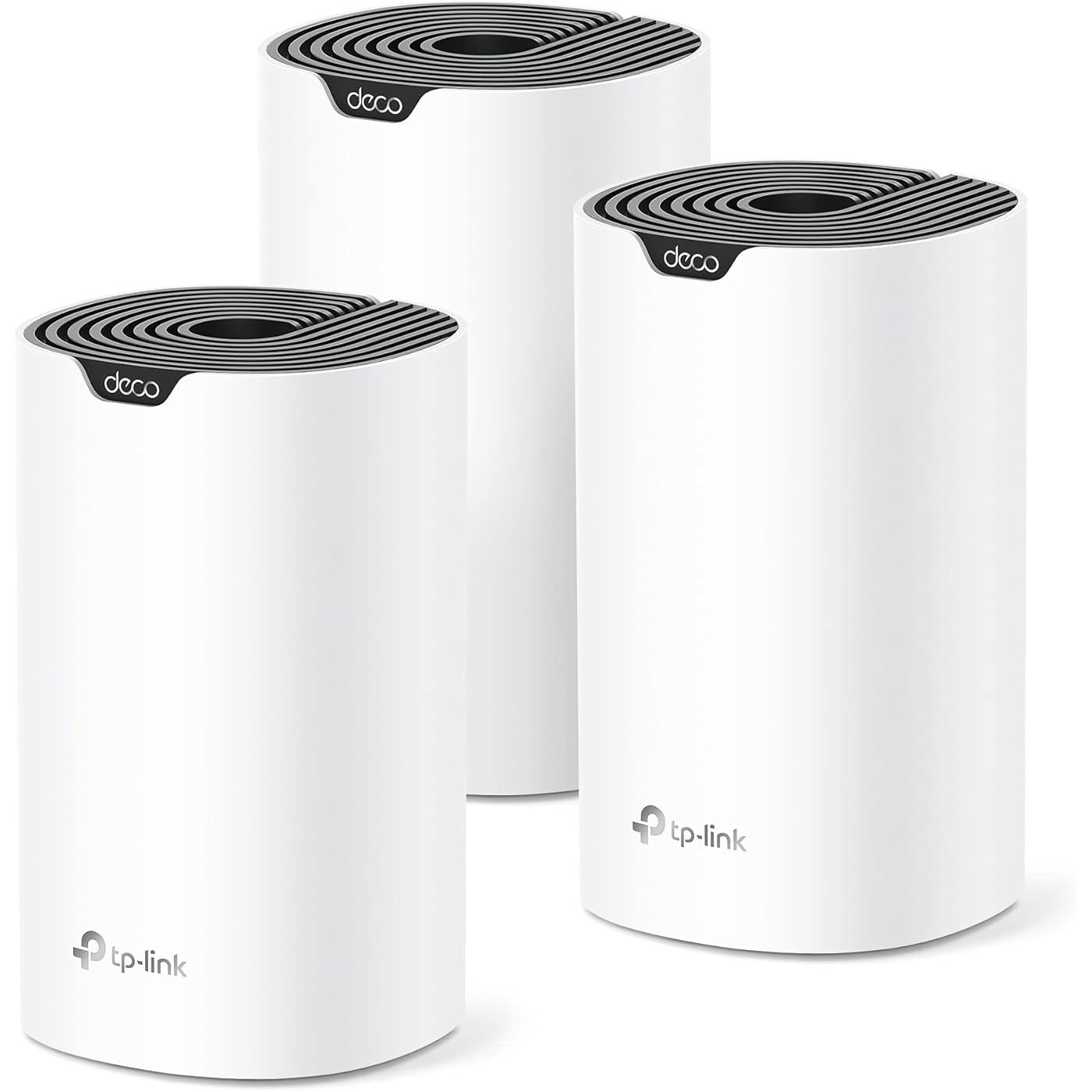
TP-Link Deco S4 Mesh AC1900 WiFi System - Up to 5,500 Sq.ft. Coverage, Replaces WiFi Router and Extender, Gigabit Ports, Works with Alexa, Deco S4(3-Pack)

  • Based on 29,566 reviews
Condition: New
Checking for the best price...
$99.99 Why this price?
Save $30.00 was $129.99

Buy Now, Pay Later


As low as $16.67 / mo
  • – 6-month term
  • – No impact on credit to apply
  • – Instant approval decision
  • – Secure and straightforward checkout

Ready to go? Add this product to your cart and select a plan during checkout.

Payment plans are offered through our trusted finance partners Klarna, Affirm, Afterpay, Apple Pay, and PayTomorrow. No-credit-needed leasing options through Acima may also be available at checkout.

Learn more about financing & leasing here.

Selected Option

Free shipping on this product

FREE refund/replacement until Jan 31, 2026

To qualify for a full refund, items must be returned in their original, unused condition. If an item is returned in a used, damaged, or materially different state, you may be granted a partial refund.

To initiate a return, please visit our Returns Center.

View our full returns policy here.


Availability: Only 10 left in stock, order soon!
Fulfilled by Amazon

Arrives Sunday, May 3
Order within 12 hours and 35 minutes
Available payment plans shown during checkout

Protection Plan Protect Your Purchase
Checking for protection plans...

Style: Wi-Fi 5 AC1900


Size: 3 Pack


Features

  • A New Way to WiFi: Deco Mesh technology gives you a better WiFi experience in all directions with faster WiFi speeds and strong WiFi signal to cover your whole home.
  • Better Coverage than traditional WiFi routers: Deco S4 three units work seamlessly to create a WiFi mesh network that can cover homes up to 5, 500 square feet. No dead zone anymore.
  • Seamless and Stable WiFi Mesh: Rather than wifi range extender that need multiple network names and passwords, Deco S4 allows you to enjoy seamless roaming throughout the house, with a single network name and password.
  • Incredibly fast 3 3 6 Stream AC1900 speeds makes the deco capable of providing connectivity for up to 100 devices.
  • With advanced Deco Mesh Technology, units work together to form a unified network with a single network name. Devices automatically switch between Decos as you move through your home for the fastest possible speeds.
  • Robust Parental Controls: Limit online time and block inappropriate websites according to unique profiles created for each family member. Easy to keep your children safe while theyre online.
  • Setup is a breeze with the Deco app available on your Android or iOS device. Turn on or off guest WiFi with Alexa voice commands.
  • Each Deco S4 has 2 Gigabit Ethernet ports(6 in total for a 3-pack) and supports Wired Ethernet Backhaul for better speeds. Any of them can work as a Wi-Fi Router. Works with all internet service providers, such as AT T, Verizon, Xfinity, Spectrum, RCN, Cox, CenturyLink, Frontier, etc.( a modem is required for most internet service providers)

Description

Each Deco S4 Unit has 2 Gigabit Etherent Ports, Supports WAN/LAN auto-sensing, Any of them can work as a WiFi Router. All TP-Link Deco Mesh WiFi can work together.

Brand: TP-Link


Model Name: Deco S4(3-Pack)


Special Feature: Access Point Mode


Frequency Band Class: Dual-Band


Wireless Communication Standard: 802.11ac


Compatible Devices: All WiFi Enabled devices


Recommended Uses For Product: Home


Included Components: Deco S4 (3-pack) 3 Deco S4R Units 1 RJ45 Ethernet Cable 3 Power Adapters 1 Quick Installation Guide


Connectivity Technology: Ethernet, Wi-Fi


Color: White


Product Dimensions: 3.57 x 3.57 x 6.39 inches


Item Weight: 4.2 pounds


Item model number: Deco S4(3-Pack)


Date First Available: February 21, 2020


Manufacturer: TP-Link


Frequently asked questions

If you place your order now, the estimated arrival date for this product is: Sunday, May 3

Yes, absolutely! You may return this product for a full refund within 30 days of receiving it.

To initiate a return, please visit our Returns Center.

View our full returns policy here.

  • Klarna Financing
  • Affirm Pay in 4
  • Affirm Financing
  • Afterpay Financing
  • PayTomorrow Financing
  • Financing through Apple Pay
Leasing options through Acima may also be available during checkout.

Learn more about financing & leasing here.

Top Amazon Reviews


  • I'm a Network Tech, These are Awesome
Style: Wi-Fi 5 AC1900 Size: 3 Pack
I work as a data network technician, and these routers are awesome. I bought two 3-unit kits to build a WiFi mesh network for a customer on a large, multi-million dollar mountain property with four buildings including the main house. I was expecting to have to run network cables and utilize long-range point-to-point transceiver antennas to get WiFi to the farther outbuildings, but the Deco routers were pushing strong enough signal and automatically connected to each other in a such a way that cable runs and extra antennas weren't necessary. The routers were extremely easy to configure using the Deco app, and deploying them across the property was a breeze. The range on the units is impressive, easily covering 70+ feet and going through dense log-cabin walls. I was extremely impressed when one particular router which was too far away to communicate with the main unit had its traffic automatically routed through the next closest unit in a nearby building, daisy-chaining itself so that it could be connected and without any additional setup or configuration on my part. Speeds at all units were well within acceptable ranges, with all except one Deco getting over 100mbps download speeds. The mesh capabilities of the devices are very efficient and effective, with my mobile device automatically switching to the router with the best signal strength as I moved around the property. The Deco app made setup and management of the network very easy, with details like a network map, device heartbeat info, parental controls, and more. Adding all 6 routers to the network was easy and fast. This system ended up saving me time and materials, and saving my customer money because of how easy and effective it was at providing WiFi coverage around his property without the need for extra hardware or equipment. ... show more
Reviewed in the United States on September 22, 2025 by Mike Mike

  • Reliable Whole-Home Coverage, Even Through Concrete Walls
Style: AX3000 Pro w/ Dual 2.5G Ports Size: 3 Pack
I installed this system in my apartment, which is full of thick concrete walls that usually wreak havoc on Wi-Fi signals. The Deco X55 Pro has handled it impressively and the coverage is strong and consistent in every room, with no dead zones or frustrating drops. Setup was straightforward using the Deco app, and the nodes linked together quickly without hassle. Speeds are fast enough to handle streaming, video calls, and multiple devices at once, and I haven’t noticed any lag or slowdowns since making the switch. The compact design of each unit also blends in nicely without looking like tech clutter. For anyone struggling with poor coverage in larger spaces or apartments with dense walls, this mesh system delivers exactly what it promises: reliable, seamless Wi-Fi throughout the home. ... show more
Reviewed in the United States on September 28, 2025 by MR1453

  • Definitely improved signal strength and availability
Style: Wi-Fi 6 AX1500 (Newer Model) Size: 3 Pack
working well, were fsairly easy to configure through the app-much easier than the old way of logging in with the IP address. so far have been consistently reliable. Wi-Fi signal is now strong on all 3 levels, a step up from my 5-year old single router.
Reviewed in the United States on December 6, 2025 by Blackhawk

  • Great product, but has some issues
Style: Wi-Fi 5 AC1900 Size: 3 Pack
*** 1 Year Review Update *** I decided to keep the system. After a few firmware updates and once TP-Link fixed the AP only mode such that the main and guest networks are truly separated I switched over from using it as a router to an AP solution. It has worked flawlessly since and without any performance degradation's. I still do not like the app-centric approach for "management" (cannot call it that honestly); insight would probably be more appropriate. But, I will be moving in the future to an enterprise grade solution (this solution purchase has just been a stop-gap until that time and I finalize my network architecture). For the average home consumer that is not very tech-savvy (which is the audience this product really targets) it is overall very simple to get up and running with very few issues, especially at this price point. I have submitted over a dozen feature requests to TP-Link and almost all of them have been discarded by the manufacturer (but at least acknowledged); of the ones that were "accepted" they were very trivial. As of today, Sep 21 20201, the system via the app is no longer able to check for updates (it receives an error). I believe this is not due to the units themselves but instead TP-Link's update portal that the units use to check for updates. Checking on the main site reveals an update published on July 15 2021 (S4 2.0_en_1.5.0 Build 20210607 Rel. 56436_US_EU_AU_JP_up.bin) that is available which is one update newer than my currently applied firmware published on September 30 2020 (S4 2.0_en_1.4.3 Build 20200918 Rel. 77820_US_EU_AU_JP_up.bin). Looks like I will have to update the units manually using the download links provided by TP-Link and by logging into the web UI (note: each unit will have its own web UI but one - the master - will show a different one by showing you the topology of the mesh; a manual firmward update can be applied using that unit). = Summary Overall this is a great product. It definitely addresses the WiFi coverage in our new home. It has only been a few days since I set them up. However, a star in my rating had to be knocked off which will become evident shortly. I may update this review after some more time has passed. But it is currently appearing I might be returning this. I operate these in access point mode and not router mode. I have a better router than what these units provide and do not need double NAT'ing on my house wide network. That, and, I will be replacing the house wide router with a substantially better one anyway in the coming months. This review, however, covers my utilization and experience in both modes. Also note that I am an IT professional and deal with network infrastructure (along with many other things) day to day for over 20 years. In this review the term “satellite” is used to denote a Deco unit that is not the main Deco unit. I have intentionally saved the worst points of my review as the last section. = Topology Setup I have fiber to the premise gateway, still with the gateways’ Wi-Fi fully enabled on both 2.4Ghz and 5Ghz bands. My home is over 2,650 sqft, single story, built this year, with gigabit Cat5e cables to each room the Deco S4 units are situated. All Deco units use the Ethernet backhaul. All Cat5e runs and cables have been tested to support gigabit speeds point-to-point (with of course the obligatory TCP/IP overhead). Placement wise each of the Deco units are almost in a straight line, a function of my floor plan and where I need Wi-Fi coverage the most. Relative distances between Deco units: - 25 linear feet between first satellite and second, main Deco unit with one interior door between. This I refer to as satellite 1. - 45 linear feet between second satellite and main Deco unit with 3 interior only walls between. This I refer to as satellite 2. = Performance The throughput performance on these is fantastic, especially at the price point. I have fiber gigabit Internet service. I use speedtest.net for all bench marks. I get the following throughput on a Samsung Galaxy Note 8 (US), stock firmware, latest software and security patches. Distance is always the distance between my test device and a specific Deco unit and with line of sight between the test device and the target Deco unit. | Deco | Distance | Downstream | Upstream | Satellite 1 | 1 ft | 344 | 392 | Main | 1 ft | 446 | 389 | Satellite 2 | 1 ft | 460 | 392 | Satellite 1 | 3 ft | 279 | 422 | Main | 3 ft | 485 | 409 | Satellite 2 | 3 ft | 392 | 383 | Satellite 1 | 6 ft | 355 | 350 | Main | 6 ft | 477 | 390 | Satellite 2 | 6 ft | 483 | 461 | Satellite 1 | 9 ft | 361 | 475 | Main | 9 ft | 482 | 374 | Satellite 2 | 9 ft | 477 | 466 | Satellite 1 | 12 ft | 385 | 460 | Main | 12 ft | 451 | 458 | Satellite 2 | 12 ft | 501 | 528 | Satellite 1 | 15 ft | 445 | 389 | Main | 15 ft | 461 | 453 | Satellite 2 | 15 ft | 500 | 432 | A 15 foot distance between a Deco unit and a connected device is most likely acceptable considering average housing room sizes. However, in my house floor plan, I have an easy 25 foot line of sight from the main Deco unit to where I did a test. Results came in as 251 Mbps downstream and 117 Mbps upstream. Still, highly acceptable. At my maximum floor plan range to that same Deco unit and still maintaining line of sight of 33 feet I wind up getting an unexpectedly impressive 493 Mbps downstream and 388 Mbps upstream. While I cannot check in the app to see specifically which Deco unit my test device was connected to due to either app or overall product system issues, I am left with only one avenue of explanation: the Deco system has successfully performed link aggregation for my test device. If, in the first place, I am correct in this very poor conclusion due to the lack of data, then, this is indeed impressive and can very well be THE single most discriminator in overall product performance vs issues vs cost. I realize these performance tests are not representative of real world scenarios. Fact is, most people do not go to such lengths to test their products and relevant environments, much less describe their environments. When a little more time goes by I will update this review with more realistic real world performance tests in terms of longer distances and obstructions. = The Good I do not need parental controls, so, access point mode removes that for me, thankfully. Because I operate this in access point mode not having quality of service on the Deco's is just fine as is not having DHCP handled by the Deco's. Again, my current infrastructure handles all of these elegantly and more than sufficiently. In order to get a proper pass off while going from one end of the house to the other I had to enable fast roaming. Without enabling this resulting in unbearably long hand offs from one unit to the other based on proximity to units. The net result of this was severe performance degradation. This seems to work without issue and solved the hand off issue. The app is straightforward to use and easy to understand, ranging from initial installation to adding additional Deco's to day to day activities. The app also provides notifications of new devices when they are added to / detected on the network (both in router and access point modes). As expected you can define a main Wi-Fi network and a guest network. This is standard fare. You can select if you want both 2.4GHz and 5GHz bands active or be more selective. Again, this is standard fare. You can rename connected devices in the app. Useful especially when connected devices do not allow you to set their DHCP host name. The units try to profile a connected device type (e.g., Phone, PC, etc) in which the result of this is also easily accessible via the app. But, when it cannot or gets it wrong you can override this in the app, very useful feature indeed. The app will also show you basic information such as allocated IP address, MAC address (wish it was in colon delimited notation and not hypen as the former is the standard representation for MAC addresses), connection type (main or guest network and frequency band) and which Deco unit the device is currently linked to. Unfortunately you cannot get the same level of information regarding devices connected to the guest network. Having visibility into this is just as important to give you another data point in your connected IoT devices. Oh, yeah, I suppose that people visiting your home is good too. Regardless, it is utterly unclear whether or not connected devices on the guest network have visibility to one another (e.g., can see each other), and much less have any reach into the main Wi-Fi or rest of your network. At a minimum, the default of any guest Wi-Fi network should be nothing can see anything else on the guest Wi-Fi , cannot see the main Wi-Fi, cannot see the rest of your network and can only see the Internet. Any Deco unit can serve as the main. In router mode, this means that the main unit has routing capabilities. Likewise, a different unit can be specified as the main via the app. = The Bad There is no white listing of devices, only a black list. Security best practice is white listing devices that are authorized for access. Having only a black list is unacceptable. It is on this ground alone these units may very well be returned. It escapes me why TP-Link would fail to include the ability to white list. Since this product seems to be targeted to the less network technologically bound than myself I can understand why only a black list is available (to prevent the less technologically adept folks from effectively locking themselves out). However, not including a white list capability does an injustice to everyone and is, security wise, shameful and puts consumers’ home networks at additional unnecessary risk of exploitation. Yes, using a white list to winds up meaning having to go through a little more trouble to allow a new device onto the network. For me, and every other IT security professional out there, white listing is an essential tool in the security posture arsenal and is one that should never be omitted. The only firmware release is the initial firmware release: Deco S4(US)_V2_191023 from December 25, 2019 (TP-Link support site). In the Deco app it reports no new updates for the firmware with a current version of 1.1.5 Build 20191023 Rel. 67285. Unzipping the firmware release on the support site shows the same firmware version as the app shows (specifically: S4 2.0_en_1.1.5 Build 20191023 Rel. 67285_US_EU_AU_JP_up.bin). Half a year later I would expect at least an additional firmware release. While not having any could be a good thing, generally, this is never the case. There are always bugs and vulnerabilities in every piece of software, and, firmware is no exception. Clearly a firmware update is needed at least to add a white list feature. There is a barely usable web UI for the Deco's beyond that of just using the Deco app. I have found a landing page for each Deco connected to my router via the IP assigned to each. All UI's require authentication. The UI is different depending on which Deco you connect to. The Deco's that are not the main Deco provide the following features: update the firmware, pull the system log or reboot. Accessing the system log allows you to save it, email it or clear it. In contrast, connecting to the UI for the main Deco yields a subset of the features compared to the app but adds visibility into the units' CPU and memory usage. Said subset of features are mainly read only via the interface, again, not very useful. Thus there is no real point in using anything but the app if one is looking for access to more robust features. Connected device presence status (online / offline) is wholly inaccurate as reported by the app. The only connected devices that are accurately reported for presence are those that have not left the Wi-Fi range and not power cycled. For example, all of my Fire TV sticks show as being online but all mobile devices that left the Wi-Fi range now show as offline despite being back within Wi-Fi range of the units for several hours. Even manually refreshing the view still yields in the app reporting these same mobile devices as being offline. More testing still needs to be performed, but, there is no reason why the device list status page in the app is this inaccurate. Bandwidth utilization by connected device in the device list is great to have. The only problem is that it too is completely inaccurate to the same degree as mentioned previously regarding connected device presence status. For those devices that actually show as being online the bandwidth utilization shown in this same view is always 0Kbps up and downstream. Since installation of the units I have yet to see this populated and have seen, once, and only once, a single connected device bandwidth utilization being reported if I select the said device in the list. There is no ability to perform a wireless site survey. There is no ability to use 802.11x. From a network management perspective there is no way to rename a specific Deco in terms of the host name that it will present to the rest of your network. All units show up simply as "deco-S4" from DHCP. Not useful. There is no way to designate the guest network LAN IP address range. = The Ugly Initial set up was in router mode, the default. Setup of main and satellite 1 Deco’s went flawlessly and took but a few minutes per. Meanwhile, satellite 2 refuses to join the mesh in router mode and always leaves me staring at a red blinking light. The app reports “Unable to add these Decos” and “Move these Decos closer to a Deco that you’ve already set up, then tap TRY AGAIN.” Why would anyone have to move a Deco unit closer to another? They have an Ethernet backhaul, and by definition, can communicate with each other! Meanwhile, the engineer within me takes a different stance: while all Deco units indeed have a gigabit Ethernet backhaul each unit must be able to verify a minimal Wi-Fi signal level from its closest neighbor. And, since I am a customer facing type of person that voice inside of me would scream: in order to assure the best possible experience please ensure all Deco units have no physical obstructions between them and that none are surrounded by things that can block radio frequencies such as metal and concrete. Point is, I have yet to get all three Deco units online in router mode at all. It is NOT an option to bring any units closer together. Satellite 2 Deco has been power cycled and reset (via the reset button on the bottom of the unit) half a dozen times per with precisely the same results. Now, putting the system into access point mode results in a perfectly usable system without any of these problems. Wish I knew why. Regardless, this is a telltale sign to me of poor engineering. Of course, switching system modes from router to access point (or vice versa) results in the system rebooting all Deco’s. The majority of most modern residential Wi-Fi capable routers do not require a reboot when making this change. This is so problematic that it is cause, alone, for me to return the product. ... show more
Reviewed in the United States on July 1, 2020 by Christian

  • Excellent Wi-Fi Coverage and Easy Setup
Style: AX3000 Pro w/ Dual 2.5G Ports Size: 3 Pack
I was having trouble getting internet to reach the far end of my house. My old router couldn’t cover the second-floor bedrooms, which are about 150 ft away. My home is 3,500 sq. ft., and this system provides excellent coverage for the entire space. Installation was impressively easy, I set up all three units in under 10 minutes. Now I have stable, high-range Wi-Fi throughout the house, and internal speeds are very good. Excellent value for the price! ... show more
Reviewed in the United States on November 23, 2025 by Mike Mike

Can't find a product?

Find it on Amazon first, then paste the link below.
Checking for best price...