Search  for anything...

TP-Link Deco 7 Pro BE63 Tri-Band WiFi 7 BE10000 Whole Home Mesh System- 6-Stream 10 Gbps, 4x2.5G Ports Wired Backhaul, 4X Smart Internal Antennas, VPN, HomeShield, Free Expert Support (2-Pack)

  • Based on 7,376 reviews
Condition: New
Checking for the best price...
$319.99 Why this price?
Save $30.00 was $349.99

Buy Now, Pay Later


As low as / mo
  • – Up to 36-month term if approved
  • – No impact on credit to apply
  • – Instant approval decision
  • – Secure and straightforward checkout

Ready to go? Add this product to your cart and select a plan during checkout.

Payment plans are offered through our trusted finance partners Klarna, Affirm, Afterpay, Apple Pay, and PayTomorrow. No-credit-needed leasing options through Acima may also be available at checkout.

Learn more about financing & leasing here.

Selected Option

Free shipping on this product

FREE 30-day refund/replacement

To qualify for a full refund, items must be returned in their original, unused condition. If an item is returned in a used, damaged, or materially different state, you may be granted a partial refund.

To initiate a return, please visit our Returns Center.

View our full returns policy here.


Availability: In Stock.
Fulfilled by Amazon

Arrives Saturday, May 2
Order within 5 hours and 31 minutes
Available payment plans shown during checkout

Protection Plan Protect Your Purchase
Checking for protection plans...

Style: Wi-Fi 7, 2.5G Port


Size: 2 Pack


Features

  • Supercharged Deco 7 Pro BE10000 Tri-Band Wi-Fi 7 Speeds: Features cutting-edge Wi-Fi 7 technology, including Multi-Link Operation, Multi-RUs, 4K-QAM, and 320 MHz channels. Delivers speeds of 5188 Mbps on 6GHz, 4324 Mbps on 5GHz, and 574 Mbps on 2.4GHz.
  • Vast Mesh Coverage & Device Capacity: The 2-pack mesh system covers up to a vast 5,800 sq.ft. and supports over 200 devices without compromising performance, ensuring seamless connectivity.
  • Four 2.5G WAN/LAN Ports: Includes four 2.5G WAN/LAN ports and a USB 3.0 port, making it an ideal choice for future-proofing your home network.
  • Dual Wireless & Wired Backhaul: Leverages TP-Link's self-developed technology to support simultaneous wireless and wired backhaul. Maximizes Wi-Fi 7 benefits for faster speeds and broader coverage.
  • AI-Driven Seamless Roaming: The Deco Mesh creates a unified network with a single network name. Uses AI-Roaming technology for seamless streaming and optimal speeds, adapting through advanced algorithms and self-learning as you move throughout your home.
  • TP-Link HomeShield: Provides comprehensive network protection, robust parental controls, and real-time IoT security when you are at home or on the go. A safer internet experience enhances your smart living.
  • VPN Client & Server Support: Enables home devices to access remote VPN servers without installing VPN software on each device. Supports simultaneous VPN and regular internet connections for enhanced security and flexibility.
  • Easy Setup & Management: Quickly set up and manage your mesh router using the free Deco App, available for Android and iOS.
  • Extensive Compatibility: TP-Link Deco products seamlessly integrate to create a Mesh WiFi network. They are backward compatible with all WiFi generations and work with any internet service provider (modem required for most ISPs).

Description

Upgrade your home Wi-Fi experience with the Deco 7 Pro BE10000 Whole-Home Mesh Router. This versatile device can extend the range of your existing mesh network or serve as a standalone router. It covers up to 5,800 sq. ft. with ultra-fast Wi-Fi 7, ensuring your entire home is blanketed under one optimized network. Say goodbye to frustrating dead zones and sluggish connections! †△ Perfect for 4K/8K streaming, lag-free gaming, and lightning-fast downloads, you'll revel in speeds of up to 10 Gbps combined across the 6GHz, 5GHz, and 2.4GHz bands. What's more, it effortlessly handles up to 200 connected devices, making it ideal for even the most demanding smart home setups. Additionally, the Deco BE10000 boosts multi-gig internet and wired connectivity options, featuring four 2.5 Gbps ports and one USB 3.0 port for unparalleled flexibility and blazing-fast data transfers. Setting up and managing your network is effortless with the TP-Link Deco app. Quickly establish your network, customize settings, and monitor network traffic metrics. Most importantly, keep your network and all connected devices safe with TP-Link's premium network security service, HomeShield. Experience the future of home networking with Deco BE10000 – where speed, coverage, and security converge in one unbeatable package.

Brand: TP-Link


Model Name: WiFi 7 Mesh System


Special Feature: Access Point Mode, Guest Mode, QoS, Remote Access, WPS


Frequency Band Class: Tri-Band


Wireless Communication Standard: 802.11.be, 802.11ac, 802.11ax, 802.11g, 802.11n


Compatible Devices: Smartphone


Recommended Uses For Product: Gaming, Home


Included Components: 1 RJ45 Ethernet cable, 2 Deco BE63 units, 2 Power adapters, Quick Installation Guide


Connectivity Technology: Wi-Fi


Color: White


Other Special Features of the Product: Access Point Mode, Guest Mode, QoS, Remote Access, WPS


Frequency Band Class: Tri-Band


Wireless Compability: 802.11.be, 802.11ac, 802.11ax, 802.11g, 802.11n


Compatible Devices: Smartphone


Antenna Location: Gaming, Home


Connectivity Technology: Wi-Fi


Antenna Type: Internal


Operating System: Omada


Security Protocol: WPA-PSK, WPA2-PSK, WPA3


Number of Ports: 4


Control Method: App, Voice


Data Transfer Rate: 10 Gigabits Per Second


LAN Port Bandwidth: 2.5 Gbps


Maximum Upstream Data Transfer Rate: 5188 Megabits Per Second


Number of Antennas: 4


Smart Home Compatibility: Smart Home Compatible


Wi-Fi Generation: Wi-Fi 7


Connectivity Range: 5800 Square Feet


Is Modem Compatible: Yes


Connectivity Protocol: Wi-Fi


Coverage: 5,800 square feet


Controller Type: App Control


Frequency: 6 GHz


Brand: TP-Link


Model Name: WiFi 7 Mesh System


Built-In Media: 1 RJ45 Ethernet cable, 2 Deco BE63 units, 2 Power adapters, Quick Installation Guide


Model Number: Deco BE63(2-Pack)


UPC: 840030712692


Manufacturer: TP-Link


Mfr Part Number: Deco BE63(2-Pack)


Unit Count: 1.0 Count


Warranty Description: 2 year manufacturer


Item Weight: 3.33 Pounds


Item Dimensions L x W x H: 4.23"L x 4.23"W x 6.93"H


Color: White


Frequently asked questions

If you place your order now, the estimated arrival date for this product is: Saturday, May 2

Yes, absolutely! You may return this product for a full refund within 30 days of receiving it.

To initiate a return, please visit our Returns Center.

View our full returns policy here.

  • Klarna Financing
  • Affirm Pay in 4
  • Affirm Financing
  • Afterpay Financing
  • PayTomorrow Financing
  • Financing through Apple Pay
Leasing options through Acima may also be available during checkout.

Learn more about financing & leasing here.

Top Amazon Reviews


  • Fantastic WiFi7 router!
Style: Wi-Fi 7, 2.5G Port Size: 1 Pack
I’ll admit I’m a big fan of TP Link products in general having many of their smart products, from routers, to smart plugs, and even security cameras. I’ve owned this brand of Wi-Fi router in the past so I felt pretty confident in spending a bit and upgrading to their Wi-Fi 7 router. Now to be fair and perfectly honest, upgrading to a Wi-Fi 7 router at this point in time is way early to the game and for the large majority of people quite frankly unnecessary. I like to stay a little bit ahead of the curve so I thought I’d bite the bullet. On any given day, I have probably 70+ devices connected to the router. And out of that many only about three can even connect to the newest 6 GHz band on this router to take advantage of the fullest speed possible. And this is why I would suggest that most people hold off on buying Wi-Fi 7 at the moment, at least until smart devices catch up and can access the 6 GHz band. Even my Apple TV 4K cannot access the newest band! Now onto this router specifically, so far, I really love it! I’m using just a single router to cover an entire 3000 square-foot house and it’s doing a fantastic job without need to buy other mesh routers and increase the spend tremendously! I honestly can’t believe how small this thing is compared to most huge routers that can provide this same level of speed! As is typical with TP Link routers, the Wi-Fi speeds are as fast as I expected! The set up was super fast and easy using their Deco app. In fact, I can manage almost everything I need to within the app. This includes changing the DNS settings to either Cloudflare or Google. With prior routers from TPLink I was having to go to a website to manage deeper settings on the router, but not so with this one, and that makes things quite a bit easier. Another thing that makes this router very useful for me is the 2.4GHz IOT Band that is specifically set up for those devices. So basically, I set up all of my smart plugs, cameras, and everything else on that band to maintain better privacy. I really like that they included this feature on these routers! I have AT&T fiber with 1000Mbps service and as you can see with the included picture, I’m actually getting a nice chunk over that! But keep in mind I was right next to the router in getting this result. As you move further from the router, the speeds will move down in tandem. Overall, I’m very happy with the router and hope it will provide many years of service! ... show more
Reviewed in the United States on April 25, 2024 by MetalMike

  • Goodbye EERO!
Style: Wi-Fi 7, 2.5G Port Size: 3 Pack
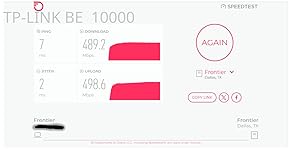
Goodbye EERO! We have been EERO users since 2024 when our ISP (Frontier) sent us a “free” EERO 6 PRO for a $10 shipping fee. It was easy to setup and we got good, not great, performance. About 140 Mbps down and 50 Mbps up on a 500/500 system. Compared to the router it replaced we were happy. I run a home network with android phones/apple Ipads, windows computers ( 5 on W11, 1 on W10 ) , a Linux computer and 3 TVs . The EERO was easy to set up and easy to add additional nodes. Connections were never a problem with the EERO. The TVs would often buffer when we watched YouTube-TV. The android phone app used to control the EEROs has problems. The status screen, used to show the health of your EERO nodes, is terribly unreliable. Often it will show EERO nodes that are unplugged as online. We called EERO support and spent several hours debugging this problem. I had android 11 at the time but my son had android 16 and both showed the same error. EERO support wrote a ticket on this problem but we have noticed no improvement in the app since. In Feb 26, I noticed Frontier had been charging us $7/month for the “free” EERO. We called and they took it of the account and required that we ship the “free” EERO PRO 6 back to them – which we did. We were using EERO 6 non-pro nodes on our system for some time. The EERO PRO 6 ran so hot we were a little afraid of it. In mid March 26 we noticed Amazon had a EERO 7 PRO on sale for $199. We ordered that and connected it to our system. As always, it was super easy to add a new node with the EERO app. The EERO PRO 7 was getting 370 Mbps/170Mbps which seemed like a huge upgrade! We noticed in the status it was connecting on the 6Ghz network to our intel and AMD boxes. This was great! On the Linux host, it connected and did 350/320. Wow, awesome! The joy did not last long, however. Later in the day, on the intel computer I was seeing 120 / 57 again. I found it was back on the 5 GHz band. If I disconnected and reconnected. It reconnected and we were back on the 6Ghz band with great performance. Later in the day it had gone back to the 5 Ghz band along with disappointing performance. It appears the EERO are coded to go after the strongest signal even if a good signal on a super performance band is available. I read a review online of the TP-LINK DECO B3 10000. The review indicated you could set a per-device preference of the band to use for the connection. EERO does not have this! I felt this might be just what I needed. The router arrived later in the day thanks to prime! We installed the 3 node TP-LINK DECO B3 10000 in the same locations as 3 of our existing EERO nodes. The TP-LINK app is not as easy to use to install the system as the EERO app. After a couple of failed attempts we got it to install. Yea! Once you have the first node set up it is really easy to add the additional nodes. The app does let you customize the network to use for each device. Excellent! I checked the intel windows box again. It was hitting 430/420 on WiFi. Wow! Damn! We had not seen that performance before with EERO, ever! The other WiFi devices where showing good performance too. The LG/TCL TVs are no longer buffering on YouTube-TV. All of our phones were on the 6Ghz band. There was one big exception to this joy! The UBUNTU Linux 24.04 node wold not connect to the TP-LINK DECO. I suspect it was a problem with WPA3 protocol DECO uses! We tried all sorts of things but it would never work. Edit: We were able to show that it was related to WPA3 Simultaneous Authentication of Equals (SAE) or more commonly WPA Personal. We reenabled the eero 7 which uses wpa/wpa2 protocols for all bands. It connected. The TP-LINK DECO is set to only use WPA3 SAE for the 6 Ghz band. We set the preference for the device to connect any band in the DECO app as opposed to 6 Ghz. It connected immediately on the less efficient 5 Ghz band. End Edit: Wait, there are 4 Ethernet ports on the back of each TP-LINK DECO node. There is a network node ( EERO and TP-LINK) right by the Linux computer. Let me try that. It worked! The Linux box was hitting 480/470 with the Ethernet connection. The intel box, which is right next to the Linux box, hits over 500/500 when hooked up to the Ethernet cables from TP-LINK DECO. We have let it run for a couple days to see if there are gotchas. None so far. We have the winner. We are done with EERO. We are shipping the EERO PRO 7 back to Amazon tomorrow. ... show more
Reviewed in the United States on March 29, 2026 by RHdk

Can't find a product?

Find it on Amazon first, then paste the link below.
Checking for best price...