Search  for anything...

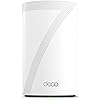
TP-Link Deco 7 Pro BE63 Tri-Band WiFi 7 BE10000 Whole Home Mesh System- 6-Stream 10 Gbps, 4X 2.5G Ports Wired Backhaul, 4X Smart Internal Antennas, VPN, HomeShield, Free Expert Support (1-Pack)

  • Based on 7,393 reviews
Condition: New
Checking for the best price...
$169.99 Why this price?
Save $30.00 was $199.99

Buy Now, Pay Later


As low as $28.33 / mo
  • – 6-month term
  • – No impact on credit
  • – Instant approval decision
  • – Secure and straightforward checkout

Ready to go? Add this product to your cart and select a plan during checkout.

Payment plans are offered through our trusted finance partners Klarna, Affirm, Afterpay, Apple Pay, and PayTomorrow. No-credit-needed leasing options through Acima may also be available at checkout.

Learn more about financing & leasing here.

Selected Option

Free shipping on this product

FREE 30-day refund/replacement

To qualify for a full refund, items must be returned in their original, unused condition. If an item is returned in a used, damaged, or materially different state, you may be granted a partial refund.

To initiate a return, please visit our Returns Center.

View our full returns policy here.

Availability: Only 10 left in stock, order soon!
Fulfilled by Amazon

Arrives Thursday, Mar 12
Order within 14 hours and 33 minutes
Available payment plans shown during checkout

Protection Plan Protect Your Purchase
Checking for protection plans...

Style: WiFi 7 BE10000


Size: 1 Pack


Features

  • Supercharged Deco 7 Pro BE10000 Tri-Band Wi-Fi 7 Speeds: Features cutting-edge Wi-Fi 7 technology, including Multi-Link Operation, Multi-RUs, 4K-QAM, and 320 MHz channels. Delivers speeds of 5188 Mbps on 6GHz, 4324 Mbps on 5GHz, and 574 Mbps on 2.4GHz.
  • Vast Mesh Coverage & Device Capacity: The mesh router covers up to a vast 3,000 sq.ft. and supports over 200 devices without compromising performance, ensuring seamless connectivity.
  • Full 2.5G WAN/LAN Ports: Includes four 2.5G WAN/LAN ports and a USB 3.0 port, making it an ideal choice for future-proofing your home network.
  • Dual Wireless & Wired Backhaul: Leverages TP-Link's self-developed technology to support simultaneous wireless and wired backhaul. Maximizes Wi-Fi 7 benefits for faster speeds and broader coverage.
  • AI-Driven Seamless Roaming: The Deco Mesh creates a unified network with a single network name. Uses AI-Roaming technology for seamless streaming and optimal speeds, adapting through advanced algorithms and self-learning as you move throughout your home.
  • TP-Link HomeShield: Protect your home network with TP-Link's premium security service. Free features include network security scans, IoT device identification, parental controls, quality of service, and reports. Visit TP-Link site for more information.
  • VPN Client & Server Support: Enables home devices to access remote VPN servers without installing VPN software on each device. Supports simultaneous VPN and regular internet connections for enhanced security and flexibility.
  • Easy Setup & Management: Quickly set up and manage your mesh router using the free Deco App, available for Android and iOS.
  • Extensive Compatibility: TP-Link Deco products seamlessly integrate to create a Mesh WiFi network. They are backward compatible with all WiFi generations and work with any internet service provider (modem required for most ISPs).

Description

Upgrade your home Wi-Fi experience with the Deco 7 Pro BE10000 Whole-Home Mesh Router. This versatile device can extend the range of your existing mesh network or serve as a standalone router. It covers up to 3,000 sq. ft. with ultra-fast Wi-Fi 7, ensuring your entire home is blanketed under one optimized network. Say goodbye to frustrating dead zones and sluggish connections! †△ Perfect for 4K/8K streaming, lag-free gaming, and lightning-fast downloads, you'll revel in speeds of up to 10 Gbps combined across the 6GHz, 5GHz, and 2.4GHz bands. What's more, it effortlessly handles up to 200 connected devices, making it ideal for even the most demanding smart home setups. Additionally, the Deco BE10000 boosts multi-gig internet and wired connectivity options, featuring four 2.5 Gbps ports and one USB 3.0 port for unparalleled flexibility and blazing-fast data transfers. Setting up and managing your network is effortless with the TP-Link Deco app. Quickly establish your network, customize settings, and monitor network traffic metrics. Most importantly, keep your network and all connected devices safe with TP-Link's premium network security service, HomeShield. Experience the future of home networking with Deco BE10000 – where speed, coverage, and security converge in one unbeatable package.

Brand: TP-Link


Model Name: WiFi 7 Mesh System


Special Feature: Access Point Mode, Guest Mode, QoS, Remote Access, WPS


Frequency Band Class: Tri-Band


Wireless Communication Standard: 802.11.be, 802.11ac, 802.11ax, 802.11g, 802.11n


Compatible Devices: Smartphone


Recommended Uses For Product: Gaming, Home


Included Components: 1 Deco BE63 unit, 1 Power adapters, 1 RJ45 Ethernet cable, Quick Installation Guide


Connectivity Technology: Wi-Fi


Color: White


Product Dimensions: 4.23 x 4.23 x 6.93 inches


Item Weight: 1.66 pounds


Item model number: Deco BE63(1-Pack)


Date First Available: November 24, 2023


Manufacturer: TP-Link


Frequently asked questions

If you place your order now, the estimated arrival date for this product is: Thursday, Mar 12

Yes, absolutely! You may return this product for a full refund within 30 days of receiving it.

To initiate a return, please visit our Returns Center.

View our full returns policy here.

  • Klarna Financing
  • Affirm Pay in 4
  • Affirm Financing
  • Afterpay Financing
  • PayTomorrow Financing
  • Financing through Apple Pay
Leasing options through Acima may also be available during checkout.

Learn more about financing & leasing here.

Top Amazon Reviews
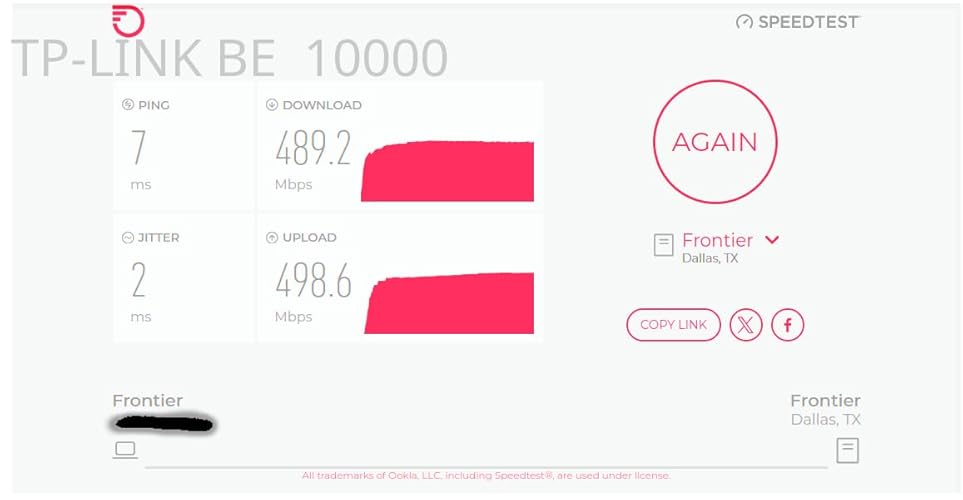

  • Great Router & Mesh System So Far
Style: WiFi 7 BE10000 Size: 3 Pack
Replaced an older ASUS mesh system that was a daily headache to deal with for a 4,500 sq ft house on 3 levels. Decided to give this TP-Link Tri-Band WiFi 7 BE10000 Whole Home Mesh System (Deco BE63) a go. Based on my constant problems with my ASUS mesh system, I was expecting this to be a pain from the start. I was dead wrong. This took about 30 minutes (if that) to set up and get going, start to finish, and it works flawlessly in this 3 level house. Whole house is covered, about 70 devices, and it hums right along with no issues. I'm very impressed (and relieved from not having to deal with that ASUS fiasco every day). I've only had this now for a couple of days, but everything is going well so far. PROS: 1. Setup was simple and straightforward via the Deco app 2. It worked perfectly out of the box - no hassles or hiccups 3. Enough flexibility to set your router's address and the DHCP range - if you have a lot of static IP addresses this makes transitioning to the TPLink much easier 4. Speed is great - I haven't benchmarked it, but it no one has noticed any lagging on any devices, multiple 4k TVs, etc. CONS: There are a couple of things - 1. What idiot designed these power adapters? First, they're HUGE. The way it has to be plugged in it takes up 3 outlets on a power strip. There's no reason a power supply has to be that large. Second, the flimsy power cord is way, way too short. Someone really dropped the ball in design of the power supply and cord, particularly for a $450 router. 2. The router has a USB port on it. (in fact each of the 3 units has the same 3 RJ45 and USB ports, but the USB for the main unit (the first one you set up and go through the installation) is the only one that you can hang an external drive off of and access it.)) I plugged an external hard drive into the USB port and was able to share it via the Deco app - the one catch is that you can't just create a share name, such as "backup". The router adds a "G" so that in order to use the share, it must be used as \\your.router.ip.address\G\backup ...not really a big deal, but I have many computers that run backups and I had to go reconfigure them to add the "G" to the network path. Other thoughts - You're forced to use the Deco app on a phone or tablet to manage the network. There is a webpage interface, but it's basic stuff only. That said, I'm pretty impressed with the Deco app itself - seems to have all of the needed features without a lot of stuff I don't really use or need that I had in the ASUS and have seen in other router setups. There is a basic level of security included for free, but TP-Link offers additional tiers of security. I ended up adding the Security+ ... but they also have a tier that includes advanced Parental Controls, VPN, Password Management, and several other things, for more money of course. So far so good on all of my IoT devices too. If you're looking for a router system with great coverage and speed that you don't have to muck around with daily, this appears to be a solid choice. I'll update this review if anything changes. ... show more
Reviewed in the United States on April 19, 2025 by Dazed & Confused

  • Very happy! Made a big difference in wi-fi performance
Style: WiFi 6E, AXE5400 Size: 3 Pack
We have an AT&T gateway and have been using three older TP-Link routers as access points connected by ethernet using our home's structured wiring and a TP-Link repeater to boost the signal to our two Ring doorbells. I'm embarrassed to say but we only have 50mb/sec internet because nothing faster is available where we live, even though communities right next to us have had fiber for years. That said, the speed we have actually works just fine for everything we do, which is quite a lot. We do streaming for all our TV watching, work from home, have many Ring cameras and doorbells, and lots of other devices. The problem was that our wi-fi seemed to get bogged down and wasn't able to even deliver the 50mb/sec speed we have. This was especially problematic for our two Ring Doorbell Pros, where the video quality really suffered. Everything was blocky and blurry, I'm assuming because the cameras weren't getting enough speed and/or strong enough connection. The construction of our house likely doesn't help since the front is brick and stone. With this new Deco system, everything works and works well. We have a 3-story house, and I placed one unit on each floor. The first and third floor units are wired and the second floor unit is wireless, connected to the third floor unit above it. This configuration allowed me to place the second floor unit closer to the front of the house where the two Ring doorbells are, without the need for an extender. The system was very easy to set up and the app is great. It is easy to navigate, and settings are straightforward and easy to change. It provides lots of information on status, connected clients, signal strength, speed, etc. It's not as 'advanced' as the typical web-based router configuration interfaces but seems to have everything I needed. I have these in access point mode also, since my gateway acts as a router. I may see if I can change that at some point, but everything works flawlessly, so I may not mess with it. The great part is that I now have full wi-fi speed everywhere in the house and everything loads much faster. Live feeds on the Ring doorbells take less than a second to start and video is crisp and clear. I'm also getting excellent signal strength readings from all our outdoor cameras and doorbells, with readings in the -40s. Streaming starts faster on every TV, and we haven't had a single issue since we started using this system. Also, you can customize settings for every connected device, like which Deco you prefer it connect to and if you want to restrict it to a certain band (both default to 'Auto'). This is useful in certain cases, like for our two Ring doorbells, I set them both to preferred connection to the second floor Deco because it's the closest one. That way if it gets unplugged or there's a power outage, this will ensure it always connects to the closest one. I left most everything else on Auto and that seems to work fine, and it seems to select the best (closest) Deco. I've also had no issues with 5Ghz devices connecting to the 2.4Ghz band. Our phones have 6Ghz capability, so I specifically connected them to that network, since it has a different SSID. Signal strength and speed on that network is also excellent everywhere. I made both the main and guest network SSIDs and passwords the same as our old system. Most 2.4Ghz clients connected to the new system automatically. Any clients we had on the 5Ghz band had to be reconnected because our old system had those networks separate. That wasn't a big deal, and this new setup is simpler to work with, having both 2.4Ghz and 5Ghz combined. The guest mode works great. We use that network for my wife's home-based business for her clients to connect to because it isolates connected clients from our main network and devices. You can easily turn it on and off in the app as well. I couldn't be happier, especially given how affordable this system was. I know you can spend a lot more, but wow this one is awesome and a great price. When I bought it, the price was $269 for new, but Amazon also had one from 'Amazon Resale' in 'Like New' condition for $219, which I bought. It all works fine, but when I received the product, it had a sticker on the box stating that it was 'Refurbished', which was no disclosed in the listing, which stated it looks and works like new and included ALL original accessories and contents, noting minor damage to the product box. What I received did not include any instructions or manuals and included a slip that said these could be obtained on-line and were not included with refurbished products. It also stated that it had a 90-day warranty but the original warranty that would come with a new product did not apply. While I'm thrilled with the product and it does work, I feel this was a bait and switch situation on Amazon's part. I highly recommend this system. ... show more
Reviewed in the United States on February 14, 2025 by R. Precourt

Can't find a product?

Find it on Amazon first, then paste the link below.
Checking for best price...