Search  for anything...

TP-Link Deco XE75 Pro AXE5400 Tri-Band WiFi 6E Mesh System - 2.5G WAN/LAN Port, Covers up to 7200 Sq.Ft, Replaces WiFi Router and Extender, AI-Driven Mesh, 6GHz Band, 3-Pack

  • Based on 3,377 reviews
Condition: New
Checking for the best price...
$399.99 Why this price?

Buy Now, Pay Later


As low as / mo
  • – Up to 36-month term if approved
  • – No impact on credit to apply
  • – Instant approval decision
  • – Secure and straightforward checkout

Ready to go? Add this product to your cart and select a plan during checkout.

Payment plans are offered through our trusted finance partners Klarna, Affirm, Afterpay, Apple Pay, and PayTomorrow. No-credit-needed leasing options through Acima may also be available at checkout.

Learn more about financing & leasing here.

Selected Option

Free shipping on this product

FREE 30-day refund/replacement

To qualify for a full refund, items must be returned in their original, unused condition. If an item is returned in a used, damaged, or materially different state, you may be granted a partial refund.

To initiate a return, please visit our Returns Center.

View our full returns policy here.


Availability: Only 3 left in stock, order soon!
Fulfilled by Amazon

Arrives Sunday, Mar 22
Order within 16 hours and 21 minutes
Available payment plans shown during checkout

Protection Plan Protect Your Purchase
Checking for protection plans...

Style: WiFi 6E, AXE5400


Size: 3 Pack


Features

  • WiFi 6E Tri-Band Mesh WiFi Cover up to 7,200 Sq.Ft with next-gen seamless WiFi and make dead zones and buffering a thing of the past1 2
  • Beyond the Speed of Gigabit - A 2.5 Gbps port and 2 Gigabit ports per unit allow you to take full advantage of your Multi-Gig broadband speed (Ideal for gigabit plus internet plans up to 2.5 Gbps). Plug your PCs, smart TVs, or game consoles into the ports for blazing-fast wired connections
  • Brand-New 6 GHz Band Experience the latest frequency of WiFi, eliminating interference from all legacy devices. The 6 GHz band works as a backhaul to ensure stable connections between nodes by default. You can switch it to Wi-Fi Network mode and connect your WiFi 6E-compatible devices to 6GHz Network3
  • True Tri-Band Speed All three WiFi bands work together to unleash your networks total speeds up to 5,400 Mbps for 200 devices (6 GHz: 2402 Mbps (HE160);5 GHz: 2402 Mbps (HE160);2.4 GHz: 574 Mbps)1 3
  • Our Cybersecurity Commitment - TP-Link is a signatory of the U.S. Cybersecurity and Infrastructure Security Agencys (CISA) Secure-by-Design pledge. This device is designed, built, and maintained, with advanced security as a core requirement.
  • AI-Driven Mesh - Deco XE75 Pro delivers smart WiFi that follows you wherever you are, without interruption. It automatically learns your network environment, client quality, and user behaviors.
  • Easy Setup and Management - The Deco app helps you set up your network in minutes with clear visual guidance and keeps you in control even when you are not home; Works with Alexa as well Turn on or off Guest Wi-Fi by simple voice commands.
  • TP-Link HomeShield - TP-Link's premium security service keeps your home network safe with cutting-edge network and IoT protection. Free features: 1. Basic Network Security including Security Scan and IoT Device Identification 2. Basic Parental Controls 3. Quality of Service 4. Basic Weekly/Monthly Reports. Visit TP-Link website for more information.
  • Works with all internet service providers, such as Comcast, Charter, ATandT, Verizon, Xfinity, Spectrum, RCN, Cox, CenturyLink, Frontier, etc.( a modem is required for most internet service providers)

Description

TP-Link Deco AXE5400 Tri-Band WiFi 6E Mesh System(Deco XE75 Pro) - 2.5G WAN/LAN port, Covers up to 7200 Sq.Ft, Replaces WiFi Router and Extender, AI- Driven Mesh, New 6GHz Band, 3-PackNowadays, ISPs in many areas have started offering Multi-Gig internet access plans with competitive pricing. For such cases, the Multi-Gig connection becomes an ideal choice for unleashing the fullest potential of your internet performance. High demanding applications such as AR, VR gaming, 4K and 8K streaming became more popular than ever.Faster-than-Gigabit wired connections are surely needed now to match the speeds and if the cost isn’t much to upgrade, why not? Each Deco XE75 Pro unit has one 2.5G WAN/LAN port and 2 x 1 Gigabit LAN ports. A 2.5G Multi-Gig port can support all of the following connection speeds: 10 Mbps, 100 Mbps, 1 Gbps, and 2.5 Gbps.

Brand: TP-Link


Model Name: Deco XE75 V1


Special Feature: Guest Mode, Internet Security, LED Indicator, Parental Control, QoS, Remote Access


Frequency Band Class: Tri-Band


Wireless Communication Standard: 802.11ax


Compatible Devices: Gaming Console, Personal Computer, Security Camera, Smart Television, Smart Thermostat, Smartphone, Tablet See more


Recommended Uses For Product: Home


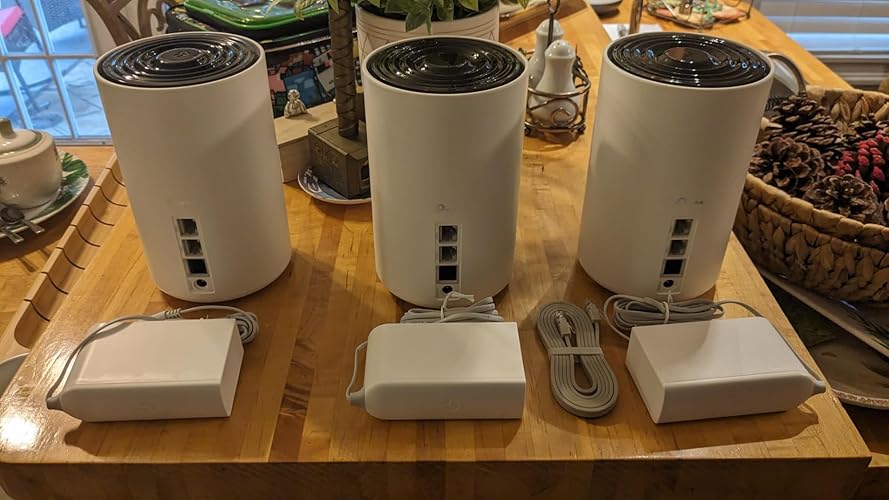
Included Components: 1 x Quick Installation Guide, 1 x RJ45 Ethernet cable, 3 x Deco XE75 Pro units, 3 x Power adapters


Connectivity Technology: Ethernet, Wi-Fi


Color: Black and White


Product Dimensions: 4.13 x 4.13 x 6.65 inches


Item Weight: 4.12 pounds


Item model number: Deco XE75 Pro(3-pack)


Date First Available: August 23, 2022


Manufacturer: TP-Link


Frequently asked questions

If you place your order now, the estimated arrival date for this product is: Sunday, Mar 22

Yes, absolutely! You may return this product for a full refund within 30 days of receiving it.

To initiate a return, please visit our Returns Center.

View our full returns policy here.

  • Klarna Financing
  • Affirm Pay in 4
  • Affirm Financing
  • Afterpay Financing
  • PayTomorrow Financing
  • Financing through Apple Pay
Leasing options through Acima may also be available during checkout.

Learn more about financing & leasing here.

Top Amazon Reviews


  • TP-Link XE75 5400 6G Mesh System: Start-up Pointers (It's a great router when you install it right!)
Style: WiFi 6E, AXE5400 Size: 3 Pack
7/21/2025 initial thoughts. I bought the 3-pack but added one more unit for inside -- I'm sure 3 is plenty in most 2600 sf homes. But ours has a lot of angles & when the signal passes through too many walls, it degrades fast. I also bought another outdoor water-resistant unit for outside, so the signal to cameras is strong; we can also use Wi-Fi anywhere further away from the house. Even with all that, the Deco system is still less than cheapest Orbi system. Yes, it will cost you some money -- you can add more nodes later if you find really bad dead spots. The Deco units (Deco is TP-Link's brand name for this system) are easy to install too. I used Microsoft Co-Pilot to help me make decisions on where to install and the settings. Very helpful. The Deco phone app is best for setting up the nodes -- you can carry your phone with you while you do it. Make sure your phone is connected to the Wi-Fi. It is very straight forward and does most of the work. If will ask you to set up an online Deco account so that will carry all of your settings. First get one unit up and running so it will become your base. All the units are the same, so the phone app will guide you to set up the base. You are going to use this first Deco unit as the router home base. Then connect this base unit to the output port on your existing modem. Some modems have 2G ports -- use that one if not already taken, to connect the Deco to your modem. Gives you the fastest transfer rate between modem and router. FYI, an Xfinity acts both as modem and router. If you have any service (AT&T, Charter, etc) providing one device that does both modem and router duties, you'll need to do the following for a simple setup. You'll set this combo unit to "BRIDGE MODE". It will turn off Wi-Fi in the combo unit and reduces conflicts between devices. In my case, I use Xfinity. I think you can make this change through the Xfinity phone app. If not and you have some basic skills, login into the router interface directly (default IP is 10.0.0.1) and select BRIDGE mode. Now your gateway is only a modem, not a router. At this point, ANYTHING YOU PLUG IN will plug into the Deco router (unless you are a techie running more than one router). Now install and use the SpeedTest app on your phone to check for HIGHEST signal strength in the rest of your house. That's where you want to place other units, so they can talk to each other. A few feet in any direction can also make a big difference. I CANNOT STRESS ENOUGH TO USE SpeedTest (or other similar app) to find THE FASTEST other points in your house. Mapping this first saves a lot of headaches. TEST & TEST & TEST again. Test high points in the room (even near the ceiling) and test low! It's not even the same speed in the same space when you check high vs low. I think they recommend high spots BUT I did find a couple of chest level locations. The Deco app may have an automated speed testing feature for this, but I opted to use something I already knew. Also, make sure you have a power outlet near these placement points. I am really particular and like the cords hidden. Sometimes it's hard to get both a great signal and hiding the power plug. After placing the units and getting them online, I turned on "6G BACKHAUL" in the Deco units (that may not be the exact name) if it's not already turned on. The 6G frequency will be used almost exclusively for the Deco units to talk to each other -- leads to no interference from other devices. Most people do not have 6G or 7G devices yet. So you can TURN OFF the Wi-Fi SSID broadcast for 6G. Again, use ChatGPT, Copilot or whatever AI to help you find stuff in the Deco router. These changes are easily made in the Deco app once you find the right page. The app is better than the webpage, in my opinion. You can carry your phone around the house. Finally, do yourself a favor if you want ethernet (hard wired) connections at any of the nodes and have more than 2 wired devices to plug in at any node. Buy UNMANAGED network switches to plug into the ethernet ports on any of the Deco units -- all of the Deco units are the same. I have a switch in my office for the computer, printers, a few other devices that I wanted wired. Wired offers THE FASTEST speeds but really isn't necessary (I have 1200Mbps down / 40Mbps up -- YES, the up speed is low but that's all Xfinity home users get right now). Three ethernet ports on a Deco unit is not enough in some cases. Right now, I don't use the ethernet ports on any of the Deco satellites. Hope this helps. This Deco router is FAR SUPERIOR to the decade-old router it replaced. It costs a lot more than basic routers but was still cheaper than Orbi and is giving me full use of the speeds for which I'm paying. Good luck. ... show more
Reviewed in the United States on July 21, 2025 by TnT Family TnT Family

  • Great Wi-Fi coverage with easy-to-understand instructions and excellent interface...
Style: (Newer Model) AXE4900 Size: 3 Pack
I purchased this system because the BGW320-500 modem/router that AT&T provides with their fiber internet didn't provide good enough Wi-Fi coverage, among other issues. I put the main unit near the AT&T router and spread the other two satellite units in the living room and the master bedroom. This meant the three TP-Link units were well distributed throughout my home. Immediately we went from spotty Wi-Fi performance to excellent coverage and speeds everywhere in my house, even the back bedrooms which before had hardly worked at all. The setup is very easy, with great instructions that guide you through the process. The speeds of downloading and uploading doubled right after installation. What is really great is the interface to the units which is easy to use, and was working fine right out of the box, but it provides access to many features that can be tweaked as you wish. The satellite mesh units can be connected via Wi-Fi or ethernet for better speeds. I have them connected via Wi-Fi and it works well. The streaming units (Roku and Apple TV) connected easily and we get great streaming performance to our 4k TVs. All the IoT devices (refrigerator, coffee maker, dishwasher, Apple Pod, Atmos speakers, etc) connect fine and operate flawlessly. It required some work to get the AT&T BGW320-500 into "passthrough mode", as AT&T does not provide the ability to have the unit operate in "bridge mode" which allows all Wi-Fi and other functions to be handled by a better unit like this TP-Link product. I had to do quite a bit of Googling and reading guides and forums where other users had worked out all the settings that need to be adjusted on the AT&T BGW320-500 to get it to work well with this unit (or any unit, for that matter). Luckily there is a robust user's forum on the TP-Link website where a collection of gearheads documented the procedure to get things working well. Once I got that all worked out, I got the full 1 gigabit speed I'm paying for and it operates flawlessly (even after a power outage, it all came back up working fine). My family (and others that have stayed with us over the holiday) have really enjoyed the much better Wi-Fi coverage and speeds this unit has afforded. I have my Synology NAS (running my Plex server) connected via ethernet to this unit, as is my MacBook Pro, because I get better speeds that way (as my 2018 MacBook Pro does not have Wi-Fi 6e capabilities). However, the Wi-Fi speeds to my newer PC laptop (and my wife's newer MacBook Pro) which does have Wi-Fi 6 matches the upload and download speeds of my hardwired ethernet connection to my MacBook Pro. So, if you're looking for better coverage or speeds, I can recommend this product wholeheartedly. It's definitely one of the best mesh router products out there, easy to set up and easy to use. ... show more
Reviewed in the United States on February 12, 2025 by Superman

  • Gamers in large or old houses look here
Style: (Newer Model) AXE4900 Size: 3 Pack
Some recently moved, new place is very large AND very old. The router was for some reason in the basement, my pc setup on the 2nd floor, basement was concrete and brick, thick walls and tons of space between the router and my setup. Near the router 400up400down speeds, I can game with this it’s not bad at all. On first floor 150up80down. Disaster. On 2nd floor 15up20down speeds. Unplayable. Even using my new ish gaming router the walls just too much I guess. So at the top of the basement stairs I have mesh plugged directly into Ethernet>modem. In living room I have 2nd unit plugged into a power outlet. No Ethernet only WiFi tot he first one in basement stairs. Third unit in bedroom upstairs Ethernet from this unit into my pc. My pc registers Ethernet internet, wifi turned off, and I’m getting 360up/380down consistently. Can play fps games no slingshotting no buggyness, it’s almost as if I’m direct into the router like at our old place. This mesh is a tri channel and that’s a must, it uses a separate channel to talk to the other 2 units leaving the 5g and 2.5g wide open for traffic. App is amazing, I was able to set up, secure and run the whole system, plugging in took more time than setting up. Some older devices wouldn’t connect, so I can a guest channel, with password obviously, and used the app to disable 5g on the guest network, and this resolved all compatibility issues. Absolutely worth the cost, this is what you want if you want stable, consistent, fast internet over a larger space in older heavily insulated homes. 10/10 i would recommend this to ANYONE with any sort of internet issues. ... show more
Reviewed in the United States on March 5, 2026 by #amazonaddict

Can't find a product?

Find it on Amazon first, then paste the link below.
Checking for best price...