Search  for anything...

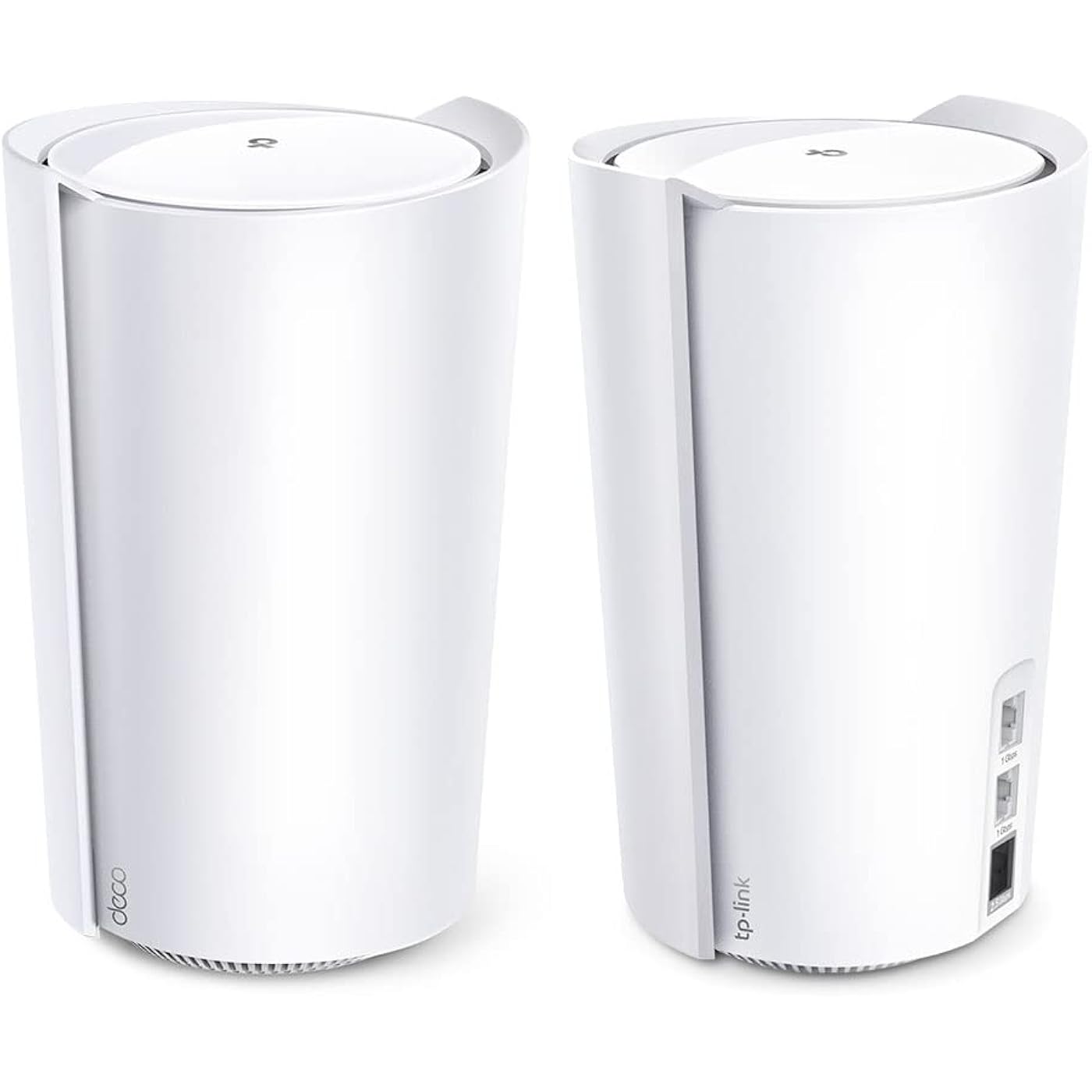
TP-Link Deco AX7800 Tri-Band Mesh WiFi 6 System (Deco X95) - Whole Home Coverage up to 6100 Sq.Ft with AI-Driven Smart Antennas, Multi-Gig Ethernet, Replaces Wireless Router and Extender (2-Pack)
  • Based on 145 reviews
Condition: Used - Like New
Checking for the best price...
$225.36 Why this price?
Save $174.63 was $399.99

Buy Now, Pay Later


As low as $37.56 / mo
  • – 6-month term
  • – No impact on credit to apply
  • – Instant approval decision
  • – Secure and straightforward checkout

Ready to go? Add this product to your cart and select a plan during checkout.

Payment plans are offered through our trusted finance partners Klarna, Affirm, Afterpay, Zip, Apple Pay, and Google Pay. No-credit-needed leasing options through Acima may also be available at checkout.

Learn more about financing & leasing here.

Selected Option

Free shipping on this product

This item is eligible for return within 30 days of receipt

To qualify for a full refund, items must be returned in their original, unused condition. If an item is returned in a used, damaged, or materially different state, you may be granted a partial refund.

To initiate a return, please visit our Returns Center.

View our full returns policy here.


Availability: Only 1 left in stock, order soon!
Fulfilled by Amazon

Arrives Tuesday, Oct 20
Order within 15 hours and 59 minutes
Available payment plans shown during checkout

Protection Plan Protect Your Purchase
Checking for protection plans...

Style: AX7800 Tri-Band


Size: 2 Pack


Features

  • AX7800 Tri-Band Wi-Fi 6 Mesh: Experience lightning fast speeds up to 4804 Mbps at 5GHz Band 1, 2402 Mbps at 5GHz Band 2 and 574 Mbps at 2.4GHz with 8 separate streams to reduce lag.
  • Whole Home Wi-Fi Coverage: Cover up to 6,100 Sq.Ft. with seamless high-performance Wi-Fi and make dead zones and buffering a thing of the past.
  • Connect More Devices: Connect up to 200 devices on the Wi-Fi network without dragging down performance. Connect even more with 3 ethernet ports (1 X 2.5G Port, 2 X 1G Ports) equipped in each unit of Deco X95, providing wired connections for devices like gaming console, smart TV and more.
  • 2.5G Multi-Gigabit Port: Breakthrough gigabit speeds and enter the multi-gig era of wired connection. With more internet service providers offering multi-gig wired connection, dont let your router be a bottleneck
  • Our Cybersecurity Commitment: TP-Link is a signatory of the U.S. Cybersecurity and Infrastructure Security Agencys (CISA) Secure-by-Design pledge. This device is designed, built, and maintained, with advanced security as a core requirement.
  • AI-Driven Mesh with Smart Antennas: Unite your home under one Wi-Fi name and password with seamless AI-driven Mesh . Improve connection between Deco units with Smart Antennas that concentrate signal to the direction of your Deco satellites.
  • TP-Link HomeShield - TP-Link's premium security service keeps your home network safe with cutting-edge network and IoT protection. Free features: 1. Basic Network Security including Security Scan and IoT Device Identification 2. Basic Parental Controls 3. Quality of Service 4. Basic Weekly/Monthly Reports. Visit TP-Link website for more information.
  • Easy Set Up and Management: Set up and manage your router in minutes with the free Deco App available for both Android and iOS devices
  • Extensive Compatibility: All TP-Link Deco products can work together to form a Mesh Wi-Fi network. Also compatible with all internet service providers, such as Comcast, Charter, AT&T, Verizon, Xfinity, Spectrum, RCN, Cox, CenturyLink, Frontier, Starlink etc. (a modem is required for most internet service providers)

Description

Fast, Far-Reaching Mesh Wi-Fi System Deco X95 covers your entire home with blazing fast mesh Wi-Fi 6. It uses powerful AX7800 Wi-Fi 6 with TP-Link Mesh technology to deliver strong Wi-Fi throughout your home and even connect up to 200 devices. Tri-Band technology reduces lag that originates from congestion: when too many devices are connected to your Wi-Fi network. The Mesh system automatically connects your devices to the least crowded Wi-Fi band depending on the device's data usage. Smart Antenna driven by AI will auto-detect and concentrate the signal to the direction of your 2nd Deco unit. Acheive all the performance benefits with peace of mind with TP-Link's HomeShield protection. Stay secure with WPA3 encription and provide a safe online-playground for your kids with parental controls.

Brand: TP-Link


Model Name: Deco X95(2-pack)


Special Feature: Access Point Mode, QoS


Frequency Band Class: Tri-Band


Wireless Communication Standard: 802.11ac, 802.11ax, 802.11b, 802.11g, 802.11n


Compatible Devices: Gaming Console


Recommended Uses For Product: Home


Included Components: 1 x RJ45 Ethernet cable, 2 x Deco X95 units, 2 x Power adapters, Quick Installation Guide


Connectivity Technology: Ethernet, Wi-Fi


Color: White


Other Special Features of the Product: Access Point Mode, QoS


Frequency Band Class: Tri-Band


Wireless Compability: 802.11ac, 802.11ax, 802.11b, 802.11g, 802.11n


Compatible Devices: Gaming Console


Antenna Location: Home


Connectivity Technology: Ethernet, Wi-Fi


Antenna Type: Internal


Operating System: Openwrt


Security Protocol: WPA, WPA2, WPA3


Number of Ports: 6


Control Method: App


Data Transfer Rate: 7800 megabits_per_second


LAN Port Bandwidth: 10/100/1000 Mbps


Maximum Upstream Data Transfer Rate: 2500 megabits_per_second


RAM Memory Installed: 1 GB


Number of Antennas: 6


Wi-Fi Generation: Wi-Fi 6


Connectivity Range: 6100 square_feet


Connectivity Protocol: Wi-Fi, Ethernet


Controller Type: App Control


Coverage: 6100 sq.ft.


Frequency: 5 GHz


Brand: TP-Link


Model Name: Deco X95(2-pack)


Built-In Media: 1 x RJ45 Ethernet cable, 2 x Deco X95 units, 2 x Power adapters, Quick Installation Guide


Model Number: Deco X95(2-pack)


Unit Count: 2 Count


UPC: 840030705045


Number of Items: 1


Number of Packs: 2


Global Trade Identification Number: 45


Manufacturer: TP-Link


Item Type Name: Mesh WiFi


Mfr Part Number: Deco X95(2-pack)


Warranty Description: 2 year manufacturer


Item Weight: 3.1 pounds


Item Dimensions L x W x H: 5.12"L x 4.84"W x 8.2"H


Color: White


Frequently asked questions

If you place your order now, the estimated arrival date for this product is: Tuesday, Oct 20

Yes, absolutely! You may return this product for a full refund within 30 days of receiving it.

To initiate a return, please visit our Returns Center.

View our full returns policy here.

  • Klarna Financing
  • Affirm Pay in 4
  • Affirm Financing
  • Afterpay Financing
  • Zip Pay in 4
  • Financing through Apple Pay
  • Financing through Google Pay
Leasing options through Acima may also be available during checkout.

Learn more about financing & leasing here.

Top Amazon Reviews


  • Deco X95 - after 1 week I'm happy
Got the Deco X95 (AX7800) to replace an Amplifi Alien mesh setup that had started frequently rebooting. So far, Im really happy. Im not a home networking expert, but Im also not a novice - somewhere inbetween. Ive set up many of these in the past (from Orbi to Eero and Amplifi), and use some of the customization features. Setup was simple. Took me less than 5 minutes to have the entire mesh network set up. Every device connected (except one, Sonos), and I have about 60 devices in the house including all the IoT stuff. The app was easy to use and pointed me in the right direction, step by step. After a full week, I have had zero devices drop or have connection issue in a 4k sqft house. Stability is probably the #1 requirement for me, both my wife and I work from home. As mentioned, Sonos didnt work within the 1st hour I had set up the Deco. Sonos is notoriously bad with mesh networks, which is unfortunate because I love their products otherwise. I fiddled with some security settings (set it to WPA2/WPA3), rebooted my sonos devices...and decided to work on it the next day. Im not sure if it was the security setting or the reboot - but miraculously the next day all of my sonos devices appeared on the network map and were working (I have 8 of them). So, I know it can be frustrating, but I at least wanted to share one experience of sonos working with Deco, since I saw a few comments about it in other reviews. Edit 2/15/23: Just wanted to share that this has been 100% rock solid and stable for a month now. Very happy with performance, range, stability. Even though the unit is not as fancy as my Amplifi Alien, it was an upgrade in performance and range which matters more than the cool on screen display the Alien had. ... show more
Reviewed in the United States on January 23, 2023 by MP

  • Great system, great price/value and high performance
Very happy with the quality and performance of this DECO Wi-fi 6 system with a main and satellite unit. It has great ethernet and wireless connectivity throughout my 2000sq ft home, in the back patio area and throughout my entire lot (9K sq ft) . Rarely do I have devices disconnecting. The app allows me to do weekly security and performance scans on the Wi-fi system which is a great help, especially if your having interference. The system will autoscan for best performing channels for 2.4 and 5GHz. And I can schedule monthly reboots to ensure the unit is connecting to all my devices. Only once did a reboot cause connectivity issue but on the second reboot all was fine. The DECO system also sends (to the app) weekly performance reports. For many years, I used another brand of Wi-fi, but based on my needs I found them to be overpriced. I was skeptical at first of purchasing such a low cost system but it's turned out to be a great performing system for a great price. Would definitely buy this brand again when I upgrade this system in the future. BTW, DECOs allow you to turn off the bright LEDs per a schedule or permanently especially if the LEDs are too bright for room. My internet is 1G and many of my devices are performing at 650Mbs+ speed. So far have not experienced buffering issues especially with my wireless tv's and cable boxes, surround sound system, solar power monitors or outdoor cameras/tv. This DECO system has definitely exceeded my expectations ... show more
Reviewed in the United States on August 18, 2025 by NM

  • Major upgrade over older wifi mesh network. Very fast.
UPDATE: 6/28/24: (1 star) I'm officially giving this product a 1 star. It stopped working and I contacted technical support. Got boiler plate troubleshooting tips. I did all and still having issues. Was told to do a replacement online. I did that process almost a week ago and have not heard back from TPLINK customer support even though it clearly states "they'll get back with you within 2 business days". Contacted customer support again and was told I'd get an email and I need to respond to it to get a replacement process started. Never got an email. Now trying to contact TPLINK again. UPDATE: 6/17/2024 (3 stars) 3 months after setting up this Wifi mesh network, I'm running into terrible internet connectivity issues. The routers show they are green and I can connect to the wifi perfectly, but I get no internet service. This started occasionally and now are constantly happening. I've called my ISP who said they show no issues on their end and now I'm in talks with TP-LINK. I've sent over pictures to customer service showing the issue. I don't know how this product can suddenly just stop working after 3 months. My old routers are still kicking and it's been 5 years. There's definitely some quality control issues happening. Hopefully, they can send me a new pair because it's definitely still under warranty. The hassle though to call, go through hours of troubleshooting, and to hopefully get a replacement is not what I signed up for. ------- March 30, 2024 Review (5 stars) I changed over from Xfinity to fiber and wanted a new wifi mesh solution that could keep up with the gigabit up/down streams. I was really wary about this product because amongst the high reviews were a plethora of bad reviews. However, when I received the product, I was pleasantly surprised how easy it was to setup and get online. Step 1: download app. Step 2: plug ethernet cable into AX7800 and power on Step 3: detect and setup AX7800 Step 4: once set up, go place the other router in the area you want Step 5: plug in router, turn on and let app detect. That was it. The results are super impressive. The internet speeds in the house went from an avg of 200mbp/s to over 500mbp/s with this network. House size is 3700 sqft and two stories. Router is in the middle entertainment area surrounded by an enclave and a large tv. Second router is on the stair landing about 15 ft away behind a thick wooden wall. Tested signal was in the master bedroom 40 ft away on the second floor. I'm super impressed and very happy with the product. ... show more
Reviewed in the United States on April 3, 2024 by Lisa Yang

  • Powerful, Capable, With a Hitch
I'm 3 months in with these, and my opinion of them is slightly mixed. I'm using 2 of these as a sort of bridge to a PC on LAN, as well as for their ability to be wireless access points. The Good: * They really do have fantastic bandwidth for things like local network file transfer, and when you *don't* use QoS (priorties), they distribute your internet bandwidth pretty well too. * Setup and general management is excellent, and I'll even venture to say that the folks complaining here about loss of network management functions are nitpicking about the smallest things. You can still hide networks, filter access, assign IP addresses, and make port forwarding rules. The ability to add or change your network from a touch on your phone is also a very clutch feature. The Bad: * The first bad is the worst bad. If you use these as routers, they are absolutely TERRIBLE at recovering from power loss, disconnect, or even just turning one off to move it somewhere else. I struggled for hours when I first moved one to get my entire network to work, and ended up factory resetting the main unit and rebuilding the network. There is a careful, patient, and deliberate reset process to getting it back online, but it's so specific and time consuming that it's fairly ridiculous. Apparently this only happens if you use them in router mode, so if you want them just as access points, these may be ideal. But man...if you lose power a lot, these would be a nightmare. * QoS and prioritizing devices seems to cause a general apportionment of your download capacity, such that even the most priority device will still only get a "slice" of total download bandwidth rather than the whole thing. This is on a 1000mbps connection though, so a 300-400mbps slice of the internet bandwidth may not matter for most users. But be awa that it does seem to cap your total bandwidth no matter what. Overall, I'm keeping them, and like their features. If they're reading this though, they really, really need to fix how these things recov from power loss or disconnects! ... show more
Reviewed in the United States on June 19, 2023 by G. Pretti

  • Fantastic Speeds Around the House!
I got this Deco X95 to replace an Asus XT9 WiFi-6 mesh system, which in turn was used to rep[lace a Netgear Orbi RBK852 WiFi-6 mesh system. The Netgear Orbi was an amazing first step to replace a stand alone WiFi-6 router but, after we moved into a new home with lots of floor space, it became obvious that a mesh system was necessary to cover all the IoT gear and Zoom meetings the were becoming the norm. The Orbi required a paid subscription for the cybersecurity benefit to work and it became awkward to setup and maintain. I switched to the Asus XT9 to get the Tri-Band format and that seemed to work out well. It did seem that the Asus was slow to respond to network changes and it has way too many user-involved settings to tune in order to get a reasonable level of performance. I decided to tray the Deco X95 and it is a hit! Fast, snappy performance and easy setup, even though I have a background in military and commercial electronics, I’m not really looking to go through a bevy of menus during setup to get the system up and running. The Deco X95 is a pleasure to use and own. The coverage is great and I had our new home pre-wired for Ethernet CAT-6 so I can feed my UHD 4K Blu-Ray player stored Hi-Resolution music files from an NAS, feed two TVs 4K streaming services from Amazon and work remotely from home. Coverage is great in our backyard and in front of the house and inside the garage. ... show more
Reviewed in the United States on November 30, 2023 by Carl C. Jackson

  • Deco X95 - Excellent Performance and Range
Running a 2-unit Deco X95 in my 4000sqft home to upgrade to Wifi 6 and replace a previous 3-unit Linksys Velop AC (WiFi 5) mesh wifi system. The primary node (connected to the cable modem using Xfinity Gigabit+ service with 1.2 Gbps down; 35 Mbps up) gets wifi speeds at the over-provisioned 1.4 Gbps down, 41 Mbps up. Satellite node, connected to main node via wireless backhaul, is located one floor below the main node and clocks in at up to 700 - 800 Mbps down and 38 Mbps up. Range is seriously impressive and covers my backyard and front driveway right up through the court. At its minimum at the furthest range away from the nodes, I'm still clocking in at about 200Mbps down, 35 Mbps up. I find the network options in the TP-Link Deco app sufficient for the vast majority of users who will not have any need to tinker with advanced network settings. The only lacking aspect in the app functionality is a speed test between cable modem and Deco main node. However, I later discovered TP Link has a Wi-Fi Toolkit app that has that functionality. Otherwise, no other complaints with the product. ... show more
Reviewed in the United States on July 17, 2023 by Brian Theodore

  • We replaced a Google mesh system to move to WiFi6
We're quite impressed with the range and signal quality of this mesh system. We replaced a three puck Google Wifi system in order to go to WiFi6. We couldn't use the new Google system because the pucks double as Google speakers/assistants and we can't have any device with a microphone in a couple of rooms (work from home rules). This two router system has far better coverage in our 3000sq' solid brick home. We really don't have any low reception areas. Also the IOT (an additional wireless network specifically for WiFi enabled smart devices) has resolved a major issue by creating a stable, independent, 2.4ghz SSID that is compatible with almost all IOT devices. The app also allows for very granular network settings so you can setup your network as you prefer, or just use the automatic settings if you're a novice. I very happy that our cable installer and a network engineer told us to stay away from the Eero system (it really is junk), and to go with TP-Link. ... show more
Reviewed in the United States on October 22, 2023 by Clark S.

  • Bereft of configuration options, poor signal integrity
I was hopeful that this would at least perform better than the rental unit I got with my ISP, and in some ways it was. Some devices connect well, and hold a steady connection. Others will drop periodically, or reduce their throughput to a fraction of intended speed. This will happen regardless of distance, and after optimization. Setup was easy enough, but I've been in technology for decades, I don't need my hand held, I need configuration and options based on my infrastructure. I'd like to segregate my IoT devices from my faster items, but nope. Can't do that with this. Device enumeration? Nope. Everything shows up as "network device". Should have went with ubiquiti. ... show more
Reviewed in the United States on January 1, 2025 by Tbone

Can't find a product?

Find it on Amazon first, then paste the link below.
Checking for best price...