


Search  for anything...

TP-Link Deco 7 Outdoor BE65 BE11000 Tri-Band Wi-Fi 7 Mesh Extender | Up to 3,000 sq.ft, 2 * 2.5G PoE+ Ports, IP65 Waterproof | Multiple Mount Options | 6 GHz, MLO, Homeshield, 320 MHz, AI-Roaming

  • Based on 0 reviews
Condition: New
Checking for the best price...
$299.99 Why this price?

Buy Now, Pay Later


As low as $50.00 / mo
  • – 6-month term
  • – No impact on credit to apply
  • – Instant approval decision
  • – Secure and straightforward checkout

Ready to go? Add this product to your cart and select a plan during checkout.

Payment plans are offered through our trusted finance partners Klarna, Affirm, Afterpay, Zip, Apple Pay, and Google Pay. No-credit-needed leasing options through Acima may also be available at checkout.

Learn more about financing & leasing here.

Selected Option

Free shipping on this product

FREE 30-day refund/replacement

To qualify for a full refund, items must be returned in their original, unused condition. If an item is returned in a used, damaged, or materially different state, you may be granted a partial refund.

To initiate a return, please visit our Returns Center.

View our full returns policy here.


Availability: In Stock.
Fulfilled by Amazon

Arrives Monday, Aug 17
Order within 5 hours and 9 minutes
Available payment plans shown during checkout

Protection Plan Protect Your Purchase
Checking for protection plans...

Style: Wi-Fi 7, 2.5G Port


Size: 1 Pack Outdoor


Features

  • Extend Fast Wi-Fi 7 Outdoors - The Deco 7 Outdoor Mesh WiFi System creates a single unified network, with each unit working together to automatically connect your devices to the fastest Deco as you move. Covers up to an additional 3,000 sq. ft. for up to 200 devices with seamless, high-performance Wi-Fi, eliminating dead zones and buffering.
  • 6-Stream, Tri-Band Wi-Fi 7 with 11 Gbps Total Bandwidth - Designed with the latest Wi-Fi 7 technology, featuring Multi-Link Operation (MLO), Multi-RUs, and 4K-QAM, the deco unit achieves full speeds of up to 5765 Mbps on the 6 GHz band, 4324 Mbps on the 5 GHz band, and 688 Mbps on the 2.4 GHz band as well as optimized performance on latest WiFi 7 laptops and devices, like the iPhone 16 Pro and Samsung Galaxy S24 Ultra.
  • Ultra-Fast 2.5 Gbps Wired Performance - 2x 2.5 Gbps PoE+ ports maximize flexibility and throughput. Integrate with a multi-gig modem for gig+ internet. Enjoy seamless 4K/8K streaming, AR/VR gaming, and incredibly fast downloads/uploads.
  • IP65 Weatherproof Design - Built to withstand rain, dust, moisture, shocks, and vibrations, the IP65-rated Deco BE65-Outdoor ensures reliable performance in harsh conditions. *
  • Our Cybersecurity Commitment - TP-Link is a signatory of the U.S. Cybersecurity and Infrastructure Security Agencys (CISA) Secure-by-Design pledge. This device is designed, built, and maintained, with advanced security as a core requirement.
  • Multiple Placement Options - Place it on a tabletop or mount it easily using the included kit, which provides pole and wall setup accessories.
  • Seamless AI-Driven Roaming - AI-Roaming technology automatically switches you to the optimal Deco unit for smooth, uninterrupted WiFi throughout your home.
  • TP-Link HomeShield - Provides comprehensive home network protection, robust parental controls, and real-time IoT security when you are at home or on the go. A safer internet experience enhances your smart living and adds armor to your network. **
  • Simple Wi-Fi Setup and Management - Quickly set up and manage your network with the easy-to-use Deco App. Works with all TP-Link Decos work together and any internet provider. For best performance: ensure that you are on the latest firmware by checking your Deco app.
  • Extensive Compatibility - TP-Link Deco products are extensively compatible and can work together to form a Mesh Wi-Fi network. It is also backward compatible with all WiFi generations and works with any internet service provider (a modem is required for most internet service providers).

Description

Take Your Seamless Mesh Wi-Fi OutdoorsDeco BE65-Outdoor Wi-Fi 7 mesh router ensures seamless outdoor Wi-Fi with cutting-edge Wi-Fi 7 technology for faster speeds, wider coverage, and minimal interference. Featuring Wi-Fi 7 MLO, 4K-QAM, 6 GHz band, 320 MHz, and 6-stream tri-band Wi-Fi, it delivers unmatched performance. ⌂◇Its IP65 weatherproof design protects against rain and dust ingress. Dead zones are eliminated with advanced mesh technology. Enjoy a more connected outdoor experience, whether you’re taking work or school calls outside or relaxing with music or an audio book.This mesh WiFi router supports a range of advanced features, including smart connect (band steering), beamforming, OFDMA, TWT (Target Wake Time), and BSS coloring. AI- mesh enabled, it offers multi-network support, AP mode, Quality of Service (QoS), access control, IPTV, IPv6, a guest network, LED control, port forwarding, and cloud management. △For secure remote access, the router supports VPN client, server, and pass-through, allowing devices to connect to VPN without needing additional software. To enhance security, you can set up a separate WiFi SSID for IoT devices, such as a smartwatch or smart speaker, using HomeShield and WPA3 encryption to protect your home network and devices. Additionally, this router functions as a Wi-Fi smart hub and is compatible with Alexa and Google assistants via voice commands, such as turning on and off your guest WiFi.Security features include SPI Firewall, IP address and MAC address filtering, and IP/MAC address binding. It operates in temperatures ranging from -22°F to 140°F and humidity levels of 10% to 90% RH. This purchase / package contents includes the Deco BE65-Outdoor unit, an AC Power Cord, a RJ45 Ethernet Cable, a Wall/Pole Mounting Kit (Pole Mounting Strap, Plastic Wall Anchors, Self-Tapping Screws), and an Installation Guide. It has regulatory certifications from the FCC.

Brand: TP-Link


Model Name: Tri-Band Wi-Fi 7 Outdoor Mesh Extender


Special Feature: Access Point Mode, Guest Mode, Internet Security, LED Indicator, QoS


Frequency Band Class: Tri-Band


Wireless Communication Standard: 802.11.be, 802.11ac, 802.11ax, 802.11g, 802.11n


Compatible Devices: Personal Computer, Security Camera, Smart Television, Smartphone, Tablet


Recommended Uses For Product: Business, Home


Included Components: 1 * Deco BE65 unit, 1 * Power adapter, 1 * RJ45 Ethernet cable, Quick Installation Guide


Connectivity Technology: Ethernet, Wi-Fi


Color: White


Other Special Features of the Product: Access Point Mode, Guest Mode, Internet Security, LED Indicator, QoS


Frequency Band Class: Tri-Band


Wireless Compability: 802.11.be, 802.11ac, 802.11ax, 802.11g, 802.11n


Compatible Devices: Personal Computer, Security Camera, Smart Television, Smartphone, Tablet


Antenna Location: Business, Home


Connectivity Technology: Ethernet, Wi-Fi


Antenna Type: Internal


Operating System: Linux


Security Protocol: WPA-PSK, WPA2-PSK, WPA3


Number of Ports: 2


Control Method: App, Voice


Data Transfer Rate: 11000 Megabits Per Second


LAN Port Bandwidth: 2.5 Gbps


Maximum Upstream Data Transfer Rate: 11000 Megabits Per Second


Smart Home Compatibility: Smart Home Compatible


Wi-Fi Generation: Wi-Fi 7


Has Internet Connectivity: Yes


Router Network Type: hybrid


Connectivity Range: 3000 Square Feet


Is Modem Compatible: Yes


Connectivity Protocol: Wi-Fi, Ethernet


Coverage: Up to 3,000 sq.ft


Controller Type: App Control


Frequency: 6 GHz


Brand: TP-Link


Model Name: Tri-Band Wi-Fi 7 Outdoor Mesh Extender


Built-In Media: 1 * Deco BE65 unit, 1 * Power adapter, 1 * RJ45 Ethernet cable, Quick Installation Guide


Model Number: Deco BE65-Outdoor(1-Pack)


UPC: 840460601795


Manufacturer: TP-Link


Mfr Part Number: Deco BE65-Outdoor(1-Pack)


Unit Count: 1.0 Count


Warranty Description: 2 Year Manufacturer


Item Weight: 2.31 Pounds


Item Dimensions L x W x H: 6.93"L x 4.23"W x 4.23"H


Color: White


Frequently asked questions

If you place your order now, the estimated arrival date for this product is: Monday, Aug 17

Yes, absolutely! You may return this product for a full refund within 30 days of receiving it.

To initiate a return, please visit our Returns Center.

View our full returns policy here.

  • Klarna Financing
  • Affirm Pay in 4
  • Affirm Financing
  • Afterpay Financing
  • Zip Pay in 4
  • Financing through Apple Pay
  • Financing through Google Pay
Leasing options through Acima may also be available during checkout.

Learn more about financing & leasing here.

Top Amazon Reviews

  • Blazing fast, rock solid coverage
Style: Wi-Fi 7, 2.5G Port Size: 2 Pack
Upgraded from an older AX mesh system to the Deco BE63 a few weeks ago and the difference is night and day. Setup was painless — the Deco app walked me through everything in about 15 minutes, from plugging in the main unit to placing the satellite across the house. No tech headaches. Speed is insane. I’m pulling close to gigabit wired and wireless speeds throughout the entire house, even in the back rooms where my old system used to drop to like 80mbps. The 6GHz band on WiFi 7 is a game changer if you have devices that support it — pings are super low, no lag on streaming or gaming. Coverage is excellent with just two units. My house is around 2,500 sq ft and signal stays strong from the garage to the upstairs bedrooms. Handoff between nodes is seamless, no dropouts when I’m walking around on a call. The 2.5G WAN/LAN ports are a nice touch for future-proofing, especially if you have a multi-gig internet plan. App controls are solid too — easy to see connected devices, set up guest networks, and run speed tests. Only downsides: it’s expensive, and some advanced features like more in-depth QoS are locked behind the HomeShield paid tier. The units are also a bit large compared to older Deco models, so factor in shelf space. Overall, if you want top-tier mesh performance and have devices that can take advantage of WiFi 7, this is one of the best systems out right now. Worth the price if you care about speed and reliability. ... show more
Reviewed in the United States on May 24, 2026 by NiyalPatel

  • Great wifi 7 mesh system.
Style: Wi-Fi 7, 2.5G Port Size: 2 Pack
I went from a 4-node Wifi 6 mesh system to a 2-node BE63 system and it works much better than the previous system. Range is excellent, speed is very good, handling of concurrent devices is very good. The TP-Link app is basic but it lets you see current network activity and prioritize or block specific devices. 6GHz is great if you have a newer laptop that also supports it. I have it setup with wired backhaul and it was very simple to set up. Overall I'm very happy with it. ... show more
Reviewed in the United States on May 20, 2026 by E. Henry

  • Goodbye EERO! Goodbye EERO!
Style: Wi-Fi 7, 2.5G Port Size: 3 Pack
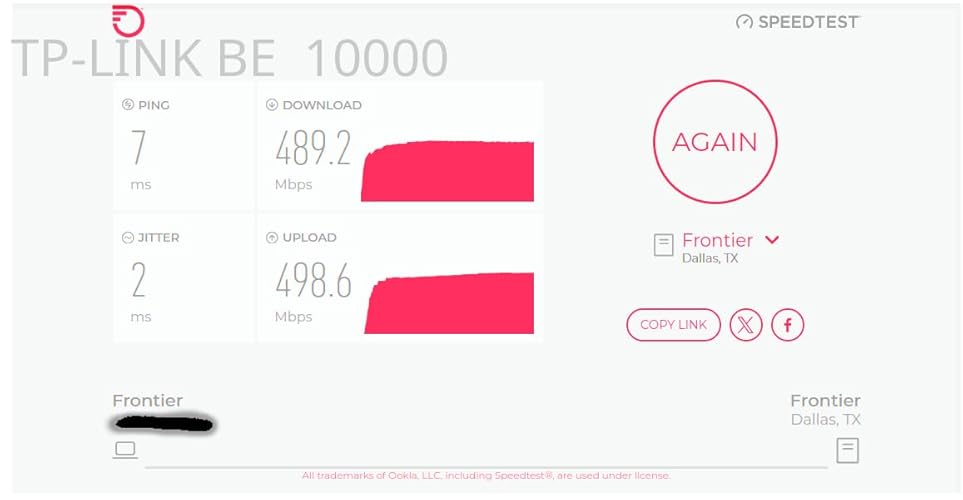
Goodbye EERO! We have been EERO users since 2024 when our ISP (Frontier) sent us a “free” EERO 6 PRO for a $10 shipping fee. It was easy to setup and we got good, not great, performance. About 140 Mbps down and 50 Mbps up on a 500/500 system. Compared to the router it replaced we were happy. I run a home network with android phones/apple Ipads, windows computers ( 5 on W11, 1 on W10 ) , a Linux computer and 3 TVs . The EERO was easy to set up and easy to add additional nodes. Connections were never a problem with the EERO. The TVs would often buffer when we watched YouTube-TV. The android phone app used to control the EEROs has problems. The status screen, used to show the health of your EERO nodes, is terribly unreliable. Often it will show EERO nodes that are unplugged as online. We called EERO support and spent several hours debugging this problem. I had android 11 at the time but my son had android 16 and both showed the same error. EERO support wrote a ticket on this problem but we have noticed no improvement in the app since. In Feb 26, I noticed Frontier had been charging us $7/month for the “free” EERO. We called and they took it of the account and required that we ship the “free” EERO PRO 6 back to them – which we did. We were using EERO 6 non-pro nodes on our system for some time. The EERO PRO 6 ran so hot we were a little afraid of it. In mid March 26 we noticed Amazon had a EERO 7 PRO on sale for $199. We ordered that and connected it to our system. As always, it was super easy to add a new node with the EERO app. The EERO PRO 7 was getting 370 Mbps/170Mbps which seemed like a huge upgrade! We noticed in the status it was connecting on the 6Ghz network to our intel and AMD boxes. This was great! On the Linux host, it connected and did 350/320. Wow, awesome! The joy did not last long, however. Later in the day, on the intel computer I was seeing 120 / 57 again. I found it was back on the 5 GHz band. If I disconnected and reconnected. It reconnected and we were back on the 6Ghz band with great performance. Later in the day it had gone back to the 5 Ghz band along with disappointing performance. It appears the EERO are coded to go after the strongest signal even if a good signal on a super performance band is available. I read a review online of the TP-LINK DECO B3 10000. The review indicated you could set a per-device preference of the band to use for the connection. EERO does not have this! I felt this might be just what I needed. The router arrived later in the day thanks to prime! We installed the 3 node TP-LINK DECO B3 10000 in the same locations as 3 of our existing EERO nodes. The TP-LINK app is not as easy to use to install the system as the EERO app. After a couple of failed attempts we got it to install. Yea! Once you have the first node set up it is really easy to add the additional nodes. The app does let you customize the network to use for each device. Excellent! I checked the intel windows box again. It was hitting 430/420 on WiFi. Wow! Damn! We had not seen that performance before with EERO, ever! The other WiFi devices where showing good performance too. The LG/TCL TVs are no longer buffering on YouTube-TV. All of our phones were on the 6Ghz band. There was one big exception to this joy! The UBUNTU Linux 24.04 node wold not connect to the TP-LINK DECO. I suspect it was a problem with WPA3 protocol DECO uses! We tried all sorts of things but it would never work. Edit: We were able to show that it was related to WPA3 Simultaneous Authentication of Equals (SAE) or more commonly WPA Personal. We reenabled the eero 7 which uses wpa/wpa2 protocols for all bands. It connected. The TP-LINK DECO is set to only use WPA3 SAE for the 6 Ghz band. We set the preference for the device to connect any band in the DECO app as opposed to 6 Ghz. It connected immediately on the less efficient 5 Ghz band. End Edit: Wait, there are 4 Ethernet ports on the back of each TP-LINK DECO node. There is a network node ( EERO and TP-LINK) right by the Linux computer. Let me try that. It worked! The Linux box was hitting 480/470 with the Ethernet connection. The intel box, which is right next to the Linux box, hits over 500/500 when hooked up to the Ethernet cables from TP-LINK DECO. We have let it run for a couple days to see if there are gotchas. None so far. We have the winner. We are done with EERO. We are shipping the EERO PRO 7 back to Amazon tomorrow. ... show more
Reviewed in the United States on March 29, 2026 Reviewed in the United States on March 29, 2026 by RHdk

  • INFERIOR RUBBISH TERRIBLE TECH SUPPORT - DO NOT WASTE YOUR MONEY ON TP-LINK
Style: Wi-Fi 7, 2.5G Port Size: 3 Pack
Final Update 2-May-2025: Okay I have grown to hate this mesh system and I seriously don't see myself purchasing another TP-Link device ever again! I suspected that the price point was good to be true and I was 100% correct. This mesh system is a hot mess and a great compilation of "unstability". It is constantly dropping connections to the Internet (it's not the ISP as they equipment remains up and running when the TP-Link is experiencing problems). This in no way compares to some of the other brands. This was supposed to be an upgrade from my two node Asus Wi-Fi 6E mesh system but now I see that was in a completely different class to this piece of junk.. Further Update: The tech support finally admitted that it was a FW issue and released a beta FW for me to upload manually and check. After successfully flashing the FW with the beta version the mesh remained up for me to confirm the new FW and that it was pushed to all three nodes. I then tried activating the VPN and encountered the same problem. I was able to deactivate the VPN but it brought my entire network is down as none of my clients remained connected to the WiFi for longer than a minute or two and they couldn't access the internet. This experience calls to question if the beta FW they gave me was properly tested suggesting that there is a lack of a proper quality assurance process. Fortunately I have a technical background so I was able to download and revert to a prior FW version, disable auto update and restore my network and get the VPN working again. I will try to exchange this mesh system but rest assured I never want to see the name TP-Link ever again!! This was truly an atrocious experience and am appalled that companies actually treat their customers in this manner and still expect to be in business.. Update after 1 month: This has to be one if the absolutely worst purchases I have ever made!! This excuse for a mesh system spends more time down than up. The VPN via my NORD subscription simply stopped working and the techs wasted my time troubleshooting when it is obvious that the issue is the router and not NORD itself as the same config works in the OpenVPN client for Windows. Every day I wake up I discover yet another reason to dislike this piece of junk.. I WILL NEVER BUY TP-LINK AGAIN AND WILL NEVER RECOMMEND THEM!! ========================= Original Review: Pros: 1. Setup is very intuitive (great App). 2. Great performance in terms of speed (wired/wireless backhaul). Cons: 1. iOT network is pointless as it's on the same VLAN (false sense of security). 2. The Guess network is pointless as it's on the same VLAN (false sense of security). 3. You cannot isolate devices on the guest network. 4. The VLAN option is tied to IPTV functionality (extremely poor design for a solution at this price point). 5. Extremely limited feature set overall 6. Not very stable and specific clients can periodically fail to connect for whatever reason until the device is rebooted. You get the feeling that it's a beta product because these same devices work fine on other routers.. At the end of the day this is a residential device! This is not a corporate or soho classified device. There is no basic firewall, there is no comprehensive DHCP reservation functionality, etc. If you are looking for a robust, secure and feature rich solution look elsewhere - this is NOT the solution.. Also, all of a sudden, the VPN no longer works with no change in configuration. Support was useless as he kept telling me that the issue was with Nord and hence never really listened.. Meanwhile the exact same config file works on an Asus router with no issues.. I cannot recommend this mesh set. It's simply not a quality product! ... show more
Reviewed in the United States on October 31, 2024 by A. Robinson

  • Fantastic WiFi7 router! Fantastic WiFi7 router!
Style: Wi-Fi 7, 2.5G Port Size: 1 Pack
I’ll admit I’m a big fan of TP Link products in general having many of their smart products, from routers, to smart plugs, and even security cameras. I’ve owned this brand of Wi-Fi router in the past so I felt pretty confident in spending a bit and upgrading to their Wi-Fi 7 router. Now to be fair and perfectly honest, upgrading to a Wi-Fi 7 router at this point in time is way early to the game and for the large majority of people quite frankly unnecessary. I like to stay a little bit ahead of the curve so I thought I’d bite the bullet. On any given day, I have probably 70+ devices connected to the router. And out of that many only about three can even connect to the newest 6 GHz band on this router to take advantage of the fullest speed possible. And this is why I would suggest that most people hold off on buying Wi-Fi 7 at the moment, at least until smart devices catch up and can access the 6 GHz band. Even my Apple TV 4K cannot access the newest band! Now onto this router specifically, so far, I really love it! I’m using just a single router to cover an entire 3000 square-foot house and it’s doing a fantastic job without need to buy other mesh routers and increase the spend tremendously! I honestly can’t believe how small this thing is compared to most huge routers that can provide this same level of speed! As is typical with TP Link routers, the Wi-Fi speeds are as fast as I expected! The set up was super fast and easy using their Deco app. In fact, I can manage almost everything I need to within the app. This includes changing the DNS settings to either Cloudflare or Google. With prior routers from TPLink I was having to go to a website to manage deeper settings on the router, but not so with this one, and that makes things quite a bit easier. Another thing that makes this router very useful for me is the 2.4GHz IOT Band that is specifically set up for those devices. So basically, I set up all of my smart plugs, cameras, and everything else on that band to maintain better privacy. I really like that they included this feature on these routers! I have AT&T fiber with 1000Mbps service and as you can see with the included picture, I’m actually getting a nice chunk over that! But keep in mind I was right next to the router in getting this result. As you move further from the router, the speeds will move down in tandem. Overall, I’m very happy with the router and hope it will provide many years of service! ... show more
Reviewed in the United States on April 25, 2024 Reviewed in the United States on April 25, 2024 by MetalMike

  • Setup - in my case anyway - wasn't a breeze
Style: Wi-Fi 7, 2.5G Port Size: 3 Pack
I purchased the 3-pack of BE63 devices to replace an Asus Mesh network. The Asus had supported us well until an early March release of firmware caused the router and mesh nodes to go offline often. A FW update released in late March was supposed to address the issue, but the issue remained and my router dropped offline often. I sought assistance from Asus and was given the old "let's reset everything and start from scratch" approach - something I didn't want to do as I knew the issues would remain. I took a deep dive with these TP-Link Deco units. They're not cheap but offer WiFi 7, which will "future proof" my setup for the foreseeable future. Most of what I've read and reviewed indicate these are a breeze to setup. That wasn't the case for me. I setup one of the devices as the main router. After repeated retries to find the Deco with my Android device it was finally detected. It took another few attempts for the Deco to "see" the internet. It eventually connected and I saved the WiFi information to my phone as part of the setup. Setting up the additional two nodes was a piece of cake - they simply needed to be plugged in and allowed to boot and were eventually detected by the app on the phone. But that's when the fun began. NO OTHER wireless clients would connect. They'd either indicate the network password was incorrect (I repeatedly checked the setting to ensure we were using the correct one) or that it simply couldn't connect to the network. I chatted with a Deco technician who eventually recommended resetting the Deco router and nodes, choosing one of the satellite nodes to be the main router, uninstalling and then reinstalling the Deco app. These steps worked. Clients were able to connect to all three points of access. An FW update was detected by the app and applied to all 3 devices in about 5 - 8 minutes time. A couple of notes. I used the same SSID with this new network as I had with the Asus network, the thinking being that wireless clients would automatically connect once the network was back up (and eventually accessible). During setup, however, I learned that setup mandated an 8-character minimum password. My previous password, while strong, was only 7-positions in length. This necessitated visiting every wireless client to update the network password for each. These include several Ring cameras, a Ring Chime Pro, several smart bulbs and 5 Bose Soundtouch devices (the Bose units were really "fun" to reconnect). During my chat with tech support I asked if there was any way to suppress the 8-character minimum but, alas, there isn't one. Network speed is impressive. I've got Verizon FiOS with 1Gb up & down. Wireless clients (none of which support WiFi 7 (yet)) exceeded 900Mb up & down. Speed can only improve as WiFi 7 devices are added to the network and Verizon eventually offers speeds exceeding 1Gbps. Signal strength from all clients is strong, indicating my coverage is good. I'm looking for a heat map application that I can use to determine actual coverage. All in all, I'm pleased with network performance, but setup (in my case, anyway) was not as advertised. Recommended! ... show more
Reviewed in the United States on April 12, 2025 by CorkyMuldoon

  • Best 2-pack wifi7 with 2.5gbps wirelessly Best 2-pack wifi7 with 2.5gbps wirelessly
Style: Wi-Fi 7, 2.5G Port Size: 2 Pack
I used with Google Fiber 8gb edge, overkill is my style, imagine my shock when I see the equipment sucks from google, WiFi 6, random disconnects, and max WiFi speeds of 500mbps on wifi6 devices and 5hz devices even worse at maybe 100mbps, then you have to connect to each band manually, there is no network handling for automatic band handover! This system has wifi7, 2.5gb Ethernet ports, and on 6hz band is getting almost 2gbps, on 5hz 250+mbps, and I have yet to see it have to use 2.4hz because the 5/6hz bands have such good coverage in my 3000sq ft 2 story house. I have had zero disconnects, and no issues. I am very happy with this 2 pack Deco system and glad to know it can cover 5000 sq ft so when we move into our dream home we have this covered. I have had google home WiFi, nighthawk, syth lord, and others; this system takes it and gives me WiFi as fast as Ethernet. Latency is 5ms, ping is 2ms near perfect. ... show more
Reviewed in the United States on February 8, 2026 Reviewed in the United States on February 8, 2026 by Rebekah

  • App UI is next level. Mesh is questionable. App UI is next level. Mesh is questionable.
Style: Wi-Fi 7, 2.5G Port Size: 1 Pack
My CR1000A Verizon router broke. I upgraded from G3100 for speed reasons but G3100 was so stable. Not a week after my friend 's CR1000A broke, mine did too. I was frustrated without Internet. Most routers are so ugly and distasteful with so many antenna looking like a UFO about to take off. All my furniture were white so I didn't have a whole lot of options. My initial choice was Google Nest but it was so basic even though it looks good. So I opted for this good rated one. It's half the size of my Verizon router. I love that white cylinderical look. The LED indicator of green saying connection to internet and red saying disconnected is just so helpful. Now, I'm happy with the purchase for my use. I have a small place so mesh is not necessary. In fact, I might return it if I needed mesh. My friend has Google Nest and it runs smoothly. Deco was causing issues because mesh was on. I read forums and found that it's a known issue so I went into all my devices and turned off mesh mode. It was trying to find the best signal for me and if I'm moving away from the router/node, it was dropping connection. I cannot say if this issue is no longer there if there's another node. For me, as only using a single node, it was necessary for me to turn off mesh mode individually in all my wifi devices. If you are having problems with this as a single node, try turning off mesh mode and 'fast roaming'. If you have hard wire switches throughout your house, make sure you power cycle them. I was scratching my head trying to troubleshoot why my wired speed were 1/3 of what it should be. Power cycling the switches fixed it. Wireless speed is amazing. There's no drop in speed. It's exactly the speed I subscribed from my ISP. Another upside to this router is that it has 2.5gbps LAN ports. My house is wired in CAT 6 and 7 so I can take advantage of this except I'll need to upgrade my switches, NAS and computer NIC, lol. For the premium price I paid, it should have been 10 gbps LAN because even the Verizon CR1000A has 10 gbps LAN. I don't get why 10 gbps LAN tp-link routers are above $500. Unbelievable. Wait a few years I guess. With Verizon, I used to have to use a desktop web browser to manage my network which I didn't know was so outdated. I can now do all of that from Deco app on my phone. It's so intuitive and didn't need a whole lot of learning or prior knowledge. I love this Deco app. I can see all my clients, separate IoT network for my wifi light switches, reserve DHCP address, block, isolate clients, etc. all on my phone. That's so convenient. I tried chat support with Deco support. I had a pleasant experience. Didn't have to wait too long. The support guy made sense and knew what he was saying. Bottom line: It looks good and it works great once the mesh mode is turned off in single-node configuration. It's $100 more expensive than what I wanted to spend on but I didn't have a lot of options for white routers that looks great, works great, and fast. ... show more
Reviewed in the United States on July 28, 2024 Reviewed in the United States on July 28, 2024 by Thant A.

Can't find a product?

Find it on Amazon first, then paste the link below.
Checking for best price...

