


Search  for anything...

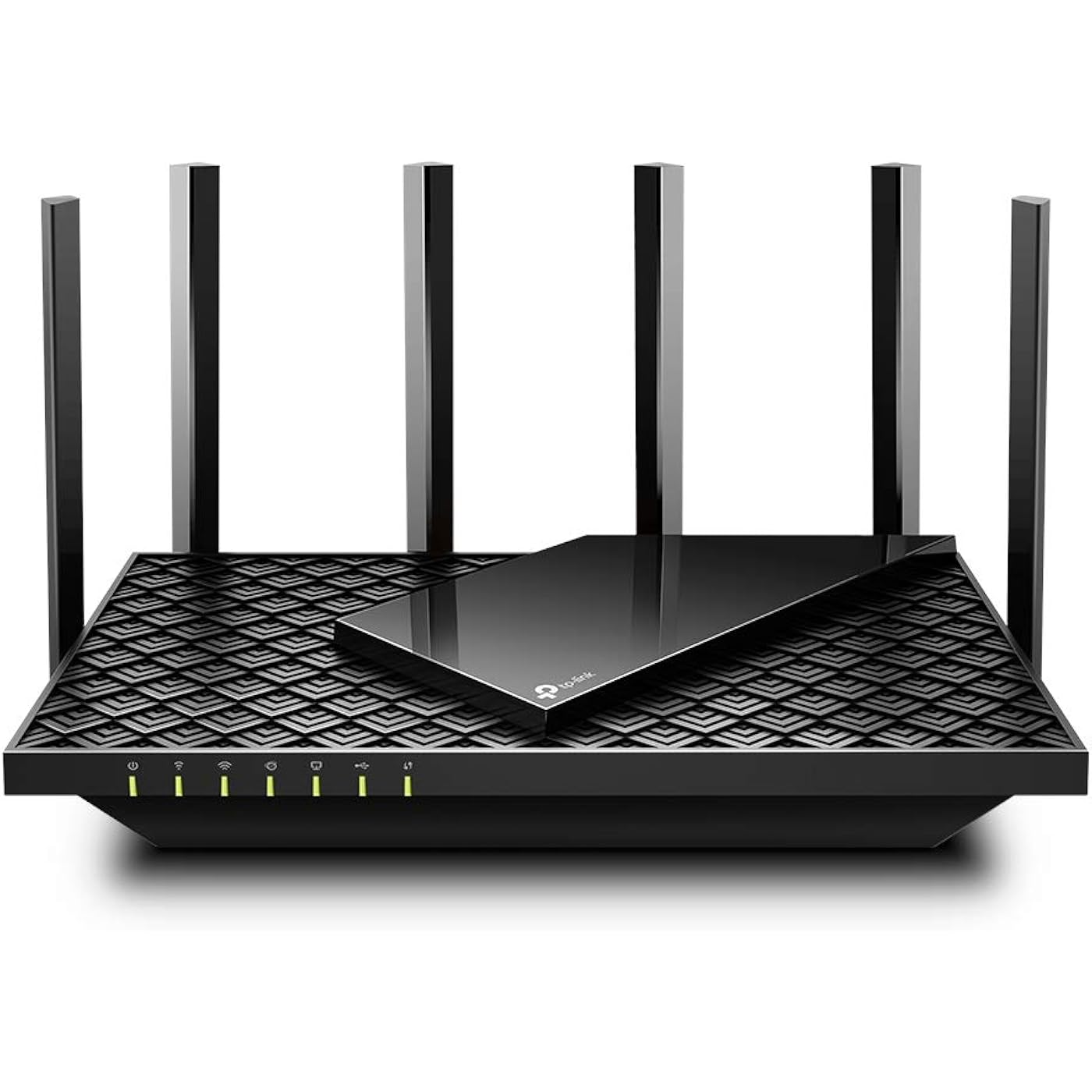
TP-Link AX5400 WiFi 6 Router (Archer AX73)- Dual Band Gigabit Wireless Internet Router for Streaming, Long Range Coverage

  • Based on 9,599 reviews
Condition: New
Checking for the best price...
$98.98 Why this price?
Save $31.01 was $129.99

Buy Now, Pay Later


As low as $16.50 / mo
  • – 6-month term
  • – No impact on credit to apply
  • – Instant approval decision
  • – Secure and straightforward checkout

Ready to go? Add this product to your cart and select a plan during checkout.

Payment plans are offered through our trusted finance partners Klarna, Affirm, Afterpay, Apple Pay, and PayTomorrow. No-credit-needed leasing options through Acima may also be available at checkout.

Learn more about financing & leasing here.

Selected Option

Free shipping on this product

FREE 30-day refund/replacement

To qualify for a full refund, items must be returned in their original, unused condition. If an item is returned in a used, damaged, or materially different state, you may be granted a partial refund.

To initiate a return, please visit our Returns Center.

View our full returns policy here.


Availability: Only 3 left in stock, order soon!
Fulfilled by Amazon

Arrives Wednesday, Jun 3
Order within 4 hours and 46 minutes
Available payment plans shown during checkout

Protection Plan Protect Your Purchase
Checking for protection plans...

Size: WiFi 6, Dual-Band AX5400


Features

  • Gigabit WiFi for 8K Streaming Up to 5400 Mbps WiFi for faster browsing, streaming, gaming and downloading, all at the same time.Operating Temperature: 0C40C (32F 104F)
  • Full Featured WiFi 6 Router Equipped with 4T4R and HE160 technologies on the 5 GHz band to enable max 4.8 Gbps ultra-fast connections.Power:12 V 2.5 A
  • Connect More Devices Supports MU-MIMO and OFDMA to reduce congestion and 4X the average throughput
  • Extensive Coverage - Enjoy stable WiFi connections, even in the kitchen and bedroom. High-Power FEM, 6 Antennas, Beamforming, and 4T4R structures combine to adapt WiFi coverage to perfectly fit your home and concentrate signal strength towards your devices
  • More Vents, Less Heat Improved vented areas help unleash the full power of the router
  • USB Sharing 1 USB 3.0 port enables easy media sharing and private cloud storage
  • TP-Link HomeShield - TP-Link's premium security service keeps your home network safe with cutting-edge network and IoT protection. Free features: 1. Basic Network Security including Security Scan and IoT Device Identification 2. Basic Parental Controls 3. Quality of Service 4. Basic Weekly/Monthly Reports. Visit TP-Link website for more information.
  • Works with all internet service providers, such as AT and T, Verizon, Xfinity, Spectrum, RCN, Cox, CenturyLink, Frontier, etc.( a modem is required for most internet service providers)

Description

The latest generation of Wi-Fi technology brings faster speeds, less lag, and higher capacity, enabling more simultaneous connections on your home network.Warp Speed for Smooth 8K StreamingDrastically improved speeds enable streaming, fast downloading, and gaming, all at the same time. Need to go faster. Hop on 5 GHz with full speed-boosting features to stream multiple 8K videos without lagging.Extensive Wi-Fi Coverage with Advanced TechnologyEnjoy stable Wi-Fi connections, even in the kitchen and bedroom. High-Power FEM, 6× Antennas, Beamforming, and 4T4R structures combine to adapt Wi-Fi coverage to perfectly fit your home and concentrate signal strength towards your devices. Up to 4x more capacity to easily handle dozens of devices streaming and gaming at the same time — OFDMA and MU-MIMO combine to future-proof your home network by providing greater capacity to connect more devices.Designed to Be CoolThe slant rectangle atop of the scaled armor design provides a contemporary aesthetic. The vent design takes up 167 cm² (25 in²) of its top surface for improved heat dissipation, unleashing the whole machine's full power.TP-Link HomeShield: Advanced Security for Unlimited ClientsHomeShield protects all connected clients against DDoS, malicious sites, and port intrusion, delivering a safe network environment for your data and privacy.TP-Link OneMesh: Flexibly Create Whole Home WiFi with Archer AX73Want to build a whole-home Wi-Fi. Archer AX73 supports OneMesh to form seamless whole-home coverage, preventing drops and lag when moving between signals.

Brand: TP-Link


Model Name: Archer AX73


Special Feature: Beamforming, Parental Control, QoS, WPS


Frequency Band Class: Dual-Band


Wireless Communication Standard: 802.11ac, 802.11ax, 802.11b, 802.11g, 802.11n


Compatible Devices: Laptops, Desktops, Smartphones, Tablets, Game Consoles, Streaming Devices


Recommended Uses For Product: Gaming


Included Components: Power Adapter, RJ45 Ethernet Cable, Wi-Fi Router Archer AX73


Connectivity Technology: Ethernet, USB, Wi-Fi


Color: Black


Other Special Features of the Product: Beamforming, Parental Control, QoS, WPS


Frequency Band Class: Dual-Band


Wireless Compability: 802.11ac, 802.11ax, 802.11b, 802.11g, 802.11n


Compatible Devices: Laptops, Desktops, Smartphones, Tablets, Game Consoles, Streaming Devices


Antenna Location: Gaming


Connectivity Technology: Ethernet, USB, Wi-Fi


Antenna Type: Fixed


Operating System: Proprietary operating system developed by TP-Link


Security Protocol: WPA2, WPA2-Enterprise, WPA3


Number of Ports: 5


Control Method: App


Data Transfer Rate: 5378 Megabits Per Second


LAN Port Bandwidth: 10/100/1000 Mbps


Voltage: 100240 Volts


Maximum Upstream Data Transfer Rate: 2500 Megabits Per Second


Number of Antennas: 6


Smart Home Compatibility: Smart Home Compatible


Router Firewall Security Level: High


Wi-Fi Generation: Wi-Fi 6


Has Internet Connectivity: Yes


Router Network Type: dual-band


Is Modem Compatible: Yes


Connectivity Protocol: Wi-Fi


Coverage: Extensive Coverage


Controller Type: iOS


Frequency: 5 GHz


Brand: TP-Link


Model Name: Archer AX73


Built-In Media: Power Adapter, RJ45 Ethernet Cable, Wi-Fi Router Archer AX73


Model Number: Archer AX73


UPC: 840030702327


Manufacturer: TP-Link


Mfr Part Number: Archer AX73


Unit Count: 1.0 Count


Warranty Description: 2 year manufacturer


Item Weight: 1.5 Pounds


Item Dimensions L x W x H: 10.73"L x 5.8"W x 1.94"H


Color: Black


Has Security Updates: Yes


Frequently asked questions

If you place your order now, the estimated arrival date for this product is: Wednesday, Jun 3

Yes, absolutely! You may return this product for a full refund within 30 days of receiving it.

To initiate a return, please visit our Returns Center.

View our full returns policy here.

  • Klarna Financing
  • Affirm Pay in 4
  • Affirm Financing
  • Afterpay Financing
  • PayTomorrow Financing
  • Financing through Apple Pay
Leasing options through Acima may also be available during checkout.

Learn more about financing & leasing here.

Top Amazon Reviews


  • Perfect router for most users
Size: WiFi 6, Dual-Band AX5400
There are many routers claiming to be fast and support the max speed of the wifi 6 protocol. However, most routers fall short terribly. Some heat up like a toaster like AX3000 and some don't have the processing power i.e. the required number of CPUs to quickly process the packets by 20+ devices. Further, some are $300+ which kind of brings the affordability into play. This router however finds the right balance in all the features which I was looking to upgrade. I was looking in the range of about $100 and tried to AX3000. However, it heats up too fast and then starts to thermal throttle the speed and doesn't even stay connected with the clients like a laptop or mobile devices. I have tried a Netgear router from Costco AX4300 but fall short when around 20 devices are connected to it and don't support the mesh networking. Features which I wanted and like: Range: This device has a superb range by itself and covers my home pretty easily. I see I have a good wifi signal at all ends of my home and I live in a 2-floor apartment with the router placed upstairs. Mesh: I like to receive a good network in my backyard as well and so I have added a RE505X which costs another 80 bucks but saves money on my mobile data plan as I don't invest in an unlimited data plan. There is only 1 SSID that is broadcasted and it automatically switches based on where I am in the home. Heat: Some routers heat up and create a fire hazard and also have the probability of breaking down sooner than I like them to. This is not the case with this one and it stays relatively cooler and never experienced any slowing down of the network. I have touched it to check several times and it's good. Setup: The setup was really easy. The basic setup can be done in minutes and there is no RnD required. The tether app is pretty cool for basic setup. I also have requirements for static IP based on mac address and port forwarding. Both of them are easy to configure. They also have support for dynamic DNS so you can easily host your basic website in your home network. For this, I need static IP address reservation and port forwarding. Parental controls: This is a real plus that allows me to block youtube or any site whenever I need to get my kid away from the TV. Reboot schedule: I like to have a reboot schedule which is good this router has it and very easy to set up. LED lights: This router allows to turn off led lights and I like it that way once the setup is complete. Summary: I think its a router for average home with right balance of ease of use and price and features. Note: I have not been paid for this review and have bought the router with my own money. 2 Weeks Update: Going strong with over 20 devices connected, no disconnections reported by anyone in device. I have 3 heavy internet users at home. No heating issues, range is good. 4 Months Update: Working perfectly for 4 months. No issues. 2 year update Still works as new with no issues ... show more
Reviewed in the United States on May 23, 2021 by Prateek Garg

  • Fast router, no issues after two months
Size: WiFi 6, Dual-Band AX5400
I use this with my Hutton CODA56 modem. I have not had any issues with this router at all. My internet is 250mbps up and down, speed tests show me pushing 300, and when I game my ping is usually in the 40s. This is from my desktop pc using a WiFi PCIE adapter. Basically, the router is as fast as an Ethernet cable. The router has multiple antennas which surprisingly are not for looks - the router is in my basement and after initial setup, my smart tv upstairs was showing low signal. I adjusted one of the antennas to point at the living room and my tv. showed full bars. Router setup is easy, and the menu options when you’re logged in to set the name, etc are pretty intuitive. One note about setup is that there is an option to optimize your connectivity. Instead of having a separate 2.4 and 5ghz network like most routers, this router can just have one network to connect to and the router decides based on load, demand, etc which bandwidth to operate for each device, behind the scenes . We have a hatch sound machine for our kid that operates on WiFi (seriously, why does a sound machine need an app?) but you can only connect to a Hatch on a 2.4ghz WiFi network. I had to log in to the router and uncheck the optimize setting to create separate 2.4 and 5ghz networks so that I could connect to the sound machine and change whatever settings needed to. Not an issue or a knock gains the router, just something to be aware of. Really I don’t think about my router often, which in my opinion is a good thing. I have owned it almost two months now and it has been completely reliable. ... show more
Reviewed in the United States on January 1, 2026 by Dan

  • An excellent device
Size: WiFi 6, Dual-Band AX5400
The TP-Link AX5400 is a WiFi 6 router with dual band and long range wireless capabilities. Also known as the Archer AX73, the WiFi 6 technology allows this product to achieve speeds up to 5400 Mbps as a theoretical maximum. Even though actual speeds will probably be lower than that, it will still be fast enough to perform bandwidth demanding tasks such as large file transfers over the network or Ultra High Definition streaming on your local home network. Installation is super easy, it’s basically plug and play. You connect the router to your internet modem, and then connect your devices via the WiFi networks. The A5400 will come with default wireless settings, including a predefined network name and password, for easy initial setup. It is strongly recommended to change these settings to your own, for security reasons. Management can be done either via the smartphone app or (very happy about this one) the web interface. More about that later. Aesthetically, you will notice that this router has a rather interesting rectangular design, and it is equipped with 6 (!!!) antennas. Yes, you read that right: 6 antennas. TP-Link claims that this supports large wifi coverage and good signal strength to all devices with their beamforming and 4T4R technologies. Even though I have no practical way of measuring the performance of these technologies, I can attest to the fact that the AX5400’s coverage is excellent and I didn’t notice any dead spots at home (including the devices located outside my home, such as wifi cameras and doorbells). In case you do experience dead spots, you can add an extra TP-Link mesh device compatible with the AX5400 to solve the issue. I talk more about mesh networking below. One of the major features of the AX5400 is mesh networking. Mesh means that all your routers connect with each other, forming a mesh of coverage rather than having one router that acts as a single point of connection. Your wireless device will always connect automatically to the mesh router that provides the strongest signal. This is called Roaming. Much like in telecom/mobile networks, your Wi-Fi devices might change positions and move around your house. This means that the wireless signal between your device and the router gets weaker with distance. With mesh routers your device will automatically connect to a different router unit that offers a stronger signal, without interrupting the running service and streams. This not only increases the coverage vastly, but also offers seamless handovers and transitions of Wi-Fi services as you change your position in your house. In other words, you get Wi-Fi Roaming capabilities that will vastly improve the reliability of your wireless connection. That, of course, means that you need another TP-Link mesh capable device to achieve this functionality. TP-Link provides a list of mesh devices compatible with the AX5400 on their website. So far I have no complains regarding the AX5400’s performance. The Wi-Fi is very quick and outperforms my internet connection. I haven’t noticed any issues with latency either. One remark I want to make here is that, even though older WiFi cards will still be able to connect and operate with the AX5400, you will need a Wi-Fi 6 compatible wireless card to make the most out of the mesh system. Making the most out of it doesn’t mean that you will experience speeds close to 5.4 Gbps. These speeds are a theoretical maximum, they are achieved in the lab and they are impossible to see in the average home network setup. You will see, though, very high speeds depending on the quality of your wireless card (in my tests, I used the TP-Link WiFi 6 AX3000 PCIe WiFi Card), the distance from the router and the obstacles that separate you from it. Bottom line: it’ll be fast, but be realistic with your expectations. But probably one of the things I’m most happy about this router is the availability of a web interface for management. Being the owner/user of the otherwise great TP-Link Deco system, one of my main complaints was the lack of a web interface for network configuration. As a power user, I find it hard to configure my network equipment via the small screen of a smartphone. You can access the web interface by typing the router’s management IP (you can find it listed as Gateway on your computer’s network settings) in your browser. You’ll have to first set up a local password (or create an account with TP-Link) before accessing the router configuration. Once you log in, the first screen you’ll see is the home screen, or a summary screen if you like. You can see the internet status, the router status and some shortcut button to common functions, your mesh devices (if you have any) and the connected client devices. This last bit is quite interesting, since you’ll be able to see the connected devices, their real time speed (up/down), the interface they’re connected to (ethernet, 2.4G or 5G), their “negotiated” max bandwidth, how long they’ve been connected to the router and, finally, a “block” button to deny the device access to the network. Below, I’m going through some of the functions that I find interesting, but I will omit the ones that are so common you can find them virtually in every router out there. On the Wireless screen you’ll find your WiFi settings. You can turn on or off OFDMA, TWT, Smart Connect and, of course, the Wireless radio itself. OFDMA (simultaneous transmission to different devices within the same transmission window) will significantly increase the traffic speed with compatible devices (your device must support OFDMA), TWT will help increase your device’s battery life by maintaining the connection with the router and allowing the device to go to sleep (aka not forcing the device to send keep alive messages to the router too frequently), while Smart Connect optimized the connectivity of the router’s radio bands with the client devices. TP-Link offers a security platform with the AX5400, similar to what they offer with the rest of their flagship devices, HomeShield. The user will get some basic functionality out of the box, and additional sophisticated features and analytics are available with a subscription service. The last screen on the web interface is the Advanced screen, where all the advanced options are located. Power users will definitely appreciate some of these. The first thing that caught my eye was Lan —> Link Aggregation. You can aggregate (combine) up to two Ethernet ports into one (logical) network port, aggregating their bandwidth as well. Of course, you’ll need to aggregate ports on the other end of the connection as well, but that is the other side of the problem. Pretty cool. The router also supports direct DynDNS logins, for those of you who still use a DynDNS client on your computer. Another cool section is Routing. You can use your own static routes defined in the router’s config if you need to direct specific traffic to specific destinations. Use this only if you know what you’re doing, otherwise a bad routing config will probably block your access and traffic. The router comes with a USB port, which is nothing unusual. What is very cool, though, is the fact that the USB port supports (except for mass storage devices) Apple’s Time Machine. Just connect a storage device to the AX5400’s USB port, enable Time Machine in settings, and voila! No need for one of those old Apple AirPort Extreme routers anymore. NAT is, of course, present in this device as well, for your port forwarding needs. Security features include a Firewall, ACLs and MAC spoofing protection (by binding IPs to specific MACs). You have your standard VPN server built in, supporting both OpenVPN and PPTP, IPv6 support for you dual-stackers out there and a bunch of router Admin features (firmware update, backup, remote management, system logs etc.). Last but not least, you can switch the mode of the device between a Router (the device will route traffic and provide routing services) and an Access Point (the device will become a wireless gateway for clients, but you will need to connect it to a router for routing services - this is used mostly to expand the WiFi network). Overall the TP-Link AX5400 WiFi 6 router is a great home routing device and a strong contender in this segment of products. I’m very happy with it for the time I’ve been using it, and I definitely recommend it. ... show more
Reviewed in the United States on May 18, 2021 by MyProductPortraits

Can't find a product?

Find it on Amazon first, then paste the link below.
Checking for best price...
