Search  for anything...

THIRDREALITY ZigBee Smart Button, 3-Way Remote Control, Require Zigbee hub, Work with SmartThings, Aeotec, Hubitat, Home Assistant, Third Reality Hub, Battery Included.

  • Based on 707 reviews
Condition: New
Checking for the best price...
$19.98 Why this price?
Save $30.00 was $49.98

Buy Now, Pay Later


As low as $4 / mo
  • – 4-month term
  • – No impact on credit to apply
  • – Instant approval decision
  • – Secure and straightforward checkout

Ready to go? Add this product to your cart and select a plan during checkout.

Payment plans are offered through our trusted finance partners Klarna, Affirm, Afterpay, Zip, Apple Pay, and Google Pay. No-credit-needed leasing options through Acima may also be available at checkout.

Learn more about financing & leasing here.

Selected Option

Free shipping on this product

FREE 30-day refund/replacement

To qualify for a full refund, items must be returned in their original, unused condition. If an item is returned in a used, damaged, or materially different state, you may be granted a partial refund.

To initiate a return, please visit our Returns Center.

View our full returns policy here.


Availability: In Stock.
Fulfilled by Amazon

Arrives Saturday, Sep 5
Order within 10 hours and 47 minutes
Available payment plans shown during checkout

Protection Plan Protect Your Purchase
Checking for protection plans...

Color: White


Features

  • ZIGBEE 3.0 STANDARD: Low power consumption and stability. Work with SmartThings, Aeotec, Hubitat, Third Reality Smart Hub, Home Assistant. Notes: ZIGBEE HUB REQUIRED AND SOLD SEPARATELY.
  • EASY MOUNTING: With the wireless and compact design, you can place the Smart Button wherever its handy, stick it to the wall by using the double-sided tape or attach to the fridge with the magnetic strips. Both accessories are included in the box.
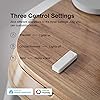
  • REMOTE CONTROL: Three type of control settings - Pressed, Double Pressed and Held, remote control smart home devices or groups with one action. One press to turn on the light, double press to turn on the fan and humidifier, long press to turn them off, etc.
  • SCENE CONTROLLER: In our daily life, we may have some constant scenarios ---- Turn off some lights and close the blind when watching movies at home, turn off all the lights before sleeping or turn on some lights when arriving home. The repetitive things may disturb you, however, with THIRDREALITY Smart Button, you can assign the daily scenarios to the three types of control setting so that one press can realize the scenario you want.
  • LONG BATTERY LIFE: 2 AAA Batteries-operated smart button, Low power consumption, can last 3-Year for normal use.
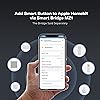
  • Compatible with Apple HomeKit through Smart Bridge MZ1: Enabled by Smart Bridge MZ1 (Sold Separately) integrates with Apple HomeKit, to achieve easy control and monitoring. Additionally, it supports software OTA (Over-The-Air) updates.

Description

Third Reality ZigBee Smart Button is a standard ZigBee 3.0 device, it can direct work with SmartThings/Aeotec hub, Hubitat,Third Reality Smart Hub and Home Assistant. Support three type of control settings-Pressed, Double Pressed and Held,remote control smart home devices or groups with one action. Set up a Smart Button by your nightstand to activate a sleep scene, turn off all the lights and close the blinds. Or place a Smart Buttons at key exit points in your home. As you leave, turn off all lights and deactivate non-essential devices to save energy. With four different colors available, you have more choices to easily identify the right area. Personalize your night light with custom colors and stickers to match your style. Compact design of the Smart Button allows you to place it wherever it's handy. You can stick it to the wall with the included double-sided tape or attach it to the fridge using the magnetic strips—both accessories are included. Powered by 2 AAA batteries, the Smart Button is easy to replace and can last up to 3 years, ensuring long-term reliability. Using the Smart Bridge MZ1 (sold separately) and the 3R-Installer App, you can easily manage the compatibility settings for smart buttons with Google Home. Click the button to turn on all the switches in the living room, double-click to turn off all the switches, no longer have to turn on one by one. Attach a Smart Button to your fridge to easily control kitchen appliances through Third Reality Plugs. Turn on the oven, start the coffee maker, and power up other kitchen gadgets with one click. Effortless Control, with one click, you can manage all the blinds in the washing room

Brand: THIRDREALITY


Special Feature: Ergonomic


Color: White


Max Number of Supported Devices: 1


Compatible Devices: Fan


Additional Features: Ergonomic


Maximum Number of Supported Devices: 1


Compatible Devices: Fan


Connectivity Technology: ZigBee


Button Quantity: 1


Controller Type: Zigbee


Maximum Range: 10 meters


Number of Batteries: 2 AAA batteries required.


Battery Type: Alkaline


Color: White


EU Spare Part Availability Duration: 3 years


Item Weight: 1.44 ounces


Brand: THIRDREALITY


Model Name: 3RSB022Z


Model Number:


Number of Items: 1


UPC: 850001595575


Unit Count: 1 Count


Manufacturer: Third Reality, Inc


Mfr Part Number:


Frequently asked questions

If you place your order now, the estimated arrival date for this product is: Saturday, Sep 5

Yes, absolutely! You may return this product for a full refund within 30 days of receiving it.

To initiate a return, please visit our Returns Center.

View our full returns policy here.

  • Klarna Financing
  • Affirm Pay in 4
  • Affirm Financing
  • Afterpay Financing
  • Zip Pay in 4
  • Financing through Apple Pay
  • Financing through Google Pay
Leasing options through Acima may also be available during checkout.

Learn more about financing & leasing here.

Top Amazon Reviews


  • Solid Buttons
Color: White 2 Pack
These smart buttons have worked well with my Home Assistant setup. I mainly use them to control lamps with Zigbee smart bulbs, and they're quick to respond and easy to configure for different automations. I don't use them every day since most of my lighting is controlled by Inovelli switches and automations, but they're great to have available. They're especially useful for guests or anyone who just wants a physical button instead of using an app or voice assistant. Setup was simple, battery life has been good, and they've been reliable. If you're looking for an easy way to add physical controls to your smart home, these are a great option. ... show more
Reviewed in the United States on June 27, 2026 by Matt

  • This is the smart button that I imagined
Color: White
Excellent: comes with batteries, pairs easily with Home Assistant. Comes with stickers, and a pair of adhesive magnetic strips. Works well, comes in colors, connects easily, good ergonomics (good size/shape).
Reviewed in the United States on July 23, 2026 by J. Hall

  • does what it's supposed to do.
Color: Red
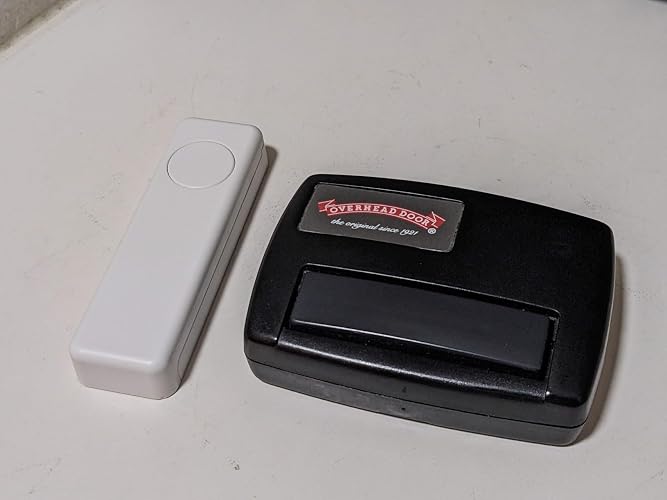
I have many bouton in my home assistant all of them before were a big square where the entire body is the bouton. All of them (except one with bad review) were BO so I try that one. That bouton is remote control type. (feel like a tv clicker) On That one, you need to pay attention to click on the small circle instead of slapping the whole thing. Easy paring, work every time. They use simple AAA batteries instead of the expansive watch battery witch is a major plus. you can configure the usual one click, double click and long press. ( 3 action with one bouton) ... show more
Reviewed in the United States on April 4, 2026 by remy bilodeau

  • Reliable, Versatile, and the Perfect Smart Partner!
Color: White
This THIRDREALITY Zigbee Smart Button is easily one of the most reliable additions to my smart home. It paired instantly with my hub and offers a rock-solid local connection—a lifesaver for controlling lights when the internet goes out. The 3-way control (single, double, and long press) provides great versatility, and I love that it uses standard AAA batteries instead of those annoying coin cells, making maintenance much easier. I’ve specifically paired it with the THIRDREALITY R3 Presence Sensor, and they work perfectly together; while the R3 handles the automated presence detection, the button gives me a quick, tactile way to override scenes or trigger specific routines without needing to use voice commands. It’s compact, responsive, and available in different colors for easy room identification—definitely a 5-star product for any Zigbee-based setup! ... show more
Reviewed in the United States on March 23, 2026 by Amazon Customer

  • Versatile and dependable!
Color: White
A great addition to my smart home. Added one in the bedroom to control lights and raise or lower my sleep number bed as an alternative to voice commands using Alexa. (Very useful when the wife is asleep). Easily paired with my Sonoff zigbee gateway in Home Assistant and has worked flawlessly for months. I’ve added two more: one for my wife’s side of the bed and another for the tv room. With 3 programmable options (single short click, double click, or single long press) it is very easy to customize functions. ... show more
Reviewed in the United States on April 18, 2026 by TechSupportDad

  • Three button model requires advanced configuration in home assistant. Works well once configured
Color: Black ZB2 1Pack
Works well. I was worried about the beep others mentioned but it only beeps when pairing and to indicate full charge. The three button model requires some configuration in home assistant, since it doesn't get identified as a button. You have to make an automation to listen for the ZHA events. Here's a YAML for an automation with blank actions. You can paste it in the yaml editor then add actions in the GUI. The actions go under the conditions alias: "ZB2 Black Remote" trigger: - platform: event event_type: zha_event event_data: device_ieee: "c0:00:28:2c:02:b6:2c:d8" command: recall params: scene_id: 111 id: btn1_single - platform: event event_type: zha_event event_data: device_ieee: "c0:00:28:2c:02:b6:2c:d8" command: recall params: scene_id: 112 id: btn1_double - platform: event event_type: zha_event event_data: device_ieee: "c0:00:28:2c:02:b6:2c:d8" command: recall params: scene_id: 113 id: btn1_hold - platform: event event_type: zha_event event_data: device_ieee: "c0:00:28:2c:02:b6:2c:d8" command: recall params: scene_id: 121 id: btn2_single - platform: event event_type: zha_event event_data: device_ieee: "c0:00:28:2c:02:b6:2c:d8" command: recall params: scene_id: 122 id: btn2_double - platform: event event_type: zha_event event_data: device_ieee: "c0:00:28:2c:02:b6:2c:d8" command: recall params: scene_id: 123 id: btn2_hold - platform: event event_type: zha_event event_data: device_ieee: "c0:00:28:2c:02:b6:2c:d8" command: recall params: scene_id: 131 id: btn3_single - platform: event event_type: zha_event event_data: device_ieee: "c0:00:28:2c:02:b6:2c:d8" command: recall params: scene_id: 132 id: btn3_double - platform: event event_type: zha_event event_data: device_ieee: "c0:00:28:2c:02:b6:2c:d8" command: recall params: scene_id: 133 id: btn3_hold condition: [] action: - choose: - conditions: - condition: trigger id: btn1_single sequence: [] - conditions: - condition: trigger id: btn1_double sequence: [] - conditions: - condition: trigger id: btn1_hold sequence: [] - conditions: - condition: trigger id: btn2_single sequence: [] - conditions: - condition: trigger id: btn2_double sequence: [] - conditions: - condition: trigger id: btn2_hold sequence: [] - conditions: - condition: trigger id: btn3_single sequence: [] - conditions: - condition: trigger id: btn3_double sequence: [] - conditions: - condition: trigger id: btn3_hold sequence: [] mode: single ... show more
Reviewed in the United States on April 28, 2026 by Connor

  • Home Assistant Automations FAIL!
Color: White
UGH!!!!! SO FRUSTRATING!!!! Added it to Home Assistant via Zigbee Home Automation. Device detects button presses, but when attempting to use it for an Automation, the only options are battery and firmware state. Can't figure out how to get this thing to trigger an action.
Reviewed in the United States on July 23, 2026 by X_HOBBES

  • Very nice price for a perfect solution for our SmartThings home
Color: White
Very reasonably priced Zigbee button for our SmartThings system. It connected almost immediately and so far has stayed connected and responds immediately. We really like that they come in different colors so we can use them for different rooms and different scenes. It offers a single press, double press, and long press - more than enough options for what we need them for. We are planning on purchasing several more to mount on the back side of our Google Nest Hubs. Our SmartThings hub will only control lights when the internet goes out if you have routines set up. With these buttons you can still control devices when the internet is out. Time will only tell how long the batteries last considering we don't really use the buttons unless we decide to not speak to Google or the internet goes out. ... show more
Reviewed in the United States on February 12, 2026 by ScottyPB

Can't find a product?

Find it on Amazon first, then paste the link below.
Checking for best price...