Search  for anything...

Sovol SV06 Plus ACE 3D Printer Open Source, 500mm/s Max High Speed 3D Printers, Fully Auto Leveling, with Camera Upgraded Structure Planetary Dual Gear Direct Drive Large Volume 11.8x11.8x13.8 inch

Based on 620 reviews
Condition: New
Checking for inventory...

Notify me when this product is back in stock

$309.00
Save $190.99 was $499.99

Buy Now, Pay Later


As low as / mo
  • – Up to 36-month term if approved
  • – No impact on credit to apply
  • – Instant approval decision
  • – Secure and straightforward checkout

Payment plans are offered through our trusted finance partners Klarna, Affirm, Afterpay, Zip, Apple Pay, and Google Pay. No-credit-needed leasing options through Acima may also be available at checkout.

Learn more about financing & leasing here.

Selected Option

Free shipping on this product

FREE 30-day refund/replacement

To qualify for a full refund, items must be returned in their original, unused condition. If an item is returned in a used, damaged, or materially different state, you may be granted a partial refund.

To initiate a return, please visit our Returns Center.

View our full returns policy here.


Availability: Unavailable
Fulfilled by Amazon

Available payment plans shown during checkout

At a glance

Condition
New
Set
Sovol SV06 Plus ACE
Weight
14 kg
Color
SV06 Plus ACE Blue
Material
Aluminum
Works with
OrcaSlicer(Win\Mac), Cura-Ultimaker(Win\Mac), Cura-Sovol(Win)

Features 5

  • Speed up to 500mm/s with Enhanced Precision: Harnessing advanced technology to deliver Sovol SV06 Plus ACE rapid printing without compromising on intricate details, resulting in impeccable, high-quality print models. Fast print enhanced overall production efficiency greatly. The Z-axis is reinforced with diagonal rod supports, forming a sturdy triangular structure to minimize wobbling during high-speed printing and enhance printing precision
  • Everything at Your Fingertips: 4.3 inch capacitive touch screen as easy as your smart phone. You don't have to be a 3D printing expert to use the SV06 Plus ACE. Complete all settings with a simple tap on the screen, including auto-leveling the bed, previewing prints, and one-click printing. The leveling sensor of Sovol SV06 Plus ACE automatically measures Z-axis offsets and adjusts the Z-offset to ensure precise leveling and no more leveling issues. Adaptive probing adjusts probing area based on the prints' footprint, reducing preparation time. Dual Z-axis Motors ensures efficient and stable leveling
  • Built-in Camera: Defect Detection makes Sovol SV06 Plus ACE automatically stop printing (with Obico App) when a "spaghetti monster" is detected, based on real-time camera monitoring. You can also monitor the printing status in real-time via Obico and control the printer remotely. Timelapse Photography helps you capture stunning printing processes and create condensed videos of the print, ready to share on your social media
  • Dual Axis Core Metal Bearings And Rails: The X and Y axis of SV06 Plus ACE are equipped with Sovol's new dual axis core metal bearings and all-metal rail system, significantly improving the reliability and lifespan of the 3D printer. Compared to traditional V-shaped POM wheels, this not only enhances structural strength and extends lifespan, but also reduces noise during printing, making it smoother and more efficient

Description

Sovol was founded in Shenzhen China, 2018. In the past 7 years, we have independently developed several 3D printers and many best-selling accessories which are exported to five continents. We have more than 130,000 fans around the world. As a growing brand, Sovol has a complete production line, an experienced R&D and after-sales team, and aims to provide global makers with one-stop 3D printing experience and services.

Specs 6

Brand Sovol
Material Aluminum
Color SV06 Plus ACE Blue
Item Weight 14 kg
Item model number Sovol SV06 Plus ACE
Manufacturer Sovol

Frequently asked questions

This product is currently out of stock. Please check back later for shipping info.

Yes, absolutely! You may return this product for a full refund within 30 days of receiving it.

To initiate a return, please visit our Returns Center.

View our full returns policy here.

  • Klarna Financing
  • Affirm Pay in 4
  • Affirm Financing
  • Afterpay Financing
  • Zip Pay in 4
  • Financing through Apple Pay
  • Financing through Google Pay
Leasing options through Acima may also be available during checkout.

Learn more about financing & leasing here.

Top Amazon Reviews


Excellent quality, great customer support, decent price.
Set name: Sovol SV06 Plus ACE
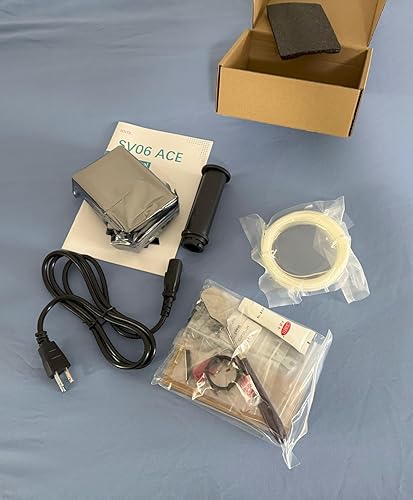
Alright, so, I got this printer on a whim (yeah I know, everyone says get a bambu) but it was the only one with metal linear rails. I didn't want to gamble on rubber wheels in a slot, to me that screams "precision isn't guaranteed". So, I pulled the trigger, got it for a decent price ($300) and it was pretty damn good out of the box. Set up was alright, and all the cals were simple enough. I had no idea what Klipper was (slopped up some information on it), installed ORcaSlicer and tried to print something with the small spool of white PLA filament they include, and the quality of the print was IMPRESSIVE. it uses a load cell to determine the bed level, which is excellent. I tried to level the bed once, and I got like, close (probably 0.3-0.5) and called it good because Klipper can compensate for being unlevel (and I'm absolutely lazy) and again, the print quality was stupid good. Like, I wasn't expecting it to be like a resin printer or anything, but printing 32mm sized stuff (like DnD minis) was surprisingly good---I use PETG lately because the bed adherence is crazy. ANYWAY, I printed a couple things, ran out of the filament, changed it, homed the printer and it drove the nozzle into the bed. haaaaard (though it ended up being a nothingburger). So I drive the Z axis up with my hands on the lead screwed, rebooted, and rebooted and I got a strange error about the display, and the printer just stopped responding. It started, and seemingly booted, but in Mainsail I was getting the same error as the one on the printer's small touch screen, and it was in a bootloop. So I sent an email to Sovol support (specifically Amazon support) and I told them that it was within the return window, and honestly I was thinking about sending it back for a replacement (again, because I'm lazy and I didn't want to take the damn thing apart). And without having to push them with evidence and stuff, they offered to replace several things on the printer, and told me that if that didn't work, they'd send me a whole new printer, FREE OF CHARGE, and with a new warranty. straight from china. now naturally, I jumped at this offer, because well, maaaaybe I could get two working printers lol. So long story short, they expedited the parts, and they arrived before the Amazon return window as well (which was cool of them), and turns out they sent me a whole new mobo, print head board, load cell, replacement nozzle (because it destroyed it when it drove into the bed) as well as a free .2mm nozzle. I swapped the mobo, which was easy enough---unplug the cables, a few screws, pop it old one, throw in new one, screw it down, plug cables, bobs your uncle. And presto, it booted right up. I printed my test piece like 30 minutes later after the cals. So, the point I'm driving at is if you're looking for a deeeecent printer with very good support, I'd honestly buy another Sovol without thinking twice if I upgrade in the future. OH ALSO: All the things that plagued the older models (non Ace) are fixed on the Ace version, and also, major upgrades like the accelerometer and the load cell. Get the Ace version if you're gonna pull the trigger on one of these. I honestly wasn't expecting super high quality, but again, I was pleasantly surprised. Well done Sovol! I appreciate you backing your product and also not stonewalling me when I needed help!! ... show more
Reviewed in the United States on May 2, 2026 by Atlas McLeod

From Box to printing in less than 30 minutes!
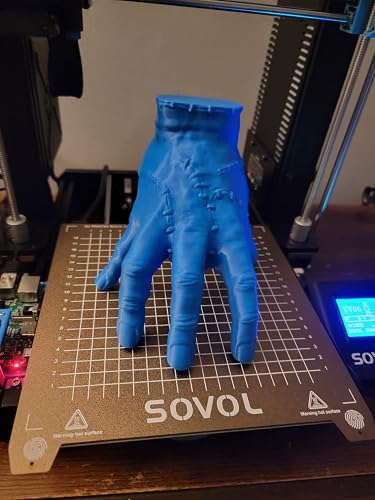
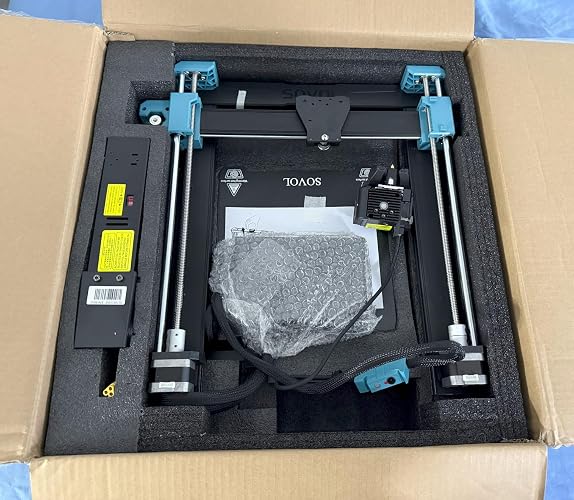
I have had this printer for one week now, from the moment of opening it to printing was less than 30 minutes. Setup is really easy and I appreciate the notched edges to make lining up the gantry easier. The printer is already 90% assembled and requires a few screws to install the gantry, extruder and power supply. Once assembled I ran through the included steps to align the z axis and level the bed. I then set up a cura profile using the included recommended retraction settings a left everything else default in cura's generic profiles. I started with a roll of PETG and let it get to work by first printing some mods for it. Over the course of the last week I have printed a camera mount, raspberry pi mount and a light mount for the SV06. I also have a SV01 that I used the SV06 to print some mods for as well. I printed cable chains, a light mount, a camera mount and a raspberry pi mount for it as well. Once I completed all my mod prints I began to print some for fun prints by printing out Thing from the Netflix show Wednesday, and a heavy metal baby Groot. Both of which turned out fantastic! I've started to print some TPU with it as well which I'll dive into further below. Final notes: Packaging: 10/10 Everything is very well packed in the box with plenty of padding to reduce damage during shipping. There was no fighting with packaging to unbox the unit that can come from other overly packaged products, everything is well marked and easy to remove. Setup: 10/10 There is some minor assembly required to get this printer running, this took no more than 30 minutes thanks to the well marked packaging and instructions. The notched extrusion makes it super easy to align the gantry and install the 4 screws to mount it. 2 screws are required to mount the power supply to the rear of the gantry and one XT60 power cable to plug in to supply power from the supply to the rest of the unit. The controller box slides onto the opposite side of the gantry and is held in place with a latching mechanism. 3 screws are required to install the extruder onto the x axis and a simple ribbon cable plugs into the extruder assembly. Included belt tensioners make it simple to adjust the belts to the needed tension. Once assembled, running through the z-align and bed leveling steps is a matter of selecting a few options on the screen to complete the setup process. Quality: 10/10 Out of the box with no tuning, or running any calibration prints this thing is just great! Using basic generic profiles in cura to run through half a roll of PETG was as simple as slicing and sending it to print. String was very minimal if any at all. Ease of use: 8/10 The only reason I give ease of use an 8 is because I began to run some TPU prints through it and this is were I began to have some trouble. With TPU being a softer material I struggled to get it to feed through the extruder. Using the traditional method the filament would just wrap itself around the gears. After a bit of pulling my hair out I found the trick to feeding it which required a few extra steps. I had to open the extruder door and feed the filament through and down to the throat of the hotend, close the door and make sure to apply just enough pressure onto the extruder. I was then able to start printing TPU but quickly reached another failure where it wrapped around the gears. I was able to resolve this with a higher temperature than what I normally would run for TPU. Noise: 8/10 The printer is a bit noisy and this is due to the bearings, a little bit of grease and it will help tame the noise. There's a few methods to go about doing this and I am undecided on how I will tackle it myself. One requires disassembling the unit to get to the bearings and the other is to lubricate the rods the bearings slide on. Whether lubricating the rods will be enough for the long term is where I remain undecided. Overall: 9/10 Another fantastic printer from Sovol and I couldn't be happier with my purchase. Some minor annoyances with feeding softer filaments and some noise isn't anything to deter me from using it. There's no better bang for your buck than what you get with this printer. -Pros * All metal hotend * Sensorless homing * Auto bed leveling * Planetary direct drive metal extruder * Silent drive board * Dual drive z-axis * PEI flexible metal build plate * Great print quality out the box - Cons: * A little noisy * Flexible filaments can be difficult to get going ... show more
Reviewed in the United States on January 27, 2023 by Mike B

Be ready to spend a lot of time fixing
Set name: Sovol T300
Background As a field service technician with nearly a decade of experience working on industrial CNC machinery, I have extensive knowledge of precision mechanical systems. I’ve been using the Comgrow T300 3D printer for four months, and this review reflects my experience with its performance and reliability. Initial Impressions The T300 is marketed as a budget-friendly 3D printer with a large build volume, but its reliability has been disappointing. Despite my technical background, I’ve encountered persistent issues that have made this printer frustrating to use. Issues Encountered Y-Axis Tensioner Failure: On the first day, the Y-axis tensioner snapped. While Comgrow sent a replacement part, it took weeks to arrive from China. I designed and printed a replacement myself, rendering the shipped part unnecessary. Y-Axis Layer Shifts: For prints longer than 5–6 hours, I noticed significant layer shifts in the Y-axis. After troubleshooting, I determined the stepper motor was overheating, losing torque, and missing steps. I upgraded to a stronger stepper motor, added a heat sink and fan, and reduced max acceleration to 3000 mm/s² and print speed to 80 mm/s to prevent overheating of the motor and driver. Extruder Tensioner Failure: Shortly after resolving the Y-axis issues, the heated insert in the extruder tensioner failed. I purchased a new tool head from Comgrow, which was easy to swap since it’s sold as a complete unit. However, the PTFE liner in the new heat sink was warped or crushed, preventing filament loading. I reverted to the original hot end, managed one successful print, and then encountered further extrusion issues that remain unresolved. Ongoing Reliability Problems: The T300’s stock components, particularly the tool head and electronics, have consistently underperformed. I’m now planning to replace the stock tool head with a custom Stealthburner setup and may overhaul the electronics entirely. Performance When Functional When the T300 works, it produces high-quality prints with good detail. However, achieving consistent performance requires significant modifications and constant troubleshooting, which is unacceptable for a consumer-grade printer. Pros Print Quality (When Working): Capable of producing detailed prints with proper calibration. Large Build Volume: Suitable for larger projects, a plus for hobbyists. Affordable Price: Competitive for its size and feature set, though reliability issues diminish this value. Cons Poor Reliability: Frequent hardware failures and overheating issues. Slow Support and Shipping: Replacement parts take weeks to arrive from China. Subpar Components: Stock tool head and electronics are prone to failure and require upgrades. Time-Intensive Fixes: Requires advanced technical knowledge to maintain functionality. Final Thoughts The Comgrow T300 3D printer has potential but is plagued by unreliable components and frequent failures. While it can deliver good print quality when operational, the constant need for repairs and modifications makes it a poor choice for most users. Even with my extensive experience in CNC systems, I found the T300’s issues excessive compared to other 3D printers I’ve used. Unless you’re prepared to invest significant time and money into upgrades, I recommend looking at more reliable alternatives. ... show more
Reviewed in the United States on July 15, 2025 by zach wells

First 3d printer - Great entry printer to the hobby
First 3d printer. This review is after nearly 3 weeks of non-stop printing (literally, I keep it going 24x7). I spent a lot of time researching printers and ended up starting with this printer. I made sure to watch the setup video and youtube setup videos before it arrived. Knowing generally how to set it up accelerated the process and in 30 minutes my first print of a benchy started. The first print was on PolyMaker Silk PLA, a little wisp here and there and a couple blobs of over extrusion but nothing horrible. Made an infinity cube fidget toy for my daughter and she loved it. I put the printer on a rubber fatigue mat, it's a solid 1" of rubber on top of the thin piece of packaging material it came with to reduce the effects of mechanical movement. It resides in a corner of a room away from drafts and the room stays at 70 degrees. Bed leveling was easy and for the most part worked well. Even after adjusting the nozzle height it just seemed off a little, after heating the bed to 70 and the nozzle to 200, then ran a full z axis calibration and bed leveling and did another nozzle height adjustment - the printer printed even layers and adhered to the bed perfectly. One filament failed on the benchy with the same settings. After a little research I bought a filament dryer and the two PLA filaments were at about 30% humidity, when they were brought down to 15%, no stringing, no blobs, no failures, and the end result looks amazing. With the dry filament they printed at a few degrees cooler without issue resulting in fantastic results. One thing I noticed which I don't think is a printer issue, perhaps a slicing issue; printing multiple objects in one run. Each time I tried it failed in spectacular ways. Printing one object at a time fixed the issue. After watching youtube videos it seems it could be the previous layer cooled too on an object the new layer didn't adhere properly. An extruder test confirmed its accuracy; tell it to extrude 100mm of filament and it did 100mm on the nose. All the calibration tests recommended by youtubers (one being dr vax) came out near perfect. Overall I'm impressed by the printer's quality prints (once you dial in material temp and retraction settings). And after setting it up to run Octo4a (Octiprint for android) I turned an old unused cellphone into a Octiprint server connected straight to the printer and now I can monitor the status from my phone with a live webstream and allows me to start prints without using the microsd card. Pros: Good quality prints Easy setup I like the simplified one button control knob. Others may not. Handles overhangs better than expected which is a testament to it's part cooling ability Cons: A little slow printing with default Cura settings. After a little tweaking it goes a little quicker but not insanely fast. Creaky. The normal movements are easy to get used to, its the occasional creak and squeak starts to annoy you after a while. Even after lubricating the z lead screws and guide rails and a belt tension adjustment it still creaks a bit here and there. If the noise bothers you put in an enclosure which on my list to do since I'll eventually do ASA on this machine. Overall, I'm satisfied, actually - amazed at what this printer can do. Paired with the Sovol Filament dryer and good quality dry filament, it does fantastic. Edit After some tuning, it now blazes through prints with near perfect results as the blue benchy shows. The creaking was tamed somewhat after a round of screw tightening. I printed the blue benchy at 80mm/s at first but had a little over extrusion. Cranked up the speed and hit 96mm/s with no problem. Love this printer and so does my daughter. ... show more
Reviewed in the United States on January 24, 2023 by eeeper

A worthwhile entry machine for those wanting to get started with 3D Printing with headroom to spare.
I rarely give things 5 stars, everything usually has room to improve, understand that as you read the rest. Arrival: As usual, the Amazon box within a Box without enough packing was a thing, I do wish they would just leave the product box unenclosed so its not bouncing around. Past the outer box, the actual product box had the Amazon Warehouse Deals inspected sticker on it, I contacted Sovol, they checked my order and it SHOULD have been new, so after I inspected the box and opened it up, it did NOT look like it had been used, so while it may be a return, Amazon warehouse did its checking, no harm, no foul so far. Unboxing & Assembly: Do be VERY careful if you have not dealt with electronics with ribbon cables before, the control unit is not detached so if you twist it the wrong way or pull it, you WILL damage the cable! Otherwise, its was nearly as easy to assemble some other plant named printers I have. Two things to note: When assembling the frame, there may be sharp metal pieces from where the extrusions where cut for the gantry to sit upright into, did not cause me an issue and would not have cut me, but I did clear it out before screwing it in (see images), then, make sure you route the power cable before screwing the power supply in, not enough room to feed it down after screwing it into the frame as I learned. First power on and print: No issues with first power on, I did read the prior reviews and took precautions to make sure the gantry frame was as straight as possible and snug as can be, the first power on calibration went off without a hitch. As for the first print, I used Elegoo PLA+ Black as the filament, and ran it from a box sitting behind as I am not personally a fan of the top mounted spool, the print completed without an issue, I printed the filament sensor and ptfe mount for the top, no issues, its installed and is in use (more photos to come after). Software (printer & computer): I REALLY like that this printer is using super close to vanilla open source klipper, they have made some modifications which means its not mainline but I am sure that can be adjusted by those craftier then I in short order. Even with that said, the interface is simplistic, and while I have submitted some translation and layout recommendations, I would not have a problem recommending it to a first time user looking for something cheap and functional. I would recommend getting OrcaSlicer directly from github instead of using the outdated USB copy, the profiles are included or you can grab the older ones off the USB if desired. I have owned this printer for 47 days, and have about 300 print hours on it, so far at least, no MAJOR issues that I don't feel I could guide a new user through which is good. The manual can use some work, but I plan on submitting change recommendations to Sovol who seem to be very receptive even if due to US/China time difference there is a drastic delay. ... show more
Reviewed in the United States on July 2, 2025 by Hammerfest

Great 3D Printer for the price that will not disappoint!
I've been 3D printing since early 2021 and looked at many different 3D Printers and narrowed down it down to the Sovol SV01 (Classsic) to be my 1st printer because I liked the features offered for a good price and their customer service. During my 2 years of printing, I learned a lot and had been enjoying printing since. But......I quickly realized that a 2nd printer would greatly help when printing large multi-object prints and multiple colors. I looked at many printers and kept going back to Sovol’s website and was eyeing the SV06. I saw Sovol’s announcement of the SV06 late 2022 and really liked the features it offered but kept contemplating on making a purchase for a 2nd printer. 7 months later, I decided I was ready for a 2nd printer and purchased the Sovol SV06. I’m glad I purchased it. Upon opening the packaging, I noticed it was packaged extremely well! Each component was packed into its own compartment and all the screws/bolts bags are labeled making it easier to assemble. If your new to the 3D printing world, then this is an excellent printer with very little effort in assembling. The entire process of assembling took me just under 30mins from unboxing to turning it on (I took my time reading through the guide and tightening all the screws/bolts). There is also a guide that was included with the packaging with pictures and there are videos online on how to assemble it. The guide is very detailed. Once I got it all assembled and also got the auto z aligned & bed leveled, I started by printing the benchy included on the sd card but got half way through it and realized the nozzle/hot end was angled severely which may not be a problem for small prints but a huge problem for large prints. I took the extruder off the mount (so much easier to remove than my older SV01) and looked over it. I contact Sovol’s support and they were extremely helpful. They provided a replacement and links to videos and information & once I received the replacement parts it was easy to fix the issue. Pros: • The biggest pro that I like about this printer is the Bed Leveling feature. Unlike my SV01, I would have to level it every few prints even after adding the silicon pieces instead of springs. With the SV06, the bed does not have any springs or silicon pieces. It slides on rods and includes an inductive sensor. I included the G29 command in my startup gcode and it checks the bed before printing. • I like the size of this printer. It is smaller than my Sovol SV01. Its not to small but not to big. Its a good size that will allow for printing almost anything. If your into printing cosplay helmets they you may have to cut up parts and print multiple parts. For me I’ll probably print helmets on my SV01 and print all the small misc. pieces on my SV06 so I can complete them much quicker. • The extruder is extremely easy to work with. With my previous SV01 I would have to move the gantry to the very top to give me room to work on the extruder and sometimes maneuvering to get a good angle to work on it. With the SV06 there’s 3 screws to undo and remove the wiring clip and its free to work on. Wish this was feature was around on my SV01. • Prints PLA, PLA+, PETG, TPU, ABS, ASA, Nylon & etc... I mostly print with PLA, PLA+, PETG & TPU. I haven’t tried TPU on the SV06 but PLA, PLA+ and PETG print extremely well. • Filament change from the printer is very easy compared to my SV01. Its easier to navigate through the menu to find the filament change. Cons: • Loading filament was a little tricky the 1st few times but after several attempts its become much easier than my SV01. There are videos on how to properly load filament that should help. • The size of the bed. Even though for me its not a con since I have another printer that I can use but if this is your 1st printer that may be an issue. Its build plate says 235mm x 235mm but the actual build plate size is 220mm x 220mm. Wish Sovol would had adjusted the wording on that since it can cause some confusion. If this is to small you could always go with a SV06 Plus that has a bigger bed. • I’ve read online that others experience the bearings being very loud. I experienced the same issue but used some specialized grease and fixed the loud sound. This can be an issue if you don’t have specialized grease to fix it. It should be something Sovol should have fixed before sending them but not a big deal. Just something to think about when purchasing. • Still uses a micro sd card and a micro usb. Wish this used a USB-A or USB-C connection but not an issue for me since I had an extra Raspberry PI running Octoprint connected to my SV06 using a micro usb cable. Also something to think about when purchasing. • No Run out Sensor offered. I never used my run out sensor on my SV01 since I problems getting filament to load into it so for me its not an issue. I just keep an eye out on how much filament I have loaded and guestimate on when I need to change it. • No color display like the SV06 Plus but for me its not to much of a problem since I’m use to it on my SV01. I’ve only printed a few test pieces but so far the SV06 has been a great printer for the price. If this is your 1st printer then I think it will be a 1st good printer or 2nd/3rd/etc… printer. Its very easy to use and is loaded with a lot of features that I can’t wait to start using it more! I like it so much that I may have to get another SV06 so I can print more! ... show more
Reviewed in the United States on May 1, 2023 by eric272

READ BEFORE USING THIS PRINTER
Alright, so I bought this printer based on my "good beginner 3D printer" research as this is my first 3D printer Pros: - It comes with everything you might need to get started (including a spool clipper) - Assembly was very easy - Packaging was excellent - Leveling and setup was very quick and easy - Benchy looked fantastic and had great overall prints with it. Now for the cons, which are 3 MAJOR issues and 1 minor issue: - Major issue #1: The printer's nozzle will RAM & DEEPLY SCRATCH the build surface plate after following the manual's calibration instructions. After some research, I found that the issue was with the firmware and the way to avoid this is: After performing the Auto-Z align go to Prepare menu > Move Z axis manually from 5mm to 0mm (firmware flaw defaults it to 5mm) then continue on to Probe Z offset. I now have a scratched bed & bent nozzle on my brand new printer :( - Major issue #2: The printer IS NOT lubricated and doesn't come with included grease + properly greasing it would have me disassemble the whole printer and applying grease inside the bearings, which isn't exactly beginner friendly .. Manual doesn't mention this for some reason. - Major issue #3: When printing with different filaments using Sovol3D software > post processing scripts > Filament change, the printer will not continue where it left off after changing the filament. The reason for that is: when it's time to change filaments, the bed will slide forward about 3cm for some reason instead of sitting still which will ruin your print. - Minor issue: I sometimes get a solid blue screen when turning it on that won't go away. After some research, turns out I have to re-flash the firmware to fix the issue using an empty SD card, just make sure you UNTICK "Quick format" when formatting the SD card > save downloaded firmware on SD card > insert it in the printer then turn it on and wait a few seconds for the Sovol logo. Note: it still happens sometimes so I'd recommend having a dedicated SD card to re-flash the firmware whenever it happens to save time. I really hope they fix these issues as they're mostly software related. My review will remain 2 stars until these issues are resolved. ... show more
Reviewed in the United States on January 26, 2023 by Mo

Great printer but some initial problems, no response from Sovol
I’ve had the printer for a few weeks now and have printed a number of things in both PLA and PETG. Overall it works great and is very easy to use once you get it assembled and set up. I could not load filament initially, and had to disassemble the extruder to discover that there was filament left above the heater, and the nozzle was completely clogged with melted filament. I tried contacting Sovol to ask for a replacement nozzle but got no response. So don’t expect any level of customer support aside from what you can read on Reddit. ... show more
Reviewed in the United States on April 12, 2026 by ian
Checking for inventory...