Search  for anything...

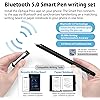
Smart Sync Pen for Note Taking with Notebook and Writing Board,Real-time Sync for Digitizing,Convert to Text,Storing,Sharing Paper Notes via APP on Smartphone/IPAD (Android and iOS)

  • Based on 341 reviews
Condition: New
Checking for the best price...
$93.99 Why this price?
Save $4.96 was $98.95

Buy Now, Pay Later


As low as $15.67 / mo
  • – 6-month term
  • – No impact on credit to apply
  • – Instant approval decision
  • – Secure and straightforward checkout

Ready to go? Add this product to your cart and select a plan during checkout.

Payment plans are offered through our trusted finance partners Klarna, Affirm, Afterpay, Apple Pay, and PayTomorrow. No-credit-needed leasing options through Acima may also be available at checkout.

Learn more about financing & leasing here.

Selected Option

Free shipping on this product

FREE 30-day refund/replacement

To qualify for a full refund, items must be returned in their original, unused condition. If an item is returned in a used, damaged, or materially different state, you may be granted a partial refund.

To initiate a return, please visit our Returns Center.

View our full returns policy here.


Availability: In Stock.
Fulfilled by Amazon

Arrives Apr 23 – Apr 24
Order within 5 hours and 53 minutes
Available payment plans shown during checkout

Protection Plan Protect Your Purchase
Checking for protection plans...

Size: Smart Pen+Notebook+Tablet


Features

  • Free APP-Ophaya Pro+ Instantly Sync,Effortlessly Captures handwritten notes and drawings with precision, synchronizing them in real-time to devices with the Ophaya Pro+ app(Suitable for iOS and Android smart phone), Never miss an idea again
  • OCR Handwriting RecognitionHandwritten text can be converted to digital text, which can then be shared as a word document.
  • Searchable Handwriting NoteHandwritten notes can be searched using keywords, tags, and timestamps, making it easier to find specific information.
  • Multiple note file formats for storage and sharing PDF/Word/PNG/GIF/Mp4 (Note: Multiple PDF and png files can be combined before sharing).
  • Audio Recording Records audio simultaneously while you write, allowing you to sync your notes with the corresponding audio for context. and Clicking on the notes allows you to locate and play back the corresponding audio content.
  • Offline StorageThis feature allows you to continue writing and saving content even when not connected to your phone. Once reconnected, the saved content will automatically upload to the app, which is especially useful for preventing the loss of key information during work or class, helping you review important details later.
  • Customizable settings Allow users to select different pen thicknesses, colors, and other personalization options in the app, enabling eraser functionality for editing and providing a better writing experience.
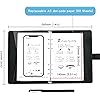
  • What's in the box 1x smart pen, 1x Pu Notebook (60 sheets), 4x Ballpoint Refills, 2x Plastic Pen Nib, 1x USB-C Cable

Color: Black


Brand: Ophayapen


Material: Aluminum, Paper, ps


Number of Batteries: 1 Lithium Ion batteries required. (included)


Item Weight: 2.4 Pounds


Compatible Devices: Smartphone


Item dimensions L x W x H: 11.42 x 9.92 x 1.77 inches


Are Batteries Included: Yes


Batteries Required?: Yes


Pressure Sensitivity: 2024 g


Product Dimensions: 11.42 x 9.92 x 1.77 inches


Item Weight: 2.44 pounds


Item model number: SMP-3


Batteries: 1 Lithium Ion batteries required. (included)


Date First Available: July 26, 2023


Manufacturer: Ophayapen


Frequently asked questions

If you place your order now, the estimated arrival date for this product is: Apr 23 – Apr 24

Yes, absolutely! You may return this product for a full refund within 30 days of receiving it.

To initiate a return, please visit our Returns Center.

View our full returns policy here.

  • Klarna Financing
  • Affirm Pay in 4
  • Affirm Financing
  • Afterpay Financing
  • PayTomorrow Financing
  • Financing through Apple Pay
Leasing options through Acima may also be available during checkout.

Learn more about financing & leasing here.

Top Amazon Reviews


  • It's a very helpful and fun tool.
I am very much enjoying the Ophaya board and pen set. I have thus far not used the "paper" so can not comment on that. This is a very good product. I am very happy with the brightness of the new board that they gave me. They tell me now that everyone is getting this new brighter board. That's good. The fact that you can see your drawing or handwriting is a fun aspect, and the audio recording that you can append to the writing/drawing is very helpful as well. Note to those who have criticized the audio recording saying that it does not always work: I had the same experience but found a work around that works for me. Here is my way of working with this. I use the writing aspect to make a brief note on the board. Then I tap the record button on the writing board to read the note as well as any other pertinent information. Then I PAUSE the recording IN THE APP, not on the board, and write whatever I want in the board again, and then PRESS the RECORD ICON on the board to say whatever I want and PAUSE the recording in the APP to write again. Repeat till you run out of time or space or thoughts! In other words, tap to begin or resume recording only on the board, pause or conclude the recording only on the app, and write only during the pauses of audio recording and this function will work well. It's an excellent note taker when you get past that little quirk. Ophaya - when will you have a letter size board? That would be great! Original review" It works pretty well! The main thing that was not so good for me was that the writing board to me was very very dim; requiring an exterior light to see what you are writing. And then, when you use an outside light, the glare off the board made that difficult! But I contacted the company and they said that they would replace the board. Should they do that, I will report what happens when I use it, and spend some more time in the review explaining the other things that I like! I'd like to upgrade to 5 stars -- if the screen works well, I will do that. ... show more
Reviewed in the United States on May 14, 2025 by D. W. Locke

  • Highly recommended to try this digital pen set
Precise & Responsive – The pen tracks smoothly with minimal lag, making writing and sketching feel natural. Comfortable Grip– The ergonomic design prevents hand fatigue during long sessions. Works Well with App – Seamless compatibility with app and it reflected to the app immediately Pressure Sensitivity – Great for drawing or those who want varied line thickness. Works very well with the notebooks, making it versatile. This digital pen is a great choice for professionals. It delivers a paper-like/smooth/precise writing experience and works well with the notebooks and on the app. While it has a few small drawbacks, the performance makes it worth the price. ... show more
Reviewed in the United States on July 9, 2025 by Zhuangzi D. Zhuangzi D.

  • Terrible app
So I had previously used a Livescribe Echo and really loved it. I lost the pen and wanted to try something different. I'm really disappointed with this. A couple things to understand, the audio recording is done on your phone, via their Ophaya Pro+ app. So keep in mind that notification sounds etc will be captured in your audio. The user experience in the app for listening back to your recordings is terrible. It's extremely difficult to move through your notes and through the audio. There's no way to increase the speed of the audio (sometimes I want to listen at 1.5 or 2x speed to get to the spot I'm looking for) either. And for a recent meeting I was in, I recorded for about 2 hours, multiple pages of notes, and I couldn't navigate to different sections of my notes at all. I would expect to be able to click on a place in my written notes (in the app) and have the audio play at the point I was taking notes. Not the experience here. The tablet is a nice option for drawing or if you're just taking a few notes, but the app just falls so short of any expectations for this type of pen. Not to mention I couldn't find any way to get support for it. So if anyone from Ophaya wants to help, please let me know! I was so disappointed that my return window expired before I was able to really use this and see how terrible it was. ... show more
Reviewed in the United States on May 9, 2024 by Jason T

  • English Directions needed in startup manual
Nice product but difficult for me to get started with. I was trying to charge the tablet but didn't understand how to plug in the cable. I'm blind & it was just too difficult, so I gave it to my Son.
Reviewed in the United States on August 3, 2025 by Christine

  • Works great—smooth, high-resolution syncs with no delay
It's better to use than I imagined. Writing syncs have no delay, and the Bluetooth connection is fast every time. The quality of the paper notebook is excellent, and the writing experience is great. The tablet is also very useful, especially convenient for quickly jotting down memos without wasting paper. I plan to use it for meeting summaries later. What could be improved is making the app more refined. It would be great if the pen could record audio independently, and the recording could sync with the note-taking strokes. Additionally, having a USB-C port would be even better. Overall, a very satisfying shopping experience. ... show more
Reviewed in the United States on July 1, 2025 by Comma

  • a game-changer for anyone who takes notes by hand!
It syncs seamlessly with my smartphone in real time, instantly digitizing everything I write. Converting handwritten notes to text is surprisingly accurate, and being able to store and share my notes right from the app is incredibly convenient. The writing experience feels natural, just like using a regular pen. It’s perfect for students, professionals, or anyone who wants the best of both analog and digital worlds! ... show more
Reviewed in the United States on July 15, 2025 by Donald T.

  • Does what it says; with difficulty
It does turn writing into text. Yes. It does allow you to write in different colors. Yes. The app is not user-friendly. And if you lose the cap, you know, the hardest part to keep track of with a pen, be prepared to chatge it every time you have to use it. I don't feel like this has any ease of use.
Reviewed in the United States on September 5, 2025 by Azia

Can't find a product?

Find it on Amazon first, then paste the link below.
Checking for best price...