Search  for anything...

SCRIB3D P1 3D Printing Pen with Display - Includes 3D Pen, 3 Starter Colors of PLA Filament, Stencil Book + Project Guide, and Power adapter

  • Based on 19,387 reviews
Condition: New
Checking for the best price...
$34.99 Why this price?
Save $5.00 was $39.99

Buy Now, Pay Later


As low as $8 / mo
  • – 4-month term
  • – No impact on credit
  • – Instant approval decision
  • – Secure and straightforward checkout

Ready to go? Add this product to your cart and select a plan during checkout.

Payment plans are offered through our trusted finance partners Klarna, Affirm, Afterpay, Apple Pay, and PayTomorrow. No-credit-needed leasing options through Acima may also be available at checkout.

Learn more about financing & leasing here.

Free shipping on this product

FREE 30-day refund/replacement

To qualify for a full refund, items must be returned in their original, unused condition. If an item is returned in a used, damaged, or materially different state, you may be granted a partial refund.

To initiate a return, please visit our Returns Center.

View our full returns policy here.


Availability: In Stock.
Fulfilled by Amazon

Arrives Monday, Feb 23
Order within 54 minutes
Available payment plans shown during checkout

Protection Plan Protect Your Purchase
Checking for protection plans...

Features

  • [FOR CREATIVE PROJECTS] Create, draw, doodle, and build in 3D with this versatile, high-quality 3D pen. The SCRIB3D P1 enhances spatial thinking, creativity, and artistic skills. Ideal for collaborative projects, handmade creations, decorations, or everyday repairs. The P1 features a stepless speed function for precise control, whether working on detailed designs or faster infill tasks.
  • [READY-TO-USE KIT] Includes 3 colors (30 feet) of PLA plastic to keep you Doodling for ages, as well as a power adapter, step-by-step manual, and a free stencil guide. Just plug in, heat it up and enjoy the fun of creating three-dimensional masterpieces. PLA is a versatile, easy-to-use printing plastic that is great for both first time and advanced users.
  • [BEGINNER FRIENDLY] Plug the adapter into the back of the pen and choose your filament. The red light will turn on indicating warm up, this will take about 2-3 mins. Double click the forward button to start and feed the filament through the back of the pen. Once the filament has reached the nozzle of the pen, click forward to stop. Press and hold the forward button or double click for a continous flow. Once you have completed your design, press and hold the reverse button to retract filament.
  • [MULTI-FUNCTIONAL] The SCRIB3D P1 Pen is temperature adjustable to accommodate multiple types of filament: PLA (160-210C, 320-410F) or ABS (210-235C, 410-455F). Unlike other 3D printing pens, the P1 has an easy-to-use stepless speed slider, designed for optimal speed adjustment. Perfect for any task, from slow & intricate projects to faster infill work.
  • [SAFE & RISK-FREE PURCHASE] The P1s ceramic nozzle and premium motor ensure safety and high performance without clogging. Equipped with a 2-minute auto-sleep function after doodling stops, anti-clogging features, and intuitive controls to ensure a seamless doodling experience. Comes with a 1-year guarantee and responsive customer service. Buy with 100% confidence. If you experience any quality issues or need help getting started, please feel free to contact us were happy to assist.

Description

Create, Draw, Doodle, and Build in 3D with this affordable yet high grade 3D pen. The new SCRIB3D P1 3D Pen helps improve spatial thinking, creativity and artistic skills. Great for quality family time and as a practical tool for making handmade gifts or decorations, or for everyday fixes around the home. The P1 Pen features a stepless speed function designed for optimal speed control no matter the task - whether slower intricate projects or faster infill work.

Product Dimensions: 4.61 x 7.87 x 1.97 inches


Item Weight: 12.9 ounces


Item model number: SCRIB_PEN_P1


Release date: October 1, 2020


Manufacturer: SCRIB3D


Frequently asked questions

If you place your order now, the estimated arrival date for this product is: Monday, Feb 23

Yes, absolutely! You may return this product for a full refund within 30 days of receiving it.

To initiate a return, please visit our Returns Center.

View our full returns policy here.

  • Klarna Financing
  • Affirm Pay in 4
  • Affirm Financing
  • Afterpay Financing
  • PayTomorrow Financing
  • Financing through Apple Pay
Leasing options through Acima may also be available during checkout.

Learn more about financing & leasing here.

Top Amazon Reviews


  • Fun and easy
This has been a great gift for my daughter! So easy to use and she has so much fun getting creative!
Reviewed in the United States on February 13, 2026 by Ryan

  • Great pen for its cost.
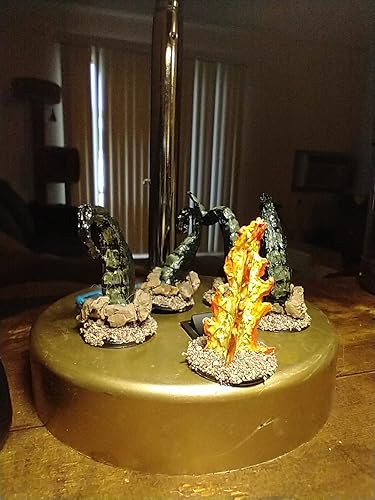
This is probably going to be the most in-depth review I have ever wrote on Amazon. I am doing this because I feel like it is important for when you are shopping for 3D pens. This will cover the PLA that the pen comes with, and also PLA I bought elsewhere and why I have chosen what I have. ------------------- My first impressions: I am surprised at how light the pen is. I have small-ish hands for a 5'1" woman and it felt very comfortable to hold. After reading the instructions, it states that if the PLA crackles or bubbles while the using the pen, to lower the temp. Sure, no problem right? Not really. I use wax paper to trace my designs on, I use this due to a youtube video which suggested it, and its a lot cheaper than the mats. I also prefer it over mats because it is paper thin, which gives me the most accuracy of my tracing which is important to me. I started using the pen at the default 190f. As I was using it, I noticed that the PLA did crackle in the pen, and it did form bubbles. As advised by the instructions I turned it down lower. The lowest point for PLA is 160f according to the instructions, however, it would not stick to the wax paper at all. I then tried 170f and again, the PLA would not stick to the wax paper as well as it had with the 190f. Once more I turned it up to 180f, it stuck, not as well as I would like but it was a lot better than the other settings. Also, at the lower settings it gives no time at all to adjust the plastic if you need to nudge or squish down a bump. Changing the PLA: After using most of the PLA given in the kit, I went out and bought from a local small buisiness (SUPPORT THEM!) which uses locally sourced PLA. Once more, I tried the 190f temp setting. Not only does the PLA come out much smoother, it sticks to the wax paper perfectly, and I am noticing my pen does not get near as hot using it. I can use it for much longer before deciding to give it a break. This means I can nudge the PLA, and bend it and it sticks well to my wax paper so it does not shift on me while working. I also notice that it is much less stringy than the PLA the pen comes with. PLA brand matters, and it is good to research into a good PLA, I am just glad our local PLA works this nicely. TIPS: Bonus, a tip to enjoy your pen even more. You can get a lot more use out of your pen with various other tools. A wood burner with temp control and multi tips is wonderful for shaping and smoothing your project after you had made it. Use aluminum foil covered in painter's tape to fill in big gaps to use less PLA. A course sand-paper followed by a smoothing sand paper also helps in finishing off the nice smoothness of the PLA. As stated before, Wax Paper is a wonderful material to work on. It could be used repeatedly until it eventually tears and painter's tape peels off it nice so you can adjust and move it. Look for some good youtube videos to get you started on techniques to best build your 3D Pen creations! Overall: This is a very nice pen for its cost, you can adjust the temp, its light and comfortable, also easy to use. Pictures provided show the projects I have made with this pen for my D&D sessions. The PLA that I bought works wonderful for being painted right on without any primer. If you are curious, I use 3D Fuel PLA. Someone suggested not to work it too hard, giving it a break every 30min or so, I think some times I do go closer to an hour. Always press the up button and get your PLA fully out before you turn it off (by unplugging it). Always trim the tail off the PLA. I have yet to run into any of the issues of it clogging or just turning off. Only twice did it seem to "turn off" and I think my PLA had nudged the cord since it curls, because it would auto go back to temp after. ... show more
Reviewed in the United States on June 8, 2021 by Lisa Lisa

  • 3D pen
The SCRIB3D P1 3D Printing Pen is a really fun and creative tool once you get the hang of it. It comes with everything you need to start—starter PLA filament colors, project guide, and power adapter—which makes it great for beginners, kids, or anyone interested in 3D drawing.After a little practice, it works smoothly and lets you create cool shapes, decorations, and small projects. The only downside is that it’s a little complicated to use the first time. It takes some patience to understand the controls, filament flow, and proper drawing speed. However, once you learn the basics, it becomes much easier and really enjoyable. ... show more
Reviewed in the United States on February 12, 2026 by Dinayvis Cabrera

  • Neat to use
Was difficult to figure out at first. But once understanding how this works it was good. Seems like a good quality. Easy to use for a while . Cleaning is easy. Battery lasts a few hours so long as your taking breaks. Its like a bulky pen.
Reviewed in the United States on January 24, 2026 by Pamela VanBuren

  • So much fun
This was a Christmas gift for my 10-year-old granddaughter. She is 100% obsessed with this pen. She has thanked us multiple times and told us how much she loves it multiple times. The butterfly was her first attempt at making something with it and did several other projects already. If you have a child that loves to draw, then they need this. The plastic cools quickly but the tip of the pen does get pretty warm but not so hot that they will get a terrible burn. Just warm enough to let you know you touched it. She seemed to be able to hold it well and commented on how easy it was to use. This one is a winner for sure. ... show more
Reviewed in the United States on December 31, 2025 by Amy Amy

  • Burning issues.
I purchased for my 10-year-old granddaughter, it was used a few times. While the unit was plugged into the outlet, not being used, it melted the plug and the outlet. She did enjoy using it a few times that we had the printing pen and I am not sure what caused the malfunction. I am just glad that I was home when this happened and could smell the burning. I am giving it three stars cause I’m not exactly sure what happened and I see that this is purchased by a lot of people. ... show more
Reviewed in the United States on January 21, 2026 by Amazon Customer Amazon Customer

  • Marketed as a creative art tool, but is so much more.
I purchased this, not as a standalone 3D printing tool, for which it is well-suited, but as an extension of my regular 3D printer. I have been printing 3D models at home for a little over a year and discovered I was often gluing pieces together after the print. Sometimes the glue is very effective, but not always. In the times when pieces don't fit together cleanly, this tool works effectively as a plastic welder. Since it uses the same filament as the big printer, the weld matches the pieces and can be hidden when necessary. CON: I had to design and print a stand to hold the tool while it heats up and for the short periods when you need both hands to manipulate the models. PRO: It does a great job connecting plastic to plastic! ... show more
Reviewed in the United States on January 14, 2026 by Carmen

  • Awesome gadget for a kid
My 9 yo son loves this. It has to be supervised because the top has to get hot to melt the material so please use with caution. It was easy to assemble and put together. It's great quality and the size is perfect for kids. It's relatively lightweight given the size. I would highly recommend it for kids and first time users ... show more
Reviewed in the United States on February 14, 2026 by Aupride02

Can't find a product?

Find it on Amazon first, then paste the link below.
Checking for best price...