Search  for anything...

SAMSUNG 65-Inch Class Frame Series - 4K Quantum HDR Smart TV with Alexa Built-in (QN65LS03AAFXZA, 2021 Model)

  • Based on 1,940 reviews
Condition: Used - Like New
Checking for the best price...
$1,299.00 Why this price?
Save $698.99 was $1,997.99

Buy Now, Pay Later


As low as / mo
  • – Up to 36-month term if approved
  • – No impact on credit to apply
  • – Instant approval decision
  • – Secure and straightforward checkout

Ready to go? Add this product to your cart and select a plan during checkout.

Payment plans are offered through our trusted finance partners Klarna, Affirm, Afterpay, Zip, Apple Pay, and Google Pay. No-credit-needed leasing options through Acima may also be available at checkout.

Learn more about financing & leasing here.

Selected Option

Free shipping on this product

This item is eligible for return within 30 days of receipt

To qualify for a full refund, items must be returned in their original, unused condition. If an item is returned in a used, damaged, or materially different state, you may be granted a partial refund.

To initiate a return, please visit our Returns Center.

View our full returns policy here.


Availability: Only 1 left in stock, order soon!
Fulfilled by Beach Camera Same Day Shipping

Arrives Wednesday, Jul 29
Order within 4 hours and 15 seconds
Available payment plans shown during checkout

Protection Plan Protect Your Purchase
Checking for protection plans...

Size: 65 in


Style: TV Only


Features

  • ART MODE: The Frame transforms into a beautiful work of art when youre not watching TV. Activate the built-in motion sensor so whenever you walk into the room, your TV displays one of your favorite selections.
  • ART STORE: Buy individual pieces or subscribe to a library with over 1,400 established and emerging artists work. Fees apply to subscription service.
  • 100% COLOR VOLUME WITH QUANTUM DOT: A billion stay-true shades of breathtaking color. QLED televisions can produce 100% Color Volume in the DCI-P3 color space, the format for most cinema screens and HDR movies for television.
  • CUSTOMIZABLE FRAME: Elevate your space to make The Frame your own by enhancing it with different frame styles and color options. Customizable bezels sold separately. QUANTUM PROCESSOR 4K: Elevate your picture to 4K with machine based AI.
  • ALEXA BUILT-IN: Ask more from your TV. Just ask Alexa to open apps, change the channel, search for movies and shows, play music, control your smart home devices and more. To talk to Alexa, press and hold the mic button on your remote. If you have hands-free enabled just say, "Alexa" and ask a question.

Description

Showcasing stunning TV and movies in 4K resolution alongside lifelike art and photos, The Frame 65-inch QLED 4K Smart TV features a customizable display with endless combinations. Art Mode allows you to match the screen with your décor with a wide range of choices from the Samsung Art Store collection, featuring the work of over 1,400 established and emerging artists¹. This slim, minimalist-style 4K Smart TV looks beautiful from every angle and enhances any space it’s in. Motion sensors shut off the screen when you’re away to conserve energy². Bring more than a billion colors to life with 100% Color Volume, Quantum Dot Technology³ and stunning 4K resolution. With Amazon Alexa built-in technology⁴, you can open apps, change the channel, search for movies and more. Get the most immersive TV experience yet, powered by a 4K Quantum Processor and AI-driven technology. Samsung combines elegant design with the latest smart and innovative technology, to push the limits of what’s possible in picture and sound. Built not just for the way you watch, but for the way you live. ¹Fees apply to subscription service. ²Motion Sensor operates only in Art Mode. Performance may vary depending on the lighting condition. ³QLED televisions can produce 100% Color Volume in the DCI-P3 color space, the format for most cinema screens and HDR movies for television. ⁴Amazon, Alexa, and all related logos are trademarks of , Inc. or its affiliate.

Screen Size: 65 Inches


Brand: Samsung


Display Technology: QLED


Resolution: 4K


Refresh Rate: 60 Hz


Special Feature: 100% Color Volume with Quantum Dot, Art Mode, Art Store, Customizable Bezel, Quantum Processor 4K, Smart TV Tizen See more


Included Components: One Connect Box, Slim Fit Wall Mount, SolarCell Remote ( TM-2180E), User Manual


Connectivity Technology: wired, wireless


Aspect Ratio: 169


Product Dimensions: 10.3"D x 57.4"W x 34.2"H


Display Technology: QLED


Resolution: 4K


Refresh Rate: 60 Hz


Aspect Ratio: 169


Contrast Ratio: High


Screen Finish: Flat


HDR Format Supported: HDR10, HDR10+, Quantum HDR


Motion Enhancement Technology: Motion Rate 240 Technology


Picture Quality Enhancement Technology: Quantum Processor 4K


Display Language Options: English, French, Spanish


Display Backlight Configuration: Edge LED


Display Backlight Setting: Supreme UHD Dimming


Display Backlight Technology: LED


Display Refresh Rate in Hertz: 120


Has Color Screen: Yes


Screen Size: 65 Inches


Item Dimensions D x W x H: 10.3"D x 57.4"W x 34.2"H


Item Weight: 49.6 Pounds


Item Weight Without Stand: 49.8 Pounds


Base Width: 42.4 Inches


Base Depth: 10.3 Inches


Display Size Class: 65 Inches


Size: 65 in


Speaker Description: 2.2 channel speaker system with 40W sound output (RMS)


Speaker Maximum Output Power: 40 Watts


Number of Audio Channels: 4


Analog Audio Output Count: 1


Integrated Surround Sound Format: Dolby Digital Plus


Power Consumption: 97 Watts


Line Voltage: 100-240 VAC 50-60 Hz


Number of Batteries: 1 Lithium Polymer batteries required. (included)


Annual Energy Consumption: 187 Kilowatt Hours


Is Electric: Yes


Battery Type: 1 lithium_polymer, 3 aaa


Operating System: Tizen


Control Method: Remote, Voice


Remote Control Technology: Voice control


Color: Black


Warranty Type: Limited


Compatible Devices: Gaming Console, Laptop, Smartphone, Tablet


Tuner Type: ATSC, Clear QAM


Video Encoding: H.265 (HEVC)


Water Resistance Level: Not Water Resistant


Portable: No


Brand: Samsung


Built-In Media: One Connect Box, Slim Fit Wall Mount, SolarCell Remote ( TM-2180E), User Manual


Model Name: AMZSAMQN65LS03AAOB9


Antenna Location: Home Viewing


Model Year: 2021


Model Number: QN65LS03AAFXZA


Warranty Description: 1 Year Manufacturer


Model Series: LS03A


Remote Required Battery Quantity: 3


Specific Uses For Product: Home Viewing


Manufacturer: Samsung


UPC: 887276522630


Mfr Part Number: QN65LS03AAFXZA


Item Type Name: Smart TV


Unit Count: 1.0 Count


Item Width: 57.4 Inches


Connectivity Technology: wired, wireless


Internet Applications: Browser


Audio Input: HDMI, USB, Bluetooth


Signal Format: ATSC


Total Number of HDMI Ports: 4


Hardware Interface: Bluetooth, Ethernet, HDMI, USB


Wireless Technology: Bluetooth, Wi-Fi


Screen Mirroring Technology: Smart View


Bluetooth Version: 4.2


Connector Type: HDMI, USB


Number of Component Inputs: 4


Total USB 2.0 Ports: 2


Total Usb Ports: 2


Content Sharing Direction: Mobile to TV


Additional Features: 100% Color Volume with Quantum Dot, Art Mode, Art Store, Customizable Bezel, Quantum Processor 4K, Smart TV Tizen


Parental Control Technology: V-Chip


Smart Home Compatibility: Smart Home Compatible


Mounting Type: Wall Mount


VESA Mount Standard: 400 x 300 mm


Frequently asked questions

If you place your order now, the estimated arrival date for this product is: Wednesday, Jul 29

Yes, absolutely! You may return this product for a full refund within 30 days of receiving it.

To initiate a return, please visit our Returns Center.

View our full returns policy here.

  • Klarna Financing
  • Affirm Pay in 4
  • Affirm Financing
  • Afterpay Financing
  • Zip Pay in 4
  • Financing through Apple Pay
  • Financing through Google Pay
Leasing options through Acima may also be available during checkout.

Learn more about financing & leasing here.

Top Amazon Reviews


  • Install Write-Up to Hide OneConnect Box Install Write-Up to Hide OneConnect Box
Size: 50 in Style: TV Only
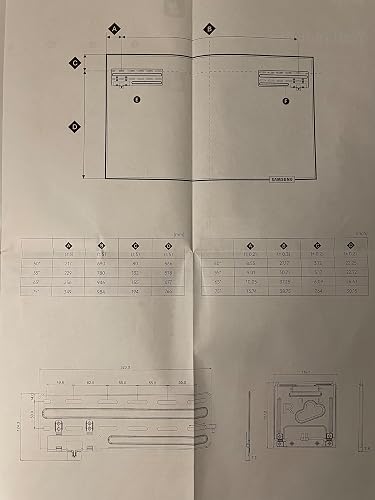
Overall nice tv! Sharing my install story as to how I hid the cables and got the tv mounted. Hope it helps someone else. Installation: I had a hard time finding the install instructions for this 2021 model, which I wanted to see BEFORE buying to get my wall construction right. I’ve posted a picture of them here hoping it helps someone else ahead of time - see tv markup on top w/ letters that correspond to measurements in the table directly below it (right side is inches). I despise cables so decided to put a Chief (#PAC525FC) in-wall storage box into the drywall between studs with an outlet inside it; see picture. This worked out nicely and fits the OneConnect box perfectly (which is what everything connects too - HDMI, power, antenna, and other cables). The OneConnect box then has a thin cable that runs to the back of the tv allowing it to sit flush on the wall. I ran my HDMI and antenna cables behind the wall down to an outlet directly below the in-wall Chief box that has inputs for such connections (see lower outlet cut-out in photo). I bought such an outlet off AMZN as well for <$20. So my Xbox and cable box now simply plug directly into the wall. Mounting of the tv is a little silly as it’s 2 mounts holding the tv vs. 1 single in the middle. Because of the distance between the mounts (roughly 27-3/16” apart for my 50” tv) you likely won’t hit a stud for BOTH of the brackets. Because I had the wall open for the Chief box, I added 2x6’s between my studs so the mounting brackets would go into those after drywall was up. Due to ductwork in the wall my right-side tv mounting bracket overlapped by in-wall box (see photo) but this did NOT interfere with placing the OneConnect box and cables within it. The supplied screws worked perfect for the brackets. Can’t speak to the provided red drywall toggles. Install 1 mount then using a level, mark where the other one should go. Then when you hang your tv it should also be level (mine was). The instructions (more like hieroglyphics as another reviewer said) show “adjustments” can be made once the tv is hung-up, but I couldn’t figure out how that was possible. Again, if your mounts are level and straight in line you don’t have to worry about it. Picture quality + apps: Coming from a 10-year old tv this one is great. Built in apps (Disney+, AppleTV+, NFLX, AMZN, Hulu, etc.), Bluetooth sound to headphones, and the Art mode is nice when not watching anything. You can definitely tell it’s a tv with certain free artwork provided, but others are quite good looking and blend in seamlessly on the wall. Colors and motion are good with tv shows, movies, and Xbox One gaming. I read there are other tv’s with better pictures for less $$, but you buy this one for a great looking, thin tv on the wall with the art mode and magnetic frame/trim you can put around the tv (also another $150+ expense sadly...). The remote is intuitive and rechargeable, and the navigation windows for apps, etc. are very user friendly. Wife’s happy with it and I like it too! ... show more
Reviewed in the United States on May 30, 2021 Reviewed in the United States on May 30, 2021 by Brandon

  • I LOVE this tv! I LOVE this tv!
Size: 50 in Style: TV Only
I had a 17 year old 42" Panasonic flat screen television that I had been threatening to replace for years, so when this set went on sale on Prime day, I jumped on it. I was not aware of the "Frame TV" concept, even though it had been out for years, but I admit that it was the biggest selling point for buying this set. Who wouldn't want a TV that turned into wall art when it was turned off? My old TV was hung above the fireplace, so I had a limited amount of space available for the new set. I decided on the 50 inch, and now, in hindsight, I probably could have gone a little bigger, but I didn't want the new tv to overwhelm the room. We removed the old set (which weighed a ton, and took two people) and took down the old bracket so we had a clean wall to work with. All of the old wires to the Panasonic were hidden inside the wall, and I was hoping we could use the same pathway for the new tv. We couldn't. The cord going from the One Box (which powers the tv) to the set has rather large connectors on each end which would not fit inside the conduit inside the wall. So, our wires would have to be run in a wire mold (my only dislike). The hanging bracket for the tv is split, which is kind of a pain, but there is a template you can use and if you are lucky, you can hit a stud on each side. Not that you would need it, because this tv is so light that you can use toggle bolts to hang it and it would be just fine. Once the brackets are on the wall, and you install two clips on the back side of the set, you lift if up and "hang" it just like a picture. Easy peasy. The set itself looks just like a very large picture frame when the tv is off. It comes pre-loaded with a few pieces of artwork, and the offer to buy into a Samsung app that gives you access to lots more artwork. You also have the option to load your own photos onto the One Box, which is what I did. I have loaded over 100 photos so far, they all look stunning on the tv. You can also choose to individualize each photo's mat size and color, and set up either a solitary photo or a slide show with several different time intervals. Now, for the tv picture. Did I say "stunning"? Yes, I did. The new 4K has amazing color and picture clarity. It looks pretty darn close to 3D, if you ask me. My husband walks into the room when I am watching tv, stands there for a moment watching, and always says, "What a great picture"! I couldn't agree more. All in all, I have almost no complaints about this television. My only one is that I still need my DirecTV remote to access certain features that you can't control with the Samsung remote, but that's just being picky. Can you tell I really LOVE this television? Yes, I think you can. ... show more
Reviewed in the United States on July 13, 2021 Reviewed in the United States on July 13, 2021 by Adopt, don't shop

  • Wifey challenge accomplished Wifey challenge accomplished
If you've ever heard a phrase like "a bigger TV just means a bigger black square on the wall" or "I hate big TVs distracting us and our guests from conversation" from your significant other, look no further. I took that as a challenge to find a 75" TV that blends in when off better than our old 65". DONE! I will admit this came with compromises since I'd prefer the OLED picture quality. However, even with the LG Gallery series, that goal of blending into the room is lost with OLED because the picture has to change so frequently to avoid burn in. That's a slideshow...not a piece of art (look up OLED burn in if you're unaware). I had a party the weekend after installing this. 30-60 minutes after people arrived they were saying things like "wait...that's a TV!" Even with a media cabinet and a sound bar under it, it took that long to notice/realize. Keep in mind, it's never going to 100% fool anyone because it's still backlit & 2D, but that's not the goal. It blends in well enough temporarily because a dim static picture surrounded by the high level esthetics of a piece of art (including the mount) really actually tricks the mind... for a while. This works on the psychological principals of central vs peripheral perception; if something in your peripheral changes or just doesn't make sense to the mind somehow, you'll instinctively pull it into your central perception for long enough to make sense of it. This QLED TV can stay in that peripheral zone MUCH longer than an OLED TV... SCIENCE! Installation was pretty great, but I did hit a snag. You will need to be handy with a stud finder, level, tape measure, drill & drywall/masonry anchors, and you'll need to put 8 holes in your wall. Also you'll need to provide your own drywall anchors if that's your application. The outcome is well worth the work though. Other than actually making that final lift of the TV onto the wall, it is a one person job if you need it to be. Of the 8 holes, at least 4 need to be into studs, but the way the brackets work you have a lot of play to still be able to center the thing on the wall as long as your studs are 16" (standard) apart on center. I'm not sure if it will accommodate 24" spaced studs as well...do your research to make sure this is not your situation (some exterior walls) and check with Samsung's specs. I hit a snag because when I first saw the provided anchors, I assumed they'd work for drywall. They do not. That sucks if you've already drilled the size hole recommended for masonry into your drywall. Toggle bolt to the rescue! The Samsung Connect box is awesome! I know a lot of high end TVs have similar systems, and I honestly don't know if Samsung's offering here is superior or not. However, I don't know why TVs in general haven't moved to this type of hookup system. If needed, your connections could be WAY away from the TV and you still have one easily hidden wire. This makes installations in places like brick/fireplace way easier, but also it's just so much better when it comes time to change something you've got hooked up. Love it. I gave 5 stars to the remote because it's small, simple, and actually stays charged w/ a solar panel. That's my preference. I've never cared for the big fancy "magic" remotes that try to be everything and more. I like that the TV can be controlled with simple inputs. You decide, but most who like the more complicated input systems wind up w/ a Logitech anyway. Regarding Smart features and the UI, it's sufficient. As I said, I like that it accommodates a simple remote (whether it's OEM or 3rd party). I am slightly concerned that Samsung is somewhat divesting in Tizen (the smart OS) lately, just like they abandoned Smart Hub years ago. So far Tizen is still their TV OS of choice, but they moved away from it for wearables. What that may mean is that apps that come out in 5-10 years may not be supported on Tizen-based TVs... just like I can't get Disney+, Discovery+, Paramount+, etc. for my old Samsung TV w/ Smart Hub. For me I don't really care because I just use Chromecast w/ Google TV across all my screens. You should plan your own technological fate... I know mine. ... show more
Reviewed in the United States on January 30, 2022 Reviewed in the United States on January 30, 2022 by RodeHaus

  • TV GOES ON AND OFF ON ITS OWN
55 inch 2021 model samsung frame tv, wall mounted, wifi connected with no HDMIs on box in use - worked great for 6 months then started going on and off on its own with increasing frequency - very frustrating to be watching and suddenly the screen goes black, the one connect box clicks, the tv reloads but not to the same show - will watch for approximately 10 minutes then turns on and off every minute or turns on and off within first few minutes of use - tried usual trouble shooting like turning unit on and off, then unplugging entirely, wait a few minutes then plug back on, using different electrical outlets, making sure remote is charged, connect box is unobstructed, etc - also the tv seems to be overheating as its very warm along the bottom - its wall mounted according to installation instructions, so I created some air flow behind the tv but that didnt help- I stream so not connected to cable or dish - sometimes it "blamed" the network connection but when I checked the connection was fine and my other tv (roku) does not have this problem - called Amazon product support (very nice person) who connected me with a Samsung tech - after +1 hr of dealing with an obviously foreign person named "Paul" (eg didn't understand zip code format in US or where Melbourne, Florida is relative to Las Vegas, NV) - he even asked me to replace the remote battery - hello its a sealed, rechargeable lithium battery on this model - plus seemed dyslectic as kept switching/transposing numbers eg I said 709 and he said back 079 and I had to correct the serial number, my address etc several times - he didn't want to "dial into" the tv via "remote management" and attempt a fix - why have this option at all ?- so now I am going to have to wait up to 2 business days for a "Samsung" tech (actually USSI United Service Source) from Florida to contact me and I live in Nevada - still under warranty - looks like Samsung contracts out their service calls to USSI which subcontracts it out again if there is no local agent - also USSI is not even BBB accredited so I am not hopeful - I was told by "Paul" if first USSI subcontractor cant remedy then they call in another USSI tech for 2nd opinion - only then would they consider replacement - and that's only if they can't blame it on customer damage, noncompliance, error, etc in which case I would be charged for the repair - seriously - no way am I the problem - I set it up according to instructions and have not dropped it or anything like that and have good tech skills I think - sad, sad experience with this TV which I really had high hopes for - I will update the "repair" experience - when I googled this problem for my model it seems that I am not the only one who is having exactly the same issue - it appears to me that samsung doesn't stand behind their products and makes the customer jump through all sorts of frustrating hoops before resolution if that even happens - all I can say at this point is arghhhhh update: USSI contacted me within 24 hrs by email - I had to call in to get tech visit - on hold for 17 minutes for agent who told me it would take 10 business days to get the parts and then the tech would call to make an appointment to visit - that's another 2 weeks with no useable tv - so I asked the agent if they know which parts to order then this must be a common problem with this tv - she answered in the affirmative - omg Samsung knows this model is a dud and they are still selling it on Amazon - that's just not right - arghhhhh UPDATE OCT 30, 2022 - pleasantly surprised with Samsung repair service - the locally contracted tech arrived as predicted on 10/6/22 and installed 5 new components including a new mother board both in the monitor and connect box plus a new cable - it took about an hour - so after 3 weeks of use the tv is working as it's supposed to - the monitor and box are no longer over heating and the tv is not turning on and off by itself - the original equipment started failing at about 6 months and got gradually worse as i described above so hopefully the same thing won't happen as the tv is now past the 1 year warranty and I am not sure if the new components are under their own warranty - i'll try and update in 6-12 months to let you know if any problems reoccur - BOTTOM LINE - IMHO i'd still be wary of this model - it does have a low profile hanging on the wall but to me the art component is not worth it - you have to pay a monthly subscription to access most of the curated displays - I go to youtube and get continuous hours of similar art for free with brief ads at the very beginning only and optional music - the display quality on YT is fine for me - i didn't try uploading my own photographs, art to display which is a feature of this tv so can't comment there ... show more
Reviewed in the United States on September 23, 2022 by Red Rock Gal

  • Quality, Ease of Use, Long Term Use Quality, Ease of Use, Long Term Use
Size: 65 in Style: TV Only
We have been wanting this 65" Frame TV for nearly a near. When we noticed the 2021 version was released, we splurged and made the purchase. I have yet to find a any issues with this TV. Picture quality of this TV is remarkable. Remote control powers on both a USB to C cable (not included) and on the back side of the remote it has a small solar panel. We would normally leave installing wall mounted TV's to professionals. However after watching a few YouTube videos of installation of the 2021 version of the Frame TV, it was quite easy. Samsung included a easy to use mounting frame template which you can use based on the size of your TV. We spent a little extra time making sure it was accurate along with measuring on the wall. The majority of time (75%) was spent hiding the fiber optic cable which comes with the TV. We already had cables inside the wall that led up into the attic and down into a closet which already has an electrical outlet. This allows us to hide the one connect box as well as the power cable. Once the fiber optic cable run was completed, the wall mount install was easy. Install to your home wifi and quick connect to Prime was simple. Also Samsung TV content has a great list of programming. One last item. We don't have cable TV, but have an HD antenna that worked poorly on our two year old LG TV. When we installed the HD antenna to coaxial on the back of the quick connect and had all of the local TV stations in HD. No need for cable TV. ... show more
Reviewed in the United States on May 24, 2021 Reviewed in the United States on May 24, 2021 by Simona

  • The TV itself is very nice, but several things to be aware of ...
Size: 43 in Style: TV Only
1. To echo other reviewers, this TV is a huge pain in the ass to mount on the wall and the design of the mount (43” size) is not amenable to getting more than one screw in a stud. I had to mount it a few inches off of where I planned to even do that. Furthermore, the mounting “instructions,” as others have noted are useless. Not only that, they made it look like I needed some other pieces that were not included. I tried looking for online photos and videos that might help, but everything was for the larger sizes, which apparently have a different mount (although it sounds like both size mounts are equally frustrating). The only video I could find for the 43" was in an Indian language I don’t speak, but at least allowed me to confirm that my guess of how the plates went on the wall was correct and that I did not need parts I did not have. Once you get the brackets on the wall and the pins on the TV, it is very difficult to get the TV into the brackets, because it is impossible to see what you are doing. I ENDED UP PUTTING MASKING TAPE ON BOTH THE WALL AND THE SIDES OF THE TV IN PLACES WHERE I COULD REMOVE IT AFTERWARDS, SO I AT LEAST KNEW WHERE THE TV WOULD LINE UP WITH THE BRACKETS. In my case, it was even more problematic because I ran the wire through the wall instead of below the TV on the wall, so I had to hope I did not crimp it when I could not see it. 2. The downloadable manual is not very helpful either. It apparently applies to several different TV models. It tells you all kinds of information about features you are unlikely to use, including at least one not available in the US or Canada, but leaves out many of the most basic things, which you end up needing to figure out via trial and error. 3. The “art mode” is a lovely feature, but after spending the better part of several days looking online for images to use as backgrounds and, in some cases, cropping them in a photo editing app to fit the screen better, I ended up usually just turning the TV all the way off most of the time and not using it because I put it in a bedroom, not a living room, and I didn’t want it to turn back on from sleep mode every time I walked in the room for 20 seconds to get a pair of socks. Both the art mode and the “home” menus are set up to try to encourage people to buy images from Samsung or subscribe to a service, but I can’t imagine why anyone would when there are millions of images available online for free. Also note: It is easy to load images onto the TV with a USB drive, but you can’t name them or organize them in any useful way, except to mark some as favorites. The thing seems to be programmed such that if you use one of their images you usually get more “mat” options than with your own image, but the ones you get are sufficient (except that the available mat colors are an odd choice, though you can generally find one that works). Although there is a “slide show” option, the shortest time option is 5 minutes, and it has options like once a day! Not what I would call a slide show! 4. If my experience is typical, forget about using the Google Assistant that is built in. I got it set up and it worked for a few days, then stopped working, and no matter how many times I deleted it, signed out and tried resigning in, I got nowhere. The screen with the necessary code would disappear after about a second or less. Furthermore, during the brief period of time it was working, I did not find it useful. It is NOT the same as a regular Google Assistant. It seemed to be just a way to look for shows to watch, although maybe if I kept working I might have found other ways for it to be useful??? ... show more
Reviewed in the United States on February 3, 2022 by Mike WNY

  • Looks great
Size: 65 in Style: TV Only
We bought the 65" for a ship-lapped mantle/gas fireplace. It looks fantastic. We've used it for two primary purposes so far - art mode and Disney+ - and it has excelled at both of those things. We've had three or four people say "wow that's a beautiful painting" or "is that painting backlit" and they're shocked when we point out that it's actually a TV. While the kids are watching Disney movies, I've been turning lights on/off, moving around the room, etc. to get a feel for the viewing angles. So far, the only time there's been any glare is with super bright lights (our Christmas tree had bright white LEDs), but only at extreme side angles. From straight-on, both standing and at couch-height, there is little-to-no glare regardless of the environment. I can see why some reviewers don't like the one-box technology. I don't like it, either, but it isn't a big enough deal for me to take a star. With the way we set our TV up over the mantle, I'd be pretty upset about this mandatory box *if* the cord wasn't long enough for us to mount the box a few feet to the side, on a bookshelf, where you really don't notice it. If Samsung is going to stick with the one-box idea, what I would suggest is multiple lengths of cable so people have more flexibility in where they put the receiver. Even though ours is out of the way, I'd still actually prefer to move it over another 4ish feet, but I have it sitting as far as the cable allows. Setup was as easy as I've ever experienced with a tv/wall mount. The TV itself makes wifi connection and app login very easy, but that's par for the course with smart TVs these days. The wall mount is where it really shines. Hanging this thing on the included thin mount (or flat mount, whatever it's called) was a breeze. The template makes it all very easy - we didn't even take the template down, we just drilled thru the paper and mounted the brackets over it. The whole process for sure took less than 10 minutes. The only real con is one everyone probably expects when they buy this: the speakers are...acceptable. But, if you're buying a super-thin tv, you likely already know that speaker size is one of the things you have to give up. That said, the speakers get the job done for basic use (kids movies), but if you're a cinephile like myself, or a music nerd like my wife, you'll absolutely need to connect some kind of audio device to this. I tried watching the new James Bond on this and just gave up (but didn't mind the poor quality audio when I watched some old Home Improvement episodes). We tried some music, but the Echo + Echo sub we have setup are, of course, far superior. Adding a soundbar or something to this wouldn't be a big deal...if it weren't for the fact that the box is sitting multiple feet away. So now I'll either be stuck with bad sound, or will have to run a cable that is 100% going to stick out like a sore thumb. Again, not enough for me to dock a star because I went into this expecting mediocre audio quality, at best, and that's about where this thing lands. ... show more
Reviewed in the United States on December 27, 2021 by Amazon Customer

  • I like it so far
My wife ordered this TV, she liked the way it sat flush (for the most part) to the wall.. when I read some of the other reviews I was a little intimidated about hanging it (there are a lot of horror stories regarding the mounting) and honestly it wasnt bad at all. The mount is a two part bracket, i prefer a single as it’s easier to make level, but they provide a template that you can place against the wall and make your marks. Now, you do need to constantly measure (which I’m not great at) and make sure your drilling is precise because once those two brackets go on the wall, there’s no adjusting and the mounts on the back of the TV have to mate against the wall mounts PERFECTLY. However with the template, a tape measure, and a 2in1 stud finder/laser level ($20) I got it on the wall in an hour (someone better at measuring could get it done in half that time) I had no problem locating studs to drill the main weight bearing screws into place on the outer slots (screws NOT included, but I had from the previous wall mount I removed) then i used two toggle bolts (also NOT included) for extra support on the inner slots. Seriously, I watched a couple Youtube videos and an hour later it was on the wall. NOW, the TV functions by a very small thin, clear wire that runs down the center of the TV to a control box. That control box is what actually plugs into the wall, and hooks in all your external media devices. SO, if you want ALL your wires hidden and the control box in the wall, behind the TV (as shown in some of the videos) then, yeah, thats going to be a pain, and probably better left to a pro as you may need an electrician (unless you are seriously handy) but the wire is not very noticeable, and can be virtually concealed if you do it right (ours tucks behind the top of our mantle, the runs down the side of it to a cabinet that holds the control box. My wife HATES exposed wires, but again the wire is so thin and clear it’s barely noticeable when done right. As for the TV itself, the picture quality is amazing and the art feature is pretty cool. The sound is adequate (could be a little better IMO considering the price) My son plays video games on it without issue, and they look great. I’m not crazy about the Home Screen as there’s a lot of stuff on there I’m just never going to watch/use. ... show more
Reviewed in the United States on June 23, 2022 by Addison

Can't find a product?

Find it on Amazon first, then paste the link below.
Checking for best price...