Search  for anything...

Roost V3 Laptop Stand – Adjustable and Extremely Portable Laptop Stand – PC and MacBook Stand

  • Based on 1,766 reviews
Condition: New
Checking for the best price...

Buy Now, Pay Later


As low as $14.99 / mo
  • – 6-month term
  • – No impact on credit to apply
  • – Instant approval decision
  • – Secure and straightforward checkout

Ready to go? Add this product to your cart and select a plan during checkout.

Payment plans are offered through our trusted finance partners Klarna, Affirm, Afterpay, Zip, Apple Pay, and Google Pay. No-credit-needed leasing options through Acima may also be available at checkout.

Learn more about financing & leasing here.

Selected Option

Free shipping on this product

FREE 30-day refund/replacement

To qualify for a full refund, items must be returned in their original, unused condition. If an item is returned in a used, damaged, or materially different state, you may be granted a partial refund.

To initiate a return, please visit our Returns Center.

View our full returns policy here.


Availability: In Stock.
Fulfilled by Amazon

Arrives Tuesday, Oct 20
Order within 3 hours and 47 minutes
Available payment plans shown during checkout

Protection Plan Protect Your Purchase
Checking for protection plans...

Size: V3


Color: Black


Features

  • Lift to Eye Level - Raise your screen to a natural eye-line to reduce hunching and improve posture; external keyboard/mouse recommended. Screen Lift: 6.512.5
  • Set-and-Go Simplicity - Built for speed and consistency, the V3 uses a secure, two-handed lock to set your height. It pops open in one motion to your memorized setting, making it ideal for a consistent desk setup or travel
  • Zero Flex, Perfectly Still Screen - No more screen shake from wobbly and rotating-base stands. The Roosts interlocking truss frame and high-stiffness materials create an ultra-rigid platform.
  • Ultralight & Travel-Ready - Weighing only 6 oz, the Roost packs impossibly thin to live in your bag.
  • Universal Fit with Patented PivotGrips - Self-adjusting grips automatically adapt and lock onto any 1218 laptop for a confident, non-slip hold. As a US-Based company, we are dedicated to lasting quality and responsive support.

Description

The Roost V3 Laptop Stand, is the lightest and most portable laptop stand in the world. Made with sturdy construction and a flexible design to fit almost all PC and MacBook models, this compact and folding adjustable laptop stand is perfect for computing on the go. Pack up the Roost in your backpack, briefcase or laptop bag and take it to the coffee shop, office or meeting. Unpack it and set it up with a portable Bluetooth mouse and keyboard (optional), and adjust the height as needed from 6 to 14 inches, to give you to the ultimate ergonomic workstation on the go. Made with quality construction in mind. Work and rest assured that your laptop isn’t going anywhere while you’re surfing the internet or doing business, thanks to rubber insets holding the Roost perfectly in place.

Brand: Roost


Color: Black


Form Factor: Tower


Compatible Devices: Laptops


Compatible Phone Models: All laptops


Form Factor: Tower


Compatible Devices: Laptops


Compatible Phone Models: All laptops


Mounting Type: Tabletop


Other Special Features of the Product: Adjustable, Ergonomic, Foldable, Pocket Friendly, Slim Profile


Antenna Location: Manufacturing


Fastening Type: Bracket


Color: Black


Style Name: Portable


Item Dimensions: 1.2 x 13 x 1.3 inches


Unit Count: 1 Count


Item Weight: 5.8 ounces


Brand: Roost


Model Name: roost


Model Number: roost


Number of Items: 1


UPC: 090125992496


Included Components: Laptop Stand x 1; Carrying Sleeve x 1


Manufacturer: Roost Industries Corp.


Mfr Part Number: roost


Warranty Description: Lifetime from Manufacturer


Enclosure Material: Engineered Composite


Finish: coffee


Frequently asked questions

If you place your order now, the estimated arrival date for this product is: Tuesday, Oct 20

Yes, absolutely! You may return this product for a full refund within 30 days of receiving it.

To initiate a return, please visit our Returns Center.

View our full returns policy here.

  • Klarna Financing
  • Affirm Pay in 4
  • Affirm Financing
  • Afterpay Financing
  • Zip Pay in 4
  • Financing through Apple Pay
  • Financing through Google Pay
Leasing options through Acima may also be available during checkout.

Learn more about financing & leasing here.

Top Amazon Reviews


  • Roost vs Nexstand
Size: V3 Color: Black
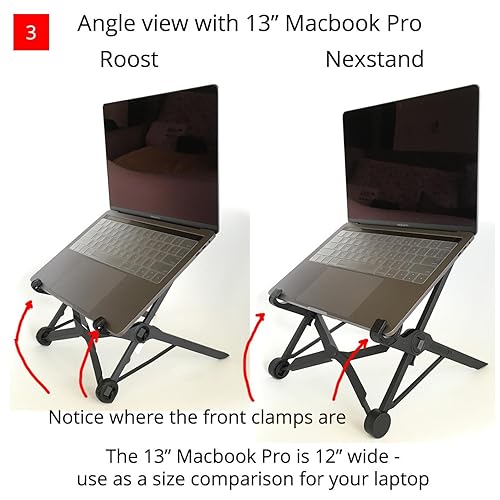
I recently bought the 13” Macbook Pro 2016 laptop and needed a stand that was ultra portable for my travels. Doing some research I found out about the Roost stand, which is a foldable laptop stand that became very famous through Kickstarter. However, recently a Chinese copycat stand known as the Nexstand started selling on Amazon. Surprisingly there was a big price difference between the two - the Roost cost $75 vs the Nexstand which was only $25. I tried to search for a comparison between the two to understand why the Roost was so much more expensive (3x more) than the Nexstand, and what differences did the Roost have to justify the price. Unfortunately I couldn’t find any good comparison online, so I ended up buying both the Roost and Nexstand so that I could personally compare the two. Here’s my findings, and hopefully it will help others also trying to decide. Just to clarify, I bought both at full price and have no affiliation to either company. SIZE When folded, the Nexstand is about 1” longer than the Roost, and slightly thicker. This means the Roost is more compact than the Nexstand, and for me that is a bonus - the extra inch that I save in my bag means I can stuff an extra pair of socks in that space! When expanded though, the Nexstand’s extra inch of length makes a big difference in that it appears considerably larger than the Roost. It suggests the Nextstand can hold a thicker or wider laptop than the Roost, but the Roost is still very capable despite its smaller size. The Nexstand comes with extra clips for thinner laptops. CARRY POUCH Both come with a soft carry pouch. Some may not consider this a big deal, but its good to carry the stand in a pouch to avoid it scratching other devices or getting caught on cables. I personally love the subtle logo of the Roost bag, and really dislike the blatant branding of the Nexstand bag. FRONT CLAMPS The laptop is held in place on the stand by the front clamps. It’s an ingenious design and well executed that prevents the laptop from slipping off even when you tilt the stand. However, as the front clamps are the point of contact with the laptop, I wanted to make sure that the clamp would not scratch my laptop. Here the Roost provides the better quality material, using rubber front padding whereas the Nexstand’s clamp is purely plastic. That would seem to make the Roost the more favorable option, but then I notice that the Roost’s plastic back has a middle plastic ridge sticking out (see red arrow on image 4) - perhaps the result of the manufacturing process or a quality control issue?. I don’t think it will scratch the laptop but it’s irritating, especially compared to the Nexstand’s smooth surface. Also it should be noted that the Nexstand clamp looks to be capable of holding thicker laptops than the Roost. REAR BACK RESTS The back of your laptop sits on the rear back rests. This is the secondary point of contact between the stand and the laptop. Just like the front clamps, I want to make sure nothing scratches my laptop. With the Roost, the back rest is covered with a long rubber pad that will gently support the laptop, whereas the Nexstand has skimped here with just a small pad that isn’t even the full width of the bar. You can of course stick some electrical tape there if you want reassurance but the Roost clearly wins here. FRONT LEGS The front legs of the stand touch the table/surface and holds the laptop weight. To prevent the stand slipping around, the Roost has rubber padding that works excellently to keep the stand stable. The Nexstand is just smooth plastic and whilst the stand does remain stable when pushed, it can slide more freely on the table surface. Roost wins here. CONCLUSION Both the Roost and Nexstand are excellent, solidly built stands that will hold your laptop steady. I don’t want to advocate one above the other and have personally kept both for now. The Nexstand’s price represents excellent value and there’s nothing really negative about its quality, so if price is important to you, or you have a really large thick laptop, go with the Nexstand. The Roost provides extra luxuries such as rubber paddings and a more compact frame, but for the price it’s slightly more difficult to justify - if the price point doesn’t bother you then the Roost certainly represents a more “upgraded” model. ... show more
Reviewed in the United States on February 10, 2017 by Tim

  • Solid product. Very sturdy, lightweight, and good value
Size: V3 Color: Black
A great and sturdy design. Solid build and surprisingly light weight and portability. A bit steep cost of entry but worth it if you plan on using daily as an EDC for your laptop. This coming from an audio pro...I use along with a full-sized keyboard and mouse and it makes the setup work ergonomically like a charm! Worthwhile purchase. Very packable and the included pouch does the trick perfectly. ... show more
Reviewed in the United States on January 5, 2026 by J. Amador

  • The Roost 2.0 vs. the Nexstand K2
Size: V3 Color: Black
We here at Pack Hacker, checked out two popular laptop stands on the market—The Roost and The Nexstand. The Roost started from a Kickstarter campaign in June of 2013, and it worked so well that it later spawned a couple of imitators. The Nexstand Laptop Stand - Portable Laptop Stand - PC and MacBook Laptop Stand is one of those. They are both great stands and will work as intended, but here at Pack Hacker, we like to dive a little deeper. Portability: Right off the bat, the Roost just looks smaller. We weighed them ourselves, and the Roost stand comes in at 6.05 ounces, while the Nexstand is a bit heavier at 8.2 ounces. A minor difference in weight, but for someone who travels a lot and is concerned with the weight of their pack or wants to travel ultralight— two ounces is nothing to sneeze at. As far as physical size, the Roost measures 1.3 x 1.3 x 13 inches (3.3 x 3.3 x 33m), while the Nexstand comes in at 1.5 x 1.5 x 14 inches (3.81 x 3.81 x 35.6 cm). Again, we’re talking about a pretty small difference here, but when you actually look at them the Roost stand definitely feels more compact. The verdict? Roost takes the win on portability. It’s smaller, lighter, and has a better case. Ultimately, that means it will pack away better in your bag or luggage. Durability & Sturdiness: With these stands, the Roost feels really robust and solid when you first pick it up. The rubber on the contact points—where the stand will be touching the laptop—is definitely of a higher quality than the Nexstand. The Nexstand feels a little looser, more wobbly—if that’s a word—and the rubber is much harder. As far as durability goes, the Roost wins again for durability and sturdiness. Although the Nexstand marketing team really likes to put gym weights on their stand to show its sturdiness, the Roost stand is built out of better materials—glass-fiber reinforced nylon vs. PVC—and feels a lot better. Versatility & Height: Both of these laptop stands will hold just about any laptop you can get your hands on, which is awesome. We have heard reports about a couple cases where thicker laptops won't fit, but the majority of laptops will work with these. The Roost stand uses a rubber sort of pivot grip, which latches onto the front of the laptop, and secures it to the stand very nicely. The Nexstand has the same type of attachment, although the harder plastic means it doesn’t grip the laptop quite as well. Ultimately, this shouldn’t be a problem—but if you bump your laptop on the Nexstand it is more likely to fall out of the stand. The Roost stand offers three different height settings that you can easily adjust between, which is very convenient. Depending on the height of the table or your chair you may need to adjust the stand a bit. But the Nexstand offers eight settings—which is amazing. The Nexstand scores major points there. It should also be noted that both stands have the same maximum height—20.5 inches to the top of the screen with a 15” Macbook Pro. For versatility and height, we just couldn’t pick a winner—it’s a tie. The Roost stand is better at holding different laptop sizes and doesn’t need the extra clips. But the Nexstand has way better options for height adjustments, making it super versatile and convenient. Price: This one is pretty clear cut. At the time of this review, the Roost stand is on sale for $79.95, while the Nexstand is listed at $29.95. We’ll let you figure out who won this category. Who won which category?: - Portability: Roost - Durability & Sturdiness: Roost - Versatility & Height: Tie - Price: Nexstand Conclusion: The Roost stand is clearly the superior laptop stand. That being said, both are capable stands, unless you’re working in some extreme environments you should be fine with either one. Ultimately, we think this decision comes down to price. If you’re the kind of person who likes to have the best gear possible (we fall into this category), go for the Roost. If you’re a little more budget conscious, the Nexstand will serve you well. After all, you can buy close to three Nexstands for the same price as one Roost stand—and it is still a perfectly capable stand. Pros: When folded, the Roost is light, compact, and easily stowed. Holds most laptops very securely. Soft rubber contact points means no damage to your laptop. Cons: You’ll need to bring along a keyboard + mouse. Price—this is one of the more expensive portable laptop stands out there. Limited height adjustments compared to other stands. ... show more
Reviewed in the United States on May 3, 2018 by Tom Wahlin @ Pack Hacker

  • Good qui
Size: V3 Color: Black
I thought it was cheap plastic material, BUT it is really good quality and strong plastic structure. It very lightweight and easily open it up. I love it. It’s quite expensive but it’s worth it.
Reviewed in the United States on April 6, 2026 by Jason Oh

  • The most portable and useful travel laptop stand on the market right now.
Size: V3 Color: Black
I used the original roost stand from way back when it launched on Kickstarter many years ago. I have also used the v2 stand for many years as my primary stand for work at my desk and while traveling. I was curious about this latest iteration and bought it to compare. I also did a comparison against the Nexstand. In my opinion, this latest Roost stand is the best version yet. The Nexstand doesn't compare to any of the Roost stands, being larger to pack, flimsier, and less adjustable. This latest version of the Roost has the most height settings of any of the iterations and folds up slightly more compactly to boot. The only disadvantage compared to the v2 is that you can't adjust the height on the fly, you need to remove the laptop and adjust the height before adding the laptop again. That said, the slight additional compactness, sturdiness and height adjustments (3 vs 7) make this iteration the best. If you can afford the cost, this is the best portable laptop stand to use with a keyboard and trackpad (or mouse) by quite a bit. Worth every penny in my book. ... show more
Reviewed in the United States on June 29, 2025 by Daniel Lee

  • Functional, practical, beautifully manufactured, but pricey
Size: V3 Color: Black
For me, the jury is still out on this product. I decided to buy it after reading a review on The Wirecutter. I have a MacBook Pro that I use in the kitchen, and my wife was commenting on how I can sit for hours, hunched over, using it. After reading the review, I decided to give this device a try. I've used it now for about a week, so here are my initial reactions. First, it's a beautifully made device. While it is mostly plastic, it is very sturdy and the design is well thought out. The basic idea is to raise the laptop to eye level in order to keep the user from slouching or hunching over. It does a fine job by lifting and tilting the laptop while holding it securely. Once the stand is open, the laptop is inserted into the two front grips by tilting the computer forward, inserting the edge into the grips, then tilting it back onto the stand. It's pretty ingenious and holds the laptop very securely. After the laptop is properly inserted in the stand, you can adjust the level of the screen to one of three levels. From trial and error, I chose the middle level. One "gottcha" is that to raise the laptop level after lowering it, you need to remove the computer from the stand and lightly push the legs together to reset the height to the top-most setting. It would be more elegant if you could adjust the level without having to remove it. The good news is that once you've arrived at what the right height for you is, you probably won't need to adjust it again. The stand is very light and compact. It weighs only 3.2 ounces and folds into a very compact form factor. It would be trivial to throw this into your backpack or suitcase for travel. It comes with a nylon case, although for me it would just be another thing to lose. If I take it with me, I just toss it in my suitcase between a couple shirts and I'm off. The bigger issue is the true expense of the item. The Roost costs $75, not inexpensive for a laptop stand by any standard. I get that you pay for design and functionality, but $75 is still a pretty hefty price to pay for a plastic stand, although I concede it is very well designed and manufactured. The true expense is ultimately determined by adding a keyboard and mouse/trackpad, neither of which are included. If you work for a corporation that can supply you with these items, then this is irrelevant. On the other hand, if you're self-employed like me, and don't have spare keyboards hanging around, you'll need to purchase one. I chose to buy a reconditioned Apple Bluetooth Keyboard and trackpad, adding an additional $80 to the cost of this system. So the total cost is really $155 for it to be functional. Unfortunately, unlike the Executive Office Solutions Portable Adjustable Aluminum Laptop Desk/Stand/Table Vented Notebook-Macbook-Ergonomic Extra Wide Tray TV Bed Lap Tray Stand Up/Sitting-Black, the Roost isn't designed for using the built-in keyboard and trackpad. The expense is also a bit of a problem when you consider that an AmazonBasics Adjustable Tablet Stand is also well designed and manufactured and sells for under $10. That stand is every bit as durable and every bit as clever and well designed for its purpose as is the Roost. Unlike the Roost, you can continue to use an iPad and the table stand with or without external accessories. My point is that if you're ordering this device without considering that you'll need a keyboard and mouse/trackpad, you haven't arrived at the true cost of this device. (As a sidebar, I find it incredible that there isn't a combination keyboard and trackpad designed for Mac users. What's up with that?) I'm going to use the Roost for awhile and see if I can justify its initial expense plus the cost of a keyboard and trackpad. I definitely like the ability to have the screen at eye level, and hopefully my good posture will justify the expense. More to come! Monday, September 26, 2016 update: I've been using this stand for a few months now, and can testify to both it's functionality and durability. My original concern of cost still holds, but I can definitely say I've been sitting up straighter which hopefully translates to my well-being. I have uncovered one other advantage of the Roost Stand, although it isn't a biggee. I always have something to drink next to my laptop. Whether I'm having my morning coffee or drinking ice water from my Tervis, liquid is always present. With the laptop elevated, the only items at risk are the trackpad and keyboard. That would be nowhere near the disaster of spilling a glass of water on my 15" MacBook Pro. Sunday, December 4, 2016 update: I just upgraded my early 2010 MacBook Pro to the new 15" with Touchbar. It fits perfectly in the Roost and continues to offer the same advantages as I've outlined above. The new computer fits just as well as the older MacBook Pro, and in fact, just about any 13" or 15" laptop will fit nicely into this stand. BTW, I received a note that corrected me on my use of the word "plastic" to describe this stand. I stand corrected. It is actually made of "…glass filled nylon and deltan." My apologies to the manufacturer. ... show more
Reviewed in the United States on August 9, 2016 by Bocaboy

  • BEST LAPTOP STAND ON THE MARKET
Size: V3 Color: Black
I met the founder at a conference (what's up man, go blue!!!). When I got a $500 "work from home" budget from my gig, I decided to pick this up for my 16in Macbook Pro. Not only is it lightweight and durable, I love how it folds up and even comes with a bag. This laptop stand blows everything I have used before out of the water! It's really easy to setup and get working in minutes. The color is really cool as well. ... show more
Reviewed in the United States on December 21, 2025 by Drew

  • Money well spent!
Size: V3 Color: Black
When I started college I knew I wanted a stand for my laptop and came across the Roost V3 in my research. I am so pleased with this stand as it is extremely sturdy. It has rubber grips on the front 2 legs which keep it firmly in place and the rotating hinge clasps grips the laptop in place. I like that it has easy to adjust height preferences and includes a guide for optimal viewing. It's lightweight and easy to fold up and transport. I use this primarily at home when doing school work and my neck and shoulders don't ache the way they did when I bent over my laptop before. It may seem expensive for a stand but the quality is definitely there and I have zero regrets about this purchase. If you work from home, do schoolwork or just sit at a computer a lot do yourself a favor and add this to your desk. ... show more
Reviewed in the United States on July 22, 2022 by Cathy

Can't find a product?

Find it on Amazon first, then paste the link below.
Checking for best price...