Search  for anything...

Razer Huntsman Mini 60% Gaming Keyboard: Fastest Keyboard Switches Ever - Linear Optical Switches - Chroma RGB Lighting - PBT Keycaps - Onboard Memory - Classic Black (Renewed)

  • Based on 379 reviews
Condition: Refurbished - Excellent
Checking for the best price...
$59.98 Why this price?
Save $25.52 was $85.50

Buy Now, Pay Later


As low as $10.00 / mo
  • – 6-month term
  • – No impact on credit
  • – Instant approval decision
  • – Secure and straightforward checkout

Ready to go? Add this product to your cart and select a plan during checkout.

Payment plans are offered through our trusted finance partners Klarna, Affirm, Afterpay, Apple Pay, and PayTomorrow. No-credit-needed leasing options through Acima may also be available at checkout.

Learn more about financing & leasing here.

Selected Option

Free shipping on this product

90-day refund/replacement

To qualify for a full refund, items must be returned in their original, unused condition. If an item is returned in a used, damaged, or materially different state, you may be granted a partial refund.

To initiate a return, please visit our Returns Center.

View our full returns policy here.


Availability: In Stock.
Fulfilled by Amazon

Arrives Thursday, Mar 12
Order within 15 hours and 18 minutes
Available payment plans shown during checkout

Protection Plan Protect Your Purchase
Checking for protection plans...

Color: Classic Black


Size: Keyboard


Style: Huntsman Mini


Configuration: Linear Optical Switch


Features

  • The #1 Best-Selling Gaming Peripherals Manufacturer in the US: Source - The NPD Group, Inc., U.S. Retail Tracking Service, Gaming Designed: Keyboards, Mice, PC Headsets, and PC Microphones, Based on dollar sales, Jan. 2017- June 2020 combined
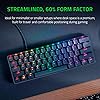
  • Faster Than Traditional Mechanical Switches: Razer Linear Optical switch technology uses optical beam-based actuation, registering key presses at the speed of light (15-30% shorter actuation distance than other linear switches at 1.0 mm)
  • Ultimate Personalization & Gaming Immersion with Razer Chroma: Fully syncs with popular games, Razer hardware, Philips Hue, and gear from 30+ partners; supports 16.8 million colors on individually backlit keys
  • Quality, Aluminum Construction: Covered with a matte, aluminum top frame for increased structural integrity
  • Oil-Resistant Doubleshot PBT Keycaps: Made of textured, high-grade PBT for a more durable and textured finish less prone to long-term grime buildup
  • Fully Programmable Macros: Razer Hypershift allows for all keys and keypress combinations to be remapped to execute complex commands

Description

Oil-Resistant Doubleshot PBT Keycaps, Made of textured, high-grade PBT for a more durable and textured finish less prone to long-term grime buildup

Brand: Razer


Compatible Devices: Gaming Console


Connectivity Technology: USB


Keyboard Description: Gaming


Recommended Uses For Product: Gaming


Special Feature: Lighting


Color: Classic Black


Number of Keys: 61


Keyboard backlighting color support: RGB


Style: Huntsman Mini


Product Dimensions: 4.07 x 11.56 x 1.45 inches


Item Weight: 1.1 pounds


Manufacturer: Razer Inc.


Language: English


Item model number: RZ03-03390200-R3M1-cr


Date First Available: September 15, 2020


Frequently asked questions

If you place your order now, the estimated arrival date for this product is: Thursday, Mar 12

Yes, absolutely! You may return this product for a full refund within 90 days of receiving it.

To initiate a return, please visit our Returns Center.

View our full returns policy here.

  • Klarna Financing
  • Affirm Pay in 4
  • Affirm Financing
  • Afterpay Financing
  • PayTomorrow Financing
  • Financing through Apple Pay
Leasing options through Acima may also be available during checkout.

Learn more about financing & leasing here.

Top Amazon Reviews


  • It's good
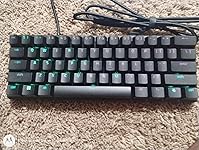
The Razer huntsman mini looked brand new. The only thing that looks suspicious is the key caps because there's a steelseties icon keycap in the menu bottom , and it looks like there's no 2 bottom.
Reviewed in the United States on January 4, 2024 by No No

  • Awesome
The media could not be loaded. Awesome piece of art. You can do anything with the razer chroma synapse app, any colorful profiles, anything. I was little bit scared because this is my first order ever made on Amazon (Czechia wasnt much supported for shipping), when I saw few reviews that wasn’t much good. Got the keyboard today, seem to be working nice. ... show more
Reviewed in the United States on August 19, 2022 by Michael Michael

  • Great keyboard
Very happy with this keyboard. Perfect for gaming.
Reviewed in the United States on March 10, 2024 by Amazon Customer

  • Huntsman 60% vs Black widow v3 65%
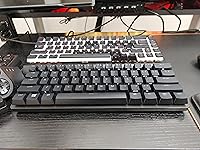
Sorry for only one picture. I had taken many photos of both keyboards but Amazon is not allowing me to upload images from my gallery so just took this shot to show both keyboards together. Despite buying primarily Razer products I am NOT a Razer Fan boy and my reviews are completely honest. I have been using both keyboards for more than a month now and ended up settling on the black widow. I bought both keyboards with Amazon Renew which gives you a 90 day return policy so it's a great way to get to know a product before keeping it and save some money too! The Huntsman is a nice keyboard but ultimately the black widow 65% form factor is was the determining factor the fact it could also share the dongle of my mouse was a nice bonus. If you like a 60% keyboard maybe the Huntsman is a winner. I will go into details below of the pros and cons of both. First I want to say, if you are not already in the Razer eco system like I am you may want to explore other options because the Razer Synapse is probably the only problem with these keyboards. Maybe Razer will fix them with updates, but I doubt it because they have a good enough approach to certain things. Black Widow (BW) 65% vs Huntsman (HM) 60% - Switches: The BW yellow switches only make sounds when released while the HM red switches make a sound when they bottom out and when released making this the louder of the two. They both feel like quality switches but the HM keys feel more stable. Also if you don't know the HM switches are optical and will last longer and have a faster response time but I find them to be way to sensitive to type on. The BW ditches allow the LED light to shine through which means if you switch key caps you won't be disappointed with the results. That said the HM had me feeling not impressed with some new key caps I purchased for the fact the the light only shines away from you. This is exaggerated by the spacebar. The BW is definitely the brighter option which is shocking since it is wireless. - 65% or 60%: I don't know why anyone would have a 60% keyboard if a 65% is an option. Removing arrow keys from a keyboard means you have to use your mouse when typing. I am a programmer and this quickly became a hindrance in my productivity. Razer gives access to the arrow keys by means of pressing function but the location is unnatural and you will quickly opt to using the mouse instead. This brings up one of the issues with Razer Synapse and that is you can't map Razers preset "hyper shift" keys so you can't correct the placement of things. Using the 60% as a dedicated gaming keyboards means you will be limited on custom mapping most of the keyboard. - Design: I think the HM has a much cleaner design with the small bezels. I honestly wish the HM was 65% and this would be a really hard choice. They both feel like quality keyboards but the HM comes with PBT Keycaps which makes this feel like the more premium choice even though the BW is twice the price. - Connectivity: The BW wins hands down offering Bluetooth, 2.4ghz and usb-c and unlike the HM the usb-c connector is not proprietary. I put a magnetic connector on the BW so that I can quickly connect it for charging only and leave it on 2.4ghz. works great but only issue with the BW is the keyboard goes to sleep even when charging and it doesn't wake quick enough to not be annoying. Can't seem to disable the feature either even if you have it off in the settings. Since I game with the Tartarus if I switch to the keyboard to quickly type something it is usually a sleep and the delay can be costly while gaming. Also Bluetooth seems to not be the best, I had to repair multiple times when I trying to reconnect to my computer using it. I try to just stick with the 2.4ghz. You have to connect all razer products to the USB ports directly on your computer or you will experience buggy behavior. The fact that the BW can use the same dongle as the Naga mouse means I only need 2 USB ports for my current setup and can avoid the bugs that razer doesn't want to address. One of those bugs is an increased frequency of key press lockups which I will go into more detail later. - Function: I found with both the BW and the HM and even the Tartarus Pro that sometines keys get stuck in a active/pressed state. This seems to be software related but I thought I would mention it. To fix it you have to press that same key again and rarely but sometimes you have to disconnect the device. Seems to be a trend with Razer products if you do your research. The sensitivity of the HM makes it a little more difficult to type on the the BW. Even just slightly resting your finger on a key will trigger it, seriously. What I would like to see: - Razer Synapse not restricting a users ability to customize the keyboard. That is the point of these gaming keyboards, isn't it. - fix the issue with the stuck keys, I don't see how any competitive gamer would trust a razer keyboard. Warning: In regards to all razer products, the don't work well when connected to any hub and must be connected directly to the computer. This includes Razers own hubs SMH! I have a Razer Core V2 and don't use the USB ports on it for my keyboard or mouse like I thought I could do. I think this is an issue with their Razer Synapse software because before I went all in on Razer I was all in on Logitech and never had issues with using USB hubs/docking stations. Razer is aware of the problem and instead of fixing it just tells users to connect directly to the computer/laptop. So if you go razer, make sure you have enough USB ports. ... show more
Reviewed in the United States on July 26, 2021 by Critmyself Critmyself

  • Razer is best
I switched the razer blackwidow chroma out for the Huntsman Mini mostly due to limited desk space and I couldn't be happier. I use it for gaming whatever else on pc. I recommend razer to anyone and everyone. Pros: small, simple, optical switches, detachable USB-C Cons: doesn't come with wrist rest and I wish it was magnetized so it stays in place. Great keyboard for the price. ... show more
Reviewed in the United States on August 7, 2021 by Shawn M. Shawn M.

  • Great Gaming Keyboard
Especially for small desk spaces.
Reviewed in the United States on January 18, 2024 by inthe303

  • Better than the Ducky
RGB is super nice, vibrant but not unbearable. The keys are quiet but have a very satisfying sound. They're very sensitive. Only downfall is sometimes my keys get somewhat stuck. To explain better the key doesn't stay down but the keyboard is thinking the key is getting pressed still. If that makes sense. ... show more
Reviewed in the United States on April 22, 2021 by Israel y.

  • Terrible Una verdadera estafa
PRODUCTO CHINO CON REBRANDING . No compren productos Razer , pesimo servicio de post venta y garantia de la marca, he comprado este teclado y nunca funciono la tecla N , ademas de diferentes mouse que a las semanas de uso normal presentan problemas de doble click. PORFAVOR busquen otra marca para comprar. ... show more
Reviewed in the United States on April 8, 2022 by Matias

Can't find a product?

Find it on Amazon first, then paste the link below.
Checking for best price...