




Search  for anything...

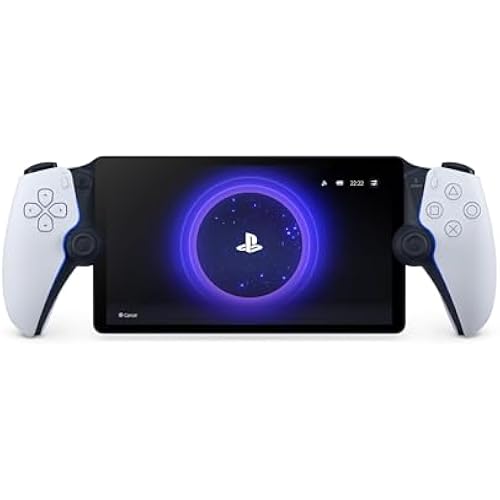
PlayStation Portal Remote Player - Midnight Black

  • Based on 4,973 reviews
Condition: New
Checking for the best price...
$179.00 Why this price?
Holiday Deal · 10% off was $199.99

Buy Now, Pay Later


As low as $29.83 / mo
  • – 6-month term
  • – No impact on credit
  • – Instant approval decision
  • – Secure and straightforward checkout

Ready to go? Add this product to your cart and select a plan during checkout.

Payment plans are offered through our trusted finance partners Klarna, Affirm, Afterpay, Apple Pay, and PayTomorrow. No-credit-needed leasing options through Acima may also be available at checkout.

Learn more about financing & leasing here.

Selected Option

Free shipping on this product
This item's return window has been extended for the holiday season: FREE refund/replacement until Jan 31, 2026

To qualify for a full refund, items must be returned in their original, unused condition. If an item is returned in a used, damaged, or materially different state, you may be granted a partial refund.

To initiate a return, please visit our Returns Center.

View our full returns policy here.


Availability: In Stock.
Fulfilled by Amazon

Arrives Dec 30 – Jan 5
Order within 1 hour and 12 minutes
Available payment plans shown during checkout

Protection Plan Protect Your Purchase
Checking for protection plans...

Color: Midnight Black


Features

  • Play Your Game Collection with Remote Play - PlayStation Portal Remote Player can play compatible games you have installed on your PS5 console, including your favorite games for PS5 and PS4.*
  • Cloud Streaming from the Game Catalog and Classics Catalog - Discover an awesome library of PS5 games on the PlayStation Portal Remote Player with PlayStation Plus Premium. Access hundreds of games from the Game Catalog and Classics Catalog, streamed directly to your PlayStation Portal Remote Player with new games added every month.
  • Cloud Streaming for PS5 Games in Your Library - With PlayStation Plus Premium, stream select digital PS5 games in Your Library from PlayStation Store directly to your PlayStation Portal Remote Player, with no downloads required. Enjoy instant access to some of the latest and greatest PS5 games in the palm of your hand.
  • Tempest 3D AudioTech - Surround yourself with sound via Tempest 3D AudioTech on PlayStation Portal Remote Player. Experience realistic, immersive audio in supported PS5 games when a compatible audio device is connected, either wirelessly via PlayStation Link or wired via the 3.5mm audio jack.
  • Beautiful 8 LCD Screen - Take in every exquisite detail of your favorite games as they come alive on a brightly lit and gorgeous full HD screen.
  • 60fps Capable at 1080p Resolution - PlayStation Portal Remote Player can deliver silky smooth gameplay at up to 60fps with high image clarity on its 1080p resolution screen.***
  • *PlayStation Portal Remote Player can stream compatible games installed on your PS5 console. PlayStation Portal Remote Player requires broadband internet Wi-Fi with at least 5Mbps for use. For a better play experience, a high-speed connection of at least 15Mbps is recommended. The quality and connectivity of your play experience may vary depending on your network environment. A PS5 console and account for PlayStation Network is required. The PS5 console must be connected to a broadband internet connection, powered on fully or in Rest Mode, and it must be paired with your PlayStation Portal Remote Player to play installed games
  • ** Games that require a VR headset (PlayStation VR or PlayStation VR2) or additional peripherals (other than a DUALSHOCK 4, DualSense, or DualSense Edge wireless controller) are not compatible. Games that must be streamed on PS5 using a PS Plus Premium membership are not compatible. Haptic feedback and adaptive trigger features
  • *** Individual game performance will vary based on the specific game being played, and the quality of connectivity in your network environment. Haptic feedback and adaptive trigger features are only available when those features are supported by the game being played.

Description

Take hold of a sleek new gateway to your PS5 games with the PlayStation Portal Midnight Black remote player. Feel the Power of PlayStation® in the Palm of Your Hand. Play your PS5 console over Wi-Fi with console quality controls using PlayStation Portal Remote Player. Experience the incredible immersion of DualSense wireless controller features like haptic feedback and adaptive triggers in supported games. Put your game collection on PS5 in the palm of your hand— PlayStation Portal Remote Player can play compatible games you have installed on your console without needing to play on a TV.

Release date: February 20, 2025


Product Dimensions: 13.89 x 5.99 x 3.79 inches; 2.56 Pounds


Type of item: Video Game


Language: English


Rated: Rating Pending


Item model number: CFI-Y1001


Item Weight: 2.55 pounds


Manufacturer: Sony Interactive Entertainment


Batteries: 1 CR5 batteries required. (included)


Date First Available: January 16, 2025


Frequently asked questions

If you place your order now, the estimated arrival date for this product is: Dec 30 – Jan 5

Yes, absolutely! You may return this product for a full refund within 30 days of receiving it.

To initiate a return, please visit our Returns Center.

View our full returns policy here.

  • Klarna Financing
  • Affirm Pay in 4
  • Affirm Financing
  • Afterpay Financing
  • PayTomorrow Financing
  • Financing through Apple Pay
Leasing options through Acima may also be available during checkout.

Learn more about financing & leasing here.
Top Amazon Reviews


  • Finally a standalone handheld console with Cloud Streaming!
Color: White
Edit 11/9/2025: Upping this to 5 stars. PlayStation released cloud streaming recently and it is AMAZING. All the connectivity issues with Remote Play back to my PS5 are nonexistent with Cloud Streaming, and there are nearly 3,000 games available. The Portal finally feels like a standalone handheld console, rather than being tethered to a (sometimes) finicky Remote Play connection I really wanted to use this device more. I loved the idea of having the ability to play my PlayStation 5 from the couch with something else on TV. However, there are some limitations: 1) Your PS5 must be plugged in via ethernet for this to work well. For whatever reason, the WiFi on this device isn't as strong as something like an iPhone when my PlayStation 5 was connected via WiFi. 2) Not a great device for traveling. Due to the device size, it's hard (especially adding a case) to fit this in a smaller bag or easily pull out on a plane. Obviously, this is limited too by the fact that it needs to connect back to your PS5, and I had pretty consistent issues trying to use hotel WiFi or hotspots to connect. If you don't mind the above flaws, this device feels great, the feedback is great, and as a controller it's the closest thing to a DualSense controller. My only gripe with the controller itself is the sticks are smaller than they are on normal controller, and I would've liked the bigger size. ... show more
Reviewed in the United States on October 29, 2025 by Kevin Peck

  • Fantastic device for what it is: a PS5 remote player with all the functionality of a PS5 controller
Color: White
The PS portal is a remote play device that connects to your PS5 allowing you to play games without use of the television. This is what it is advertised as doing, and it does this very well. There has been a recent update to the device that allows you to stream games from the PS Plus library of games if you are a PS Plus subscriber, completely bypassing your PS5. As of this review, the feature is still in beta, however, from my testing it works well. If you have a good connection from your PS5 to your router and have a good WiFi connection outside, you can even remote play your PS5 while you are not at home, such as in a hotel. I suggest using your phone's hot spot on a 5G connection to do this. For a more responsive and lag free experience make sure your PS5 is connected to your router with an Ethernet cable instead of connecting via WiFi. This will provide a stable experience on your PS Portal. Remember that this is not a stand alone console like a Switch or a Steam Deck allowing you to play games directly on the machine. The PS Portal connects to your PS5 or can stream games from the PS Plus library if you are a subscriber. The PS Portal itself has all the functions of the PS5 controller which is awesome. That means when you play a game that makes use of the adaptive triggers, the PS Portal will feel just like your PS5 controllers. For instance, pulling an arrow back on a bow in a game with the actually feels like there is bow string tension in the trigger. This is light years better than just getting a set of controllers that attaches to a phone for remote play. It also has all the buttons like the PS button, screen capture button, and options button. The only thing missing is the touch pad. In order to use the touch pad, you actually touch the screen on the PS Portal and a virtual touch pad pops up on the screen. My favorite feature is that the PS Portal allows you to wake up your PS5 from sleep mode. If someone in the house is using the TV, no problem. Just pick up your PS Portal, connect to your PS5, and starting playing your games! ... show more
Reviewed in the United States on July 22, 2025 by Y. T.

  • PlayStation Portal Remote Player - PlayStation 5
Color: White
The PlayStation Portal Remote Player is an intriguing addition to the PlayStation 5 ecosystem, designed to enhance the gaming experience by offering remote play capabilities. Here’s a detailed review of this innovative device: ### Design and Build The PlayStation Portal features a sleek and modern design that mirrors the aesthetics of the PlayStation 5. It’s lightweight and ergonomically designed, making it comfortable to hold during extended gaming sessions. The build quality feels premium, with a sturdy construction that promises durability. ### Display and Performance The device boasts a vibrant 8-inch LCD screen with a resolution of 1080p, ensuring crisp and clear visuals. While it’s not OLED, the display still provides good color reproduction and brightness levels, making games look sharp and engaging. The performance is smooth, with minimal latency during gameplay, provided you have a stable and fast internet connection. ### Connectivity The PlayStation Portal relies on Wi-Fi for remote play, streaming games directly from your PS5. The setup process is straightforward, and once connected, it offers a seamless gaming experience. However, the quality of gameplay heavily depends on the strength and stability of your Wi-Fi network. In areas with poor connectivity, you might experience lag or lower video quality. ### Controls The device incorporates the same haptic feedback and adaptive triggers found in the DualSense controller, providing a tactile and immersive gaming experience. The controls are responsive and intuitive, ensuring that the transition from a standard controller to the remote player is smooth and natural. ### Battery Life The battery life of the PlayStation Portal is decent, offering around 4-5 hours of continuous play on a single charge. While this might not be enough for marathon gaming sessions, it’s sufficient for casual or on-the-go gaming. The device charges via USB-C, which is convenient and ensures relatively quick recharging times. ### Use Cases The PlayStation Portal is perfect for situations where you want to play your PS5 games away from your main console setup, such as in another room or even on the go. It’s also useful for households with shared TV usage, allowing you to continue your gaming sessions without hogging the main screen. ### Price and Value Priced at a premium, the PlayStation Portal is a niche device catering to dedicated PlayStation enthusiasts. While it adds convenience and flexibility to the gaming experience, the cost might be a deterrent for some, especially when compared to simply using existing devices like smartphones or tablets with a DualSense controller for remote play. ### Conclusion The PlayStation Portal Remote Player for the PlayStation 5 is a well-designed and functional device that enhances the versatility of the PS5 gaming experience. With its comfortable design, responsive controls, and decent display quality, it offers a solid remote play solution. However, its reliance on a strong Wi-Fi connection and relatively high price point might limit its appeal to only the most dedicated PlayStation fans. If you frequently find yourself wanting to play your PS5 games away from your main setup, the PlayStation Portal is a worthy investment. ... show more
Reviewed in the United States on July 24, 2024 by Benjamin

Can't find a product?

Find it on Amazon first, then paste the link below.
Checking for best price...
