Search  for anything...

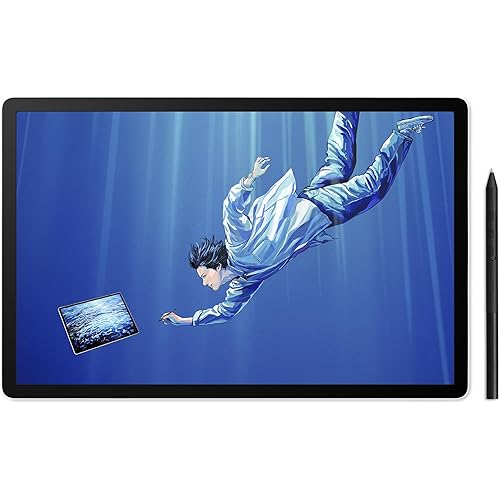
PicassoTab A10 Drawing Tablet • No Computer Needed • Stylus Pen, Pro Drawing Apps & Tutorials • 10" Screen, 6GB+128GB, Android 14 • Portable, Standalone for Digital Graphic Artist, Student • A10

  • Based on 4,107 reviews
Condition: New
Checking for the best price...
$199.95 Why this price?
Holiday Deal · 9% off was $219.95

Buy Now, Pay Later


As low as $33.33 / mo
  • – 6-month term
  • – No impact on credit
  • – Instant approval decision
  • – Secure and straightforward checkout

Ready to go? Add this product to your cart and select a plan during checkout.

Payment plans are offered through our trusted finance partners Klarna, Affirm, Afterpay, Apple Pay, and PayTomorrow. No-credit-needed leasing options through Acima may also be available at checkout.

Learn more about financing & leasing here.

Free shipping on this product
This item's return window has been extended for the holiday season: FREE refund/replacement until Jan 31, 2026

To qualify for a full refund, items must be returned in their original, unused condition. If an item is returned in a used, damaged, or materially different state, you may be granted a partial refund.

To initiate a return, please visit our Returns Center.

View our full returns policy here.


Availability: In Stock.
Fulfilled by Amazon

Arrives Dec 20 – Dec 21
Order within 12 hours and 24 minutes
Available payment plans shown during checkout

Protection Plan Protect Your Purchase
Checking for protection plans...

Features

  • SKETCH, ANIMATE or TAKE NOTES: Discover the most affordable art tablet designed for creativity and productivity. It comes with an active pen and pre-installed drawing and animation apps, making it perfect for artists, animators, or students taking notes in class.
  • 4 BONUS ITEMS INCLUDED: Inside the box, you'll find a high-quality tablet case, a drawing glove, a universal power adapter, and a pre-installed screen protectorcollectively worth $50all bundled with the 10-inch tablet and active pen.
  • CLEAR DISPLAY, AMPLE STORAGE, AND POWERFUL PERFORMANCE: Powered by a high-performance MediaTek Octa-core processor, this tablet excels at multitasking. Its IPS HD display delivers crystal-clear visuals, while the 128GB storage capacity allows you to download thousands of apps from the Play Store.
  • SEAMLESS CONNECTIVITY: Stay connected with built-in WiFi and enjoy entertainment on the go. Ideal for streaming Netflix, playing games, or browsing the web. Plus, a USB-C port ensure you have all the connectivity options you need.
  • CERTIFIED QUALITY AND WORRY-FREE PURCHASE: GMS, FCC, and CE certifications guarantee safety and quality. Enjoy peace of mind with a 1-year warranty and exceptional customer support. Reach out to us with any questionswe're here to help!

Brand: Simbans


Connectivity Technology: Wi-Fi


Pressure Sensitivity: 4096 Levels


Operating System: Android 14


Special Feature: Front Facing Camera, Multi-Touch Screen, Rear Facing Camera, Stylus Pen


Package Dimensions: 14.41 x 8.7 x 2.09 inches


Item Weight: 3.56 pounds


Item model number: A10


Batteries: 1 AAAA batteries required. (included)


Date First Available: June 16, 2017


Manufacturer: Simbans


Language: English


Frequently asked questions

If you place your order now, the estimated arrival date for this product is: Dec 20 – Dec 21

Yes, absolutely! You may return this product for a full refund within 30 days of receiving it.

To initiate a return, please visit our Returns Center.

View our full returns policy here.

  • Klarna Financing
  • Affirm Pay in 4
  • Affirm Financing
  • Afterpay Financing
  • PayTomorrow Financing
  • Financing through Apple Pay
Leasing options through Acima may also be available during checkout.

Learn more about financing & leasing here.

Top Amazon Reviews


  • The best drawing app that I found was ibis paint X. If you've used clip studio it's close.
I am very pleased with this tablet. The only critique is I wish it had more sensitivity for the tablet pen. Which I know is about 1000 and my other tablet is at 2000. So there is very much a difference. I think the price is the best and it's a really nice working tablet. I've downloaded tons of apps so far and haven't found any issues. I've been trying to find apps that support drawing. I wasn't a huge fan of the ones provided so I kept searching. Ibis paint X: Good app and you can upload to your clip studio cloud app. Adobe sketcher: Very good feeling with the pencil, but the pen is lacking. Good for sketching. Sketch - draw and paint A very close second to ibis paint, but they have a nice drawing community that will be taken down in September. Overall it's powerful enough for the drawing and I never saw a need to have multiple apps open at the same time so I haven't done a stress test. I think it's great for when I'm on the go and need some digital drawing on the go. ... show more
Reviewed in the United States on July 19, 2019 by Aisling Pedrotti

  • Excellent tablet, great Customer Service!
This is a great drawing table for the beginner as well as a more experienced user. The tablet is large and the screen resolution is exceptional. The stylus is not bulky or awkward to use and feels quite natural for drawing. I like that this also came with the drawing "glove." I had an issue where the screen got cracked. This was due to it falling on the ground, not a defect. I contacted Simban's Customer Service found on their website. A very friendly Customer Service Rep. walked me through the process to get it repaired at their facility. The process was simple and he communicated frequently. I expected a 6 week turn around, ended up being 2 weeks. Their Customer Service went above and beyond to make sure everything was right with my broken tablet. Couldn't be happier with the tablet or with Simban's Customer Service! ... show more
Reviewed in the United States on June 1, 2020 by Jeed

  • Great for the growing artist
My daughter has been drawing on paper since she was 3. At first I thought it was just a phase, but she has continued to draw for the past ten years. I give you this bit of information to politely say, it’s taken her 7 of those years to get me to buy this tablet for her. We have spent so much money on special erasers, drawing pads, charcoal pencils, all of the “great stuff” artists use. We bought an iPad for my wife, and later handed it down to my daughter. Although there are some great apps for other tablets, the apps are limited in a lot of ways. For the past three years my daughter has been BEGGING for a “drawing tablet”. So I decided to do some research for specifics. The good: this particular tablet arrives with a specific drawing app that IPhone or Android does not offer. The display is very good, obviously with it being a “smaller size” the picture seems so much clearer. It’s very responsive with the stylus that it comes with. The price is within reason, and it allows for “YouTube” recording. The bad: although it does come with a leather bound case, there are no other options as far as a case goes. The stylus does not have a rubber tip, so you may have to buy a screen protector in order to prevent scratches (I’m not quite sure of this just yet, it’s only been two months). It only bolsters the desire for bigger and more expensive tablet. 😭 The down and dirty: I would definitely recommend this product to someone who is looking to grow their artistic abilities. My daughter takes Art in school and has been able to expand her abilities because of the different abilities the app has. Definitely buy the glove for the artist tablet, it comes with one black one, but if it gets caught in the couch, eaten by the dog, or just forgot at school, then it kind of curves the “earth is ending” moments. Great product, just know you ARE getting what you’re paying for. ... show more
Reviewed in the United States on March 6, 2019 by Eric & Amy

  • It's better than I thought it would be!
I love everything about it so far. I didn't realize that it essentially is like an android phone (with the app layout etc). This made the transition super smooth. Everything was very easy to find and navigate. It booted up very quickly. Screen protector already installed. There is a pretty little case that comes with it. There was a AAAA (heck I never knew there was such a thing) battery already in the pen with an extra one. Not sure how long the battery life lasts but I will update as I'll be using it a lot. Will see how long the tablet batter lasts after constant usage. I believe it turns off after a few minutes of no usage. I'm sure that can be adjusted. I only purchased it for the drawing. I will upgrade the sketchbook software that was installed but will also add ArtRage. Pros * It comes with a charger (US as well as UK/Europe included) with usb cord (to use in outlet or charge by computer). * If I wanted to, there is a HDMI port to connect to a computer or tv * You can add additional memory. *Pen sensitivity Cons/Other Thoughts * Technically I don't have any or have not found anything yet. It doesn't seem to get too hot when on for a very long time. *This is my first tablet so I can't say if it is heavy? I have arthritis and carpal tunnel so I wouldn't be the best judge of it anyway. But it doesn't seem too bulky or ridiculous. *Compared to a wacom pen, the included pen certainly has some weight to it. I do not believe it is plastic, it is perhaps metal or something similar (from unscrewing the cap) when taking a look at the battery. *The pen is not thick in width but it's not super skinny either. I honestly do not know what to compare it too. Umm.....If you need specifics feel free to ask and I'll try and get more information. It seems larger (in width) than a regular pen or pencil (is round/no edges). So maybe the size of a normal pen + maybe another 15%? Again I may just be way off but the weight and size does not mess with it's balance or my accuracy drawing. ***edit I don't know what I was thinking. It is the same size as a default wacom pen. Sorry. :D *The tip/nib seems similar to the default one that comes with a Wacom. I will update later to see how long it takes me to wear it down. To my knowledge there were no extras but I'm sure the universal default ones will fit. I will say that I will order more of the flex tip nibs. Edit 3/3/18 I've been playing with it everyday. Again I only use it for the drawing/reference photo capability and not for internet browsing etc. Revisited the default art program (with the 99 cent upgrade) so am still learning about the different tools/features. I did figure out ow to change the background color. I haven't quite found a way of adding color/painting that I like yet though. I now switch between it and ArtRage. The little daily challenges are also fun (can upload to deviantart). I tried replacing the default pen nib with one of the other ones I am more familiar with (fits wacom pens). Nope. It did not work. I am still researching if you can only use the default pen/nib or if there is a way to make any styluses work. I feel that the default is too hard. I like the smoother/felt type ones. Even with the screen protector on the tablet as well as drawing lightly, a person will scratch the crap out of the thing. I'm sure it would be easy just to put another screen protector on but hopefully you catch my drift. I did go ahead and purchase rechargeable AAAA batteries and an adapter as I use it for drawing a lot. Battery power overall? I can't gauge yet. I have ot remember to pay attention. I charge it all the way and also turn the screen off if I'm not drawing (ie sneaking in some drawing at work but a call comes in). I have noticed after disabling or force stopping programs the battery power is better. I also have wifi off because again, I'm just using it strictly for drawing purposes. ... show more
Reviewed in the United States on February 24, 2018 by Crystal \(^.^)/

Can't find a product?

Find it on Amazon first, then paste the link below.
Checking for best price...