Search  for anything...

Phomemo Label Maker, M220 Thermal Label Printer, 80mm Portable Bluetooth Barcode Printer Compatible with Andriod/iOS for Home, Office, Small Business, with 3 Packs Label & Case

  • Based on 3,121 reviews
Condition: New
Checking for the best price...
$68.98 Why this price?
New Year Deal · 30% off was $98.56

Buy Now, Pay Later


As low as $11.50 / mo
  • – 6-month term
  • – No impact on credit
  • – Instant approval decision
  • – Secure and straightforward checkout

Ready to go? Add this product to your cart and select a plan during checkout.

Payment plans are offered through our trusted finance partners Klarna, Affirm, Afterpay, Apple Pay, and PayTomorrow. No-credit-needed leasing options through Acima may also be available at checkout.

Learn more about financing & leasing here.

Selected Option

Free shipping on this product

30-day refund / replacement

To qualify for a full refund, items must be returned in their original, unused condition. If an item is returned in a used, damaged, or materially different state, you may be granted a partial refund.

To initiate a return, please visit our Returns Center.

View our full returns policy here.


Availability: In Stock.
Fulfilled by Amazon

Arrives Sunday, Feb 8
Order within 19 hours and 10 minutes
Available payment plans shown during checkout

Protection Plan Protect Your Purchase
Checking for protection plans...

Color: Black


Style: 1 Printer + 3 Roll Labels + 1 Case


Features

  • Ultra-Portable Design: The Phomemo M220 label maker is compact and lightweight, featuring stable Bluetooth technology for easy printing from smartphones and tablets using the "Print Master" app. The label maker support print thermal label width rang from 0.78'' to 3.14'', NOT support print 4 x 6 shipping labels,Charging with 5V 2A, Don't use the charger that output above 5V
  • Inkless and Cost-Effective: Utilize upgraded thermal technology for inkless printing, eliminating the need for ink, toner, or ribbons, and reducing costs compared to traditional label printers.
  • Versatile Compatibility: The M220 label maker is compatible with Android, iOS, iPad, Windows 10/11, and Mac, making it suitable for both mobile and desktop use in various settings like home, office, and small businesses.
  • User-Friendly Operation: Simply download the "Print Master" app, connect via Bluetooth, and start creating labels with the M220 thermal printer. For PC users, download the driver from the Phomemo website for seamless printing.
  • Diverse Applications: Print text, barcodes, QR codes, images, addresses, and more with the "Print Master" app, which offers a vast library of icons and templates to simplify label creation.
  • The Label Maker Complete Package - The box includes one Phomemo M220 label maker machine black, one M220 label maker storage case, an instruction manual, a USB data cable, one roll 40mm x 30mm thermal labels, one roll 60mm x 40mm thermal labels, one roll 70mm x 80mm thermal labels.
  • Phone and Tablet Start Printing - Step 1: Download the App 'Print Master'. Step 2: Turn on the M220 label maker and your phone's or tablet's Bluetooth. Step 3: Click the 'Printer' icon in the App to search for the M220 portable label printer, connect it via Bluetooth in the App, select the label size, and edit the content to start printing
  • Laptop/PC Starts Printing - Step 1: Please check your laptop/PC's operating system (OS) and download and install the correct M220 driver and the 'Labelife' app from the Phomemo website. Step 2: Use the USB data cable to connect the M220 label maker to your computer. Step 3: Select the label size, edit the content, and choose M220 from the printer list
  • How to Clean the Print Head - Wipe the cut parts of the label maker, especially the black lines, with alcohol cotton to ensure that there is no adhesive or foreign object on the print head. Note: Do not scratch the print head with any hard objects

Brand: Phomemo


Connectivity Technology: Bluetooth, USB-Type-C


Printing Technology: Thermal


Special Feature: Portable


Color: Black


Model Name: M220


Printer Output: Monochrome


Max Printspeed Monochrome: 40 ppm


Item Weight: 450 Grams


Product Dimensions: 2.4"D x 4.9"W x 4.6"H


Controller Type: Android, iOS


Maximum Media Size: 20-80mm


Included Components: 1 Label Maker Case, 1 M220 Label Maker, 1 Roll 40 x 30mm Labels, 1 Roll 60 x 40mm Labels, 1 Roll 70 x 80mm Labels


Print media: Labels


Scanner Type: Portable


Max Input Sheet Capacity: 1


Max Copy Speed (Black & White): 4E+1 ppm


Compatible Devices: Android & iOS Phone / Tablet (Connection Via Bluetooth on The App Not Phone or Tablet Directly), Chrome OS v3 and above laptop /PC (Connection Via USB Not Bluetooth), Linux laptop/PC (Connection Via USB Not Bluetooth), Windows x86 / Windows 7/8/10/11 and above laptop / PC (Connection Via USB Not Bluetooth), macOS 10.14 and above laptop/PC(Connection Via USB Not Bluetooth)


Sheet Size: 80mm


Maximum Black and White Print Resolution: 200-300 dpi


Warranty Type: limited warranty


Dual-sided printing: No


Maximum copies per run: 36


Max copy resolution black-white: 203 dpi


Duplex: Simplex


Hardware Interface: USB Type C


Ink Color: Black


Additional Printer functions: Print Only


Control Method: App


Output sheet capacity: 1


Number of Trays: 1


Processor Count: 1


Series Number: 220


Total USB Ports: 1


Model Series: M220


Printer Ink Type: Thermal


Memory Storage Capacity: 64 MB


Product Dimensions: 6.3 x 3.5 x 7.48 inches


Item Weight: 15.9 ounces


Item model number: M220


Batteries: 1 Lithium Polymer batteries required. (included)


Date First Available: February 22, 2023


Manufacturer: Zhuhai Quin Technology Co., Ltd


Frequently asked questions

If you place your order now, the estimated arrival date for this product is: Sunday, Feb 8

Yes, absolutely! You may return this product for a full refund within 30 days of receiving it.

To initiate a return, please visit our Returns Center.

View our full returns policy here.

  • Klarna Financing
  • Affirm Pay in 4
  • Affirm Financing
  • Afterpay Financing
  • PayTomorrow Financing
  • Financing through Apple Pay
Leasing options through Acima may also be available during checkout.

Learn more about financing & leasing here.

Top Amazon Reviews


  • Awesome label maker. So fun 🌠😎☀️
Color: Purple Style: 1 Printer + 3 Roll Labels
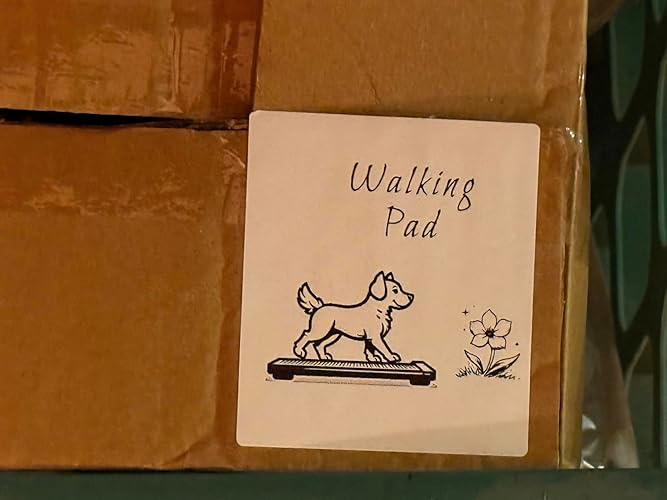
This LabelMaker is great 😊 It is so fun to use and I feel it’s very easy to learn. They have a lot of YouTube video tutorials on their YouTube channel so I highly recommend that and you could go to the playlists that they have on their YouTube channel to learn for the exact model printer you have for example this one they have 14 videos on the playlist. I bought some special labels for my cables and I’ve been making some for my boxes and they even have an AI feature so I asked it to make a dog walking on a treadmill because it was for my treadmill equipment and they made a really cute label which I’ll post here on this review. I think their customer is really good as I did reach out to them. They got back to me. I really like the color purple and the battery seems to be good. I like the fact that this is USB-C so I can use my existing iPhone charger to charge this. I think it’s very fun to make these labels. With the app, you can change many different fonts and you could add designs and choose from their templates. It’s very customizable.. The quality is very good. This is a thermal printer so there’s no ink it’s done by heat so that’s great. You never need to buy ink. The Bluetooth connectivity was very easy to connect to my iPhone. ... show more
Reviewed in the United States on July 25, 2025 by Dude Dude

  • Super easy to use and perfect for my small business
Color: Black Style: 1 Printer + 1 Roll Labels
I really like this label maker! I use it to print labels for my small business and it makes the process so much easier. I love that it’s thermal printing and not ink-based, so I never have to worry about running out of ink. The app is very simple to use on my phone, and I can design and print labels in just a few seconds. It’s also lightweight and easy to carry, so I can take it with me when I need to. Definitely recommend it if you want something practical and reliable! ... show more
Reviewed in the United States on October 1, 2025 by Dany Filippini Dany Filippini

  • got more than 1 already
Color: Green Style: 1 Printer + 1 Roll Labels
I’m really impressed with this product! From the moment I received it, the packaging was neat and secure. The item works exactly as described and exceeded my expectations in terms of quality and performance. It feels durable and well-made, and I’ve found it very easy to use. Customer service was also responsive and helpful when I had a quick question. Overall, this is a fantastic purchase that I would highly recommend to others. Definitely worth every penny! ... show more
Reviewed in the United States on June 25, 2025 by Orlando

  • Convenience over quality. Keeping, but will use for crafts.
Color: Black Style: 1 Printer + 1 Roll Labels
Set up was easy. I like that this little printer is Bluetooth and can work with just my phone. I plan to use it in my craft space to do some labels for my candles and items I make for friends. The app works fairly well. I would give the app 4/5 stars. Someone mentioned you have to subscribe to the app. No, you don't. If you want premium fonts and graphics you require a subscription. If you are fine with the standard or can import your own graphics, you are good to go. As for printing quality, that is where I knocked a star off. It is ok. It isn't great. It is a $45 thermal printer, so I need to keep that in mind. It isn't going to print like my laser or my ink jet. However, I am trading quality for convenience. If I were selling my crafts, then yes, I would do higher quality labels on a different printer. However, I want fast labels for items I give friends and family. So, this printer will be fine for that. Again, convenience over quality I guess. I don't need a $1500 label printer. I like that the printer fits on my craft desk in my garage. That is one of the reason I wanted it. I can print nicer labels on my other printers, but I have to go in the house, pull the files up on my computer, print to my inkjet or laser, then go back out to the garage. I do this all for one label. Yes, it is a first world problem. However, it is not convenient for one label. One label takes 10-15 minutes by the time I go through the process. I don't love the quality of this little printer when it comes to the handling of graphics, but I am not sending it back either. I didn't want to spend more than $50. So, I am getting what I paid for. It will work for my needs. ... show more
Reviewed in the United States on July 30, 2025 by KaceyB KaceyB

  • Great little label maker
Color: Green Style: 1 Printer + 1 Roll Labels
I absolutely LOVE this little label maker! It’s compact, easy to use. The setup was quick and seamless and the app is intuitive with plenty of fonts, sizes, and icons to personalize your labels.
Reviewed in the United States on July 29, 2025 by Marie N Jones

  • Good label / sticker printer
Color: Black Style: 1 Printer + 3 Roll Labels + 1 Case
Easy and makes nice big fonts
Reviewed in the United States on August 14, 2025 by Placeholder

  • Excellent Product
Color: Black Style: 1 Printer + 3 Roll Labels + 1 Case
I don’t usually write reviews, but after reading all the negative reviews and purchasing this product ready for a challenge, there was no challenge! The product is easy to use right out of the box! Scan the QR code, download and open the app, start to create your labels and print. I purchased the set with the bag and the three different size labels. I was more interested in the app when looking for a label maker. The app does not come with preloaded templates. You have to create your own. Once you have an idea it’s a very easy process. You can edit and print PDF files, access your photos to print on labels, includes barcodes, QR codes, OCR, icons, borders, lines, different fonts, tables, Excel, voice recognition, shapes, and scan functionality. The printer does turn off and you have to select “reconnect” before you print, if there is an extended time during print cycles. It’s one extra simple button. The labels print super fast and are ready to use. The printer seems very durable and quiet. The only two issues I have run into are printing super small font, it tends to blur a bit, and when changing label tape to a different one it does waste one or two labels, which is to be expected. I’ve attached a photo from the app for anyone in need of a simple template. ... show more
Reviewed in the United States on July 31, 2024 by Pepper Pepper

Can't find a product?

Find it on Amazon first, then paste the link below.
Checking for best price...