Search  for anything...

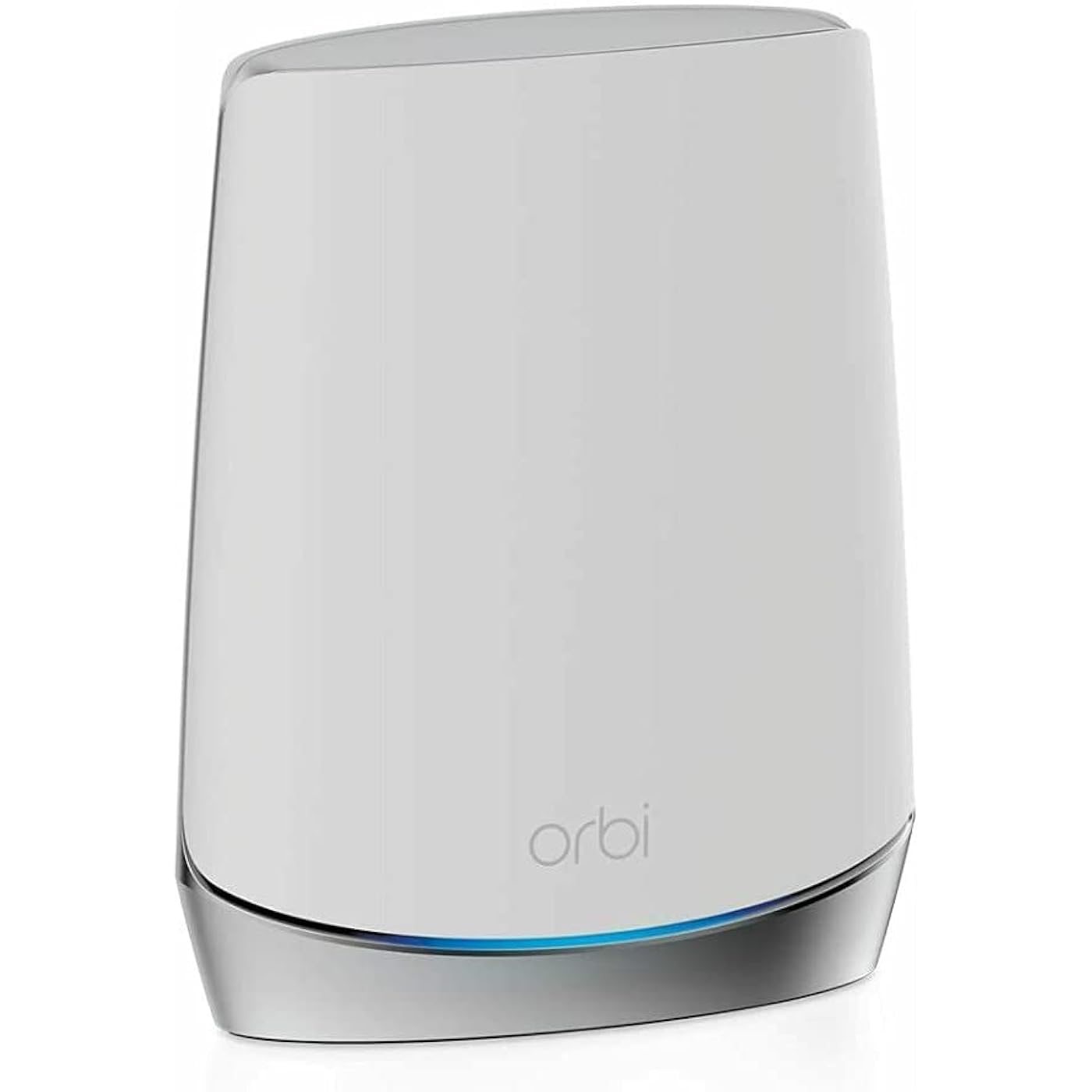
NETGEAR Orbi Whole Home Tri-Band Mesh Add-on Satellite (RBS750) – Works with Your Orbi WiFi 6 System| Adds up to 2,500 sq. ft. Coverage | AX4200 (Up to 4.2Gbps)
  • Based on 1,879 reviews
Condition: Used - Very Good
Checking for the best price...
$126.99 Why this price?
Save $176.00 was $302.99

Buy Now, Pay Later


As low as $21.17 / mo
  • – 6-month term
  • – No impact on credit to apply
  • – Instant approval decision
  • – Secure and straightforward checkout

Ready to go? Add this product to your cart and select a plan during checkout.

Payment plans are offered through our trusted finance partners Klarna, Affirm, Afterpay, Apple Pay, and PayTomorrow. No-credit-needed leasing options through Acima may also be available at checkout.

Learn more about financing & leasing here.

Selected Option

Free shipping on this product

This item is eligible for return within 30 days of receipt

To qualify for a full refund, items must be returned in their original, unused condition. If an item is returned in a used, damaged, or materially different state, you may be granted a partial refund.

To initiate a return, please visit our Returns Center.

View our full returns policy here.


Availability: Only 6 left in stock, order soon!
Fulfilled by Solano Tech

Arrives Friday, May 15
Order within 15 hours and 59 minutes
Available payment plans shown during checkout

Protection Plan Protect Your Purchase
Checking for protection plans...

Size: Satellite


Style: WiFi 6


Features

  • Compatible with RBK752 Orbi WiFi 6 System.
  • Each Orbi satellite adds 2,500 sq. ft. of coverage to form a reliable WiFi network and eliminate WiFi dead zones
  • Fast AX4200 WiFi 6 speed powers up to 4.2Gbps of uninterrupted streaming, HD video gaming, and web conferencing
  • Move freely inside and outside the house without losing connectivity, all with a single WiFi network name
  • Easily set up and manage your WiFi with the Orbi app

Description

The Orbi Tri-Band Mesh WiFi 6 Satellite provides speeds up to 4.2Gbps. Easily add up to 2,500 sq ft more coverage to your existing Orbi Tri-band Mesh WiFi AX System. Enjoy 4K/8K UHD streaming, lag-free gaming & smooth streaming. The Orbi app lets you enjoy your new Orbi WiFi in minutes.

Specs & Other Info

SpecificationDetails
BrandNETGEAR
Product SeriesOrbi RBS750
Key FeaturesWi-Fi, WPS, Parental Controls, LED Indicators, Guest & Access Point Modes, Beamforming, Enhanced Internet Security, Advanced QoS
Wireless FrequencyTri-Band with 2.4 GHz Support
Wireless Standards802.11ax & 802.11ac
CompatibilityPCs, Smart TVs, Smartphones, Tablets, Gaming Consoles, Printers, Security Cameras, Laptops, Smart Thermostats
Intended UsageOffice, Home, Gaming, Business
Package ContentsOrbi Satellite (RBS750), 12V/2.5A Power Adapter, Quick Start Guide
Connection OptionsWi-Fi, Ethernet
Dimensions9.75 x 7.75 x 6 inches
Weight1.9 pounds
Product ModelRBS750-100NAS
Launch DateMay 13, 2020
OriginVietnam

Frequently asked questions

The NETGEAR Orbi RBS750 Satellite can extend WiFi coverage up to an additional 2,500 square feet. It's important to note that the actual coverage will vary depending on the structure and layout of your house, like the number of walls and their material.

No, the NETGEAR Orbi RBS750 Satellite is specifically compatible with Your Orbi WiFi 6 System. It's an add-on satellite and may not work with other Orbi systems or WiFi routers which are not compatible with WiFi 6 technology.

The NETGEAR Orbi RBS750 offers AX4200 speed, translating to up to 4.2 Gbps. This ultra-fast speed ensures uninterrupted streaming, gaming, and browsing across multiple devices.

Yes, it supports Whole Home Tri-band Mesh technology. That means the satellite can maintain speed even as more devices connect, allowing for seamless WiFi connectivity throughout your home.

Top Amazon Reviews

🚀 Abunda's Overview

This is our summary and key points to consider based on customer reviews.


Based on the reviews, the NetGear Orbi Home Wifi System offers a significantly improved WiFi signal range and stability. The set up process can be complex and the firmware updates can occasionally cause disconnect issues. Even with its challenges, the performance of this product in enhancing WiFi connectivity across larger spaces shows a remarkable improvement compared to other devices.

Pros

  • 📶 Offers fast and strong WiFi signal
  • 🏘️ Effectively covers the entire house, reducing dead zones
  • 🔀 Dedicated backhaul channel between router & satellite ensures better performance
  • ⚙️ Decent amount of advanced networking features

Cons

  • 👎 Admin UI is quite plain and could be laggy
  • 🐞 Firmware updates can potentially cause network disconnects
  • 📞 Customer support may be frustrating
  • 🕒 Initial setup could be complex and time-consuming

Should I Buy It?

Given the ability of the NetGear Orbi Home Wifi System to cover extensive space with a strong and fast WiFi signal, it's recommended for those living in large houses with WiFi dead zones. Bear in mind that patience may be required during the initial setup and potentially problematic firmware updates. Overall, the performance seems to outweigh the drawbacks for most users.


  • Might need firmware update to sync satellite to router
The review from GUANGRONG ZENG under "Top Reviews from Other Countries" saved me. I made the mistake of buying the Orbi router/modem (CBR750) with no satellites, thinking my apartment was so small I wouldn't need a satellite. Big mistake, the wifi signal from the router in the living room did not reach the bedrooms in the back of the apartment. So I purchased the Orbi stand-alone satellite (RBS750). The instructions for syncing the satellite to the router/modem did not work at all (plugging the satellite in to an outlet and then pushing the sync buttons on the satellite and router). I kept getting the magenta light. So I followed the instructions from GUANGRONG ZENG (who got them from another reviewer). The only change I had to make, was that I found the specific IP address of my satellite in the Orbi app after I had connected the satellite via ethernet. I then entered Admin and Password as the username and password. It then took me to the page in the first image. Next step was update the firmware. I found my router's firmware version in the orbi app under router settings. Then I kept uploading the wrong file (CBR750 instead of RBS750). Once I get the right file uploaded, the firmware updated. See the second image. Then I refreshed and saw the third image. I then refreshed the Orbi app, and instead of saying "Satellites: 0 of 1," it now said "Satellites: 1 of 1." I have copied the original review below so that people can see all of the steps. Can not syn my new satellite for 2 hours, After review and tried C&J review, my system work great now, thank you for the help, i repost his post. credit to him. anyone having this problem, follow the step and give this a shot, thank you. 5.0 out of 5 stars Advanced setup may be required. Reviewed in the United States on October 21, 2023 Verified Purchase I've had good luck with my Orbi 750 system but wanted to expand the coverage with this satellite. I spent over 2 hours trying to get this to sync with my system with no luck. This is what I ended up having to do, and I’d assume this will work for whomever runs into this issue. • Start by plugging the new satellite into the Orbi router with an Ethernet cable. Plug the new satellite into power and wait for it to boot up (usually 2 minutes). • Wait for the light on the satellite to turn blue and then turn off. • At this point open a web browser and log into the Orbis interface (192.168.1.1) enter your username and password when prompted, then select attached devices and find the IP address of the new satellite. • Once you've located the new satellites IP address open a new tab and enter the new satellites IP address into the address bar and login (Username:admin/password:password). • Once you've logged into the new satellites web interface look for the firmware version and compare it to your existing Orbi firmware. If it doesn't match you need to manually update the new satellite firmware. • Open a new tab and search RBS750 firmware. Find the firmware version that matches your current system from the Netgear support site only (not 3rd party). • Once you've located the correct firmware download it to your desktop. When it's finished downloading extract the zip file to your desktop. The firmware file will end with .chk . Now go back to the browser tab for the new satellite and select firmware/update Firmware then select browse and navigate to the unzipped folder you downloaded and select the file ending .chk and update. This process can take up to 19 minutes. • Once the satellite is finished and there is no light coming from the new satellite unplug it from your router and place where you want it and plug it back into power. • After the light on the new satellite finishes blinking it should go blue for a moment then off. If the placement is poor you may get an amber light instead of blue and magenta if it's too far from the Orbi router. • This is how I got mine to work, I hope this helps someone in the same situation. After all this it works great for me. ... show more
Reviewed in the United States on April 29, 2024 by RKGSS

  • Better than expected.
Works great. Easy to set up. Much better WiFi coverage. Was able to put one in our mother in law’s house. She uses our Internet. Saves her some money!
Reviewed in the United States on January 11, 2026 by Amazon Customer

  • Works perfectly! Trust seller 5 stars =)
I can’t say enough great things about this purchase and the seller, Sophia. Before shipping the NETGEAR Orbi Whole Home Tri-Band Mesh Add-on Satellite (RBS750), she took the time to confirm that I actually needed this specific satellite and that it would be compatible with my existing network. That extra step really shows how much she cares about making sure customers get the right product. Once everything was verified, she shipped it immediately. It arrived just a couple of days later, and I had it set up and running in about 10 minutes. The satellite works perfectly and expanded my network exactly the way I hoped. The packaging was absolutely superb—seriously some of the best I’ve seen. The unit was protected so well that it probably could have survived a fall from a 20-story building! I’m extremely happy with this purchase. The item was exactly as described and exactly what I needed. Huge thanks to Sophia for the excellent service and attention to detail. Highly recommended seller! ... show more
Reviewed in the United States on March 6, 2026 by Mark

  • Effective Expansion for Improved Coverage
The NETGEAR Orbi Whole Home Tri-band Mesh Add-on Satellite (RBS750) has been an effective solution for expanding the coverage of my Orbi WiFi 6 System. While it works great and has significantly improved the WiFi signal strength in my home, I was disappointed that I had to purchase it separately to achieve the coverage I needed. The performance of the RBS750 satellite itself is impressive. It seamlessly integrates with my existing Orbi WiFi 6 System, providing a strong and reliable WiFi signal throughout my home. Furthermore, setup and installation were straightforward, thanks to the user-friendly Orbi app. I was able to quickly add the satellite to my existing network and optimize its placement for maximum coverage. However, my disappointment stems from the fact that I had to purchase the satellite separately after finding that the router alone did not provide adequate coverage for my 2,000 square foot home. Despite the router's claim to cover 2,500 square feet, I found that it fell short in certain areas of my home, leading to dead zones and unreliable connections. In conclusion, while the NETGEAR Orbi Whole Home Tri-band Mesh Add-on Satellite (RBS750) is a highly effective solution for expanding WiFi coverage, I was disappointed by the need to purchase it separately after finding that the router alone did not provide sufficient coverage. Despite this drawback, the satellite has greatly improved the WiFi experience in my home, making it a worthwhile investment for anyone seeking to enhance their Orbi WiFi system's coverage and performance. ... show more
Reviewed in the United States on February 23, 2024 by sosayspennylane

Can't find a product?

Find it on Amazon first, then paste the link below.
Checking for best price...