Search  for anything...

NETGEAR 4-Stream AX1800 WiFi 6 Router (RAX20-100NAS)

  • Based on 613 reviews
Condition: New
Checking for the best price...
$129.99 Why this price?
Save $20.00 was $149.99

Buy Now, Pay Later


As low as $21.67 / mo
  • – 6-month term
  • – No impact on credit to apply
  • – Instant approval decision
  • – Secure and straightforward checkout

Ready to go? Add this product to your cart and select a plan during checkout.

Payment plans are offered through our trusted finance partners Klarna, Affirm, Afterpay, Zip, Apple Pay, and Google Pay. No-credit-needed leasing options through Acima may also be available at checkout.

Learn more about financing & leasing here.

Selected Option

Free shipping on this product

30-day refund/replacement

To qualify for a full refund, items must be returned in their original, unused condition. If an item is returned in a used, damaged, or materially different state, you may be granted a partial refund.

To initiate a return, please visit our Returns Center.

View our full returns policy here.


Availability: Only 2 left in stock, order soon!
Fulfilled by SilverWave Co (SN Recorded)

Arrives Oct 26 – Oct 28
Order within 6 hours and 22 minutes
Available payment plans shown during checkout

Protection Plan Protect Your Purchase
Checking for protection plans...

Style: AX1800 WiFi 6 | 4 Streams


Features

  • WiFi 6 STREAM EVERYTHING AT FASTER SPEED: 1.8Gbps WiFi speed. Works with existing and new WiFi 6 devices like iPhone 11, Galaxy Note 10 and Galaxy S10.
  • WORKS WITH ALL INTERNET PROVIDERS: Replace your existing WiFi Router (separate modem or gateway required). Compatible with any Internet Service Provider up to 1Gbps including cable, satellite, fiber, DSL and more.
  • EASY TO SET-UP AND MANAGE: Connects to your existing cable modem and sets up and customizes in minutes with the Nighthawk app easily manage your WiFi settings at the device and network level, test your Internet speed, view speed history and monitor data usage.
  • USB CONNECTIONS: 1 x 3.0 USB port.
  • WIRED ETHERNET PORTS: 4 x 1G Ethernet ports.

Description

The NETGEAR 4-Stream AX1800 WiFi 6 Router, built with the latest generation WiFi 6 technology, provides greater capacity to handle more devices on your network and speeds up to 1.8Gbps ensuring that you can enjoy blazing fast internet connections on all your devices. This next-gen router is recommended for a small to medium home, up to 1,500 sq. ft., with 20 or more connected devices. Powerful quad-core processor ensures superior performance for concurrent real-time applications such as multimedia streaming, online gaming and audio/video chats. NETGEAR Armor provides advanced cyber threat protection for your home network and your connected devices.

Brand: NETGEAR


Model Name: RAX20-100NAS


Special Feature: WPS


Frequency Band Class: Dual-Band


Wireless Communication Standard: 802.11ax


Compatible Devices: Gaming Console, Laptop, Smartphone


Recommended Uses For Product: Gaming


Included Components: 4-Stream AX1800 WiFi 6 Router (RAX20), Ethernet cable, Power adapter, Quick start Guide


Connectivity Technology: Ethernet, Wi-Fi


Color: Black


Other Special Features of the Product: WPS


Frequency Band Class: Dual-Band


Wireless Compability: 802.11ax


Compatible Devices: Gaming Console, Laptop, Smartphone


Antenna Location: Gaming


Connectivity Technology: Ethernet, Wi-Fi


Antenna Type: Fixed


Operating System: ZyNOS


Security Protocol: WPA3


Number of Ports: 4


Control Method: Voice


Data Transfer Rate: 1800 megabits_per_second


LAN Port Bandwidth: 1000.0 Mbps


Voltage: 100240 volts


Maximum Upstream Data Transfer Rate: 900 megabits_per_second


Number of Antennas: 3


Router Firewall Security Level: High


Wi-Fi Generation: WiFi 6


Router Network Type: Wireless


Connectivity Protocol: Ethernet, Wi-Fi


Controller Type: App Control


Coverage: Up to 1,500 sq. ft.


Frequency: 5 GHz


Brand: NETGEAR


Model Name: RAX20-100NAS


Built-In Media: 4-Stream AX1800 WiFi 6 Router (RAX20), Ethernet cable, Power adapter, Quick start Guide


Model Number: RAX20-100NAS


Unit Count: 1 Count


UPC: 606449144352


Number of Items: 1


Manufacturer: NETGEAR


Mfr Part Number: RAX20-100NAS


Warranty Description: 1-year warranty


Item Weight: 1.2 pounds


Color: Black


Frequently asked questions

If you place your order now, the estimated arrival date for this product is: Oct 26 – Oct 28

Yes, absolutely! You may return this product for a full refund within 30 days of receiving it.

To initiate a return, please visit our Returns Center.

View our full returns policy here.

  • Klarna Financing
  • Affirm Pay in 4
  • Affirm Financing
  • Afterpay Financing
  • Zip Pay in 4
  • Financing through Apple Pay
  • Financing through Google Pay
Leasing options through Acima may also be available during checkout.

Learn more about financing & leasing here.

Top Amazon Reviews


  • A real work horse
Size: 9.2 x 6.9 x 2.4 inches
I love this router! Had one die after a few years, so I bought another one and its' still going strong. This model always picks up and carries more devices than my newer netgear routers. It has better signal strength so it always carries more load, but it runs smooth and cool.
Reviewed in the United States on May 1, 2026 by bangoskank

  • Forget the App!
Size: 9.2 x 6.9 x 2.4 inches
I worked on this for over 4 hours one day and couldn't get it to recognize the Internet connect. Start over from scratch. Try again...with different results. Finally! Download firmware update...15 minutes later...error...no Internet connection. Bedtime. Next morning. Reset manually (pin-hole at back of router). Used my laptop to connect to router for setup and manually update the Firmware. The App in my case was a waste of time. ... show more
Reviewed in the United States on August 3, 2020 by Dean Wilson

  • Works OK. Status lights unnecessarily bright.
Size: 9.2 x 6.9 x 2.4 inches
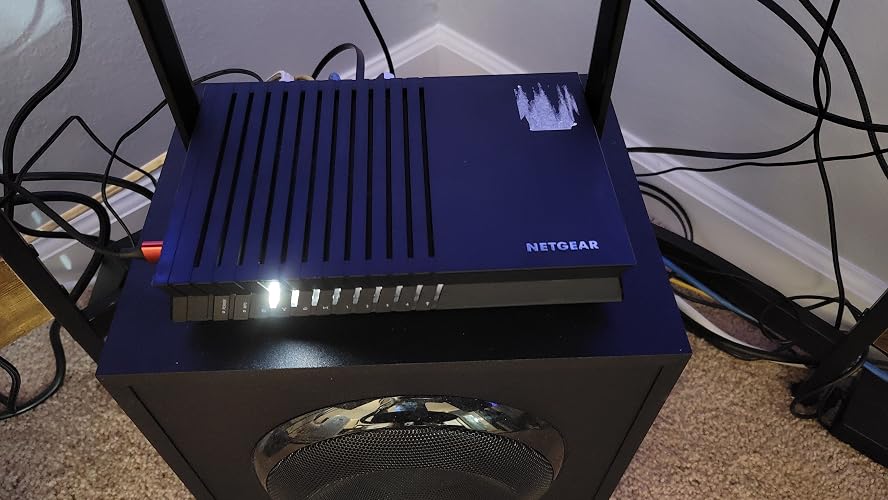
I bought the AX1800 because I did not need a long range modem for my small apartment. I also wanted a simple "box" looking device that was not overly large or styled, and small enough to put on my side desk. I have AT&T U-Verse service. Unfortunately, I must keep the old AT&T gateway/router combination unit to receive U-Verse service. And, I found out later there is no bridge mode on my unit. So, I use the new Netgear router just for my wi-fi service while the old gateway/router continues to do the routing. At least that is my understanding. All I needed wan an ordinary ethernet cable to connect the two devices. After making this connection, I turned off the built in wi-fi in the AT&T gateway/router. The Netgear puts out a strong wi-fi signal, which is strong enough even when set at 50% power. I have had no drop out problems at all since its installation. I live in an apartment building and am surrounded by dozens of other apartments. So, I do not want to unnecessarily broadcast my wi-fi signal to my neighbors. The four Ethernet ports on the back of the Netgear router are handy to have and work fine. The Netgear also includes a side mounted USB connection for an external hard drive or other storage device. But I have not used it. The Netgear Nighthawk app on my I-phone works OK. But I prefer to use the web based admin screens on my computer, which I feel are easier to use and allow me to do more things. But I must unplug my ethernet cable from my computer or these admin screens do not appear. They appear only when the computer is connected to wi-fi. Using the admin screens, I was able to identify and rename my various wi-fi connected devices and also to set the router to prevent additional devices from connecting in the future (for security). The Netgear firmware sometimes gave my wi-fi devices the names of the components inside them (for example if the wi-fi radio in a hub or other device is made by Texas Instruments). So, some re-naming was necessary. My only big complaint is that the Netgear's status lights are incredibly bright. And the labels beside the lights are difficult to read, especially since the front panel is indented and the lights are so bright. There should be some way to turn down the brightness of the status lights without turning them off completely. You will not want to sleep or watch a movie with these lights on and blinking. I put some tape over them and they still produce a lot of light. A simpler flat front panel with dimmer status lights would be a great improvement. I had to call Netgear tech support twice and they answered my questions. Update: The router works fine after almost 5 years of use. ... show more
Reviewed in the United States on December 20, 2020 by Lower East Sider

  • Simple beast router!
Size: 9.2 x 6.9 x 2.4 inches
Great budget router. Hasn’t let me down. Setup deliberately simple, but quick. Simple design. Antennas are great, just up or down and having to point 10 of them in different directions. LEDs are vibrant. One thing only that could be done, the icons on the router that represent what each LEDs are for, are black, just like the rest of the router. Could possibly be outlined white to see the icons better. I personally dabbed on some liquid paper and wiped off the excess, now icons pop. Simple beast of a router ... show more
Reviewed in the United States on April 15, 2023 by A. Salinas

  • Fast affordable WiFi 6 router.
Size: 9.2 x 6.9 x 2.4 inches
Update: The router bricked itself randomly a few days after I got it. Resetting it didn't help. Nothing worked. (I'm an engineer who is good at debugging stuff. Trust me, this was broken, probably due to a software bug.) Original Review: Refurbished? Why yes, it was. Did I realize that when I ordered it? No. Does it really matter, not in my case, but you should check to be sure you are getting a new item before purchasing it. I received a fairly clean device in the original packaging. There was a bit of dust and visual scuffs which I was able to wash off. Your mileage will vary. This router has good performance for my network. I'm running Starlink with a Boondocker Dishy Dualie power adapter, and I connected this to a 12 volt pigtail direct from my 48->12 volt battery step down converter instead of using the included 12vac->12vdc power adapter. I was being limited to about 97 Mbps by my previous 10/100 router. This is gigabit so it is far faster and capable of handling the full speed of Starlink. This router has two keyhole mounting holes on the back side, and I plan on mounting it to the wall of my mechanical room. They are just surface mount keyholes molded into the plastic housing, not through holes, but that is common and to be expected from consumer grade hardware. The Configuration was a bit annoying. There was no way to opt out of sharing "anonymous" debugging info with Netgear - a situation which I strongly disagree with, but which I was unaware of when purchasing this. Companies need to stop automatically collecting our data, but that's a larger moral issue. All in all, based on the performance and configuration, I would recommend this router. It has all the features you would want for a relatively full featured home internet, along with the performance of WiFi 6. I have noted other reviews mentioning their routers dying. I will update this review if my router suffers a similar fate. ... show more
Reviewed in the United States on October 18, 2023 by the_storyteller

  • Working great since it got install setup
Size: 9.2 x 6.9 x 2.4 inches
It has excellent strong WIFI signals within my new condominium in New York city. After connecting to the ISP Spectrum fiber optic modem and then setting up this router using my laptop connected with an ethernet network cable to one of the router's ethernet ports, the WIFI and ethernet began to work to access outside internet world. To setup, I entered in my laptop browser address using the router access URL (for computer only) which was printed on the tiny instruction paper inside the product box. The router requires you first to setup your new admin ID and password, before the access point function automatically begins to work. The Amazon Fire TV stick 4K Max is taking the 5G WIFI 6 signal from the router to broadcast 4K streaming video contents to my 4K TV now, and I enjoy watching improved streaming video. ... show more
Reviewed in the United States on September 13, 2022 by K. Chau

  • LEDS can turn mostly off
Size: 9.2 x 6.9 x 2.4 inches
Good router for the price. For those who can't stand the bright LEDS, you can turn all but the power off using the web admin page. Still bright but not as bright as all 6 LEDs on.
Reviewed in the United States on May 17, 2021 by Alex

  • Parental control don’t work, just regular router otherwise
Size: 9.2 x 6.9 x 2.4 inches
My main reason to purchase this was that its description showed I can block sites using parental controls during specific schedules. What a disappointment. It only works when you have the site using http only. Any reputable site will have https only. For example you try to block YouTube during school hours, it does not work. Even following examples on the site and help pages does not do anything. It’s a purely marketing play and no practical use. You can’t block YouTube based on IP because there are hundreds of IPs. Other than this issue, it works like a normal router. It does show VLAN support so it maybe helpful, but I don’t use that feature. —- Edit 5/18/21 I have this router running for just two days. It dropped the internet two times. I had to disconnect and reconnect WiFi. My old router (UniFi) had no issues with dropping internet. One more disconnect and this router is going back for a refund. ... show more
Reviewed in the United States on May 18, 2021 by Kakashi

Can't find a product?

Find it on Amazon first, then paste the link below.
Checking for best price...