Search  for anything...
msi

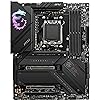
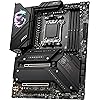
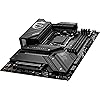
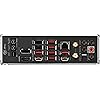
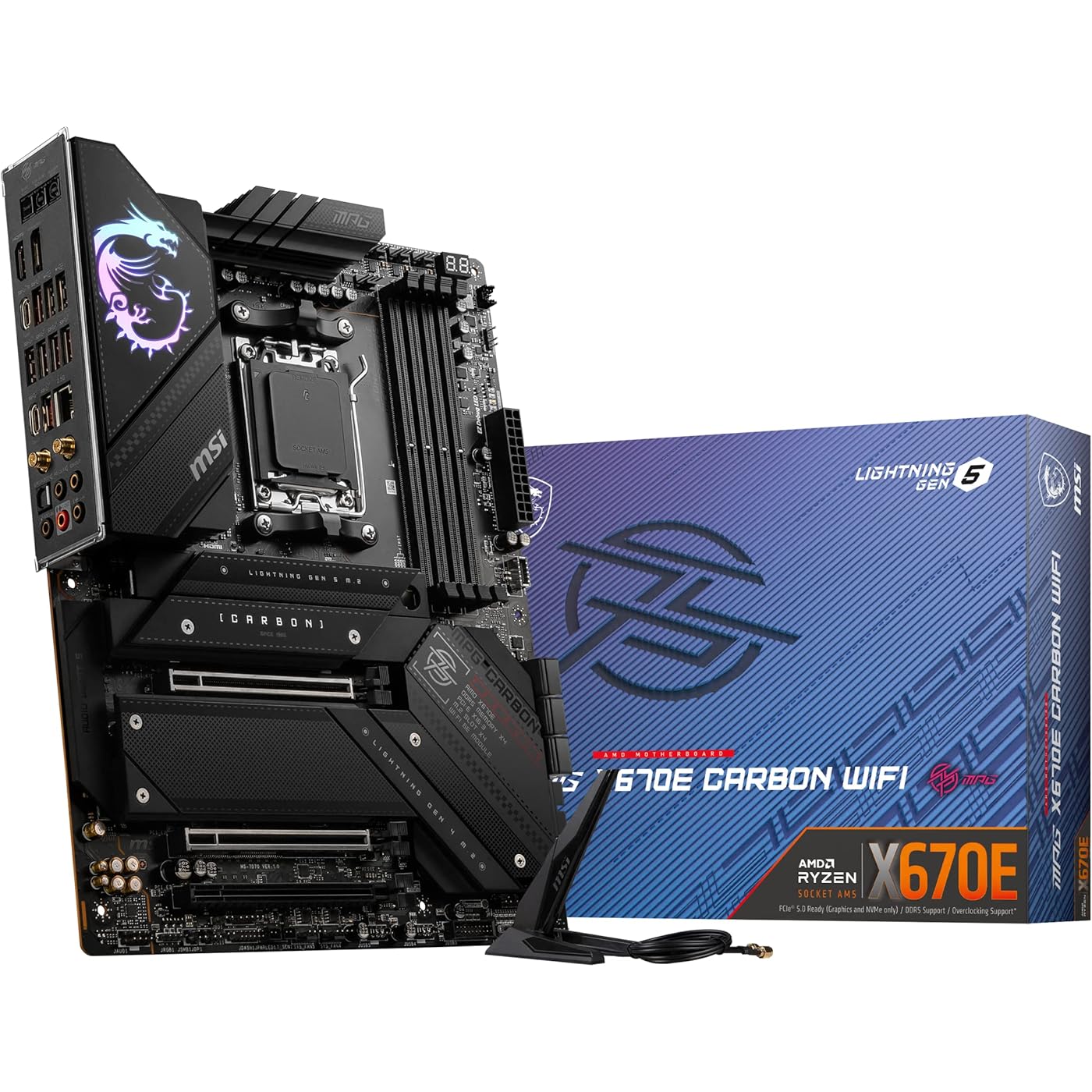
MSI MPG X670E Carbon WiFi Gaming Motherboard (AMD Ryzen 9000/8000/7000 Series Processors, AM5, DDR5, PCIe 5.0, SATA 6Gb/s, M.2, USB 3.2 Gen 2, Wi-Fi 6E, Bluetooth 5.3, LAN 2.5Gbps, HDMI/DP, ATX)
Based on 390 reviews
Condition: Used - Like New
Checking for the best price...
$249.00
Save $180.99 was $429.99

Buy Now, Pay Later


As low as $41.50 / mo
  • – 6-month term
  • – No impact on credit to apply
  • – Instant approval decision
  • – Secure and straightforward checkout

Ready to go? Add this product to your cart and select a plan during checkout.

Payment plans are offered through our trusted finance partners Klarna, Affirm, Afterpay, Zip, Apple Pay, and Google Pay. No-credit-needed leasing options through Acima may also be available at checkout.

Learn more about financing & leasing here.

Selected Option

Free shipping on this product

This item is eligible for return within 30 days of receipt

To qualify for a full refund, items must be returned in their original, unused condition. If an item is returned in a used, damaged, or materially different state, you may be granted a partial refund.

To initiate a return, please visit our Returns Center.

View our full returns policy here.


Availability: Only 1 left in stock, order soon!
Fulfilled by Rebornrack Renew

Arrives Friday, Oct 30
Order within 23 hours and 28 minutes

Available payment plans shown during checkout

Protect Your Purchase

Easy claims online, fast replacements, no fees

Checking for protection plans...

At a glance

Condition
Used - Like New
Style
MPG X670E CARBON WIFI
Model
7D70-010R
Storage
128 GB
Dimensions
9.6"L x 2.5"W x 12"H
Weight
2.09 kg
CPU Socket
Socket AM5
Warranty
3 Years
Works with
Personal Computer

Features 5

  • Support AMD Ryzen 8000/ 7000 Series Desktop Processors
  • Supports 4 DIMMs, Dual Channel DDR5-5600+ (OC)
  • Lightning Fast Game experience: PCIe 5.0, Lightning Gen 5 x4 M.2, USB 3.2 Gen 2
  • Premium Thermal Solution: Aluminum cover, heat-pipe, MOSFET thermal pads rated for 7W/mK, additional choke thermal pads and M.2 Shield Frozr are built for high performance system and non-stop gaming experience

Description

The MPG series brings out the best in gamers by allowing full expression in color with advanced RGB lighting control and synchronization. Experiment on another level of personalization with a front LED strip that provides convenient in-game and real time notifications. With the MPG series, transform your equipment into the center of attention and top leaderboards in style.

Specs 36

Brand msi
CPU Socket Socket AM5
RAM Memory Technology DDR5
Compatible Processors Supports AMD Ryzen™ 8000/ 7000 Series Desktop Processors
Chipset Type AMD X670
Memory Clock Speed 6600 MHz
Platform Windows 11
Model Name MPG X670E CARBON WIFI

Frequently asked questions

If you place your order now, the estimated arrival date for this product is: Friday, Oct 30

Yes, absolutely! You may return this product for a full refund within 30 days of receiving it.

To initiate a return, please visit our Returns Center.

View our full returns policy here.

  • Klarna Financing
  • Affirm Pay in 4
  • Affirm Financing
  • Afterpay Financing
  • Zip Pay in 4
  • Financing through Apple Pay
  • Financing through Google Pay
Leasing options through Acima may also be available during checkout.

Learn more about financing & leasing here.

Top Amazon Reviews


High-End Performance, Minor Quirk
Pattern: MPG X670E Carbon WiFi
The MSI MPG X670E Carbon WiFi motherboard is a powerhouse for enthusiasts seeking top-tier performance. Its robust 18+2+1 VRM design ensures stability even under heavy loads, making it ideal for demanding applications and overclocking scenarios. The board offers extensive connectivity options, including PCIe 5.0 slots, multiple M.2 Gen5 slots, and a comprehensive rear I/O with USB 4.0 Type-C, HDMI, and DisplayPort. Its sleek carbon-fiber aesthetic adds a premium touch to any build. However, some users have reported minor issues, such as BIOS updates being less frequent compared to other MSI boards and occasional installation challenges with certain cases due to USB port placements. Despite these minor drawbacks, the MPG X670E Carbon WiFi stands out as a reliable and feature-rich motherboard for high-performance systems. ... show more
Reviewed in the United States on June 9, 2025 by Casey Morgan

Very robust and full featured motherboard with top-notch build quality.
Pattern: MPG X670E Carbon WiFi
This is my second MSI motherboard, the first being a MEG X670E ACE. Both of these AM5 boards are superb and I'm very pleased with their quality, performance, and appearance. Yes, these boards are both on the more expensive side BUT I really believe here you get what you pay for. With the experience of these two boards, MSI has now become my #1 go-to manufacturer for such things. (RIP ASUS). ... show more
Reviewed in the United States on September 16, 2024 by S. H. Mellish

Ethernet/WiFi DOA
Pattern: MPG X670E Carbon WiFi
You'd think a board with WIFI in the name would have working Wifi. Well, it doesn't, and based on the number of Reddit posts with the same issue it isn't unique to my board. Network didn't work out of the box so I had to bypass this in the Windows 11 setup, no big deal and not completely unexpected with a new build. Updated all Drivers using the usb drive provided, still no working Ethernet or WiFi. Downloaded drivers from MSI Website on a different computer, transferred over using my own usb drive. Still doesn't work. Downloaded the newest bios from MSI for this MOBO on my other PC, flashed the BIOS, still doesn't work. Disabled all Ethernet and WiFi through BIOS, saved, rebooted, enabled it again. Does not work. Downloaded chipset drivers directly from AMD as the version was newer than the drivers from MSI website. Seemed promising, but still does not work. Faced with the choice now to tear my newly constructed machine apart and RMA the board or purchase a 3rd party $30 PCI-e ethernet/WiFi card. I chose the latter - when it arrives I'll update whether or not this works, but kinda ridiculous you have to get a 3rd party ethernet device when the motherboard boasts of it's top tier onboard network controller. Took a gamble on MSI since this board looked perfect for what I needed, but 1/10 will return to ASUS on future builds - ASUS has never let me down. PS - if for whatever reason the 3rd party ethernet card doesn't work this will be a painful RMA as otherwise this build is the cleanest I've ever done, pictures to follow. ... show more
Reviewed in the United States on April 2, 2024 by Nate

1st DOA on Arrival - 2nd replacement worked fine
Pattern: MPG X670E Carbon WiFi
DOA upon install. Would not post or illuminate any lights upon attempting to start up. The board had juice but refused to instruct the power supply to come on. The only sign of life was the lights on the input output cable connection area with the leds lighting the CMOS rest button and the SMART button. Poor quality control. I called MSI,they asked me to try another power supply which I did, still not working. Bought a different brand of motherboard and everything worked fine. Update 12/2/22 The Other brand I tried ASUS could not maintain an internet connection with the Intel i225v3 ethernet chip. SO back to MSI I ordered a replacement MSI MPG X670E Carbon WiFi Gaming to replace the original DOA board and all has been fine since then. ... show more
Reviewed in the United States on November 23, 2022 by Suds

So far so good *UPDATED w/ issue and repair!*
Pattern: MPG X670E Carbon WiFi
The first thing that struck me was how heavy the board was out of the box. A subjective sign of quality to be sure but it by no means felt cheap...it felt solid. I did miss the fact that there was no manual in the box but pulling it up on my IPAD was not a big deal. I get it, why add another 2 pounds for a manual in 10 languages of which you'll only use one. For those like me that want to see the board layout for optimal placement of M.2s (stay out of my video card lanes please)...Go to the online manual and scroll to page 525. You'll see the layout and where best to plug in your gen 4 M.2 or gen 5s if you go that route. That page should be the last page of every language...Easy enough for them to fix but in the meantime, that's where you'll find it. Plugging everything in is typical but for the price I would have liked to have seen a quick-release for the gfx card PCI slot like Asus is doing. That would have been a nice touch...But since this board edges out the comparable Asus board performance wise, I can live without it. Couple of different ways to update the BIOS, one that only needs the board to have power (no CPU or memory) is pretty cool...I just did it through the BIOS. Speaking of which, I was getting about 1 FPS while in the BIOS first few times around. Not sure what that was all about. Was a little sketch moving the mouse and clicking...Litteral slide-show. This was while using the on-board graphics from the CPU...Not sure if that had anything to do with it. After I got my RTX plugged in and a couple reboots later, it became smooth as butter. For my memory...It auto detected and set expo to 6000mhz straight away. I was a little confused at first...trying to enable what was already enabled so there's that. What really blew me away was the auto-driver update software....I was not expecting that and what a pleasant surprise! Its been a minute since I've last build a rig and yeah, you can go with the outdated drives that come packaged with the board and hope you don't have any yellow exclamation marks in Device Manager...then you have the chore of going to the website and hope you pull down the right updated drivers. When I went to update Windows? A screen superseded the Windows update and was MSI's update screen. Perfect! Deselected the bloat and updated everything in one go. This screen only pops-up once when you attempt a Windows update but I believe MSI Center has the same feature (haven't installed it yet)...Still, super convenient and appreciated. Reinstalled the OS a second time and it was indeed there again at update. Love it. Rig run down: AMD Ryzen 7 7800X3D 8-Core, 16-Thread Desktop Processor (7950X3D is a little fiddley for my taste and the performance difference over cost is not worth it for me) - G.SKILL Trident Z5 Neo RGB Series (AMD Expo) DDR5 RAM 64GB (2x32GB) 6000MT/s CL30-40-40-96 1.40V Desktop Computer Memory UDIMM - Matte Black (F5-6000J3040G32GX2-TZ5NR) - MEG Ai1300P PCIE 5 & ATX 3.0 Gaming Power Supply - Full Modular - 80 Plus Platinum Certified 1300W - 100% Japanese 105°C Capacitors - Compact Size - ATX PSU - SAMSUNG 980 PRO SSD 2TB PCIe NVMe Gen 4 Gaming M.2 Internal Solid State Drive Memory Card + 2mo Adobe CC Photography, Maximum Speed, Thermal Control MZ-V8P2T0B/AM - ASUS TUF Gaming GeForce RTX 4090 Graphics Card (PCIe 4.0, 24GB GDDR6X, HDMI 2.1a, DisplayPort 1.4a) (don't need the OC version, can install the OC BIOS if I want) - NZXT Kraken Elite 360 - RL-KN36E-B1 - 360mm AIO CPU Liquid Cooler - Customizable 2.36" LCD Display for Images, Performance Metrics and More - High-Performance Pump - 3 x F120P Fans - Black (swapped out fans for Lian Li Sl Infinities, saved a few bucks on the non-rgb version) - Lian Li O11DEXL-X - O11 Dynamic EVO XL Full Tower Gaming Case Black - O11DEXL-X_US (such a pleasure to build in) - Lian Li Universal 4- Slots Vertical GPU kit (with Gen 4 Riser) Black, Compatible with O11 Vision / O11D EVO XL / O11D EVO - VG4-4-V2X (use the middle position for the mobo in the above case and use the center pegs when mounting...You'll have one cover plate at the top and one at the bottom) - Lian Li SL Infinity 120 Reverse Blade Black Single Pack (Without Controller) - RSLIN120-1B (several of these) - Lian Li UNI FAN SL-INFINITY 120 RGB Single Pack Black (No controller included)- UF-SLIN120-1B (couple of these) - Lian Li UNI FAN SL-INFINITY 120 RGB Triple Pack Black with controller - UF-SLIN120-3B (couple of these) The rig is still fresh-up at nearly a week and barely burnt-in, but so far my experience has been positive. Hope this helps with your build. ***UPDATE*** After a year the system is still running strong BUT...there was an issue that I think may help someone. I'll keep this brief...For some reason, my system would not restart. It would shutdown ok and start ok but not restart. After some review I figured I'd update the BIOS but could not get into it. I would just get a black screen like the system hung after mashing Delete. The long-short of that was the monitor was not being handed a signal...shut off the monitor, turn it back on...there's the BIOS. So that problem was solved and BIOS updated. Still not restarting. Another straight to the point...EXPO was not working right. The auto-detect was not seeing my memory timings correctly AND the voltage was too low...I manually added the correct voltage and enabled Memory Context Retore and also increased FLKR to 2000mhz. After some noodling I was able to get the restart to work...system reboots WAY faster now and the monitor starts correctly at power-on. I see the MSI logo and the monitor does not cycle 3 times anymore. If you find any gaps...ChatGPT will fill them in. Focus on your memory and pre-boot power distribution and you'll be golden! ... show more
Reviewed in the United States on January 15, 2024 by Kikaida

Great choice for an editor
Pattern: MPG X670E Carbon WiFi
I bought this for the purpose of upgrading my PC as I am planning on editing in high quality raw footage and I wanted my computer to keep up with the demand. The board itself looks very interesting with its design and it was very easy to install into my case. So far in terms of editing and gaming, I have experienced no issues and it has worked flawlessly. If you are looking for a good higher end board that is both sturdy, well designed and capable then this is a decent choice. The only downside I have about it is the placement of the CPU power port is a bit awkward for cable management. I recommend running your wire behind the case and going over the top to look nice. ... show more
Reviewed in the United States on January 11, 2024 by paul

Awesome Board that Beats that beats all of the X870e Boards and All Gigabyte boards
Pattern: MPG X670E Carbon WiFi
Bought for 400, and getting everything I need for my connectivity. Disclaimer: I have yet to install and setup because I just purchased. I have been watching youtube reviews, reddit reviews, and support request from MSI forums. You cannot beat this board. Bios is a bit buggy, but nothing serious. I bought this with the intention of using either a 9800x3d or potentially a 9900x or 9900x3d if that becomes a reality. This board has 5.1 audio, just in case your streaming services support 5.1, which is a big plus. It has plenty of USB-C with Power Delivery for fast charging solutions. If you need additional USB-C just grab a 4 port USB-C card that has power delivery. If you need the 5 or 10gb nic, you can buy an addin card or a USB nic adapter. Plenty of stroage and debug options should you need to run a server. Would highly recommend running as a headless server without Discreet GPU card. Although, adding an Intel or AMD GPU would be great for gaming. Suggest running with an X3d CPU due to energy efficiency of those CPUs. At this price; why would you buy anything else right now? Seriously, why? Additionally; don't bother filling all four DIMM slots. Get yourself 2x16gb DDR5 5200mhz or 5400mhz Single rank DIMMS and install them on the outer two DIMM slots, for optimal performance, cuz let's be honest, you're not going to upgrade ram later. And for god's sake, grab 6 SATA SSDs to save your data locally and stop paying for cloud storage. UPDATE: had to remove some stars. the Realtek lan is useless and buggy. The wifi is crap as well. Sucks to buy a board with cheap network connectivity. I'll be replacing the onboard wifi with an Intel or mediatek card and buying a 2.5gbs pcie nic adapter. Sucks that an expensive board would use cheap hardware. And also noticed the MEG ACE have dual bios, power buttons, and external clock gen for overclocking. ... show more
Reviewed in the United States on January 13, 2025 by RandomUsr

Great board
Pattern: MPG X670E Carbon WiFi
Fantastic board, wanted x670e specifically over the 870s because I wanted to run 3-4 nvme drives. This board is a bit expensive but I got it when they ran their black Friday sale so it was more reasonable. Overall its a great MOBO that has all the features I want and tons of IO, running it with a 9800x3d. Also looks fantastic in the case. ... show more
Reviewed in the United States on March 4, 2025 by Kyro
Checking for best price...