Search  for anything...

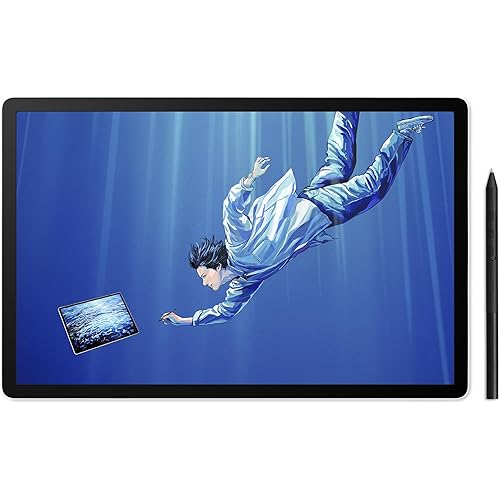
Metapen Stylus Pen M2 for Surface (Premium, 4096 Finest Control, Eraser End) - Compatible with Surface Pro 7//8/9/X//10/11/Book 3/Laptop 4/Studio 2, ASUS VivoBook Flip 14, for Creators,Students,Doers

  • Based on 2,006 reviews
Condition: New
Checking for the best price...
$36.99 Why this price?
Save $22.91 was $59.90

Buy Now, Pay Later


As low as $9 / mo
  • – 4-month term
  • – No impact on credit to apply
  • – Instant approval decision
  • – Secure and straightforward checkout

Ready to go? Add this product to your cart and select a plan during checkout.

Payment plans are offered through our trusted finance partners Klarna, Affirm, Afterpay, Apple Pay, and PayTomorrow. No-credit-needed leasing options through Acima may also be available at checkout.

Learn more about financing & leasing here.

Selected Option

Free shipping on this product

FREE 30-day refund/replacement

To qualify for a full refund, items must be returned in their original, unused condition. If an item is returned in a used, damaged, or materially different state, you may be granted a partial refund.

To initiate a return, please visit our Returns Center.

View our full returns policy here.


Availability: In Stock.
Fulfilled by Amazon

Arrives Sunday, May 10
Order within 47 minutes
Available payment plans shown during checkout

Protection Plan Protect Your Purchase
Checking for protection plans...

Style: M2


Features

  • 4096 Finest Control & Tail EraserWith 4096 levels of pressure sensitivity, the Metapen Stylus M2 is ideal for artists, photographers, and designers. Accurately draw, write, or annotate in any supported app. The eraser on the tail end quickly removes mistakes, allowing you to edit with ease just like using a traditional graphite pencil. Windows Ink lets you create sticky notes, capture ideas instantly, and even take and edit screenshots with a single click
  • Powerful Magnetic Attachment, Never Lose AgainThe Metapen M2 firmly attaches to your Microsoft Surface tablets with two stronger built-in magnets, so its always ready when inspiration strikes. [Supported Magnetic Attachment Models] Surface Pro 3Pro 11, Surface Book / Book 2 / Book 3, Surface 3, Surface Go / Go 2 / Go 3, Kobo Libra Colour, Kobo Sage, Kobo Elipsa, Kobo Elipsa 2E
  • Advanced Cone-Shaped Tip & Premium FeelUnlike old-fashioned styluses with tubular tips, the Metapen M2 features a cone-shaped tip for stronger signal detection and a streamlined design. The aluminum-alloy body with a rounded-square shape offers a comfortable grip and prevents it from rolling on your desk
  • Tilt Function & Palm RejectionThe Metapen M2 accurately reproduces both the finest lines and the broadest brush strokes. Tilt the tip up to 55 to add artistic shading to your drawings. With palm rejection technology, you can rest your hand naturally on the screen without fatigue or accidental touches and enjoy smooth, uninterrupted writing or drawing
  • Wide CompatibilityContact us at if you are unsure about compatibility. The M2 supports up to the MPP2.0 protocol, compatible with most Microsoft Surface devices and select models from HP, ASUS, Dell, Acer, Sony, and ViewSonic. [Surface Model List] Surface Pro 3/Pro 4/Pro(5th Gen)/Pro 6/Pro 7/Pro 7+/Pro 8/Pro X, Surface Book/Book 2/Book 3, Surface Laptop/Laptop 2/Laptop 3/Laptop 4/Laptop Studio, Surface 3, Surface Go/Go 2/Go 3, Surface Studio/Studio 2

Color: Classic Grey


Brand: metapen


Material: Aluminum


Number of Batteries: 1 Lithium Metal batteries required. (included)


Item Weight: 14 Grams


Battery Average Life Standby: 100 Hours


Compatible Devices: Surface 3 Surface Go, Surface Go 2, Surface Go 3 Surface Laptop, Surface Laptop 2, Surface Laptop 3, Surface Laptop 4, Surface Laptop Studio Surface Pro 3, Surface Pro 4, Surface Pro 5, Surface Pro 6, Surface Pro 7, Surface Pro 7+, Surface Pro 8, Surface Pro 9, Surface Pro X,Surrace Pro 10,Surrace Pro 11 for Business Surface Duo, Surface Duo 2 Surface Studio, Surface Studio 2 Surface Book, Surface Book 2, Surface Book 3 Kobo Libra Colour,Kobo Sage,Kobo Elipsa, Kobo Elipsa 2E See more


Are Batteries Included: Yes


Batteries Required?: Yes


Charging Time: 1 Hours


Number of Batteries: 1 Lithium Metal batteries required. (included)


Battery Average Life Standby: 100 Hours


Compatible Devices: Surface 3 Surface Go, Surface Go 2, Surface Go 3 Surface Laptop, Surface Laptop 2, Surface Laptop 3, Surface Laptop 4, Surface Laptop Studio Surface Pro 3, Surface Pro 4, Surface Pro 5, Surface Pro 6, Surface Pro 7, Surface Pro 7+, Surface Pro 8, Surface Pro 9, Surface Pro X,Surrace Pro 10,Surrace Pro 11 for Business Surface Duo, Surface Duo 2 Surface Studio, Surface Studio 2 Surface Book, Surface Book 2, Surface Book 3 Kobo Libra Colour,Kobo Sage,Kobo Elipsa, Kobo Elipsa 2E


Charging Time: 1 Hours


Battery Description: Lithium-Ion Polymer


Pressure Sensitivity: 4096 Levels


Minimum Required Operating System Version: Windows 10, Windows 11


Compatible Tablet Computer Models: Microsoft Surface Go, Microsoft Surface Go 3, Microsoft Surface Pro 3, Microsoft Surface Pro 7, Microsoft Surface Pro 8, Microsoft Surface Pro 9, Microsoft Surface Pro X


Item Weight: 14 Grams


Item Diameter: 9 Millimeters


Color: Classic Grey


Enclosure Material: Aluminum


Brand: metapen


Model Number: ME-MPP702


Are Batteries Included: Yes


Are Batteries Required: Yes


Unit Count: 1.0 Count


Manufacturer: metapen


Mfr Part Number: M2-EU-QFY-MPP702


Warranty Description: worry-free 12-month warranty


Frequently asked questions

If you place your order now, the estimated arrival date for this product is: Sunday, May 10

Yes, absolutely! You may return this product for a full refund within 30 days of receiving it.

To initiate a return, please visit our Returns Center.

View our full returns policy here.

  • Klarna Financing
  • Affirm Pay in 4
  • Affirm Financing
  • Afterpay Financing
  • PayTomorrow Financing
  • Financing through Apple Pay
Leasing options through Acima may also be available during checkout.

Learn more about financing & leasing here.

Top Amazon Reviews


  • Works great for Surface Go 2, possibly better than the MS Surface Pen
Style: M2
I've been using this pen for several months now and I can definitely say this is a VERY good pen. The M2 feels quite comfortable in hand much like an apple pencil and writes with no lag. The nibs are solid plastic, but not too hard where it'd damage the screen and they rotate on the head of the pen to "roll" across the screen to reduce friction. However, using a "paperlike" or textured screen protector REALLY wears down the nibs fast, so stick with a bare screen or regular glass protector if you'd like to have some longevity to your pen nibs. Switching nibs is pretty easy, just pull em out and pop them in. The M2 also has a stronger magnet than the normal Microsoft surface pen to keep it attached to the device (mine usually stays mounted firmly on the side when not in use). No software or drivers needed to get things going, just hover it over the screen and it's good to go. While it would be nice to have some software to adjust things like pen pressure or remap the eraser/side button, it overall functions just fine for my needs. It charges via USB-C and I typically top off the battery between drawing or while taking a break, typically less than 15-30mins at a time. I typically use my surface for drawing and animating on the go rather than just taking notes, so having a good pen is very important to make the experience more comfortable and to maintain decent workflow for art purposes. One thing I CANNOT stand from most non-wacom styluses is lag and poor accuracy, so the responsiveness of this pen is notably very good for an MMP device. Attached are a couple of doodles I've made with the M2 and my "set up" with the Go and M2 for size comparison. While tools don't make the artist, they certainly can help and this pen makes my drawings on my travel device near indiscernible from quick sketches made on my wacom display tablet and desktop set up. I'd argue this pen is even better than the standard surface pen, especially for the price point. Bonus, it comes with a few extra nibs and some metapen stickers lol ... show more
Reviewed in the United States on December 15, 2024 by PG

  • It's awesome!
Style: M2
I love it! I use this with my Kobo Libra Color primarily, and it's been awesome! My only real complaint is that the button isn't in an ideal spot if I'm holding the pen in what I find to be the most comfortable position, but it's still easy enough to press with a bit of thought. It's far cheaper than the official pen for my device, and seems to have all of the functionality of it, if not more. ... show more
Reviewed in the United States on April 9, 2026 by Josh

  • Great pen for a better price.
Style: M2
This stylus has been a fantastic addition to my setup. Writing feels incredibly natural and responsive, which has made it so much easier to keep up with fast-paced notes during class. The battery life is equally impressive; it lasts a long time on a single charge, so I rarely have to worry about it dying mid-sentence. If you're looking for a reliable pen for drawing and writing but don't want to drop a ton of money on the name-brand version, this is a really solid choice. ... show more
Reviewed in the United States on February 16, 2026 by Jimmy

  • MetaPen M2, it's ok.
Style: M2
I've had this for at least a few weeks now. I use it less than regularly. The charge isn't bad. It has a lil red light that flashes when it needs charged. I leave it on the charger for at least 1 hr & it's good for a while. It seems that I need to charge on average of every once a month. It connected right away woth easy to my Surface Pro 4. The tilt function & the pressure levels work really good when drawing. They claim that then end tip (eraser) clicking once for fast access to things in windows, well, that doesnt seem to work at all for me. It only eraser works on mine. The magnets are ok, it's holds to the side of my surface ok when not being uswd. Though it can be slid or knocked of easily. The main issue I have is the palm rejection, the shape/size of the pen, & location of the side button. Palm rejection works ½ the time which affects your drawings or writing in a negative way & has become frustrating. Despite the claim it has palm rejection, I still recommend ypu use a palm rejection glove or pad. The shape & size of the pen is off to me. The size of the pen is a bit too slim & the location of the side button is a bit too high, I'm always having to readjust and look/feel for the button to use. Overall, it's an ok pen to use with Surfaces, it works, & does what I need for the most part despite a few issues I have with it. It is cheaper than the main Surface Pen & has some features of a Surface Pen. In my opinion, it's not worth the $36.99 they advertise for it. I paid $20 on sale but I wouldn't pay more than $25 for this pen. ... show more
Reviewed in the United States on March 12, 2026 by Mandy Viertel

  • Great pen, amazing service and utility!
Style: M2
I bought the Metapen M2 a couple of years ago, and went ahead and bought another plus replacement nibs! It's fantastic! It has a magnet inside of it so I can put it against my Surface Pro 9 when I'm traveling, as well as being affordable compared to other Surface Pen products. It's easy to use and doesn't need Bluetooth - all you need to do is charge it like in the picture I showed, and the colors are easy to understand (orange means still charging, white means fully charged). The battery life is also sufficient and impressive, as I can go a couple weeks of using it in my college classes and drawing without needing to charge! I highly recommend it not only because it's convenient and sleek, but the customer service I received for it was also amazing. ... show more
Reviewed in the United States on January 21, 2025 by California Buyer

  • Surface Pro 9
Style: M2
Surface pro 9 works well. No setup required. The top eraser functions properly.
Reviewed in the United States on April 26, 2026 by Harry

Can't find a product?

Find it on Amazon first, then paste the link below.
Checking for best price...